SOP Template Library: 50+ Standard Operating Procedure Examples by Department

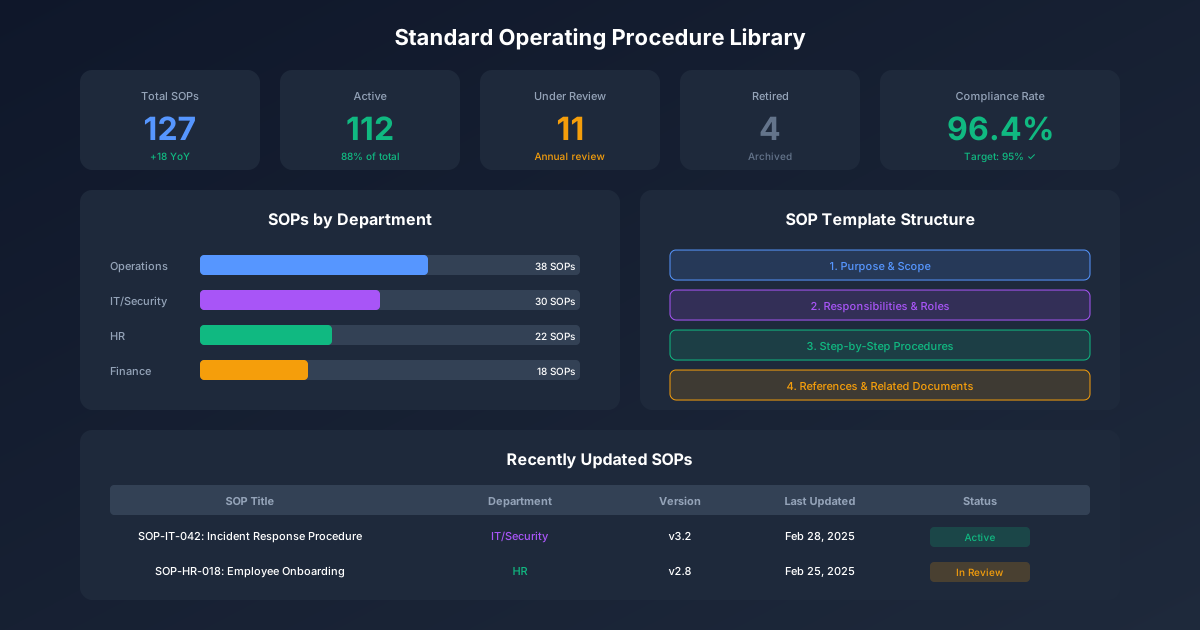
Standard Operating Procedures (SOPs) are the backbone of operational excellence. Organizations with well-written SOPs experience 35% fewer errors, 50% faster employee onboarding, and significantly better audit outcomes. This comprehensive SOP template library provides ready-to-use templates across every department, plus guidance on customizing them for your organization.
Whether you're building SOPs from scratch or standardizing existing procedures, this guide delivers the templates and best practices you need. For additional resources, visit our IT Management Hub, HR Management Hub, and Security & Compliance Hub. For process documentation fundamentals, see our Business Process Documentation Guide.
What Makes an Effective SOP
Before diving into templates, understand the elements that separate useful SOPs from shelfware.
SOP Success Factors
| Factor | Description | Impact |
|---|---|---|
| Clarity | Written at appropriate reading level | Users understand without interpretation |
| Specificity | Concrete steps with measurable criteria | Consistent execution every time |
| Accessibility | Easy to find and reference | Used when needed |
| Currency | Reflects actual current process | Maintains credibility |
| Ownership | Clear accountability for maintenance | Stays updated |
Universal SOP Structure
Every effective SOP includes these core sections:
| Section | Purpose | Content |
|---|---|---|
| Header | Identification | Title, document number, version, effective date, owner |
| Purpose | Context | Why this SOP exists (1-2 sentences) |
| Scope | Boundaries | What's included and excluded |
| Responsibilities | Accountability | Who does what |
| Definitions | Clarity | Key terms and acronyms |
| Procedure | Instructions | Numbered step-by-step process |
| References | Resources | Related documents, forms, tools |
| Revision History | Tracking | Change log with dates |
SOP Template Format
STANDARD OPERATING PROCEDURE

Document Number: [DEPT]-SOP-[###]
Title: [Descriptive Title]
Version: [X.X]
Effective Date: [Date]
Last Review: [Date]
Next Review: [Date]
Owner: [Role/Name]
Approved By: [Role/Name]

━━━━━━━━━━━━━━━━━━━━━━━━━━━━━━━━━━━━━━━━━━━━━━━━━━━━━

1.0 PURPOSE
[One paragraph explaining why this procedure exists]

2.0 SCOPE
2.1 This procedure applies to: [who/what is covered]
2.2 This procedure does not apply to: [exclusions]

3.0 RESPONSIBILITIES
3.1 [Role]: [Specific responsibilities]
3.2 [Role]: [Specific responsibilities]

4.0 DEFINITIONS
[Term]: [Definition]

5.0 PROCEDURE
5.1 [First major step]
    5.1.1 [Sub-step with specific action]
    5.1.2 [Sub-step with specific action]
5.2 [Second major step]
    5.2.1 [Sub-step]

6.0 REFERENCES
- [Related document with link]
- [Form or template]

7.0 REVISION HISTORY
| Version | Date | Author | Description |
|---------|------|--------|-------------|
| 1.0 | [Date] | [Name] | Initial release |
IT Department SOPs
IT departments require extensive SOPs to ensure security, compliance, and operational consistency.
IT SOP Categories
| Category | Example SOPs | Priority |
|---|---|---|
| Security | Access management, incident response, vulnerability management | Critical |
| Operations | Backup/recovery, change management, monitoring | Critical |
| Service Desk | Ticket handling, escalation, knowledge management | High |
| Infrastructure | Server provisioning, network changes, patching | High |
| Development | Code deployment, testing, version control | Medium |
SOP: User Access Management
Document Number: IT-SOP-001
Title: User Access Management
Version: 2.0

1.0 PURPOSE
This procedure establishes the process for granting, modifying,
and revoking user access to information systems to ensure
appropriate access controls and regulatory compliance.

2.0 SCOPE
2.1 Applies to: All employees, contractors, and third-party users
    requiring access to company information systems
2.2 Excludes: Emergency access procedures (see IT-SOP-015)

3.0 RESPONSIBILITIES
3.1 Hiring Manager: Submit access requests, approve access levels
3.2 IT Security: Review requests, provision access, maintain logs
3.3 HR: Notify IT of terminations within 24 hours
3.4 System Owners: Define role-based access requirements

4.0 DEFINITIONS
- Access Request: Formal request for system permissions
- Role-Based Access: Permissions assigned by job function
- Privileged Access: Administrative or elevated permissions

5.0 PROCEDURE

5.1 New User Access Request
    5.1.1 Manager submits Access Request Form (FM-IT-001)
    5.1.2 Form must include:
          - Employee name and ID
          - Start date
          - Systems required
          - Access level needed
          - Business justification
    5.1.3 IT Security reviews request within 2 business days
    5.1.4 If approved, IT provisions access before start date
    5.1.5 User receives credentials via secure channel

5.2 Access Modification
    5.2.1 Manager submits modification request with justification
    5.2.2 IT Security reviews against least-privilege principle
    5.2.3 Changes implemented within 3 business days
    5.2.4 User notified of changes

5.3 Access Termination
    5.3.1 HR notifies IT Security via termination checklist
    5.3.2 For voluntary termination: disable access on last day
    5.3.3 For involuntary termination: disable access immediately
    5.3.4 IT Security archives access logs for 7 years
    5.3.5 Physical access credentials collected by HR

5.4 Quarterly Access Review
    5.4.1 IT Security generates access report by system
    5.4.2 System owners review and certify access appropriateness
    5.4.3 Inappropriate access removed within 5 business days
    5.4.4 Review completion documented for audit

6.0 REFERENCES
- FM-IT-001: Access Request Form
- IT-POL-003: Information Security Policy
- IT-SOP-015: Emergency Access Procedure

7.0 REVISION HISTORY
| Version | Date | Author | Description |
|---------|------|--------|-------------|
| 1.0 | 2023-01-15 | J. Smith | Initial release |
| 2.0 | 2024-06-01 | M. Jones | Added quarterly review process |
SOP: Incident Response
Document Number: IT-SOP-002
Title: Security Incident Response
Version: 1.2

1.0 PURPOSE
This procedure defines the process for identifying, responding to,
and recovering from information security incidents to minimize
impact and ensure proper documentation.

2.0 SCOPE
Applies to all security events including: malware infections,
unauthorized access, data breaches, phishing attacks, and
system compromises.

3.0 RESPONSIBILITIES
3.1 All Employees: Report suspected incidents immediately
3.2 IT Service Desk: Initial triage and escalation
3.3 Incident Response Team: Investigation and containment
3.4 CISO: Executive communication, breach notification decisions
3.5 Legal: Regulatory notification, evidence preservation

4.0 INCIDENT SEVERITY LEVELS

| Level | Definition | Response Time | Escalation |
|-------|------------|---------------|------------|
| P1-Critical | Active breach, data exfiltration | 15 minutes | CISO, Legal, Exec |
| P2-High | Malware spread, system compromise | 1 hour | IT Director |
| P3-Medium | Contained incident, no spread | 4 hours | IT Manager |
| P4-Low | Failed attack, policy violation | 24 hours | Team Lead |

5.0 PROCEDURE

5.1 Detection and Reporting
    5.1.1 Employee observes potential security incident
    5.1.2 Report immediately via:
          - Security hotline: x4911
          - Email: security@company.com
          - ServiceDesk ticket (Category: Security)
    5.1.3 Do NOT attempt to investigate independently
    5.1.4 Preserve evidence - do not reboot or modify systems

5.2 Initial Triage (Service Desk)
    5.2.1 Log incident details in tracking system
    5.2.2 Assign severity level per Section 4.0
    5.2.3 P1/P2: Page Incident Response Team immediately
    5.2.4 P3/P4: Create ticket, assign to security queue

5.3 Containment (Incident Response Team)
    5.3.1 Assess scope of incident
    5.3.2 Isolate affected systems if necessary
    5.3.3 Preserve forensic evidence (disk images, logs)
    5.3.4 Document all actions with timestamps

5.4 Eradication
    5.4.1 Identify root cause
    5.4.2 Remove malware/threat actor access
    5.4.3 Patch vulnerabilities exploited
    5.4.4 Reset compromised credentials

5.5 Recovery
    5.5.1 Restore systems from clean backups
    5.5.2 Verify system integrity before reconnection
    5.5.3 Monitor closely for 72 hours post-recovery
    5.5.4 Return to normal operations

5.6 Post-Incident Review
    5.6.1 Conduct review within 5 business days
    5.6.2 Document lessons learned
    5.6.3 Update procedures as needed
    5.6.4 Brief leadership on findings

6.0 REFERENCES
- IT-POL-005: Incident Response Policy
- FM-IT-010: Incident Report Form
- IT-SOP-003: Evidence Preservation Procedure
Additional IT SOPs
| SOP Number | Title | Key Content |
|---|---|---|
| IT-SOP-003 | Change Management | Request, review, approval, implementation, rollback |
| IT-SOP-004 | Backup and Recovery | Backup schedules, retention, recovery testing |
| IT-SOP-005 | Patch Management | Vulnerability assessment, testing, deployment |
| IT-SOP-006 | Server Provisioning | Requests, configuration, hardening, documentation |
| IT-SOP-007 | Network Changes | Change requests, testing, implementation windows |
| IT-SOP-008 | Service Desk Operations | Ticket handling, SLAs, escalation paths |
| IT-SOP-009 | Vendor Management | Onboarding, access, monitoring, offboarding |
| IT-SOP-010 | Disaster Recovery | DR testing, activation, communication |
For comprehensive IT policies, visit our IT Policy Templates Guide and Enterprise Security Policy Library.
HR Department SOPs
HR SOPs ensure consistent employee treatment and legal compliance.
HR SOP Categories
| Category | Example SOPs | Compliance Driver |
|---|---|---|
| Recruitment | Job posting, interviewing, offers | EEOC, OFCCP |
| Onboarding | New hire processing, I-9, orientation | USCIS, state laws |
| Compensation | Payroll, benefits, overtime | FLSA, state wage laws |
| Performance | Reviews, PIPs, promotions | Documentation best practice |
| Termination | Voluntary, involuntary, exit process | WARN, state laws |
SOP: Employee Onboarding
Document Number: HR-SOP-001
Title: New Employee Onboarding
Version: 3.0

1.0 PURPOSE
This procedure ensures consistent, compliant onboarding of new
employees with completion of all required documentation and
proper orientation to company policies and culture.

2.0 SCOPE
Applies to all new full-time and part-time employees.
Contractors follow HR-SOP-012: Contractor Onboarding.

3.0 RESPONSIBILITIES
3.1 HR Coordinator: Process paperwork, coordinate orientation
3.2 Hiring Manager: Role-specific training, team introduction
3.3 IT: System access provisioning
3.4 Facilities: Workspace, badges, equipment
3.5 New Employee: Complete required forms, attend orientation

4.0 PROCEDURE

4.1 Pre-Start Activities (HR Coordinator, 5+ days before)
    4.1.1 Send offer letter and pre-employment documents
    4.1.2 Initiate background check via vendor portal
    4.1.3 Send new hire notification to:
          - IT (access request)
          - Facilities (workspace, badge)
          - Payroll (setup)
          - Hiring manager (confirmation)
    4.1.4 Prepare new hire packet

4.2 Day 1 Activities
    4.2.1 HR Coordinator meets employee at reception
    4.2.2 Complete required forms:
          □ I-9 Employment Eligibility (within 3 days)
          □ W-4 Tax Withholding
          □ State tax forms
          □ Direct deposit authorization
          □ Emergency contact form
          □ Benefits enrollment (within 30 days)
          □ Policy acknowledgments
    4.2.3 Issue employee badge and parking pass
    4.2.4 Provide employee handbook
    4.2.5 Escort to workspace and introduce to manager

4.3 Orientation (Days 1-5)
    4.3.1 Day 1: Company overview, HR policies, benefits
    4.3.2 Day 2: IT systems training, security awareness
    4.3.3 Day 3: Department-specific orientation
    4.3.4 Day 4-5: Role-specific training with manager

4.4 30-Day Follow-Up
    4.4.1 HR sends satisfaction survey
    4.4.2 Manager conducts 30-day check-in
    4.4.3 Benefits enrollment deadline reminder
    4.4.4 Confirm all training completed

4.5 90-Day Review
    4.5.1 Manager completes probationary review
    4.5.2 HR confirms all documentation complete
    4.5.3 Employee confirms handbook acknowledgment
    4.5.4 Close onboarding file

5.0 COMPLIANCE REQUIREMENTS

| Requirement | Deadline | Consequence of Miss |
|-------------|----------|---------------------|
| I-9 Section 1 | Day 1 | Federal violation |
| I-9 Section 2 | Day 3 | Federal violation |
| Benefits enrollment | Day 30 | Wait until next open enrollment |
| Safety training | Day 5 | Cannot work in production areas |

6.0 REFERENCES
- FM-HR-001: New Hire Checklist
- HR-POL-001: Employment Policy
- IT-SOP-001: User Access Management
SOP: Employee Termination
Document Number: HR-SOP-005
Title: Employee Termination Processing
Version: 2.1

1.0 PURPOSE
This procedure ensures compliant, consistent processing of
employee separations including voluntary resignations,
involuntary terminations, and layoffs.

2.0 SCOPE
Applies to all employee separations except death (HR-SOP-020)
and retirement (HR-SOP-019).

3.0 TERMINATION TYPES

| Type | Notice | Final Pay | COBRA |
|------|--------|-----------|-------|
| Voluntary resignation | Per policy (2 weeks) | Next regular payday | Offered |
| Involuntary - cause | None | Immediate | Offered |
| Involuntary - layoff | Per WARN if applicable | Per state law | Offered |
| Job abandonment | 3 no-call days | Next regular payday | Offered |

4.0 PROCEDURE

4.1 Voluntary Resignation
    4.1.1 Employee submits written resignation to manager
    4.1.2 Manager forwards to HR within 24 hours
    4.1.3 HR confirms last day, calculates final pay
    4.1.4 HR schedules exit interview
    4.1.5 Manager initiates IT access termination request
    4.1.6 Process final paycheck per state requirements

4.2 Involuntary Termination
    4.2.1 Manager consults HR before any termination discussion
    4.2.2 HR reviews documentation, approves termination
    4.2.3 Schedule termination meeting (HR + Manager present)
    4.2.4 During meeting:
          - Communicate decision clearly
          - Provide termination letter
          - Explain final pay and benefits
          - Collect company property
    4.2.5 IT disables access immediately (during meeting)
    4.2.6 Escort employee from building

4.3 Exit Processing (All Terminations)
    4.3.1 Collect company property:
          □ Badge/access cards
          □ Keys
          □ Laptop/equipment
          □ Company credit cards
          □ Parking pass
    4.3.2 Final pay calculation:
          - Hours worked through last day
          - Accrued, unused PTO (per policy)
          - Expense reimbursements
          - Deductions (advances, equipment)
    4.3.3 Provide separation documents:
          - COBRA notice (within 14 days)
          - 401(k) distribution options
          - Unemployment information
          - Non-compete reminder (if applicable)
    4.3.4 Update systems:
          - HRIS termination entry
          - Payroll final processing
          - Benefits termination

5.0 FINAL PAY REQUIREMENTS BY STATE

| State | Voluntary | Involuntary |
|-------|-----------|-------------|
| California | 72 hours (no notice) / immediate (with notice) | Immediate |
| New York | Next regular payday | Next regular payday |
| Texas | Next regular payday | Within 6 days |
| [Add your state] | [Research requirement] | [Research requirement] |

6.0 REFERENCES
- HR-POL-010: Separation Policy
- FM-HR-015: Exit Interview Form
- FM-HR-016: Termination Checklist
- IT-SOP-001: User Access Management (Section 5.3)
Additional HR SOPs
| SOP Number | Title | Key Content |
|---|---|---|
| HR-SOP-002 | Recruitment and Selection | Posting, screening, interviewing, offers |
| HR-SOP-003 | Performance Reviews | Schedule, forms, calibration, delivery |
| HR-SOP-004 | Leave Management | FMLA, PTO, leave of absence |
| HR-SOP-006 | Payroll Processing | Time entry, approvals, corrections |
| HR-SOP-007 | Benefits Administration | Enrollment, changes, COBRA |
| HR-SOP-008 | Workplace Investigations | Complaints, investigation steps |
| HR-SOP-009 | Disciplinary Actions | Documentation, progressive discipline |
| HR-SOP-010 | I-9 Compliance | Completion, reverification, audits |
For HR policy templates, visit our HR Policy Templates Guide and HR Compliance Center.
Finance Department SOPs
Finance SOPs ensure accuracy, compliance, and proper controls.
Finance SOP Categories
| Category | Example SOPs | Control Objective |
|---|---|---|
| Accounts Payable | Invoice processing, payments | Prevent fraud, ensure accuracy |
| Accounts Receivable | Billing, collections | Optimize cash flow |
| General Ledger | Journal entries, reconciliations | Financial accuracy |
| Reporting | Month-end close, financial statements | Timely, accurate reporting |
| Treasury | Cash management, banking | Safeguard assets |
SOP: Invoice Processing
Document Number: FIN-SOP-001
Title: Accounts Payable Invoice Processing
Version: 2.0

1.0 PURPOSE
This procedure establishes controls for processing vendor
invoices to ensure accuracy, proper approval, and timely
payment while preventing fraud and duplicate payments.

2.0 SCOPE
Applies to all vendor invoices. Excludes employee expense
reimbursements (FIN-SOP-010) and corporate card transactions
(FIN-SOP-011).

3.0 APPROVAL THRESHOLDS

| Amount | Approver | Additional Requirements |
|--------|----------|------------------------|
| $0 - $1,000 | Department Manager | None |
| $1,001 - $10,000 | Director | Budget verification |
| $10,001 - $50,000 | VP | Budget + CFO notification |
| $50,001+ | CFO | Board notification if unbudgeted |

4.0 PROCEDURE

4.1 Invoice Receipt
    4.1.1 All invoices sent to AP@company.com or AP mailbox
    4.1.2 AP Clerk stamps receipt date on invoice
    4.1.3 Enter invoice in AP system within 2 business days
    4.1.4 System assigns unique invoice number

4.2 Three-Way Match (for PO invoices)
    4.2.1 Match invoice to Purchase Order
          - Vendor name matches
          - Items/services match PO line items
          - Quantities within tolerance (±5%)
          - Prices match PO
    4.2.2 Match invoice to Receiving Report
          - Goods/services received
          - Quantities match invoice
          - Condition acceptable
    4.2.3 If match successful, proceed to 4.4
    4.2.4 If discrepancy, route to Purchasing for resolution

4.3 Non-PO Invoice Processing
    4.3.1 Verify invoice is not duplicate (vendor, amount, date)
    4.3.2 Code to appropriate GL account
    4.3.3 Route to department for approval per Section 3.0
    4.3.4 Approved invoices proceed to 4.4

4.4 Payment Processing
    4.4.1 Batch approved invoices daily
    4.4.2 Verify payment terms and due date
    4.4.3 Schedule payment per terms:
          - Net 30: Pay on day 25-30
          - 2/10 Net 30: Evaluate discount vs. cash flow
    4.4.4 Generate payment file (check or ACH)
    4.4.5 Two signatures required for checks >$10,000
    4.4.6 Mail checks or transmit ACH file

4.5 Month-End Procedures
    4.5.1 Accrue for received, uninvoiced goods/services
    4.5.2 Review AP aging for issues
    4.5.3 Reconcile AP subledger to GL
    4.5.4 Document reconciling items

5.0 CONTROLS

| Control | Purpose | Frequency |
|---------|---------|-----------|
| Three-way match | Prevent payment for unreceived goods | Each invoice |
| Duplicate check | Prevent double payment | Each invoice |
| Approval thresholds | Proper authorization | Each invoice |
| Segregation of duties | Prevent fraud | Ongoing |
| Vendor master changes | Prevent fraudulent vendors | Each change |

6.0 REFERENCES
- FIN-POL-001: Accounts Payable Policy
- FM-FIN-001: Invoice Approval Form
- FIN-SOP-002: Vendor Master Maintenance
Additional Finance SOPs
| SOP Number | Title | Key Content |
|---|---|---|
| FIN-SOP-002 | Vendor Master Maintenance | Adding, modifying, deactivating vendors |
| FIN-SOP-003 | Customer Invoicing | Invoice creation, delivery, adjustments |
| FIN-SOP-004 | Collections | Aging follow-up, escalation, write-offs |
| FIN-SOP-005 | Journal Entries | Preparation, approval, posting |
| FIN-SOP-006 | Bank Reconciliation | Daily cash, monthly reconciliation |
| FIN-SOP-007 | Month-End Close | Timeline, procedures, checklist |
| FIN-SOP-008 | Fixed Assets | Capitalization, depreciation, disposal |
| FIN-SOP-009 | Expense Reports | Submission, approval, reimbursement |
For financial planning resources, visit our Financial Planning Hub and Budget Templates.
Operations Department SOPs
Operations SOPs drive efficiency, quality, and safety.
Operations SOP Categories
| Category | Example SOPs | Business Impact |
|---|---|---|
| Production | Manufacturing, assembly, packaging | Quality, throughput |
| Quality | Inspection, testing, non-conformance | Customer satisfaction |
| Inventory | Receiving, storage, shipping | Accuracy, availability |
| Maintenance | Preventive, corrective, calibration | Uptime, safety |
| Safety | PPE, hazardous materials, emergency | Compliance, protection |
SOP: Inventory Receiving
Document Number: OPS-SOP-001
Title: Inventory Receiving and Inspection
Version: 1.5

1.0 PURPOSE
This procedure ensures accurate receipt, inspection, and
documentation of incoming materials and goods to maintain
inventory accuracy and quality standards.

2.0 SCOPE
Applies to all incoming shipments to warehouse locations.
Excludes direct-to-production deliveries (OPS-SOP-015).

3.0 RESPONSIBILITIES
3.1 Receiving Clerk: Unload, count, inspect, document
3.2 Quality Inspector: Quality inspection (when required)
3.3 Inventory Control: System updates, discrepancy resolution
3.4 Purchasing: Vendor communication, returns

4.0 PROCEDURE

4.1 Shipment Arrival
    4.1.1 Carrier checks in at receiving dock
    4.1.2 Receiving Clerk verifies appointment (if scheduled)
    4.1.3 Assign dock door and unloading equipment
    4.1.4 Note arrival time on carrier's BOL

4.2 Unloading and Counting
    4.2.1 Unload shipment, checking for visible damage
    4.2.2 Count all items and compare to:
          - Packing slip
          - Purchase Order
          - Bill of Lading
    4.2.3 Document any discrepancies:
          - Short shipment
          - Overage
          - Damage
          - Wrong items
    4.2.4 Photograph damage before signing BOL
    4.2.5 Sign BOL with noted exceptions

4.3 Inspection
    4.3.1 Standard items: Visual inspection for damage
    4.3.2 Quality-critical items: Route to QC for inspection
    4.3.3 Complete Receiving Inspection Form (FM-OPS-001)
    4.3.4 Apply inspection status label:
          - Green: Accepted
          - Yellow: Pending inspection
          - Red: Rejected/Hold

4.4 System Entry
    4.4.1 Enter receipt in inventory system within 4 hours
    4.4.2 Record:
          - PO number
          - Quantity received
          - Location assigned
          - Lot/serial numbers (if applicable)
    4.4.3 Generate receiving report

4.5 Put-Away
    4.5.1 Move materials to assigned location
    4.5.2 Scan location barcode to confirm
    4.5.3 FIFO: Place behind existing inventory
    4.5.4 Update location in system if changed

4.6 Discrepancy Resolution
    4.6.1 Short shipment: Notify Purchasing within 24 hours
    4.6.2 Damage: File carrier claim, quarantine goods
    4.6.3 Quality reject: Complete NCR (OPS-SOP-010)
    4.6.4 Wrong items: Contact vendor for return authorization

5.0 QUALITY INSPECTION REQUIREMENTS

| Material Type | Inspection Level | Sample Size |
|---------------|------------------|-------------|
| Raw materials (critical) | Full inspection | Per AQL table |
| Raw materials (standard) | Visual only | 100% |
| Finished goods for resale | Certificate review | Documentation |
| MRO supplies | Visual only | Random 10% |

6.0 REFERENCES
- FM-OPS-001: Receiving Inspection Form
- OPS-SOP-010: Non-Conformance Procedure
- OPS-POL-001: Quality Policy
Additional Operations SOPs
| SOP Number | Title | Key Content |
|---|---|---|
| OPS-SOP-002 | Shipping and Dispatch | Order picking, packing, carrier selection |
| OPS-SOP-003 | Inventory Cycle Counting | Count procedures, variance investigation |
| OPS-SOP-004 | Equipment Maintenance | PM schedules, work orders, documentation |
| OPS-SOP-005 | Production Scheduling | Planning, sequencing, changeovers |
| OPS-SOP-006 | Quality Control Inspection | Inspection methods, acceptance criteria |
| OPS-SOP-007 | Non-Conformance Management | NCR process, disposition, CAPA |
| OPS-SOP-008 | Workplace Safety | PPE, hazard communication, emergency |
| OPS-SOP-009 | Equipment Calibration | Calibration schedules, records |
For operations templates, see our Manufacturing Documentation Guide.
Sales & Marketing SOPs
Sales and marketing SOPs ensure consistent customer experiences and brand compliance.
Sales & Marketing SOP Categories
| Category | Example SOPs | Business Impact |
|---|---|---|
| Lead Management | Qualification, assignment, follow-up | Conversion rates |
| Sales Process | Opportunity management, quoting, closing | Revenue, forecasting |
| Customer Success | Onboarding, QBRs, renewals | Retention, expansion |
| Marketing | Campaigns, content, events | Brand, pipeline |
| Brand | Messaging, visual identity, approvals | Consistency |
SOP: Lead Qualification and Routing
Document Number: SM-SOP-001
Title: Lead Qualification and Routing
Version: 2.0

1.0 PURPOSE
This procedure ensures consistent lead qualification and
timely routing to appropriate sales resources to maximize
conversion and customer experience.

2.0 SCOPE
Applies to all inbound leads from marketing activities.
Outbound prospecting follows SM-SOP-005.

3.0 LEAD SCORING CRITERIA

| Criteria | Points | Examples |
|----------|--------|----------|
| Company size (employees) | 1-10 | Under 50=1, 50-200=5, 201-1000=7, 1000+=10 |
| Title/Role | 1-10 | Individual contributor=2, Manager=5, Director=7, VP+=10 |
| Engagement | 1-10 | Page view=1, Download=3, Demo request=10 |
| Industry fit | 1-5 | Non-target=1, Adjacent=3, Target=5 |
| Budget indicated | 0-10 | No=0, Maybe=5, Yes=10 |

**Lead Classification:**
- Hot (Score 35+): Route immediately to sales
- Warm (Score 20-34): SDR qualification call
- Cold (Score under 20): Nurture campaign

4.0 PROCEDURE

4.1 Lead Capture
    4.1.1 Lead enters system via form submission
    4.1.2 Marketing automation scores lead automatically
    4.1.3 Duplicate check against existing records
    4.1.4 Enrich data via ZoomInfo/Clearbit

4.2 Hot Lead Routing (Score 35+)
    4.2.1 System alerts assigned AE within 5 minutes
    4.2.2 AE must attempt contact within 1 hour
    4.2.3 If no contact after 3 attempts, escalate to manager
    4.2.4 Log all activities in CRM

4.3 Warm Lead Qualification (Score 20-34)
    4.3.1 SDR contacts within 24 hours
    4.3.2 Use BANT qualification framework:
          - Budget: Can they afford the solution?
          - Authority: Are they the decision maker?
          - Need: Do they have a problem we solve?
          - Timeline: When do they need a solution?
    4.3.3 If qualified, schedule meeting with AE
    4.3.4 If not qualified, add to nurture campaign

4.4 Cold Lead Nurturing (Score under 20)
    4.4.1 Add to appropriate nurture campaign
    4.4.2 Monitor engagement score changes
    4.4.3 Re-evaluate when score reaches 20+

5.0 SLA REQUIREMENTS

| Lead Type | First Contact | Follow-up Frequency | Escalation |
|-----------|---------------|---------------------|------------|
| Hot | 1 hour | Daily x 5, then weekly | 24 hours no contact |
| Warm | 24 hours | Every 3 days x 3 | 5 days no contact |
| Cold | N/A (automated) | Per nurture cadence | N/A |

6.0 REFERENCES
- CRM Lead Management Guide
- SM-SOP-002: Opportunity Management
- Nurture Campaign Library
For sales and marketing resources, visit our Sales & Marketing Hub and CRM Implementation Guide.
SOP Writing Best Practices
Follow these guidelines to create SOPs that people actually use.
Writing Tips
| Principle | Bad Example | Good Example |
|---|---|---|
| Use active voice | "The form should be completed" | "Complete the form" |
| Be specific | "Process the request quickly" | "Process within 24 hours" |
| One action per step | "Review and approve the request" | "4.1 Review request" / "4.2 Approve request" |
| Include criteria | "If appropriate, escalate" | "If >$10,000, escalate to Director" |
| Define terms | "Submit to appropriate party" | "Submit to Department Manager" |
Common Mistakes to Avoid
- Too much detail: Don't document common knowledge
- Too little detail: Don't assume expertise
- Passive voice: Makes accountability unclear
- Missing exceptions: Address common variations
- No visuals: Add screenshots, diagrams where helpful
- Outdated content: Review annually minimum
SOP Review Checklist
Before publishing any SOP, verify:
Content:
- Purpose clearly stated
- Scope defines boundaries
- Responsibilities assigned by role
- All steps are actionable
- Decision criteria are specific
- Exceptions addressed
Format:
- Follows template standard
- Consistent numbering
- Proper version control
- Owner identified
- Review date set
Validation:
- Technical review completed
- Process performer reviewed
- Test execution successful
SOP Template Downloads
Access our complete SOP template library:
- IT Policy Templates - Security, operations, service management
- Change Management Templates - Change control documentation
- Communication Plan Template - Stakeholder communication
- Project Documentation - Project management SOPs
For additional guidance, explore:
Effective SOPs transform tribal knowledge into organizational capability. Start with your highest-risk, most-frequently-performed processes, build a library systematically, and maintain it continuously. The investment in documentation pays dividends in consistency, compliance, and scalability.