Procedure Documentation Template: Write Clear SOPs That Get Followed

Organizations with well-documented procedures experience 67% fewer operational errors and reduce employee onboarding time by 50%. Yet most procedure documentation fails because it is either too complex to follow or too vague to be useful. This comprehensive guide provides everything you need to create standard operating procedures (SOPs) that your team will actually use. For a ready-to-use framework, download our SOP Template to start documenting procedures right away. For more resources, visit our IT Management Hub and IT Operations section.
Why Most SOPs Fail (And How to Fix Them)
Before diving into templates and best practices, it is critical to understand why procedure documentation often falls short:
Common SOP Failures:
- Written by experts who skip "obvious" steps
- Too much technical jargon for the intended audience
- No visual aids or screenshots
- Not updated when processes change
- Stored in locations no one can find
- No clear ownership or accountability
- Missing exception handling
The Cost of Poor Documentation:
- Average of 5.3 hours per week wasted searching for information
- 30% longer task completion times
- Increased error rates and rework
- Compliance and audit failures
- Knowledge loss during employee turnover
- Inconsistent customer experiences
The good news: with the right approach and templates, you can create procedure documentation that transforms operations.
Essential Components of Effective SOPs
Every well-structured procedure document contains five critical components that work together to ensure clarity and compliance.
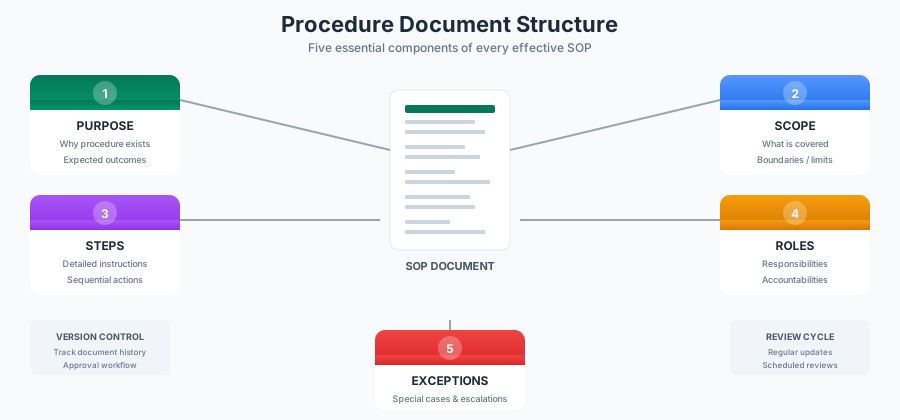
1. Purpose Statement
The purpose statement answers the fundamental question: "Why does this procedure exist?"
Elements of a Strong Purpose Statement:
- Business objective the procedure supports
- Problem or risk the procedure addresses
- Expected outcomes when followed correctly
- Consequences of not following the procedure
Example Purpose Statement:
PURPOSE:
This procedure ensures consistent, secure processing of customer
refund requests within our SLA of 3 business days while maintaining
accurate financial records and preventing fraud.

BUSINESS IMPACT:
- Customer satisfaction: Consistent refund experience
- Financial accuracy: Proper accounting treatment
- Risk mitigation: Fraud prevention controls
- Compliance: SOX audit requirements
2. Scope Definition
Clear scope prevents confusion about when a procedure applies and when it does not.
Scope Elements:
- Applicability: Who must follow this procedure
- Triggers: What events initiate the procedure
- Boundaries: What is explicitly NOT covered
- Related Procedures: Links to connected processes
Example Scope:
SCOPE:
This procedure applies to:
- All customer service representatives processing refund requests
- Supervisors approving refunds over $500
- Finance team members posting refund transactions

This procedure covers:
- Credit card refunds
- ACH refunds
- Store credit issuance

This procedure does NOT cover:
- Chargebacks (see Chargeback Handling Procedure SOP-FIN-042)
- Product exchanges (see Exchange Procedure SOP-CS-015)
- Warranty claims (see Warranty Procedure SOP-CS-023)
3. Step-by-Step Instructions
The procedural steps are the core of your SOP. Each step must be clear, actionable, and verifiable.
Best Practices for Writing Steps:
- Start each step with an action verb
- Include expected outcomes or checkpoints
- Specify decision points and branching logic
- Note time requirements where applicable
- Include screenshots for system-based tasks
Example Step Format:
STEP 3: Verify Customer Identity

3.1 ASK the customer to confirm:
    - Full name as it appears on the account
    - Last four digits of payment method
    - Order number or date of purchase

3.2 VERIFY the information matches the customer record:
    - Navigate to Customer Profile > Order History
    - Compare provided details against system data

3.3 IF information does not match:
    - Do NOT proceed with the refund
    - Document the discrepancy in case notes
    - Escalate to Fraud Prevention Team (see Section 8)

3.4 IF verified successfully:
    - Document verification in case notes
    - Proceed to Step 4

TIME: 2-3 minutes
SYSTEM: CRM Customer Profile Module
4. Roles and Responsibilities
Clear accountability ensures procedures are followed consistently and issues are escalated appropriately.
RACI Matrix Example:
| Task | CSR | Supervisor | Finance | Compliance |
|---|---|---|---|---|
| Process standard refund | R/A | I | I | - |
| Approve refund >$500 | R | A | I | I |
| Process bulk refunds | R | A | C | I |
| Monthly reconciliation | I | I | R/A | C |
| Policy exceptions | R | A | C | A |
R = Responsible (does the work) A = Accountable (final decision-maker) C = Consulted (provides input) I = Informed (kept up to date)
5. Exceptions and Escalations
No procedure covers every scenario. Document how to handle exceptions without breaking the process.
Exception Categories:
- Standard Exceptions: Pre-approved deviations with documented criteria
- Escalation Required: Situations requiring management approval
- Emergency Procedures: Time-sensitive situations requiring immediate action
- Policy Violations: How to handle discovered non-compliance
Example Exception Documentation:
EXCEPTIONS:

Exception Type 1: VIP Customer Expedited Refund
- Criteria: Customer tagged as VIP in CRM
- Deviation: Skip Steps 5-7 (standard review period)
- Authority: Any CSR may process
- Documentation: Note "VIP Expedited" in case record

Exception Type 2: Refund Exceeds Original Payment
- Criteria: Goodwill adjustment or shipping refund included
- Deviation: Additional approvals required
- Authority: Supervisor approval for amounts up to $100 over original
            Manager approval for amounts exceeding $100 over original
- Documentation: Separate approval record required

ESCALATION PATH:
Level 1: Shift Supervisor (response time: 15 minutes)
Level 2: Department Manager (response time: 1 hour)
Level 3: Director of Customer Service (response time: 4 hours)
Emergency: On-call Manager via PagerDuty (response time: 15 minutes)
SOP Formatting Standards
Consistent formatting makes procedures easier to follow and maintain. Adopt these standards across your organization.
Document Header Template
===============================================================
STANDARD OPERATING PROCEDURE

Document ID:     SOP-[DEPT]-[NUMBER]
Title:           [Procedure Name]
Version:         [X.X]
Effective Date:  [YYYY-MM-DD]
Last Review:     [YYYY-MM-DD]
Next Review:     [YYYY-MM-DD]

Owner:           [Name, Title]
Approver:        [Name, Title]
Department:      [Department Name]

Classification:  [Internal Use / Confidential / Public]
===============================================================
Numbering Conventions
Document IDs: Use a consistent naming convention that identifies department and sequence:
- SOP-IT-001: IT Department, first procedure
- SOP-HR-015: HR Department, fifteenth procedure
- SOP-FIN-042: Finance Department, forty-second procedure
Section Numbering:
1. PURPOSE
2. SCOPE
3. DEFINITIONS
4. RESPONSIBILITIES
5. PROCEDURE
   5.1 Preparation
       5.1.1 Gather required materials
       5.1.2 Verify system access
   5.2 Execution
       5.2.1 Step one
       5.2.2 Step two
6. EXCEPTIONS
7. REFERENCES
8. REVISION HISTORY
Visual Elements
Screenshots and Images:
- Capture full screen or relevant portion
- Use callouts (arrows, boxes) to highlight key elements
- Include captions explaining what the image shows
- Update images when interfaces change
Flowcharts:
- Use for complex decision trees
- Keep to one page when possible
- Include legend for symbols
- Match step numbers to procedure text
Tables:
- Use for comparing options
- Perfect for RACI matrices
- Ideal for reference data (codes, values)
Version Control Best Practices
Effective version control prevents confusion and ensures everyone uses the current procedure.
Version Numbering System
Major Versions (X.0):
- Significant process changes
- New regulatory requirements
- Complete rewrites
- Major system changes
Minor Versions (X.Y):
- Clarifications and corrections
- Added examples or screenshots
- Minor process tweaks
- Formatting updates
Example Version History:
| Version | Date | Author | Changes | Approver |
|---|---|---|---|---|
| 1.0 | 2024-01-15 | J. Smith | Initial release | M. Johnson |
| 1.1 | 2024-03-20 | J. Smith | Added screenshots for new UI | M. Johnson |
| 1.2 | 2024-06-01 | K. Davis | Clarified exception criteria | M. Johnson |
| 2.0 | 2024-09-15 | J. Smith | Updated for new refund system | R. Williams |
Change Control Process
Step 1: Change Request
- Document proposed change and rationale
- Identify affected stakeholders
- Submit to procedure owner
Step 2: Impact Assessment
- Review downstream effects
- Identify training requirements
- Determine implementation timeline
Step 3: Draft and Review
- Update procedure document
- Circulate for stakeholder review
- Incorporate feedback
Step 4: Approval
- Route through approval workflow
- Obtain required signatures
- Document approval date
Step 5: Implementation
- Publish updated version
- Archive previous version
- Communicate changes to users
- Provide training if needed
Document Storage and Access
Central Repository Requirements:
- Single source of truth
- Version history maintained
- Access controls enforced
- Search functionality
- Mobile accessibility
Recommended Platforms:
- SharePoint with document libraries
- Confluence with templates
- Google Drive with naming conventions
- Specialized procedure management software
Approval Workflow Design
A well-designed approval workflow balances control with efficiency.
Standard Approval Matrix
| Document Type | Author | Reviewer | Approver |
|---|---|---|---|
| Department SOP | SME | Supervisor | Department Head |
| Cross-functional SOP | SME | All Dept Heads | VP Operations |
| Compliance SOP | Compliance | Legal | Compliance Officer |
| Safety SOP | Safety Officer | Operations | Safety Director |
Digital Approval Process
Modern approval workflows should:
- Route automatically based on document type
- Track status in real-time
- Send reminders for pending approvals
- Maintain audit trail of all actions
- Support electronic signatures
- Integrate with document storage
Example Workflow Stages:
Draft → Peer Review → Technical Review → Management Approval →
Compliance Review → Final Approval → Publication
Approval Criteria
Reviewers should verify:
- Accuracy of procedural steps
- Clarity of instructions
- Completeness of exception handling
- Alignment with policies
- Compliance requirements met
- Training needs addressed
Complete SOP Template
Use this comprehensive template as a starting point for your procedures.
===============================================================
STANDARD OPERATING PROCEDURE

Document ID:     SOP-[DEPT]-[XXX]
Title:           [Procedure Title]
Version:         1.0
Effective Date:  [YYYY-MM-DD]
Review Date:     [YYYY-MM-DD]

Owner:           [Name, Title]
Approver:        [Name, Title]
Department:      [Department]
Classification:  [Internal Use]
===============================================================

1. PURPOSE
-----------
[Describe why this procedure exists, what business need it addresses,
and what outcomes are expected when followed correctly.]

2. SCOPE
--------
2.1 This procedure applies to:
    - [Role/Department 1]
    - [Role/Department 2]

2.2 This procedure covers:
    - [Activity/Process 1]
    - [Activity/Process 2]

2.3 This procedure does NOT cover:
    - [Exclusion 1] (see [Related Procedure])
    - [Exclusion 2] (see [Related Procedure])

3. DEFINITIONS
--------------
[Term 1]: [Definition]
[Term 2]: [Definition]
[Acronym]: [Full name and explanation]

4. RESPONSIBILITIES
-------------------
4.1 [Role 1]:
    - [Responsibility]
    - [Responsibility]

4.2 [Role 2]:
    - [Responsibility]
    - [Responsibility]

4.3 Approval Authority:
    | Amount/Criteria | Approver |
    |-----------------|----------|
    | [Criteria 1]    | [Role]   |
    | [Criteria 2]    | [Role]   |

5. PREREQUISITES
----------------
Before beginning this procedure, ensure:
[ ] [Prerequisite 1]
[ ] [Prerequisite 2]
[ ] [Required access/permissions]
[ ] [Required materials/tools]

6. PROCEDURE
------------
6.1 [Phase/Section Name]

    Step 1: [Action verb + specific instruction]

    1.1 [Sub-step with details]
        - [Additional detail or note]
        - Expected result: [What should happen]

    1.2 [Sub-step]
        IF [condition], THEN [action]
        IF [alternative condition], THEN [alternative action]

    Time estimate: [X minutes]
    System/Tool: [Name]

    Step 2: [Next action]
    ...

6.2 [Next Phase/Section Name]
    ...

7. VERIFICATION
---------------
Upon completion, verify:
[ ] [Verification checkpoint 1]
[ ] [Verification checkpoint 2]
[ ] [Expected outcome confirmed]

8. EXCEPTIONS
-------------
8.1 Standard Exceptions:

    Exception: [Name]
    - Criteria: [When this applies]
    - Deviation: [What changes]
    - Authority: [Who can approve]
    - Documentation: [What to record]

8.2 Escalation Path:
    Level 1: [Role] - [Contact method] - [Response time]
    Level 2: [Role] - [Contact method] - [Response time]
    Emergency: [Contact] - [Method] - [Response time]

9. RELATED DOCUMENTS
--------------------
- [Document Name] (SOP-XXX-XXX)
- [Policy Name]
- [Work Instruction]
- [Form/Template Name]

10. REVISION HISTORY
--------------------
| Version | Date | Author | Description | Approver |
|---------|------|--------|-------------|----------|
| 1.0     |      |        | Initial release |      |

===============================================================
DOCUMENT END
===============================================================
Industry-Specific Considerations
Different industries have unique requirements for procedure documentation.
Healthcare and Life Sciences
Additional Requirements:
- FDA 21 CFR Part 11 compliance for electronic records
- HIPAA considerations for patient information
- Clinical procedure validation requirements
- Adverse event reporting procedures
Key Elements:
- Detailed validation sections
- Deviation documentation requirements
- Training verification records
- Periodic review mandates (typically annual)
Financial Services
Regulatory Considerations:
- SOX compliance documentation
- Anti-money laundering procedures
- Know Your Customer (KYC) processes
- Segregation of duties requirements
Key Elements:
- Control point documentation
- Audit trail requirements
- Dual approval workflows
- Regulatory reference citations
Manufacturing and Quality
Quality Management Requirements:
- ISO 9001 documentation standards
- Work instruction integration
- Calibration and maintenance procedures
- Non-conformance handling
Key Elements:
- Process parameters and tolerances
- Inspection and test procedures
- Equipment-specific instructions
- Quality checkpoint verification
Technology and IT
IT-Specific Considerations:
- Change management integration
- Security and access control procedures
- Incident response protocols
- Disaster recovery procedures
Key Elements:
- System prerequisites and dependencies
- Rollback procedures
- Testing and validation steps
- Monitoring and alerting requirements
Common SOP Writing Mistakes to Avoid
Mistake 1: Writing for Experts Instead of Users
Problem: Procedures skip "obvious" steps that new team members need.
Solution: Have someone unfamiliar with the process test your procedure. They will quickly identify missing steps.
Before:
3. Process the refund in the system.
After:
3. Process the refund:
   3.1 Navigate to Orders > Refund Management
   3.2 Enter order number in search field
   3.3 Click "Search"
   3.4 Select the order from results
   3.5 Click "Initiate Refund" button
   3.6 Select refund reason from dropdown
   3.7 Verify refund amount
   3.8 Click "Submit"
   3.9 Confirm submission in popup dialog
Mistake 2: No Decision Points or Branching Logic
Problem: Real procedures have decision points. Linear instructions fail when situations vary.
Solution: Include clear IF/THEN logic and decision trees.
Before:
4. Approve the request.
After:
4. Evaluate the request:

   IF request amount is less than $500:
      → Approve directly and proceed to Step 5

   IF request amount is $500-$999:
      → Route to Supervisor for approval
      → Wait for approval notification
      → If approved, proceed to Step 5
      → If denied, proceed to Step 7 (Denial Process)

   IF request amount is $1,000 or more:
      → Route to Manager for approval
      → Attach supporting documentation
      → Wait for approval (SLA: 24 hours)
Mistake 3: Passive Voice and Vague Instructions
Problem: Passive voice obscures who is responsible for each action.
Solution: Use active voice with clear subjects.
Before:
The form should be completed and submitted.
After:
The Customer Service Representative completes Form CS-102 and
submits it to the Finance Department via email.
Mistake 4: No Verification or Quality Checkpoints
Problem: Without verification steps, errors propagate undetected.
Solution: Include explicit verification after critical steps.
Before:
6. Enter the data into the system.
7. Save the record.
After:
6. Enter the data into the system:
   - Customer name
   - Order number
   - Refund amount
   - Reason code

7. Verify data entry:
   [ ] Customer name matches original order
   [ ] Refund amount is correct
   [ ] Reason code is appropriate

8. Save the record:
   - Click "Save"
   - Confirm the success message appears
   - Record the transaction ID: ________________
Building a Culture of Procedure Compliance
Creating great SOPs is only half the battle. Building a culture where procedures are actually followed requires intentional effort.
Training and Communication
Effective Training Approaches:
- Hands-on practice with real scenarios
- Job shadowing with experienced staff
- Regular refresher sessions
- Easy access to reference materials
Communication Best Practices:
- Announce procedure changes before they take effect
- Explain the "why" behind new requirements
- Solicit feedback from procedure users
- Celebrate compliance successes
Making SOPs Accessible
Accessibility Requirements:
- Mobile-friendly format for field use
- Quick reference guides for common tasks
- Searchable repository with good tagging
- Visual job aids posted at workstations
Measuring Procedure Effectiveness
Key Metrics to Track:
- Procedure completion rates
- Error rates by procedure
- Time to complete procedures
- User satisfaction scores
- Audit findings related to procedures
Continuous Improvement
Feedback Mechanisms:
- Easy reporting of procedure issues
- Regular user surveys
- Post-incident procedure reviews
- Suggestion system for improvements
Free Procedure Documentation Resources
Complete SOP Template Package
Our procedure documentation toolkit includes:
- SOP templates for multiple industries
- Work instruction templates
- Quick reference card formats
- Flowchart templates
- Version control trackers
- Approval workflow templates
- Training verification forms
Related Resources
Documentation and Process Templates:
Compliance and Governance:
Conclusion
Effective procedure documentation is not about creating bureaucratic paperwork. It is about capturing organizational knowledge in a format that enables consistent, high-quality execution. When done well, SOPs become valuable assets that:
- Reduce errors and rework
- Accelerate employee onboarding
- Ensure compliance with regulations
- Enable continuous process improvement
- Protect institutional knowledge
Implementation Checklist:
- Audit existing procedures for gaps
- Adopt consistent formatting standards
- Implement version control system
- Establish approval workflows
- Create central document repository
- Train team on new procedures
- Set up regular review cycles
- Build feedback mechanisms
- Track compliance metrics
- Recognize procedure champions
Quick Wins:
- Start with your most critical procedure
- Use the template provided in this guide
- Have someone unfamiliar with the process review it
- Implement version control immediately
- Schedule first review for 90 days out
Next Steps:
- Download procedure templates
- Explore IT documentation best practices
- Review change management processes
- Visit IT Operations hub
Start transforming your operational documentation today. Well-written procedures do not just prevent problems. They enable your team to perform at their best, every time.