IT Policy Framework: Complete Implementation Guide for Organizations

A comprehensive IT policy framework is the foundation of effective IT governance, security, and operations. Yet many organizations either have no formal IT policies or maintain outdated documents that nobody follows. This guide provides a complete roadmap for building, implementing, and maintaining an IT policy framework that actually works. For comprehensive resources, visit our IT Manager's Complete Handbook and Enterprise Security Policy Library.
Compliance Check: Use our free Compliance Readiness Calculator to assess your organization's policy and compliance maturity level.
Why IT Policies Matter (And Why Most Fail)
The Business Case for IT Policies
Risk Mitigation:
- 60% of data breaches involve employee negligence
- Average cost of policy violations: $276 per record
- Cyber insurance requires documented policies
- Regulatory fines for non-compliance can exceed millions
Operational Efficiency:
- Reduced IT support tickets (20-30% decrease)
- Faster onboarding and training
- Clear decision-making frameworks
- Consistent service delivery
Legal and Compliance Protection:
- Demonstrates due diligence in legal proceedings
- Meets regulatory requirements (GDPR, HIPAA, SOX)
- Protects against wrongful termination claims
- Provides audit trail for compliance
Cultural Benefits:
- Sets clear expectations
- Empowers employees with guidelines
- Reduces uncertainty and confusion
- Builds security-aware culture
Why Most IT Policies Fail
Common Policy Failures:
- Written once, never updated
- Too technical or legalistic
- Not communicated effectively
- No enforcement or consequences
- Created without stakeholder input
- Inaccessible or hard to find
- Conflict with actual practices
Success Factors:
- Executive sponsorship and support
- Practical and user-friendly language
- Regular review and updates
- Effective communication and training
- Clear enforcement procedures
- Accessible policy repository
- Alignment with business needs
The Complete IT Policy Framework
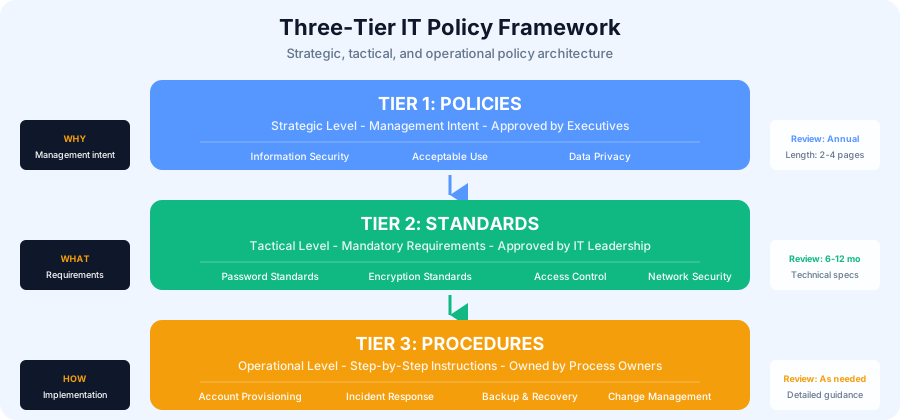
Three-Tier Policy Architecture
Tier 1: Policies (Strategic Level)
- High-level statements of management intent
- Approved by executive leadership/board
- Rarely change (reviewed annually)
- 2-4 pages per policy
- Mandatory compliance
Examples:
- Information Security Policy
- Data Privacy Policy
- Acceptable Use Policy
- Remote Work Policy
Tier 2: Standards (Tactical Level)
- Specific mandatory requirements
- Define "what" must be done
- Approved by IT leadership
- Review every 6-12 months
- Technical specifications
Examples:
- Password Standards
- Encryption Standards
- Network Security Standards
- Access Control Standards
Tier 3: Procedures (Operational Level)
- Step-by-step instructions
- Define "how" to implement standards
- Owned by process owners
- Updated as needed
- Detailed guidance
Examples:
- User Account Provisioning Procedure
- Incident Response Procedure
- Backup and Recovery Procedure
- Change Management Procedure
Essential IT Policies Every Organization Needs
Foundation Policies (Required for All):
-
Information Security Policy
- Security program governance
- Roles and responsibilities
- Security principles and objectives
- Compliance requirements
-
Acceptable Use Policy (AUP)
- Permitted and prohibited uses
- Equipment usage guidelines
- Internet and email usage
- Social media guidelines
- Consequences for violations
-
Data Classification and Handling Policy
- Data classification levels
- Handling requirements by classification
- Storage and transmission rules
- Retention and destruction
-
Access Control Policy
- Authentication requirements
- Authorization principles (least privilege)
- Access review procedures
- Privileged access management
-
Incident Response Policy
- Incident definition and classification
- Reporting requirements
- Response team structure
- Communication protocols
Security-Specific Policies:
-
Password Management Policy
- Password complexity requirements
- Change frequency
- Multi-factor authentication
- Password storage rules
-
Network Security Policy
- Network architecture principles
- Firewall requirements
- VPN usage
- Wireless security standards
-
Email Security Policy
- Email usage guidelines
- Phishing awareness
- Attachment restrictions
- Email encryption requirements
-
Physical Security Policy
- Facility access controls
- Visitor management
- Equipment security
- Clean desk requirements
-
Business Continuity and Disaster Recovery Policy
- Recovery objectives
- Backup requirements
- Testing procedures
- Roles and responsibilities
Operational Policies:
-
Change Management Policy
- Change approval authority
- Change categories and processes
- Emergency change procedures
- Documentation requirements
-
Asset Management Policy
- Asset inventory requirements
- Procurement procedures
- Lifecycle management
- Disposal procedures
-
Vendor Management Policy
- Vendor assessment criteria
- Contract requirements
- Performance monitoring
- Third-party risk management
Compliance Policies (Industry-Specific):
-
Data Privacy Policy (GDPR/CCPA)
- Personal data handling
- Data subject rights
- Consent management
- Breach notification
-
Remote Work Policy
- Eligibility criteria
- Security requirements
- Equipment and support
- Performance expectations
Policy Development Process
Phase 1: Planning and Preparation (Weeks 1-2)
Step 1: Assess Current State
Create an inventory of existing policies:
Policy Inventory Template:

Policy Name | Version | Last Updated | Owner | Status | Gaps
------------|---------|--------------|-------|--------|------
Information Security | 1.0 | 2023-01-15 | CISO | Outdated | No cloud security
Acceptable Use | 2.1 | 2024-06-01 | IT Dir | Current | Missing social media
[...]
Step 2: Identify Requirements
Gather requirements from multiple sources:
- Regulatory compliance (GDPR, HIPAA, PCI-DSS, SOX)
- Industry standards (ISO 27001, NIST, CIS Controls)
- Cyber insurance requirements
- Customer contractual obligations
- Internal risk assessments
- Audit findings and recommendations
Step 3: Prioritize Policies
Use this prioritization matrix:
| Priority | Criteria | Timeline |
|---|---|---|
| P0 | Regulatory requirement, high risk, audit finding | Complete in 1 month |
| P1 | Significant risk, insurance requirement | Complete in 2-3 months |
| P2 | Operational efficiency, best practice | Complete in 4-6 months |
| P3 | Nice to have, low risk | Complete when resources allow |
Step 4: Establish Governance
Create a Policy Governance Committee:
- Executive sponsor (CIO/CTO)
- Policy owners (CISO, IT Director, Compliance)
- Legal counsel
- HR representative
- Business unit representatives
- IT security and operations leads
Committee Responsibilities:
- Review and approve policies
- Resolve policy conflicts
- Monitor compliance
- Approve exceptions
- Oversee policy lifecycle
Phase 2: Policy Creation (Weeks 3-8)
Step 1: Use a Consistent Template
Standard Policy Template:
1. Purpose and Scope
   - Why this policy exists
   - Who it applies to
   - What it covers

2. Policy Statement
   - High-level requirements
   - Principles and objectives
   - Mandatory vs. recommended

3. Definitions
   - Key terms explained
   - Avoid jargon when possible

4. Roles and Responsibilities
   - Who does what
   - Accountability

5. Policy Requirements
   - Specific mandatory requirements
   - Organized by topic
   - Clear and actionable

6. Exceptions
   - Exception request process
   - Approval authority
   - Documentation requirements

7. Compliance and Enforcement
   - How compliance is monitored
   - Consequences for violations
   - Progressive discipline approach

8. Related Documents
   - Related policies and standards
   - Procedures and guidelines
   - External references

9. Review and Maintenance
   - Review frequency
   - Update process
   - Version control

10. Approval and Effective Date
    - Approval signatures
    - Effective date
    - Version number
Step 2: Write in Plain Language
Bad Example (Too Technical): "All user authentication mechanisms must implement multi-factor authentication utilizing FIDO2-compliant hardware tokens or TOTP-based software authenticators compliant with RFC 6238, with session timeout parameters configured to not exceed 900 seconds for privileged access."
Good Example (Clear and Actionable): "All users must use multi-factor authentication (MFA) when accessing company systems. You'll need both your password and a second verification method (such as a code from your phone or a security key). If you're accessing sensitive systems or administrative functions, your session will automatically log out after 15 minutes of inactivity."
Writing Tips:
- Use active voice ("You must" not "It is required that")
- Keep sentences short (under 25 words)
- Use bullet points and numbered lists
- Include examples
- Define technical terms
- Focus on "why" not just "what"
Step 3: Get Stakeholder Input
Policy Review Process:
- Draft Creation (Week 1): Policy owner creates initial draft
- SME Review (Week 2): Technical experts review for accuracy
- Stakeholder Review (Week 3): Affected departments provide feedback
- Legal Review (Week 4): Legal counsel reviews for compliance
- Executive Review (Week 5): Leadership reviews and approves
- Final Approval (Week 6): Governance committee approves
Step 4: Create Supporting Documents
For each policy, create:
- Executive Summary: One-page overview for leadership
- User Guide: Simple guide for end users
- FAQs: Common questions and answers
- Training Materials: Slides or videos
- Compliance Checklist: How to verify compliance
- Exception Form: Template for requesting exceptions
Phase 3: Implementation and Rollout (Weeks 9-12)
Step 1: Create Communication Plan
Announcement Timeline:
Week 1: Leadership Briefing
- Present policy to executive team
- Address concerns
- Secure visible support

Week 2: Manager Cascade
- Train managers on policy
- Provide talking points
- Address team concerns

Week 3: Organization-Wide Announcement
- Email announcement from executive sponsor
- Town hall presentation
- Make policies accessible

Week 4: Department-Specific Training
- Tailored training sessions
- Q&A opportunities
- Hands-on practice
Communication Channels:
- All-hands meeting announcement
- Email from executive sponsor
- Intranet/SharePoint policy portal
- Team meetings and training sessions
- Slack/Teams channels
- Posters and reminders
- Onboarding materials
Step 2: Conduct Training
Training Approach by Audience:
All Employees:
- 30-minute overview session
- Focus on policies affecting everyone
- Interactive Q&A
- Attestation/acknowledgment
Managers:
- 1-hour detailed session
- Enforcement responsibilities
- How to address violations
- Supporting their teams
IT Staff:
- Technical deep-dive sessions
- Implementation details
- Monitoring and compliance
- Exception handling
High-Risk Roles:
- Specialized training
- Role-specific scenarios
- Hands-on practice
- Certification/testing
Step 3: Make Policies Accessible
Policy Portal Requirements:
- Easy to search and navigate
- Mobile-friendly
- Version control
- Change tracking
- Download capabilities
- Feedback mechanism
Organization Structure:
IT Policy Portal
├── Foundation Policies
│   ├── Information Security Policy
│   ├── Acceptable Use Policy
│   └── Data Classification Policy
├── Security Policies
│   ├── Password Management
│   ├── Network Security
│   └── Email Security
├── Operational Policies
│   ├── Change Management
│   ├── Asset Management
│   └── Incident Response
└── Supporting Documents
    ├── Quick Reference Guides
    ├── FAQs
    ├── Training Materials
    └── Exception Forms
Step 4: Implement Technical Controls
Policies should be enforced by technology where possible:
| Policy | Technical Control |
|---|---|
| Password Policy | Azure AD/Okta password policies |
| Email Security | Email filtering, DLP rules |
| Network Security | Firewall rules, network segmentation |
| Data Encryption | BitLocker, device encryption |
| Access Control | IAM, RBAC, MFA |
| Web Filtering | Web proxy, DNS filtering |
| Mobile Device | MDM enrollment and policies |
| Data Loss Prevention | DLP tools, CASB |
Phase 4: Monitoring and Enforcement (Ongoing)
Step 1: Monitor Compliance
Automated Monitoring:
- Security information and event management (SIEM)
- Data loss prevention (DLP) alerts
- Access review reports
- Configuration management tools
- Vulnerability scanning
Manual Monitoring:
- Internal audits
- Policy attestation tracking
- Exception request reviews
- Incident investigation
- User surveys and feedback
Compliance Metrics:
Monthly Compliance Dashboard:

Policy Awareness:
- Training completion rate: 98%
- Policy acknowledgment rate: 95%
- Time to acknowledge: Avg 3 days

Policy Compliance:
- Password policy compliance: 94%
- MFA adoption: 89%
- Endpoint encryption: 97%
- Approved software only: 92%

Policy Violations:
- Violations reported: 12
- Violations resolved: 10
- Average resolution time: 5 days
- Repeat offenders: 2
Step 2: Handle Violations
Progressive Discipline Approach:
First Offense (Minor):
- Verbal warning
- Reminder of policy
- Immediate correction
- Document incident
Second Offense:
- Written warning
- Manager notification
- Additional training required
- Performance record
Third Offense:
- Formal disciplinary action
- HR involvement
- Potential suspension
- Performance improvement plan
Severe Violations:
- Immediate escalation
- Investigation
- Potential termination
- Legal action if warranted
Violation Handling Procedure:
1. Incident Detected
   ↓
2. Initial Assessment (Severity determination)
   ↓
3. Investigation (Gather facts)
   ↓
4. Manager Notification
   ↓
5. Employee Discussion (Hear their perspective)
   ↓
6. Corrective Action (Apply discipline)
   ↓
7. Documentation (Record in HR system)
   ↓
8. Follow-up (Verify correction)
Step 3: Manage Exceptions
Exception Request Process:
When Exceptions Are Appropriate:
- Temporary business need
- Technical limitation
- Disproportionate cost
- Compensating controls available
Exception Request Form:
Exception Request Form:

1. Requestor Information
   Name: __________
   Department: __________
   Manager: __________

2. Policy Being Requested for Exception
   Policy Name: __________
   Specific Requirement: __________

3. Business Justification
   Why is this exception needed? __________
   Business impact if denied? __________
   Duration needed: __________

4. Risk Assessment
   What security risks does this create? __________
   What compensating controls will be used? __________

5. Alternative Solutions Considered
   What alternatives were evaluated? __________
   Why are they not viable? __________

6. Approval Chain
   Manager: ________ Date: ________
   Policy Owner: ________ Date: ________
   CISO/CTO: ________ Date: ________
   (CEO required for high-risk exceptions)

7. Exception Terms
   Effective Date: __________
   Expiration Date: __________
   Review Frequency: __________
   Reporting Requirements: __________
Exception Tracking:
- Maintain exception register
- Set expiration dates and alerts
- Quarterly review of all exceptions
- Annual risk assessment
- Report to governance committee
Phase 5: Review and Improvement (Quarterly/Annually)
Annual Policy Review:
Review Triggers:
- Scheduled annual review
- Significant business change
- New regulatory requirements
- Security incident or breach
- Audit findings
- Technology changes
- Organizational restructuring
Review Checklist:
☐ Policy still aligned with business objectives?
☐ All requirements still relevant?
☐ Any requirements outdated or obsolete?
☐ Compliance with current regulations?
☐ Reflects current technology?
☐ Still practical to implement?
☐ Feedback from stakeholders addressed?
☐ Metrics show policy effectiveness?
☐ Violations analyzed for patterns?
☐ Training materials updated?
☐ Related policies still aligned?
Continuous Improvement:
- Collect user feedback
- Analyze compliance metrics
- Review violation patterns
- Benchmark against peers
- Incorporate lessons learned
- Update based on incidents
- Simplify where possible
Policy Templates and Examples
Sample Policy Structure
Acceptable Use Policy Example:
ACCEPTABLE USE POLICY
Version 2.0 | Effective Date: January 1, 2025

1. PURPOSE AND SCOPE

This Acceptable Use Policy (AUP) defines appropriate use of [Company]
information systems, including computers, networks, email, internet,
and mobile devices. This policy applies to all employees, contractors,
vendors, and anyone with access to company IT resources.

2. POLICY STATEMENT

Company IT resources are provided for business purposes. Limited
personal use is permitted when it doesn't interfere with work
responsibilities, violate law, or compromise security. Users must
protect company information and resources from unauthorized access,
damage, or loss.

3. DEFINITIONS

IT Resources: Computers, laptops, mobile devices, networks, email,
internet, software, data, and all company-owned or company-managed
technology.

4. ROLES AND RESPONSIBILITIES

Users: Responsible for appropriate use of IT resources and protecting
credentials.

Managers: Responsible for ensuring teams understand and follow this
policy.

IT: Responsible for implementing technical controls and monitoring
compliance.

5. POLICY REQUIREMENTS

5.1 Permitted Uses
✓ Business communications and collaboration
✓ Job-related research and information gathering
✓ Professional development and learning
✓ Limited personal use (reasonable, occasional)

5.2 Prohibited Uses
✗ Illegal activities or violations of law
✗ Harassment, discrimination, or hostile communications
✗ Unauthorized access to systems or data
✗ Installing unauthorized software
✗ Downloading pirated content
✗ Excessive personal use
✗ Sharing credentials or accessing systems with others' credentials
✗ Circumventing security controls
✗ Cryptocurrency mining
✗ Transmitting confidential information insecurely

5.3 Internet and Email Usage
- Internet access is logged and may be monitored
- No expectation of privacy for company email
- Email must include confidentiality footer
- External email must be professional
- Report suspicious emails to security@company.com

5.4 Mobile Devices
- Company-owned devices must have passcode/biometric lock
- Personal devices accessing company email must enroll in MDM
- Report lost or stolen devices immediately
- Company reserves right to wipe company data

5.5 Social Media
- Personal opinions don't represent company views
- Don't share confidential company information
- Follow social media policy for company accounts
- Be respectful and professional

6. EXCEPTIONS

Exceptions require written approval from IT Director and department
head. Submit exception request to it-policy-exceptions@company.com.

7. COMPLIANCE AND ENFORCEMENT

Compliance is monitored through automated systems and audits. Violations
may result in:
- First offense: Warning and retraining
- Second offense: Written warning and manager notification
- Third offense: Disciplinary action up to termination
- Severe violations: Immediate termination and legal action

8. RELATED DOCUMENTS

- Information Security Policy
- Email Security Policy
- Data Classification Policy
- Remote Work Policy
- Social Media Usage Policy

9. REVIEW AND MAINTENANCE

This policy is reviewed annually by the IT department and Policy
Governance Committee. Submit feedback to it-policies@company.com.

10. APPROVAL

Approved by: _________________ Date: _________
             John Smith, CIO

Approved by: _________________ Date: _________
             Jane Doe, CEO

Effective Date: January 1, 2025
Version: 2.0
Next Review: January 2026
Implementation Roadmap
90-Day Implementation Plan
Days 1-30: Foundation
- Week 1: Assess current state, identify gaps
- Week 2: Prioritize policies, establish governance
- Week 3: Create policy template and standards
- Week 4: Assign policy ownership, set timelines
Days 31-60: Development
- Week 5-6: Draft foundation policies (Security, AUP, Data Classification)
- Week 7: Stakeholder review and feedback
- Week 8: Legal and executive review
Days 61-90: Implementation
- Week 9: Final approvals, create policy portal
- Week 10: Communication and training launch
- Week 11: Department-specific training sessions
- Week 12: Compliance monitoring begins
Beyond 90 Days:
- Months 4-6: Develop remaining policies (Security, Operational)
- Months 7-9: Compliance-specific policies (GDPR, HIPAA)
- Months 10-12: Optimization and continuous improvement
Resource Requirements
Team Resources:
- Policy lead: 50% dedicated (50-75 hours/month)
- Subject matter experts: 10-20 hours each
- Legal review: 10-15 hours
- Training coordination: 20-30 hours
- Executive time: 5-10 hours
Budget Considerations:
- Policy management software: $5,000-15,000/year
- Legal consulting: $10,000-25,000
- Training platform: $3,000-10,000/year
- Awareness materials: $2,000-5,000
- External policy templates (optional): $1,000-5,000
Technology Needed:
- Policy management system (or SharePoint)
- Learning management system
- Document version control
- Electronic signature solution
- Compliance tracking tool
Measuring Policy Program Success
Key Performance Indicators
Awareness Metrics:
- Policy acknowledgment rate: Target 100%
- Training completion rate: Target 95%+
- Time to complete acknowledgment: Target <7 days
- Employee understanding (survey): Target 85%+
Compliance Metrics:
- Policy compliance rate: Target 95%+
- Technical control compliance: Target 98%+
- Exception request volume: Trending down
- Average exception duration: Minimize
- Closed exceptions: 100%
Effectiveness Metrics:
- Security incidents: Trending down
- Policy violations: Trending down
- Repeat violations: <5%
- Audit findings related to policies: Trending down
- Regulatory compliance: 100%
Operational Metrics:
- Policy review completion: 100% annually
- Policy update cycle time: <90 days
- Stakeholder satisfaction: Target 85%+
- Policy accessibility (portal usage): Growing
Free IT Policy Templates
Download Complete IT Policy Toolkit →
Includes 20+ ready-to-use policy templates:
- Information Security Policy
- Acceptable Use Policy
- Password Management Policy
- Remote Work Policy
- Data Classification Policy
- Incident Response Policy
- Change Management Policy
- Email Security Policy
- And 12 more...
Plus:
- Policy governance framework
- Training presentation templates
- Compliance tracking spreadsheet
- Exception request forms
- Policy acknowledgment templates
Next Steps
Start Your Policy Framework Today
Week 1 Actions:
- Download IT Policy Toolkit →
- Conduct current state assessment using the inventory template
- Identify your top 5 priority policies based on risk and compliance needs
- Establish policy governance committee with key stakeholders
- Create 90-day implementation plan using this guide
Related Resources
Enhance your IT governance program:
- IT Security Assessment Guide →
- Compliance Audit Templates →
- GDPR Compliance Guide →
- IT Governance Hub →
- Complete IT Management Guide →
A well-designed IT policy framework isn't just about compliance—it's about creating clarity, reducing risk, and empowering your organization to operate securely and efficiently. Start building your framework today with our proven templates and implementation methodology.
Frequently Asked Questions
What is an IT policy framework?
An IT policy framework is a structured hierarchy of documents that governs how an organization manages technology, security, and data. It typically follows a three-tier architecture: policies define high-level management intent, standards specify mandatory technical requirements, and procedures provide step-by-step implementation instructions. Together they create clear expectations, reduce risk, and ensure regulatory compliance.
How many IT policies does a typical company need?
Most organizations need 10 to 15 core IT policies covering information security, acceptable use, data classification, access control, incident response, password management, network security, email security, change management, asset management, vendor management, business continuity, remote work, and data privacy. The exact number depends on your industry, regulatory requirements, and organizational complexity.
How often should IT policies be reviewed?
IT policies should be reviewed at least annually by the policy governance committee. Reviews should also be triggered by significant business changes, new regulatory requirements, security incidents, audit findings, or major technology changes. The review process should verify that policies remain aligned with business objectives, reflect current technology, and comply with applicable regulations.
Who should approve IT policies in an organization?
Foundation policies like information security and acceptable use require executive approval from the CIO, CTO, or CEO. A policy governance committee typically includes the executive sponsor, CISO, IT director, legal counsel, HR representative, and business unit representatives. Standards are approved by IT leadership, while procedures are owned and approved by process owners at the operational level.
How do you enforce IT policies effectively?
Effective enforcement combines technical controls with organizational measures. Implement technology-based enforcement where possible, such as password policies in Active Directory, email filtering rules, and endpoint encryption. Pair these with clear communication, regular training, policy acknowledgment tracking, compliance monitoring through SIEM and audit tools, and a progressive discipline approach for violations.
What happens when an IT policy needs an exception?
Policy exceptions should follow a formal process requiring a written request that documents the business justification, risk assessment, compensating controls, and requested duration. Exceptions need approval from the policy owner and appropriate leadership, typically the CISO or CTO for security-related exceptions. All exceptions should have expiration dates, be tracked in an exception register, and be reviewed quarterly.