IT Documentation Templates Every Manager Needs [Free Downloads]

![IT Documentation Templates Every Manager Needs [Free Downloads]](/images/it-documentation-hero.svg?dpl=dpl_At1SKoA9zh8NKaLECzqhv4yEjB9o)
Organizations with comprehensive IT documentation reduce system downtime by 40% and onboard new IT staff 60% faster. Yet 73% of IT teams admit their documentation is inadequate or outdated. This comprehensive guide provides essential templates and best practices for creating and maintaining effective IT documentation. For more resources, visit our IT Manager's Complete Handbook.
Why IT Documentation Matters
The Cost of Poor Documentation
Common Problems:
- Knowledge trapped in individuals' heads
- Critical information lost when employees leave
- Repeated mistakes due to undocumented lessons
- Longer incident resolution times
- Inefficient onboarding (3-6 months vs. weeks)
- Compliance failures
- Audit findings
- Security vulnerabilities
Business Impact:
- Average 4 hours wasted per week searching for information
- 30% longer incident resolution without documentation
- 60% longer onboarding time
- Increased risk during personnel changes
- Failed audits and compliance violations
- Higher operational costs
Benefits of Good Documentation:
- Faster problem resolution
- Efficient knowledge transfer
- Reduced dependency on individuals
- Improved compliance
- Better disaster recovery
- Easier onboarding
- Consistent processes
- Audit trail
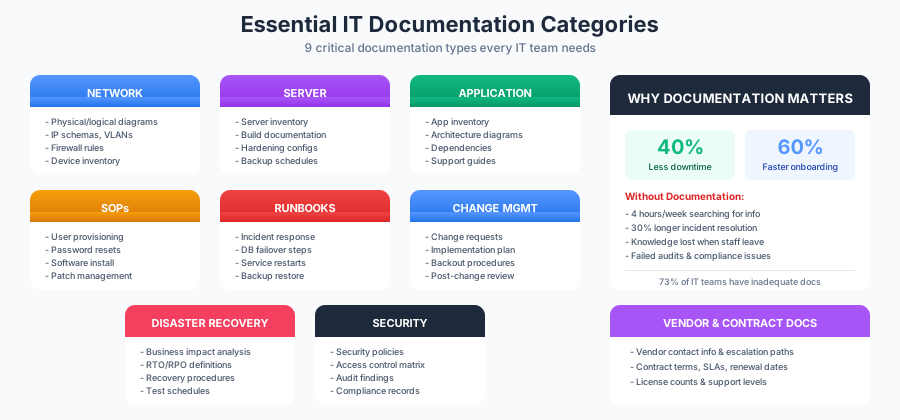
Essential IT Documentation Categories
1. Network Documentation
Network Diagrams:
- Physical Network Diagram: Shows physical connections, hardware locations
- Logical Network Diagram: Shows IP addressing, VLANs, subnets
- Network Topology: Overall network structure
- Data Flow Diagrams: How data moves through network
- Security Zones: DMZ, internal, restricted areas
Network Documentation Elements:
- Device inventory (routers, switches, firewalls)
- IP address schema and DHCP ranges
- VLAN assignments
- Firewall rules and access lists
- VPN configurations
- Wireless network details
- DNS and DHCP configurations
- Network monitoring setup
Network Diagram Tools:
- Microsoft Visio
- Lucidchart
- Draw.io (free)
- Gliffy
- Network Notepad
- Netbrain (automated)
Network Documentation Template:
Device: Core-Switch-01
Location: Main Data Center, Rack A12
Make/Model: Cisco Catalyst 9300
Serial Number: FOC12345678
IP Address: 10.0.0.1
Management VLAN: VLAN 10
Uplinks:
  - To Core-Switch-02 (Port Gig0/1-2, LACP)
  - To Firewall-01 (Port Gig0/24)
Downlinks:
  - Access switches (Ports Gig0/3-20)
Configuration: /configs/core-switch-01.cfg
Last Updated: 2025-01-15
Support Contract: XYZ123, expires 2025-12-31
Get Free IT Documentation Templates →
2. Server Documentation
Server Inventory:
- Server name and hostname
- Physical or virtual
- Hardware specifications
- Operating system and version
- IP address and network location
- Purpose and applications hosted
- Backup configuration
- Patching schedule
- Owner and contacts
Server Build Documentation:
- Standard server configurations
- Installation procedures
- Hardening steps
- Required software
- Configuration settings
- Security configurations
- Monitoring setup
- Backup configuration
Server Documentation Template:
Server Name: APP-PROD-01
Purpose: Production Application Server
Type: Virtual (VMware)
Host: ESX-HOST-03

Specifications:
- CPU: 8 vCPU
- RAM: 32GB
- Storage: 500GB (Thin provisioned)
- OS: Windows Server 2022

Network:
- IP: 10.1.50.25
- Subnet: 255.255.255.0
- Gateway: 10.1.50.1
- DNS: 10.0.10.10, 10.0.10.11

Applications:
- Microsoft IIS 10.0
- .NET Framework 4.8
- Custom Application v2.5

Backup:
- Schedule: Daily 2:00 AM
- Retention: 30 days
- Destination: Backup-Storage-01

Monitoring:
- CPU, Memory, Disk alerts configured
- Application performance monitoring
- Windows Event Log monitoring

Contacts:
- Owner: Application Team (app-team@company.com)
- Support: IT Operations (itops@company.com)

Last Updated: 2025-01-20
3. Application Documentation
Application Inventory:
- Application name and version
- Purpose and business function
- Criticality level
- Owner and stakeholders
- Hosting infrastructure
- Dependencies
- Integration points
- User access
Application Architecture:
- Architecture diagrams
- Component interactions
- Database schemas
- API documentation
- Authentication methods
- Data flows
- External dependencies
- Disaster recovery approach
Application Support Documentation:
- Common issues and solutions
- Troubleshooting guides
- Performance baselines
- Monitoring and alerts
- Backup and recovery procedures
- Upgrade procedures
- Vendor contact information
4. Standard Operating Procedures (SOPs)
SOP Structure:
Procedure Title: [Clear, descriptive title]
Procedure ID: [Unique identifier]
Version: [Version number]
Last Updated: [Date]
Owner: [Responsible person/team]

Purpose:
[Why this procedure exists]

Scope:
[What is covered, what is not]

Prerequisites:
[Required access, tools, knowledge]

Procedure Steps:
1. [Detailed step-by-step instructions]
2. [Include expected outcomes]
3. [Note any variations or conditions]
4. [Screenshots where helpful]

Rollback Procedure:
[How to undo if things go wrong]

Verification:
[How to verify successful completion]

Related Documents:
[Links to related procedures]

Change History:
[Version, Date, Changes, Author]
Essential SOPs:
- User account provisioning
- User account deprovisioning
- Password resets
- Software installation
- Server deployment
- Backup verification
- Patch management
- Incident response
- Change management
- Disaster recovery
5. Runbooks
Runbook Purpose: Detailed instructions for operational tasks, especially incident response and system recovery.
Runbook Template:
Runbook: Database Server Failover

Trigger Events:
- Primary database server failure
- Scheduled maintenance
- Performance degradation

Pre-requisites:
- Admin access to database servers
- VPN connection
- Communication with application teams

Procedure:

1. Verify Primary Database Status
   Command: ping db-primary-01
   Expected: No response or timeout

2. Check Database Replication Status
   Command: [SQL replication status query]
   Expected: Secondary in sync

3. Initiate Failover
   Steps:
   a. Stop application services
   b. Promote secondary to primary
   c. Update DNS entry
   d. Restart application services

4. Verify Application Connectivity
   Test: [Application health check URL]
   Expected: HTTP 200 response

5. Monitor for Issues
   - Check application logs
   - Monitor database performance
   - Verify user connectivity

6. Communication
   - Notify stakeholders of failover
   - Update incident ticket
   - Schedule post-mortem

Rollback:
[Procedures to fail back to original primary]

Recovery Time: 30 minutes
Dependencies: Application team availability
Emergency Contacts: [Contact list]
Common Runbooks:
- Service restart procedures
- Database failover
- Backup restoration
- Security incident response
- Network failover
- Application deployment
- System recovery
- Performance troubleshooting

6. Change Documentation
Change Request Template:
Change ID: CHG-2025-0042
Change Title: Upgrade Database Server Memory
Requestor: Database Team
Change Type: Standard
Priority: Medium

Change Description:
Upgrade memory on DB-PROD-01 from 64GB to 128GB to improve query performance

Business Justification:
Current memory utilization consistently above 90%, causing performance degradation and impacting user experience.

Risk Assessment:
- Impact: Medium (requires server restart)
- Complexity: Low (hardware addition)
- Risk Level: Low (tested procedure)

Implementation Plan:
1. Schedule maintenance window (Sunday 2:00 AM)
2. Notify users of maintenance
3. Backup server configuration
4. Power down server
5. Install additional memory
6. Power on and verify
7. Monitor performance for 24 hours

Backout Plan:
1. Power down server
2. Remove new memory
3. Restore original configuration
4. Restart server

Testing Plan:
- Verify POST completion
- Check OS memory recognition
- Run database performance tests
- Monitor application response times

Approval Required:
- Database Team Lead: [Name]
- Infrastructure Manager: [Name]
- CAB Approval: [Date]

Implementation Date: 2025-02-10
Implementation Window: 02:00-04:00 AM
Implementer: Infrastructure Team
7. Disaster Recovery Documentation
Disaster Recovery Plan Components:
Business Impact Analysis:
- Critical systems identified
- Recovery Time Objectives (RTO)
- Recovery Point Objectives (RPO)
- Maximum tolerable downtime
- Financial impact analysis
Recovery Procedures:
- System recovery priorities
- Step-by-step recovery instructions
- Required resources
- Contact information
- Communication procedures
- Testing schedule
DR Plan Template:
System: Customer Database
Criticality: Tier 1 (Critical)
RTO: 4 hours
RPO: 15 minutes

Recovery Procedure:

Phase 1: Assessment (0-30 minutes)
- Verify extent of disaster
- Activate DR team
- Declare disaster

Phase 2: Infrastructure Recovery (30 minutes - 2 hours)
- Activate DR site
- Restore network connectivity
- Bring up DR database server

Phase 3: Data Recovery (2-3 hours)
- Restore from most recent backup
- Apply transaction logs
- Verify data integrity

Phase 4: Application Recovery (3-4 hours)
- Start application services
- Configure to point to DR database
- Test application functionality

Phase 5: Verification and Cutover (3.5-4 hours)
- User acceptance testing
- Performance validation
- Communication to users
- Monitor for issues

Resources Required:
- DR site infrastructure
- Backup media/replication
- Database team (2 people)
- Infrastructure team (2 people)
- Application team (1 person)

Success Criteria:
- Application accessible
- Data current within RPO
- Performance acceptable
- Users can perform critical functions
8. Security Documentation
Essential Security Documentation:
- Security policies
- Access control matrix
- Security baseline configurations
- Vulnerability management procedures
- Incident response procedures
- Penetration test results
- Security audit findings
- Compliance documentation
Access Control Matrix Example:
| Resource | Administrators | Power Users | Standard Users | Read Only |
|---|---|---|---|---|
| Server Admin | Full | - | - | - |
| File Servers | Full | Read/Write | Read Only | Read Only |
| Database | Full | Read/Write | - | Read Only |
| Applications | Config | Full | Standard | View Only |
9. Vendor and Contract Documentation
Vendor Information:
- Vendor name and contact information
- Products/services provided
- Contract details
- Support levels and SLAs
- License information
- Renewal dates
- Escalation procedures
- Account manager contacts
Contract Documentation Template:
Vendor: ABC Software Company
Product: Enterprise Resource Planning System
Contract Number: 12345

Contract Details:
- Start Date: 2024-01-01
- End Date: 2026-12-31
- Contract Value: $150,000/year
- Payment Terms: Annual, Net 30

Licenses:
- Named Users: 200
- Concurrent Users: 150
- License Type: Enterprise

Support:
- Support Level: Platinum
- Hours: 24/7/365
- Response Time: 15 minutes (Critical)
- Dedicated Support Manager: Yes

Contacts:
- Account Manager: John Smith (jsmith@abc.com, 555-0100)
- Technical Support: support@abc.com, 555-0199
- Escalation: manager@abc.com

Renewal:
- Notice Required: 90 days
- Auto-Renewal: No
- Next Renewal: 2026-10-01
- Renewal Reminder Set: Yes

Documents:
- Contract: /contracts/ABC-12345.pdf
- SOW: /contracts/ABC-12345-SOW.pdf
- SLA: /contracts/ABC-12345-SLA.pdf
Documentation Best Practices
Creating Effective Documentation
Writing Guidelines:
1. Clear and Concise
- Use plain language
- Avoid jargon
- Define technical terms
- Short sentences and paragraphs
- Active voice
2. Well-Structured
- Logical organization
- Consistent formatting
- Clear headings
- Numbered lists for procedures
- Table of contents for long documents
3. Actionable
- Step-by-step instructions
- Expected outcomes noted
- Screenshots where helpful
- Examples provided
- Error handling included
4. Accurate and Current
- Regular reviews
- Version control
- Last updated date
- Change history
- Owner identified
5. Accessible
- Central repository
- Easy to find
- Searchable
- Appropriate permissions
- Multiple formats if needed
Documentation Tools
Documentation Platforms:
- Confluence: Team collaboration, wiki-style
- SharePoint: Microsoft environment, document management
- GitBook: Developer-friendly, version control
- Notion: Flexible, modern interface
- MediaWiki: Open source, highly customizable
- Bookstack: Simple, open source
- Read the Docs: Technical documentation
Diagramming Tools:
- Microsoft Visio
- Lucidchart
- Draw.io (free)
- PlantUML (code-based)
- Mermaid (Markdown)
Version Control:
- Git/GitHub
- Document versioning in platform
- Change tracking in Word
- Approval workflows
Documentation Governance
Documentation Standards
Document Naming Convention:
[Category]-[System/Topic]-[DocumentType]-[Version].ext

Examples:
NET-CoreNetwork-Diagram-v2.1.vsdx
SRV-DatabaseServers-Runbook-v1.0.docx
APP-CRMSystem-Architecture-v3.2.pdf
SEC-AccessControl-Policy-v2.0.docx
Document Metadata:
- Document title
- Document ID
- Version number
- Creation date
- Last updated date
- Author
- Owner
- Approval status
- Review frequency
- Related documents
Documentation Lifecycle
Creation:
- Identify need
- Assign owner
- Create document
- Peer review
- Approval
Maintenance:
- Regular review schedule
- Update triggers (changes, incidents)
- Version control
- Change tracking
- Re-approval if needed
Archival:
- Obsolete documents archived
- Retention per policy
- Historical reference
- Audit trail maintained
Review Schedule
Documentation Review Frequency:
- Critical systems: Quarterly
- Standard systems: Semi-annually
- Policies and procedures: Annually
- After major changes: Immediately
- After incidents: As needed
Review Checklist:
- Information still accurate?
- Any changes to systems/procedures?
- Screenshots still current?
- Contact information updated?
- Links still valid?
- Compliance requirements met?
- Best practices followed?
Building a Documentation Culture
Getting Buy-In
Demonstrate Value:
- Show time saved with documentation
- Highlight incidents resolved faster
- Demonstrate onboarding improvements
- Calculate cost of poor documentation
Make It Easy:
- Provide templates
- Documentation tools accessible
- Training on documentation
- Build into workflows
- Reward contributions
Lead by Example:
- Management uses documentation
- Document as you work
- Share success stories
- Recognize contributors
Documentation Habits
Build Documentation Into Processes:
- Project closure requires documentation
- Change process includes documentation updates
- Incident resolution includes knowledge articles
- Performance reviews include documentation contributions
Set Expectations:
- Documentation standards defined
- Required documentation identified
- Documentation time allocated
- Quality standards enforced
Continuous Improvement:
- Regular audits
- User feedback
- Gap identification
- Ongoing training
- Tool optimization
Common Documentation Mistakes
Mistakes to Avoid
1. Documentation Debt
- Creating documentation later (never happens)
- Letting documentation get outdated
- Solution: Document as you go
2. Over-Documentation
- Too much detail
- Documentation for documentation's sake
- Solution: Focus on value, right level of detail
3. Inaccessible Documentation
- Stored in individual folders
- Hard to find
- No search capability
- Solution: Centralized repository, good search
4. No Ownership
- Unclear who maintains
- No review process
- Solution: Assign owners, review schedule
5. Wrong Audience
- Too technical for users
- Not technical enough for engineers
- Solution: Know your audience, tailor content
Free IT Documentation Resources
Complete Documentation Template Package
Our IT documentation toolkit includes:
- Network documentation templates
- Server documentation templates
- Application documentation templates
- SOP templates
- Runbook templates
- Change documentation templates
- DR plan templates
- Vendor tracking templates
- Documentation standards guide
Download Free IT Documentation Templates →
Related Resources
IT Operations Templates:
Conclusion
Comprehensive IT documentation is essential for efficient operations, knowledge transfer, and business continuity. By implementing documentation standards and building a documentation culture, your IT organization can significantly improve operational efficiency and reduce risk.
Implementation Checklist:
- Download documentation templates
- Assess current documentation gaps
- Prioritize critical systems to document
- Select documentation platform
- Define documentation standards
- Assign documentation owners
- Create documentation templates
- Train team on documentation
- Set review schedules
- Build into processes
- Monitor and improve
Quick Wins:
- Document top 10 critical systems
- Create network diagrams
- Document server inventory
- Create runbooks for common incidents
- Establish SOP for user provisioning
- Create vendor contact list
Next Steps:
- Download documentation templates →
- Review change management →
- Explore disaster recovery →
- Visit IT Operations hub →
Start building your documentation library today. Download our comprehensive template package and documentation standards guide.
Frequently Asked Questions
What IT documentation is essential for every organization?
Every IT organization needs network diagrams showing physical and logical topology, a server and application inventory, standard operating procedures for routine tasks, runbooks for incident response, change management documentation, disaster recovery plans, and security documentation including access control matrices. These seven categories form the foundation for operational efficiency and business continuity.
How often should IT documentation be updated?
Critical system documentation should be reviewed quarterly, standard systems semi-annually, and policies and procedures at least annually. Documentation should also be updated immediately after major changes, system upgrades, or incidents that reveal gaps. Outdated documentation can be worse than no documentation because it creates false confidence during emergencies.
What tools are best for IT documentation?
Popular IT documentation platforms include Confluence for team collaboration, SharePoint for Microsoft environments, Notion for flexible modern interfaces, and GitBook for developer-friendly version control. For diagramming, Microsoft Visio, Lucidchart, and the free Draw.io are widely used. The best tool is one your team will actually use consistently, so prioritize ease of access and search capability.
Who is responsible for maintaining IT documentation?
Each document should have a designated owner, typically the subject matter expert or team lead responsible for that system or process. The IT manager or director oversees the documentation program, sets standards, and ensures reviews happen on schedule. Documentation ownership should be included in job descriptions and performance reviews to create accountability.
How should IT documentation be organized?
Organize IT documentation by category such as network, servers, applications, security, and procedures, with a consistent naming convention that includes the category, system name, document type, and version number. Store everything in a centralized, searchable repository with appropriate access permissions. Include metadata like owner, last updated date, and review frequency on every document.
What is the difference between an SOP and a runbook?
A standard operating procedure covers routine, planned tasks like user account provisioning or software installation, providing step-by-step instructions for everyday operations. A runbook focuses on operational response procedures, particularly incident response and system recovery, with detailed commands, expected outputs, and decision trees for troubleshooting. Both are essential but serve different operational needs.