Operations KPI Dashboard Template: Essential Metrics & Excel Templates

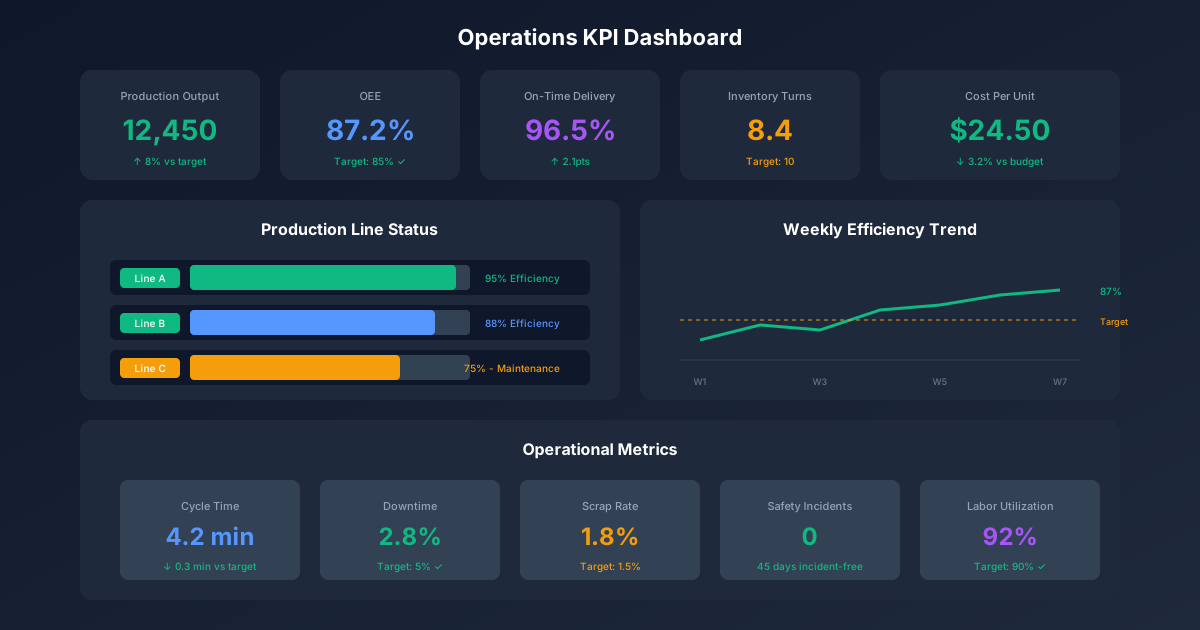
Operations leaders are drowning in data but starving for insights. With dozens of potential metrics to track, many dashboards become cluttered graveyards of unused KPIs. The result: missed problems, delayed decisions, and teams that don't know what matters.
An effective operations KPI dashboard focuses on the vital few metrics that drive business outcomes. This guide provides templates for building dashboards that transform raw data into actionable intelligence.
For related performance management resources, explore our Project Management Hub, IT Management Hub, and Financial Planning Hub. For templates, see our Project Tracker Template and IT Governance KPIs Dashboard.
Operations KPI Framework
The Four Pillars of Operations Performance
Every operations dashboard should measure across four dimensions:
| Pillar | Focus | Key Question |
|---|---|---|
| Productivity | Output efficiency | How much are we producing? |
| Quality | Defect prevention | How well are we producing? |
| Efficiency | Resource utilization | How effectively are we using resources? |
| Cost | Financial performance | What does it cost to operate? |
KPI Selection Criteria
Use these criteria to evaluate potential KPIs:
| Criterion | Description | Questions to Ask |
|---|---|---|
| Actionable | Drives specific actions | Can we influence this metric? |
| Measurable | Quantifiable with available data | Do we have reliable data sources? |
| Aligned | Supports strategic objectives | Does this connect to company goals? |
| Timely | Available when needed for decisions | Can we get updates frequently enough? |
| Owned | Clear accountability | Who is responsible for this metric? |
Rule of Thumb: If you can't name who acts on a metric, remove it from your dashboard.
Core Operations KPIs
Productivity Metrics
1. Overall Equipment Effectiveness (OEE)
The gold standard for manufacturing productivity:
OEE = Availability × Performance × Quality

Where:
- Availability = (Run Time / Planned Production Time) × 100
- Performance = (Actual Output / Theoretical Output) × 100
- Quality = (Good Units / Total Units) × 100

Example:
- Availability: 90% (scheduled 8 hrs, ran 7.2 hrs)
- Performance: 95% (could make 1000, made 950)
- Quality: 99% (950 units, 941 good)
- OEE = 0.90 × 0.95 × 0.99 = 84.6%

World-class benchmark: 85%+
OEE Dashboard Component:
| Equipment | Availability | Performance | Quality | OEE | Trend |
|---|---|---|---|---|---|
| Line 1 | 92% | 96% | 98% | 86.5% | ↗ |
| Line 2 | 88% | 94% | 99% | 81.9% | → |
| Line 3 | 85% | 91% | 97% | 75.0% | ↘ |
| Average | 88.3% | 93.7% | 98.0% | 81.1% |
2. Throughput
Units processed per time period:
Throughput = Total Output / Time Period

Daily Throughput = 2,400 units / 8 hours = 300 units/hour

Throughput Variance = (Actual - Target) / Target × 100
                    = (300 - 320) / 320 × 100 = -6.25%
3. Labor Productivity
Output per labor hour:
Labor Productivity = Units Produced / Direct Labor Hours

Example:
- Units produced: 10,000
- Direct labor hours: 400
- Productivity: 25 units/hour

Revenue per Employee = Total Revenue / Full-Time Equivalents
                     = $50M / 200 FTE = $250,000/FTE
4. Capacity Utilization
How much capacity is being used:
Capacity Utilization = Actual Output / Maximum Possible Output × 100

Example:
- Maximum capacity: 50,000 units/month
- Actual production: 42,000 units/month
- Utilization: 84%

Optimal range: 80-90% (allows for flexibility and maintenance)
Quality Metrics
1. First Pass Yield (FPY)
Products that pass quality on first attempt:
First Pass Yield = Good Units on First Pass / Total Units Started × 100

Example:
- Started: 1,000 units
- Passed first time: 940 units
- FPY: 94%

Rolled Throughput Yield (multi-step process):
RTY = FPY₁ × FPY₂ × FPY₃ × ... × FPYₙ

Example (5-step process, each 95% FPY):
RTY = 0.95⁵ = 77.4%
2. Defect Rate
Defects per unit of measurement:
Defect Rate = (Defective Units / Total Units) × 100

Defects Per Million Opportunities (DPMO):
DPMO = (Defects / Total Opportunities) × 1,000,000

Example:
- Total products: 50,000
- Opportunities per product: 10
- Total defects found: 75
- DPMO = (75 / 500,000) × 1,000,000 = 150 DPMO

Six Sigma conversion:
- 150 DPMO ≈ 5.1 sigma level
- 3.4 DPMO = 6 sigma (target)
3. Customer Complaint Rate
External quality feedback:
Complaint Rate = (Complaints / Units Shipped) × 1,000,000
               = PPM (Parts Per Million)

Example:
- Complaints: 12
- Units shipped: 100,000
- Rate: 120 PPM

Benchmark by industry:
- Automotive: < 25 PPM
- Electronics: < 100 PPM
- General manufacturing: < 500 PPM
4. Rework Rate
Products requiring additional processing:
Rework Rate = (Units Reworked / Total Units) × 100

Rework Cost = Units Reworked × Cost per Rework
            = 500 × $25 = $12,500/month
Efficiency Metrics
1. Cycle Time
Time to complete one unit of work:
Cycle Time = Production Time / Units Produced

Example:
- 8-hour shift = 480 minutes
- Units produced: 960
- Cycle time: 30 seconds/unit

Takt Time (customer demand rate):
Takt Time = Available Production Time / Customer Demand
          = 480 minutes / 800 units = 36 seconds/unit

If Cycle Time < Takt Time: Capacity exists
If Cycle Time > Takt Time: Will miss demand
2. Lead Time
Total time from order to delivery:
Lead Time = Order Date - Delivery Date

Components:
- Queue time (waiting)
- Processing time (value-add)
- Move time (transport)
- Inspection time

Lead Time Efficiency = Processing Time / Lead Time × 100

Example:
- Total lead time: 10 days
- Actual processing: 2 days
- Efficiency: 20% (80% is waste)
3. Inventory Turnover
How quickly inventory is consumed:
Inventory Turnover = Cost of Goods Sold / Average Inventory

Example:
- Annual COGS: $12,000,000
- Average inventory: $2,000,000
- Turnover: 6x per year

Days Inventory Outstanding (DIO):
DIO = 365 / Inventory Turnover = 365 / 6 = 61 days

Benchmark:
- Retail: 8-12x
- Manufacturing: 4-8x
- Grocery: 12-20x
4. Asset Utilization
Return on operational assets:
Asset Utilization = Revenue / Total Assets × 100

Fixed Asset Turnover = Revenue / Net Fixed Assets
                     = $100M / $25M = 4.0x

Higher is better (generating more revenue per asset dollar)
Cost Metrics
1. Cost Per Unit
Total cost to produce one unit:
Cost Per Unit = Total Production Costs / Units Produced

Components:
- Direct materials
- Direct labor
- Manufacturing overhead

Example:
- Materials: $500,000
- Labor: $200,000
- Overhead: $300,000
- Units: 100,000
- Cost/unit: $10.00
2. Operating Margin
Profitability of operations:
Operating Margin = Operating Income / Revenue × 100

Operating Income = Revenue - COGS - Operating Expenses

Example:
- Revenue: $10,000,000
- COGS: $6,000,000
- Operating expenses: $2,500,000
- Operating income: $1,500,000
- Operating margin: 15%
3. Cost of Poor Quality (COPQ)
Total cost of quality failures:
COPQ = Internal Failure + External Failure + Appraisal + Prevention

Internal Failure: Scrap, rework, downtime
External Failure: Returns, warranty, complaints
Appraisal: Inspection, testing, audits
Prevention: Training, quality planning

Typical COPQ: 15-25% of revenue
Best-in-class: < 5% of revenue
4. Maintenance Costs
Equipment upkeep expenses:
Maintenance Cost Ratio = Maintenance Cost / Asset Replacement Value × 100

Benchmark: 2-5% annually

Maintenance Mix (target):
- Preventive: 50-60%
- Predictive: 20-30%
- Reactive: 10-20%
Dashboard Design Template
Executive Summary View
Single-page overview for leadership:
┌─────────────────────────────────────────────────────────────┐
│                    OPERATIONS DASHBOARD                      │
│                    January 2025 - MTD                        │
├─────────────┬─────────────┬─────────────┬───────────────────┤
│ PRODUCTIVITY│   QUALITY   │  EFFICIENCY │       COST        │
├─────────────┼─────────────┼─────────────┼───────────────────┤
│   OEE       │    FPY      │ Cycle Time  │   Cost/Unit       │
│   84.2%     │    97.3%    │   28 sec    │    $8.45          │
│   ▲ +2.1%   │   ▲ +0.5%   │  ▼ -4 sec   │   ▼ -$0.32        │
├─────────────┼─────────────┼─────────────┼───────────────────┤
│ vs Target   │  vs Target  │  vs Target  │    vs Target      │
│   82% ✓     │    96% ✓    │   30 sec ✓  │    $9.00 ✓        │
└─────────────┴─────────────┴─────────────┴───────────────────┘

┌───────────────────────┬─────────────────────────────────────┐
│   TOP ISSUES          │           TREND CHARTS              │
├───────────────────────┤                                     │
│ 1. Line 3 OEE: 75%    │   [Rolling 12-month charts for      │
│ 2. Supplier delays    │    each pillar metric]              │
│ 3. Overtime trending  │                                     │
└───────────────────────┴─────────────────────────────────────┘
Detailed Metrics View
Drill-down dashboard for operations managers:
Tab 1: Production Overview
| Metric | Target | Actual | Variance | Status |
|---|---|---|---|---|
| Daily Output | 5,000 | 5,234 | +4.7% | 🟢 |
| OEE | 82% | 84.2% | +2.2% | 🟢 |
| Availability | 90% | 91.5% | +1.5% | 🟢 |
| Performance | 95% | 94.2% | -0.8% | 🟡 |
| Quality | 98% | 97.8% | -0.2% | 🟡 |
| Throughput Rate | 300/hr | 312/hr | +4% | 🟢 |
Tab 2: Quality Deep Dive
| Quality Metric | Week 1 | Week 2 | Week 3 | Week 4 | Trend |
|---|---|---|---|---|---|
| First Pass Yield | 96.8% | 97.1% | 97.5% | 97.3% | ↗ |
| Defect Rate | 3.2% | 2.9% | 2.5% | 2.7% | ↘ |
| Rework Rate | 2.1% | 1.8% | 1.5% | 1.6% | ↘ |
| Customer Returns | 45 | 38 | 32 | 35 | ↘ |
| COPQ ($K) | 125 | 112 | 98 | 105 | ↘ |
Tab 3: Efficiency Analysis
| Process Step | Cycle Time | Takt Time | Utilization | Bottleneck |
|---|---|---|---|---|
| Assembly | 24 sec | 36 sec | 67% | No |
| Testing | 38 sec | 36 sec | 106% | Yes |
| Packaging | 18 sec | 36 sec | 50% | No |
| Inspection | 12 sec | 36 sec | 33% | No |
Tab 4: Cost Performance
| Cost Category | Budget | Actual | Variance | % of Total |
|---|---|---|---|---|
| Direct Labor | $450K | $435K | -$15K | 32% |
| Materials | $520K | $545K | +$25K | 40% |
| Overhead | $280K | $275K | -$5K | 20% |
| Utilities | $85K | $92K | +$7K | 7% |
| Maintenance | $45K | $38K | -$7K | 3% |
| Total | $1,380K | $1,385K | +$5K | 100% |
Visual Elements
Gauge Charts for Key Metrics:
        OEE                    FPY                  Utilization
    ┌─────────┐           ┌─────────┐            ┌─────────┐
    │   84%   │           │   97%   │            │   78%   │
    │ ████████░░ │        │ █████████░ │         │ ███████░░░ │
    │ Target: 82%│        │Target: 96%│          │Target: 85%│
    └─────────┘           └─────────┘            └─────────┘
       🟢 Good               🟢 Good               🟡 Watch
Trend Sparklines:
Daily OEE (Last 30 Days)
│    ╭──╮    ╭──╮    ╭─────╮
│ ╭──╯  ╰────╯  ╰────╯     ╰──╮
│─╯                            ╰─ → 84.2%
└────────────────────────────────
  1         10        20       30
Pareto Chart for Defects:
Defect Type Analysis
│ ███                              │ 100%
│ ███  ██                          │
│ ███  ███  ██                     │ 80%
│ ███  ███  ███  █                 │
│ ███  ███  ███  ███  █            │ 60%
│ ███  ███  ███  ███  ███          │
│ ███  ███  ███  ███  ███  ███     │
└───────────────────────────────────
  A    B    C    D    E   Other

A: Alignment (35%)
B: Surface finish (22%)
C: Dimension (18%)
D: Assembly (12%)
E: Packaging (8%)
Industry-Specific KPIs
Manufacturing Operations
| KPI | Formula | Target Range |
|---|---|---|
| OEE | Availability × Performance × Quality | 85%+ |
| MTBF | Total Operating Time / Number of Failures | Industry-specific |
| MTTR | Total Downtime / Number of Repairs | < 2 hours |
| Schedule Adherence | Actual / Planned × 100 | > 95% |
| Changeover Time | Time between last good unit and first good unit | Minimize |
| Scrap Rate | Scrap Units / Total Units × 100 | < 2% |
Warehouse & Distribution
| KPI | Formula | Target Range |
|---|---|---|
| Order Accuracy | Accurate Orders / Total Orders × 100 | > 99.5% |
| Pick Rate | Lines Picked / Labor Hours | 100+ lines/hr |
| Inventory Accuracy | Accurate Counts / Total SKUs × 100 | > 99% |
| Dock-to-Stock Time | Receipt to Putaway Time | < 24 hours |
| Orders Per Hour | Total Orders / Total Hours | Depends on complexity |
| Space Utilization | Used Space / Available Space × 100 | 85-90% |
Service Operations
| KPI | Formula | Target Range |
|---|---|---|
| First Call Resolution | Resolved First Contact / Total Contacts × 100 | > 75% |
| Average Handle Time | Total Handle Time / Total Contacts | Balance quality vs. speed |
| Service Level | Calls Answered in X sec / Total Calls × 100 | 80% in 20 sec |
| Customer Satisfaction | CSAT Score | > 4.2/5.0 |
| Employee Utilization | Productive Time / Available Time × 100 | 75-85% |
| Escalation Rate | Escalated Tickets / Total Tickets × 100 | < 10% |
Healthcare Operations
| KPI | Formula | Target Range |
|---|---|---|
| Patient Throughput | Patients Served / Time Period | Maximize |
| Wait Time | Time from Arrival to Service | < 15 min |
| Bed Utilization | Occupied Beds / Available Beds × 100 | 80-85% |
| Length of Stay | Total Patient Days / Discharges | Minimize (safely) |
| Readmission Rate | 30-day Readmissions / Discharges × 100 | < 10% |
| Staff-to-Patient Ratio | FTE / Average Census | Per unit type |
Excel Dashboard Template
Data Structure
Tab: Raw Data
| Date | Line | Shift | Planned_Hrs | Actual_Hrs | Target_Units | Good_Units | Defects | Rework |
|---|---|---|---|---|---|---|---|---|
| 2025-01-01 | 1 | A | 8 | 7.5 | 2400 | 2280 | 48 | 24 |
| 2025-01-01 | 1 | B | 8 | 7.8 | 2400 | 2340 | 36 | 18 |
| 2025-01-01 | 2 | A | 8 | 7.2 | 2000 | 1850 | 55 | 30 |
Tab: Calculations
// Availability
=Actual_Hrs / Planned_Hrs

// Performance
=Good_Units / (Actual_Hrs * Hourly_Rate)

// Quality
=(Good_Units - Rework) / Good_Units

// OEE
=Availability * Performance * Quality

// First Pass Yield
=(Good_Units - Rework) / (Good_Units + Defects)

// Throughput
=Good_Units / Actual_Hrs

// Cost Per Unit
=Total_Costs / Good_Units
Tab: Summary
| Metric | Formula | MTD | Target | Status |
|---|---|---|---|---|
| OEE | =AVERAGE(OEE_Range) | 84.2% | 82% | =IF(MTD>=Target,"🟢","🔴") |
| Availability | =AVERAGE(Avail_Range) | 91.5% | 90% | =IF(MTD>=Target,"🟢","🔴") |
| Performance | =AVERAGE(Perf_Range) | 94.2% | 95% | =IF(MTD>=Target,"🟢","🔴") |
| Quality | =AVERAGE(Qual_Range) | 97.8% | 98% | =IF(MTD>=Target,"🟢","🔴") |
Conditional Formatting Rules
Traffic Light Status:
Green: Value >= Target
Yellow: Value >= 90% of Target
Red: Value < 90% of Target

Formula: =IF(A1>=B1,"🟢",IF(A1>=B1*0.9,"🟡","🔴"))
Trend Indicators:
Up: Current > Previous
Flat: Current = Previous (±1%)
Down: Current < Previous

Formula: =IF(A1>B1*1.01,"↗",IF(A1<B1*0.99,"↘","→"))
Variance Highlighting:
Positive variance (good): Green background
Negative variance (bad): Red background
Within tolerance: No highlight

Format: Use conditional formatting with variance thresholds
Dashboard Implementation Guide
Week 1: Requirements Gathering
- Identify key stakeholders
- Document decision-making processes
- List current data sources
- Define must-have vs. nice-to-have metrics
- Establish update frequency requirements
Week 2: Data Preparation
- Audit data quality and availability
- Create data extraction procedures
- Build data validation rules
- Design calculation methodology
- Document data dictionary
Week 3: Dashboard Design
- Create wireframe layouts
- Select visualization types
- Define color schemes and formatting
- Build calculation formulas
- Design drill-down structure
Week 4: Build and Test
- Develop dashboard in Excel/tool
- Populate with historical data
- Test calculations and formulas
- Validate against source systems
- Conduct user acceptance testing
Week 5: Deploy and Train
- Deploy to production environment
- Train end users
- Document maintenance procedures
- Establish feedback mechanism
- Schedule first review
Ongoing: Maintain and Improve
- Monitor data quality
- Update targets as needed
- Add/remove metrics based on feedback
- Refresh training materials
- Conduct quarterly reviews
Common Dashboard Mistakes
Mistake 1: Too Many Metrics
Problem: Dashboard overloaded with 30+ KPIs Impact: Users can't find what matters Solution: Limit to 12-15 metrics maximum; use drill-downs for detail
Mistake 2: No Context
Problem: Numbers without targets, trends, or benchmarks Impact: Users can't interpret if performance is good or bad Solution: Always show target, trend, and status indicator
Mistake 3: Stale Data
Problem: Dashboard shows last month's numbers Impact: Decisions based on outdated information Solution: Automate data refresh; show "last updated" timestamp
Mistake 4: Poor Visualization
Problem: Wrong chart types, cluttered design Impact: Insights hidden by bad presentation Solution: Match chart to data type; follow visualization best practices
Mistake 5: No Action Orientation
Problem: Interesting data but no clear "so what" Impact: Dashboard becomes report nobody uses Solution: Include recommendations, alerts, and action items
Key Takeaways
-
Focus on the vital few: 12-15 well-chosen KPIs beat 50 random metrics
-
Balance the four pillars: Productivity, Quality, Efficiency, and Cost work together
-
Provide context: Targets, trends, and benchmarks make numbers meaningful
-
Keep data fresh: Stale dashboards become shelfware
-
Design for action: Every metric should trigger a potential response
-
Iterate based on feedback: Start simple, add complexity based on real needs
For related resources, explore our IT Governance KPIs Dashboard, Financial Planning Hub, and Project Tracker Template.