IT Governance KPIs Dashboard: Executive Scorecard Design and Metrics Guide

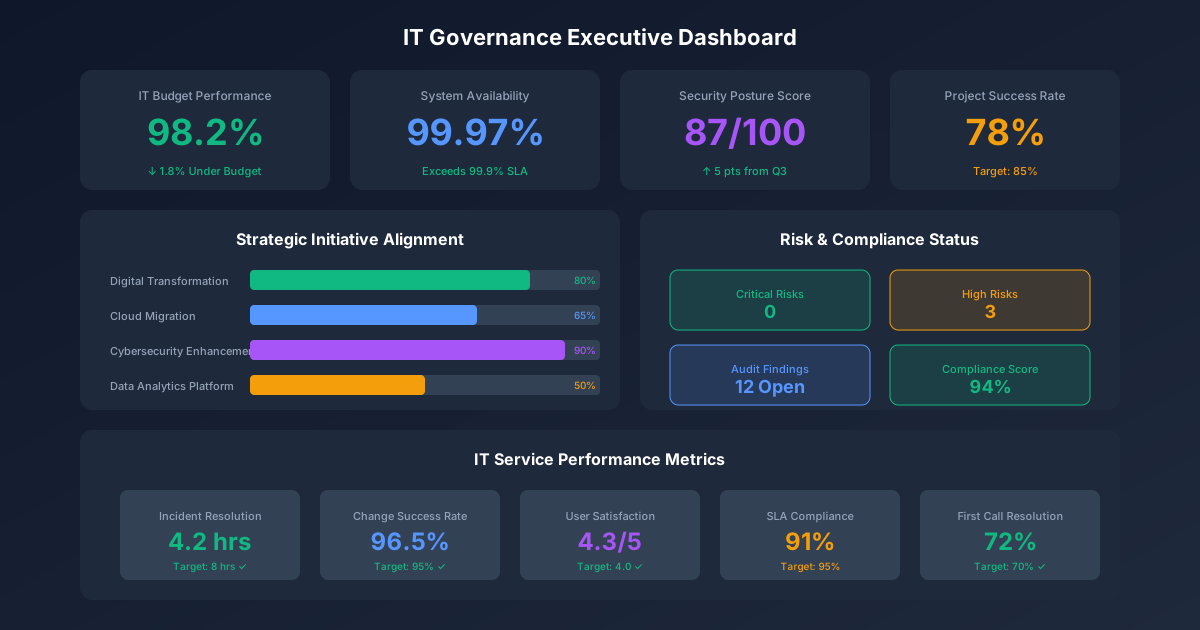
IT leaders struggle to demonstrate technology value to executives and boards. The challenge isn't lack of data—it's translating technical metrics into business language that drives decisions. Organizations with mature IT governance dashboards achieve 25% higher satisfaction with IT and 30% better alignment between IT spending and business priorities.
This guide provides a comprehensive framework for building IT governance KPIs and executive scorecards that communicate IT value, identify issues early, and enable data-driven technology decisions.
For foundational governance concepts, see our IT Management Hub and IT Governance Framework. For steering committee operations, explore our IT Steering Committee Charter Template. For comprehensive IT leadership resources, visit our IT Manager's Complete Handbook.
Why IT Governance KPIs Matter
The Communication Gap
IT departments collect vast amounts of operational data, but executives and boards need different information:
| What IT Tracks | What Executives Need |
|---|---|
| Server uptime percentage | Business system availability |
| Tickets closed per day | Service quality and user satisfaction |
| Lines of code deployed | Business capabilities delivered |
| Vulnerability counts | Business risk exposure |
| Storage utilization | Cost efficiency and capacity planning |
Effective IT governance KPIs bridge this gap by translating technical metrics into business outcomes.
Benefits of Structured IT KPIs
For the CIO/IT Leadership:
- Justify IT investments with quantified value
- Identify performance issues before they escalate
- Allocate resources based on data
- Demonstrate continuous improvement
For Executives and Board:
- Understand IT's contribution to business goals
- Make informed technology investment decisions
- Assess IT risk posture
- Hold IT accountable with clear metrics
For the Organization:
- Align IT activities with business strategy
- Optimize IT spending
- Improve service quality
- Reduce technology-related risks
IT Governance KPI Framework
The Balanced Scorecard Approach
Adapt the balanced scorecard framework for IT governance:
Four Perspectives:
| Perspective | Focus | Key Question |
|---|---|---|
| Financial | IT economics and value | Are we managing IT costs effectively? |
| Customer/User | Service quality and satisfaction | Are users well-served by IT? |
| Internal Process | Operational excellence | Are IT processes efficient and reliable? |
| Learning & Growth | Capability development | Is IT building future capabilities? |
Five IT Governance KPI Categories
Organize your dashboard around these five categories:
- Financial Performance - Cost management, ROI, spending efficiency
- Operational Excellence - Availability, performance, efficiency
- Project & Portfolio Delivery - On-time, on-budget, value realization
- Security & Risk - Threat protection, compliance, resilience
- Service & Satisfaction - User experience, support quality, adoption
Category 1: Financial Performance KPIs
Financial KPIs demonstrate IT's fiscal responsibility and value delivery.
IT Spending Metrics
IT Spend as Percentage of Revenue
IT Spend % = (Total IT Budget / Annual Revenue) × 100
| Industry | Typical Range | High Performers |
|---|---|---|
| Financial Services | 7-10% | 5-7% |
| Healthcare | 4-6% | 3-4% |
| Manufacturing | 2-4% | 1.5-2.5% |
| Retail | 2-4% | 1.5-3% |
| Technology | 5-8% | 4-6% |
| Professional Services | 4-7% | 3-5% |
| Cross-Industry Average | 3-6% | 2-4% |
IT Spend Per Employee
IT Spend Per Employee = Total IT Budget / Total Employees
| Company Size | Typical Range | Notes |
|---|---|---|
| Small (under 500) | $8,000-15,000 | Higher due to fixed costs |
| Mid-Market (500-5,000) | $6,000-12,000 | Economies of scale |
| Enterprise (5,000+) | $5,000-10,000 | Scale advantages |
IT Spend by Category
Track spending allocation across categories:
| Category | Target Range | Description |
|---|---|---|
| Run the Business | 55-70% | Maintain current operations |
| Grow the Business | 20-30% | Enhance capabilities |
| Transform the Business | 10-20% | Innovation, new capabilities |
Dashboard Visualization:
- Trend chart showing IT spend % over time
- Pie chart showing spending by category
- Comparison to industry benchmarks
Cost Efficiency Metrics
Total Cost of Ownership (TCO) Per User
TCO Per User = (Hardware + Software + Support + Infrastructure + Personnel) / Users Supported
Track TCO for major systems:
| System Type | TCO Components | Typical Range |
|---|---|---|
| ERP | License, implementation, support, training | $150-500/user/month |
| Collaboration | License, storage, support | $25-75/user/month |
| End User Computing | Device, support, software | $150-300/user/month |
Infrastructure Cost Per Unit
| Metric | Calculation | Benchmark |
|---|---|---|
| Cost per server | Annual cost / Server count | $3,000-8,000 |
| Cost per VM | Annual cost / VM count | $500-2,000 |
| Cost per GB storage | Storage costs / Total GB | $0.02-0.10 |
| Network cost per user | Network costs / Users | $50-200/month |
Cloud Cost Optimization
Cloud Waste % = (Unused/Oversized Resources Cost / Total Cloud Spend) × 100
Target: <20%
Value Delivery Metrics
IT Project ROI
Project ROI = ((Benefit Value - Project Cost) / Project Cost) × 100
Target: >20% for discretionary investments
Business Value Delivered
Quantify IT's contribution:
| Value Type | Measurement | Example |
|---|---|---|
| Cost Savings | $ saved vs. baseline | Automation reduced labor costs $500K |
| Revenue Enablement | Revenue from IT-enabled initiatives | New e-commerce generated $2M |
| Risk Avoidance | Cost of avoided incidents | Security prevented $1M breach |
| Productivity Gains | Time saved × hourly cost | New tools saved 10,000 hours ($400K) |
IT Investment Payback Period
Payback Period = Project Investment / Annual Benefit
Target: <24 months for most projects
Category 2: Operational Excellence KPIs
Operational KPIs measure IT's ability to deliver reliable, efficient services.
Availability Metrics
System Availability
Availability % = ((Total Time - Downtime) / Total Time) × 100
Availability Targets by System Criticality:
| Tier | Availability Target | Annual Downtime Allowed | Examples |
|---|---|---|---|
| Tier 1 - Critical | 99.99% | 52 minutes | ERP, payment systems |
| Tier 2 - Important | 99.9% | 8.7 hours | Email, CRM |
| Tier 3 - Standard | 99.5% | 44 hours | Dev/test, file shares |
| Tier 4 - Best Effort | 99% | 87 hours | Non-critical tools |
Planned vs. Unplanned Downtime
Unplanned Downtime % = (Unplanned Downtime / Total Downtime) × 100
Target: <20% of downtime should be unplanned
Mean Time Between Failures (MTBF)
MTBF = Total Operational Time / Number of Failures
Higher is better - indicates system reliability
Mean Time to Recovery (MTTR)
MTTR = Total Downtime / Number of Incidents
Target: <1 hour for critical systems
Performance Metrics
Application Response Time
| Application Type | Target Response Time | Measurement Point |
|---|---|---|
| Web applications | Under 2 seconds | Page load time |
| API calls | Under 200 milliseconds | Server response |
| Database queries | Under 100 milliseconds | Query execution |
| Batch jobs | Per SLA | Job completion |
Network Performance
| Metric | Target | Impact |
|---|---|---|
| Latency | Under 50ms internal, under 100ms external | User experience |
| Packet Loss | Under 0.1% | Application reliability |
| Bandwidth Utilization | Under 70% peak | Capacity headroom |
| DNS Resolution | Under 50ms | Connection speed |
Efficiency Metrics
Server/Infrastructure Utilization
Utilization % = (Resources Used / Resources Available) × 100
Target: 60-80% for cost efficiency without performance risk
| Resource | Target Utilization | Action if Below | Action if Above |
|---|---|---|---|
| CPU | 60-80% | Consolidate/rightsize | Scale up/out |
| Memory | 70-85% | Rightsize | Add capacity |
| Storage | 70-80% | Archive/cleanup | Expand |
| Network | 50-70% | Optimize | Upgrade |
Automation Rate
Automation Rate = (Automated Tasks / Total Routine Tasks) × 100
Target: >70% for mature IT operations
Track automation across:
- Server provisioning
- User onboarding/offboarding
- Patch deployment
- Backup verification
- Incident remediation
Change Success Rate
Change Success Rate = (Successful Changes / Total Changes) × 100
Target: >95%
| Change Type | Target Success Rate |
|---|---|
| Standard (pre-approved) | >99% |
| Normal (CAB approved) | >95% |
| Emergency | >90% |
Category 3: Project & Portfolio Delivery KPIs
Project KPIs measure IT's ability to deliver initiatives on time, on budget, and with expected value.
Schedule Performance
On-Time Delivery Rate
On-Time Rate = (Projects Delivered On-Time / Total Projects Completed) × 100
Target: >80%
Schedule Performance Index (SPI)
SPI = Earned Value / Planned Value
- SPI = 1.0: On schedule
- SPI > 1.0: Ahead of schedule
- SPI < 1.0: Behind schedule
Target: 0.95 - 1.05
Average Schedule Variance
Schedule Variance % = ((Actual Duration - Planned Duration) / Planned Duration) × 100
Target: ±10%
Budget Performance
On-Budget Delivery Rate
On-Budget Rate = (Projects Delivered Within Budget / Total Projects Completed) × 100
Target: >75%
Cost Performance Index (CPI)
CPI = Earned Value / Actual Cost
- CPI = 1.0: On budget
- CPI > 1.0: Under budget
- CPI < 1.0: Over budget
Target: 0.95 - 1.05
Average Cost Variance
Cost Variance % = ((Actual Cost - Planned Cost) / Planned Cost) × 100
Target: ±10%
Value Realization
Benefits Realization Rate
Benefits Realization = (Actual Benefits Achieved / Projected Benefits) × 100
Target: >80%
Track benefits realization post-implementation:
- 6 months post-go-live
- 12 months post-go-live
- 24 months post-go-live
Project Success Rate
Define success criteria beyond time/budget:
| Criterion | Weight | Measurement |
|---|---|---|
| On-time delivery | 25% | Within 10% of schedule |
| On-budget delivery | 25% | Within 10% of budget |
| Scope completion | 25% | All requirements delivered |
| Stakeholder satisfaction | 25% | >4.0/5.0 rating |
Project Success Rate = Projects Meeting All Criteria / Total Projects
Target: >70%
Portfolio Health
Portfolio Balance
Track project distribution across strategic categories:
| Category | Target Allocation | Description |
|---|---|---|
| Regulatory/Compliance | 10-20% | Must-do projects |
| Infrastructure/Operations | 20-30% | Keep the lights on |
| Business Enhancement | 30-40% | Improve existing capabilities |
| Innovation/Transformation | 15-25% | New capabilities, competitive advantage |
Resource Utilization
Resource Utilization = (Allocated Hours / Available Hours) × 100
Target: 75-85%
| Utilization Level | Interpretation | Action |
|---|---|---|
| Under 70% | Underutilized | Take on more work or reduce staff |
| 70-85% | Optimal | Maintain current levels |
| 85-95% | High utilization | Monitor for burnout |
| >95% | Overallocated | Reduce scope or add resources |
Pipeline Health
Pipeline Ratio = (Proposed Project Value / Current Year Capacity)
Target: 1.5-2.5x (healthy backlog without over-commitment)
Category 4: Security & Risk KPIs
Security KPIs demonstrate IT's protection of organizational assets and data.
Threat Protection Metrics
Security Incident Metrics
| Metric | Calculation | Target |
|---|---|---|
| Total Security Incidents | Count per period | Trending down |
| Critical/High Incidents | Count of P1/P2 | Under 5/quarter |
| Mean Time to Detect (MTTD) | Time from occurrence to detection | Under 24 hours |
| Mean Time to Respond (MTTR) | Time from detection to containment | Under 4 hours |
| Mean Time to Remediate | Time from detection to full resolution | Under 72 hours |
Vulnerability Management
Patch Compliance % = (Systems Patched Within SLA / Total Systems) × 100
| Patch Severity | SLA Target | Compliance Target |
|---|---|---|
| Critical | 72 hours | >95% |
| High | 7 days | >95% |
| Medium | 30 days | >90% |
| Low | 90 days | >85% |
Vulnerability Metrics:
| Metric | Calculation | Target |
|---|---|---|
| Open Critical Vulnerabilities | Count | 0 |
| Open High Vulnerabilities | Count | Under 10 |
| Vulnerability Age | Average days open | Under 30 days |
| Vulnerability Density | Vulns per 1,000 assets | Under 5 |
Compliance Metrics
Compliance Score
Compliance Score = (Compliant Controls / Total Required Controls) × 100
Target: >95%
Track compliance by framework:
| Framework | Scope | Target Score |
|---|---|---|
| SOC 2 | Trust services criteria | 100% (for attestation) |
| ISO 27001 | ISMS controls | 100% (for certification) |
| PCI DSS | Payment card security | 100% (for compliance) |
| HIPAA | Healthcare privacy | 100% (for compliance) |
| Internal Policy | Company policies | >95% |
Audit Finding Metrics
| Metric | Calculation | Target |
|---|---|---|
| Open Audit Findings | Count by severity | 0 critical, under 5 high |
| Finding Closure Rate | Closed on time / Total due | >90% |
| Repeat Findings | Same finding in consecutive audits | 0 |
| Average Remediation Time | Days from finding to closure | Under 90 days |
Risk Posture Metrics
Risk Exposure Score
Calculate aggregate risk exposure:
Risk Score = Σ(Likelihood × Impact × Asset Value)
Target: Within defined risk appetite
Risk Trend
Track risk score over time:
- Improving (risk decreasing)
- Stable (risk maintained)
- Deteriorating (risk increasing)
Business Continuity Metrics
| Metric | Target | Measurement |
|---|---|---|
| DR Test Success Rate | 100% | Successful recovery / Tests |
| RTO Achievement | 100% | Met RTO in tests |
| RPO Achievement | 100% | Met RPO in tests |
| Backup Success Rate | >99.9% | Successful backups / Total |
Category 5: Service & Satisfaction KPIs
Service KPIs measure IT's effectiveness in serving users and the business.
User Satisfaction
IT Satisfaction Score (ITSAT)
ITSAT = (Satisfied + Very Satisfied Responses / Total Responses) × 100
Target: >80%
Survey dimensions:
- Overall IT satisfaction
- Responsiveness to requests
- Quality of support
- System reliability
- Communication effectiveness
Net Promoter Score (NPS) for IT
NPS = % Promoters (9-10) - % Detractors (0-6)
Range: -100 to +100
Target: >20 for IT services
User Satisfaction Trend
Track satisfaction quarterly:
- Improving (+5% or more vs. prior period)
- Stable (within ±5%)
- Declining (-5% or more)
Service Desk Performance
First Contact Resolution (FCR)
FCR Rate = (Tickets Resolved on First Contact / Total Tickets) × 100
Target: >70%
Average Resolution Time
| Priority | Target Resolution | Escalation Trigger |
|---|---|---|
| P1 - Critical | Under 1 hour | 30 minutes |
| P2 - High | Under 4 hours | 2 hours |
| P3 - Medium | Under 8 hours | 4 hours |
| P4 - Low | Under 24 hours | 12 hours |
SLA Compliance
SLA Compliance = (Tickets Meeting SLA / Total Tickets) × 100
Target: >95%
Service Desk Efficiency
| Metric | Calculation | Target |
|---|---|---|
| Tickets per User per Month | Total tickets / Users | Under 1.0 |
| Cost per Ticket | Service desk cost / Tickets | $15-25 |
| Agent Utilization | Handling time / Available time | 70-80% |
| Self-Service Rate | Self-service resolutions / Total | >30% |
Adoption and Engagement
System Adoption Rate
Adoption Rate = (Active Users / Licensed Users) × 100
Target: >85% for major systems
Feature Utilization
Track usage of key features and capabilities:
| System | Key Features | Utilization Target |
|---|---|---|
| CRM | Opportunity tracking, forecasting | >80% |
| Collaboration | Video, chat, file sharing | >70% |
| ERP | Core modules, reporting | >90% |
Training Completion
Training Completion = (Completed Training / Required Training) × 100
Target: >95%
Building the Executive Dashboard
Dashboard Design Principles
1. Audience-Appropriate Detail
| Audience | Dashboard Type | Update Frequency | Detail Level |
|---|---|---|---|
| Board of Directors | Strategic summary | Quarterly | High-level trends |
| Executive Committee | Executive scorecard | Monthly | KPI summaries |
| IT Steering Committee | Governance dashboard | Monthly | Detailed metrics |
| IT Leadership | Operational dashboard | Weekly | Granular data |
2. Visual Hierarchy
Structure dashboards with:
- Top: Overall health indicator (traffic light or score)
- Middle: Key metric summaries with trend indicators
- Bottom: Supporting details and drill-down capability
3. Consistent Visual Language
| Status | Color | Meaning |
|---|---|---|
| On Target | Green | Meeting or exceeding target |
| Caution | Yellow/Amber | Within 10% of target, monitor |
| At Risk | Red | Missing target, action required |
| No Data | Gray | Data unavailable |
Board-Level Dashboard (Quarterly)
IT Governance Summary - Q1 2025
Overall IT Health: GREEN
| Dimension | Status | Trend | Key Insight |
|---|---|---|---|
| Financial | 🟢 | → | IT spend at 4.2% of revenue (target: under 5%) |
| Operations | 🟢 | ↑ | 99.97% availability (target: 99.9%) |
| Projects | 🟡 | → | 78% on-time delivery (target: 80%) |
| Security | 🟢 | ↑ | 0 critical incidents, 96% patch compliance |
| Service | 🟢 | ↑ | User satisfaction at 4.3/5.0 |
Strategic Initiative Status:
| Initiative | Progress | Budget | Timeline | Risk |
|---|---|---|---|---|
| Cloud Migration | 65% | On track | On track | Low |
| ERP Upgrade | 40% | +5% | 2 weeks behind | Medium |
| Security Program | 80% | Under budget | On track | Low |
Key Decisions Required:
- Approve $250K additional investment for ERP implementation support
- Approve vendor contract renewal for cloud services ($1.2M/year)
Executive Scorecard (Monthly)
IT Executive Scorecard - January 2025
Section 1: Financial Performance
| KPI | Actual | Target | Status | Trend |
|---|---|---|---|---|
| IT Spend (% Revenue) | 4.2% | Under 5.0% | 🟢 | → |
| IT Spend (YTD) | $2.1M | $2.3M | 🟢 | → |
| Cost per User | $425 | Under $500 | 🟢 | ↓ |
| Project ROI (avg) | 24% | >20% | 🟢 | ↑ |
Section 2: Operational Excellence
| KPI | Actual | Target | Status | Trend |
|---|---|---|---|---|
| Critical System Availability | 99.97% | 99.9% | 🟢 | → |
| Change Success Rate | 96% | 95% | 🟢 | ↑ |
| MTTR (Critical) | 45 min | Under 60 min | 🟢 | ↓ |
| Automation Rate | 72% | 70% | 🟢 | ↑ |
Section 3: Project Delivery
| KPI | Actual | Target | Status | Trend |
|---|---|---|---|---|
| On-Time Delivery | 78% | 80% | 🟡 | → |
| On-Budget Delivery | 82% | 80% | 🟢 | ↑ |
| Benefits Realization | 85% | 80% | 🟢 | → |
| Resource Utilization | 78% | 75-85% | 🟢 | → |
Section 4: Security & Risk
| KPI | Actual | Target | Status | Trend |
|---|---|---|---|---|
| Security Incidents (P1/P2) | 2 | Under 5 | 🟢 | ↓ |
| Patch Compliance (Critical) | 96% | 95% | 🟢 | ↑ |
| Open Audit Findings (High) | 3 | Under 5 | 🟢 | ↓ |
| Compliance Score | 97% | 95% | 🟢 | → |
Section 5: Service & Satisfaction
| KPI | Actual | Target | Status | Trend |
|---|---|---|---|---|
| User Satisfaction | 4.3/5.0 | 4.0/5.0 | 🟢 | ↑ |
| SLA Compliance | 94% | 95% | 🟡 | → |
| First Contact Resolution | 73% | 70% | 🟢 | ↑ |
| Self-Service Rate | 35% | 30% | 🟢 | ↑ |
Top 3 Issues/Risks:
- ERP project 2 weeks behind schedule - mitigation plan in place
- SLA compliance slightly below target - investigating root cause
- Key DBA departing - knowledge transfer and backfill in progress
Achievements This Month:
- Cloud migration Phase 2 completed on time and under budget
- Achieved highest user satisfaction score in 12 months
- Successfully completed annual DR test with full RTO/RPO achievement
IT Leadership Dashboard (Weekly)
More granular operational detail for IT management:
Operational Metrics:
- Real-time system status
- Ticket volumes and aging
- Change calendar
- Capacity utilization
- Incident trends
Project Metrics:
- Sprint/milestone status
- Resource allocation heat map
- Risk and issue tracker
- Dependency status
Financial Metrics:
- Budget burn rate
- Vendor spend tracking
- Cloud cost trends
- Forecast vs. actual
KPI Data Sources and Collection
Common Data Sources
| KPI Category | Primary Data Sources |
|---|---|
| Financial | ERP, financial systems, IT asset management, cloud billing |
| Availability | Monitoring tools (Datadog, New Relic, PRTG), APM |
| Performance | APM tools, synthetic monitoring, RUM |
| Projects | PPM tools (Jira, MS Project, Smartsheet), timesheets |
| Security | SIEM, vulnerability scanners, GRC platforms |
| Service | ITSM (ServiceNow, Jira Service Management, Freshservice) |
| Satisfaction | Survey tools (SurveyMonkey, Qualtrics), ITSM feedback |
Data Collection Frequency
| KPI Type | Collection Frequency | Reporting Frequency |
|---|---|---|
| Real-time operational | Continuous | Dashboard refresh |
| Availability metrics | Continuous | Daily/weekly |
| Performance metrics | Continuous | Daily/weekly |
| Financial metrics | Daily/weekly | Monthly |
| Project metrics | Weekly | Weekly/monthly |
| Security metrics | Daily | Weekly/monthly |
| Satisfaction metrics | Per interaction + periodic survey | Monthly/quarterly |
Automation and Tools
Dashboard Platforms:
| Tool | Best For | Integration Capability |
|---|---|---|
| Power BI | Microsoft shops, complex analytics | Excellent |
| Tableau | Visual analytics, exploration | Excellent |
| Grafana | Technical/operational dashboards | Good |
| Datadog | Infrastructure monitoring | Good |
| ServiceNow | ITSM-centric dashboards | Good |
| Custom (Python/R) | Unique requirements | Varies |
Data Integration Approaches:
- Direct Integration: Connect dashboard tool directly to source systems
- Data Warehouse: ETL to central repository, then visualize
- API Aggregation: Pull data via APIs to central platform
- Manual Collection: Spreadsheet-based for low-volume metrics
Industry Benchmarks
Financial Benchmarks
| Metric | 25th Percentile | Median | 75th Percentile |
|---|---|---|---|
| IT Spend % Revenue | 2.5% | 4.0% | 6.0% |
| IT Spend per Employee | $5,000 | $8,000 | $12,000 |
| Run/Grow/Transform Ratio | 70/20/10 | 60/25/15 | 50/30/20 |
| Project ROI | 10% | 20% | 35% |
Operational Benchmarks
| Metric | 25th Percentile | Median | 75th Percentile |
|---|---|---|---|
| Critical System Availability | 99.5% | 99.9% | 99.99% |
| Change Success Rate | 90% | 95% | 98% |
| MTTR (Critical) | 4 hours | 1 hour | 30 minutes |
| Automation Rate | 40% | 60% | 80% |
Project Benchmarks
| Metric | 25th Percentile | Median | 75th Percentile |
|---|---|---|---|
| On-Time Delivery | 60% | 75% | 85% |
| On-Budget Delivery | 55% | 70% | 85% |
| Project Success Rate | 50% | 65% | 80% |
| Benefits Realization | 60% | 75% | 90% |
Service Benchmarks
| Metric | 25th Percentile | Median | 75th Percentile |
|---|---|---|---|
| User Satisfaction | 3.5/5.0 | 4.0/5.0 | 4.5/5.0 |
| SLA Compliance | 85% | 92% | 97% |
| First Contact Resolution | 55% | 70% | 80% |
| Cost per Ticket | $30 | $22 | $15 |
Implementation Roadmap
Phase 1: Foundation (Weeks 1-4)
Week 1-2: Define KPI Framework
- Identify stakeholder reporting needs
- Select KPIs for each category (start with 3-5 per category)
- Define calculation formulas and data sources
- Set targets and thresholds
Week 3-4: Assess Data Availability
- Inventory existing data sources
- Identify data gaps
- Determine collection methods
- Establish data quality baseline
Phase 2: Build (Weeks 5-8)
Week 5-6: Establish Data Collection
- Configure monitoring tools
- Set up data extraction processes
- Create data aggregation layer
- Validate data accuracy
Week 7-8: Build Initial Dashboards
- Create executive scorecard template
- Build board-level summary
- Develop IT leadership dashboard
- Test with sample data
Phase 3: Launch (Weeks 9-12)
Week 9-10: Pilot and Refine
- Share draft dashboards with stakeholders
- Gather feedback on content and format
- Refine visualizations and metrics
- Validate targets against benchmarks
Week 11-12: Go Live
- Launch dashboards to production
- Train stakeholders on interpretation
- Establish review cadence
- Document processes and ownership
Phase 4: Mature (Ongoing)
Monthly:
- Review KPI performance
- Identify improvement opportunities
- Update dashboards as needed
Quarterly:
- Assess KPI relevance
- Adjust targets based on trends
- Gather stakeholder feedback
- Benchmark against industry
Annually:
- Comprehensive KPI framework review
- Add/retire metrics as strategy evolves
- Update benchmarks
- Refresh dashboard design
Common Pitfalls and Solutions
Pitfall 1: Too Many Metrics
Problem: Dashboard overwhelms with 50+ KPIs, obscuring what matters.
Solution:
- Limit to 15-20 KPIs for executive dashboards
- Use progressive disclosure (summary → detail)
- Focus on actionable metrics
- Ask: "What decision does this metric drive?"
Pitfall 2: Metrics Without Context
Problem: Numbers reported without targets, trends, or benchmarks.
Solution:
- Always include targets and thresholds
- Show trend direction (improving/stable/declining)
- Provide industry benchmarks for comparison
- Include brief commentary on significant variances
Pitfall 3: Vanity Metrics
Problem: Metrics that look good but don't drive decisions.
Solution:
- Connect each KPI to a business outcome
- Eliminate metrics no one acts on
- Focus on leading indicators, not just lagging
- Test: "Would we change behavior based on this metric?"
Pitfall 4: Inconsistent Definitions
Problem: Same metric calculated differently across reports.
Solution:
- Document calculation formulas explicitly
- Establish single source of truth for each metric
- Create KPI glossary with definitions
- Audit calculations periodically
Pitfall 5: Manual Data Collection
Problem: Metrics require hours of manual compilation, prone to error.
Solution:
- Automate data collection where possible
- Invest in integration between tools
- Accept good-enough automation over perfect manual
- Track data collection time as its own metric
Pitfall 6: Set and Forget
Problem: Targets never updated, dashboards become stale.
Solution:
- Review targets quarterly
- Retire metrics that aren't used
- Refresh dashboard design annually
- Solicit ongoing stakeholder feedback
Conclusion
Effective IT governance KPIs transform the conversation between IT and business leadership. When you can clearly demonstrate IT's contribution to financial performance, operational excellence, project delivery, risk management, and user satisfaction, you elevate IT from cost center to strategic partner.
Your IT Governance KPI Checklist:
- Define 15-20 KPIs across five categories
- Establish calculation formulas and data sources
- Set targets based on benchmarks and organizational goals
- Build audience-appropriate dashboards (board, executive, IT)
- Automate data collection and visualization
- Establish regular review cadence
- Continuously refine based on stakeholder feedback
Related Resources:
- IT Governance Framework - Foundational governance concepts
- IT Steering Committee Charter Template - Governance structure and operations
- IT Manager's Complete Handbook - Comprehensive IT leadership guide
- IT Budget Planning Masterclass - Financial planning for IT
Build a metrics-driven IT governance practice that demonstrates value, identifies issues early, and enables data-driven technology decisions.