IT Change Advisory Board (CAB): Complete Guide to Change Governance

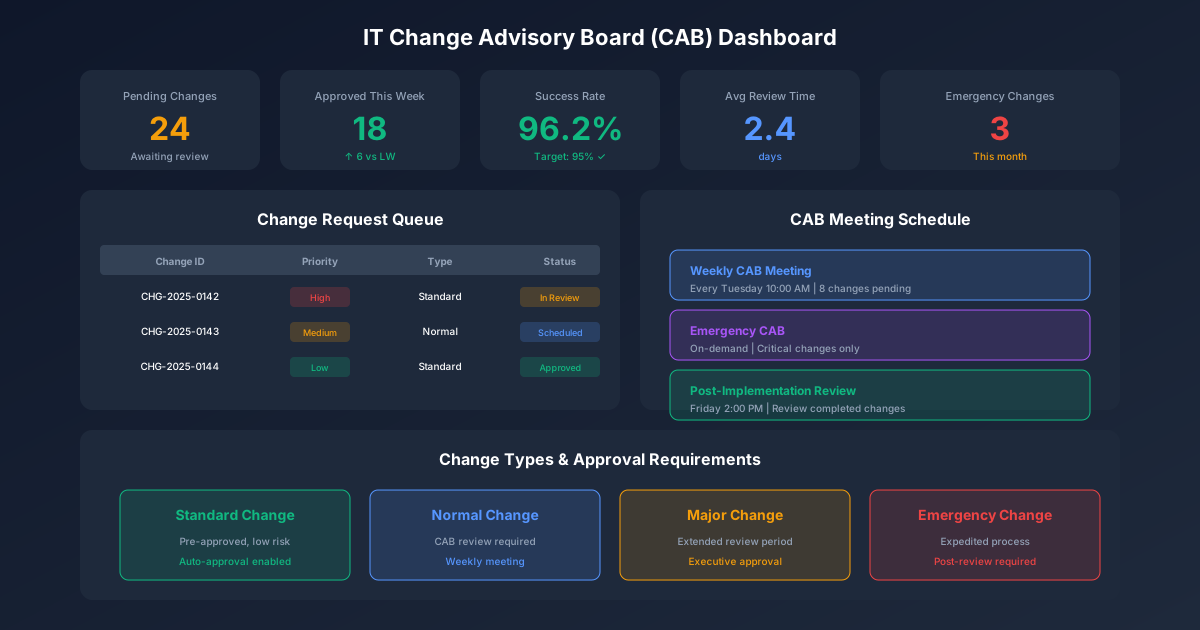
The Change Advisory Board (CAB) stands as the cornerstone of effective IT change governance. When functioning properly, the CAB enables organizations to implement changes confidently while minimizing service disruption. When poorly designed, it becomes a bureaucratic bottleneck that frustrates stakeholders and delays critical business initiatives.
This guide provides everything you need to establish, operate, and optimize your Change Advisory Board—from charter development through performance measurement. To complement your CAB process, our Change Management Plan Template provides a structured framework for documenting change strategy, stakeholder impact, and rollout planning.
Understanding the Change Advisory Board
What Is a CAB?
The Change Advisory Board is a governance body responsible for evaluating, prioritizing, and authorizing changes to IT services and infrastructure. Rooted in ITIL best practices, the CAB brings together technical experts, business stakeholders, and operational leaders to make informed decisions about proposed changes.
The CAB's primary functions include:
- Change evaluation: Assessing proposed changes for risk, impact, and readiness
- Prioritization: Sequencing changes based on business need and resource availability
- Authorization: Approving or rejecting changes based on evaluation criteria
- Coordination: Ensuring changes don't conflict with other planned activities
- Learning: Reviewing completed changes to improve future processes
CAB vs. Change Management
The CAB is a component of the broader change management process, not the entire process itself. While change management encompasses the full lifecycle from request through post-implementation review, the CAB specifically focuses on the evaluation and authorization phase.
| Change Management | Change Advisory Board |
|---|---|
| End-to-end process | Governance checkpoint |
| Includes all change activities | Focuses on evaluation/authorization |
| Owned by Change Manager | Chaired by Change Manager |
| Daily operational activities | Scheduled meeting cadence |
| Process documentation | Decision-making authority |
CAB Authority Levels
Organizations typically establish multiple authorization levels based on change risk and impact:
Tier 1: Standard Change Approval
- Pre-authorized changes with established procedures
- No CAB review required
- Example: Routine patches to non-production systems
Tier 2: Local Change Authority
- Low-risk changes within single team or system
- Team lead or application owner approves
- Example: Configuration changes to test environments
Tier 3: CAB Approval
- Moderate to high-risk changes
- Full CAB review and authorization
- Example: Production database upgrades
Tier 4: Executive CAB (eCAB)
- High-impact or enterprise-wide changes
- Senior leadership involvement
- Example: Core infrastructure replacement
CAB Charter Development
Purpose of the Charter
The CAB charter establishes the board's authority, scope, and operating procedures. A well-crafted charter prevents scope creep, clarifies decision rights, and sets stakeholder expectations.
Essential Charter Components
1. Mission Statement
Define the CAB's purpose clearly and concisely:
"The Change Advisory Board provides governance oversight for IT changes, ensuring that modifications to production systems are evaluated for risk, impact, and business alignment before implementation."
2. Scope Definition
Specify what the CAB does and doesn't govern:
In Scope:
- Production environment changes
- Infrastructure modifications
- Application deployments affecting multiple users
- Security configuration changes
- Network topology modifications
- Vendor-managed system updates
Out of Scope:
- Development environment changes
- Individual user requests (service requests)
- Break/fix activities (incident management)
- Pre-approved standard changes
- Emergency changes (handled by eCAB)
3. Authority Statement
Document the CAB's decision-making power:
- Authority to approve, reject, or defer changes
- Escalation paths for disputed decisions
- Conditions requiring executive approval
- Emergency override procedures
4. Operating Principles
Establish guiding principles for CAB operations:
- Risk-based decision making
- Business alignment prioritization
- Transparency in evaluation criteria
- Continuous improvement focus
- Stakeholder collaboration
Sample Charter Template
# Change Advisory Board Charter

## 1. Purpose
The CAB provides governance oversight for IT changes to minimize
service disruption while enabling business innovation.

## 2. Scope
### 2.1 In Scope
- All changes to production IT systems and infrastructure
- Changes affecting >25 users or critical business processes
- Security policy and configuration modifications
- Vendor system updates requiring coordination

### 2.2 Out of Scope
- Development/test environment changes
- Service requests (handled via service desk)
- Standard changes (pre-approved catalog items)
- Emergency changes (eCAB process)

## 3. Membership
### 3.1 Core Members (Required Attendance)
- Change Manager (Chair)
- Infrastructure Manager
- Application Development Lead
- Information Security Representative
- Service Desk Manager

### 3.2 Advisory Members (As Needed)
- Business unit representatives
- Project managers for major initiatives
- Vendor technical contacts
- Compliance/audit representatives

## 4. Meeting Cadence
- Weekly CAB: Tuesdays, 2:00-3:30 PM
- Emergency CAB: Convened within 2 hours as needed
- Monthly review: First Tuesday, extended to 2 hours

## 5. Decision Authority
### 5.1 CAB Authorization
- Standard and normal changes (Risk Level 1-3)
- Implementation windows during standard hours

### 5.2 Executive Escalation Required
- Enterprise-wide changes (Risk Level 4-5)
- Changes during change freeze periods
- Changes with unmitigated high risks

## 6. Operating Procedures
### 6.1 Submission Requirements
- RFC submitted minimum 5 business days before CAB
- All mandatory fields completed
- Risk assessment documented
- Backout plan validated

### 6.2 Evaluation Criteria
- Technical feasibility
- Risk level and mitigation adequacy
- Business justification
- Resource availability
- Schedule conflicts

## 7. Metrics and Reporting
- Change success rate target: >95%
- Emergency change ratio target: under 10%
- CAB efficiency target: under 5% deferred for information

## 8. Charter Review
This charter will be reviewed annually or when significant
process changes occur.

Approved: _________________ Date: _________
         IT Director

Effective Date: _________
Review Date: _________
CAB Membership Structure
Core Membership Roles
Change Manager (Chair)
- Facilitates CAB meetings
- Sets meeting agenda
- Documents decisions
- Tracks action items
- Reports CAB metrics
- Enforces process compliance
Infrastructure Manager
- Represents infrastructure team
- Assesses infrastructure impact
- Identifies resource constraints
- Validates technical approaches
- Confirms maintenance windows
Application Development Lead
- Represents development teams
- Assesses application dependencies
- Coordinates release schedules
- Validates deployment procedures
- Provides technical expertise
Information Security Representative
- Evaluates security implications
- Validates compliance requirements
- Reviews access changes
- Assesses vulnerability exposure
- Confirms security controls
Service Desk Manager
- Represents end-user perspective
- Coordinates user communication
- Assesses support readiness
- Provides incident trend data
- Plans support coverage
Operations Manager
- Coordinates operational resources
- Validates monitoring capabilities
- Assesses operational risk
- Confirms rollback capabilities
- Plans operational support
Advisory Membership
Advisory members participate when changes affect their areas:
Business Representatives
- Validate business justification
- Confirm timing acceptability
- Assess business impact
- Authorize business testing
Project Managers
- Coordinate project-related changes
- Provide implementation context
- Manage cross-project dependencies
- Track project schedule impacts
Vendor Representatives
- Provide technical expertise for vendor systems
- Validate vendor-specific procedures
- Confirm vendor support availability
- Share known issues and workarounds
Compliance/Audit Representatives
- Validate regulatory compliance
- Confirm audit trail requirements
- Assess control implications
- Review documentation adequacy
Membership Guidelines
Attendance Requirements
- Core members: Mandatory attendance; delegate if unavailable
- Advisory members: Required when relevant changes scheduled
- Delegates: Must have authority to make decisions
- Quorum: Minimum 4 core members for valid meeting
Member Responsibilities
- Review agenda and change requests before meeting
- Provide timely assessment of assigned changes
- Communicate concerns before CAB if possible
- Support post-meeting action items
- Participate in change reviews
Rotation and Succession
- Annual membership review
- Succession planning for each role
- Cross-training for backup coverage
- New member orientation process
CAB Meeting Operations
Meeting Cadence Options
Weekly CAB (Most Common)
- Suitable for: Most organizations
- Duration: 60-90 minutes
- Coverage: All pending changes
Bi-Weekly CAB
- Suitable for: Smaller organizations, stable environments
- Duration: 90-120 minutes
- Coverage: Accumulated changes
Daily CAB
- Suitable for: High-change-volume environments, DevOps shops
- Duration: 15-30 minutes (stand-up style)
- Coverage: Next 48-72 hours of changes
Meeting Structure Template
Pre-Meeting (15 minutes before)
- Chair reviews submission compliance
- Technical leads preview complex changes
- Identify missing information
- Prepare discussion points
Meeting Agenda (90 minutes)
1. Opening (5 min)
   - Roll call and quorum verification
   - Agenda review and modifications
   - Time-sensitive items identification

2. Previous Meeting Review (10 min)
   - Action item status
   - Post-implementation reviews
   - Failed change analysis

3. Forward Schedule Review (10 min)
   - Upcoming change calendar
   - Conflict identification
   - Resource availability check

4. Standard Change Review (10 min)
   - New standard change candidates
   - Standard change exceptions

5. Normal Change Evaluation (45 min)
   - Change-by-change review
   - Risk assessment validation
   - Implementation plan review
   - Decision recording

6. Emergency Change Ratification (5 min)
   - Review of recent emergency changes
   - Process compliance verification

7. Closing (5 min)
   - Summary of decisions
   - Action item assignment
   - Next meeting preview
Change Evaluation Protocol
For each change request, the CAB evaluates:
1. Completeness Check
- All required fields populated
- Risk assessment completed
- Backout plan documented
- Testing evidence provided
- Approvals obtained
2. Technical Assessment
- Implementation approach soundness
- Resource requirements realistic
- Dependencies identified
- Monitoring plan adequate
- Rollback procedure viable
3. Risk Evaluation
- Risk level appropriate
- Mitigation measures adequate
- Residual risk acceptable
- Communication plan sufficient
- Support coverage confirmed
4. Schedule Validation
- Implementation window appropriate
- No conflicts with other changes
- No conflicts with freeze periods
- Resource availability confirmed
- Business timing acceptable
5. Decision Recording
- Approved: Ready for implementation
- Approved with conditions: Specific conditions noted
- Deferred: Additional information required
- Rejected: Unacceptable risk or timing
Meeting Facilitation Best Practices
Preparation Excellence
- Distribute agenda 48 hours ahead
- Pre-screen changes for completeness
- Identify discussion items in advance
- Prepare CAB deck with key data
Time Management
- Allocate time based on change complexity
- Park lengthy discussions for offline
- Use timekeeper for major items
- Reserve time for emerging issues
Decision Quality
- Ensure all perspectives heard
- Document rationale for decisions
- Capture conditions and concerns
- Confirm action item ownership
Engagement Optimization
- Rotate presentation responsibility
- Encourage constructive challenge
- Recognize excellent submissions
- Share lessons learned
Change Evaluation Criteria
Risk Classification Framework
Risk Level 1 - Minimal
- Single system, non-production
- Easily reversible
- No user impact during implementation
- Implementation time under 1 hour
- No dependencies
Risk Level 2 - Low
- Single system or application
- Reversible within 2 hours
- Limited user impact
- Implementation time 1-4 hours
- Minimal dependencies
Risk Level 3 - Moderate
- Multiple systems or applications
- Reversible within 4 hours
- Moderate user impact
- Implementation time 4-8 hours
- Some dependencies
Risk Level 4 - High
- Critical systems or infrastructure
- Complex rollback procedure
- Significant user impact
- Implementation time >8 hours
- Multiple dependencies
Risk Level 5 - Critical
- Enterprise-wide impact
- Extended or difficult rollback
- Major business disruption potential
- Multi-day implementation
- Complex dependencies
Impact Assessment Matrix
| Impact Factor | Low | Medium | High |
|---|---|---|---|
| Users Affected | Under 25 | 25-500 | >500 |
| Business Criticality | Support function | Important process | Revenue/safety |
| Recovery Time | Under 1 hour | 1-4 hours | >4 hours |
| Data Risk | No data changes | Data updates | Data migration |
| Compliance | No impact | Minor impact | Audit-relevant |
Evaluation Checklist
Technical Readiness
- Implementation plan detailed and clear
- Technical resources identified and available
- Test results documented and acceptable
- Monitoring plan defined
- Rollback plan tested and documented
- Dependencies mapped and coordinated
Business Readiness
- Business justification documented
- Business approval obtained
- User communication planned
- Training completed (if required)
- Support team briefed
- Success criteria defined
Risk Readiness
- Risk assessment completed
- Mitigation measures implemented
- Residual risk accepted
- Escalation procedures defined
- Emergency contacts identified
- Backup resources available
Compliance Readiness
- Regulatory requirements satisfied
- Security review completed
- Audit trail requirements met
- Documentation complete
- Approval chain documented
- Post-implementation review scheduled
Decision Matrix
| Risk Level | Impact | Required Approval | Conditions |
|---|---|---|---|
| 1-2 | Low | Local authority | Standard process |
| 2-3 | Medium | CAB | Normal process |
| 3-4 | High | CAB + Sr. Manager | Enhanced review |
| 4-5 | Critical | eCAB + Executive | Full escalation |
Emergency CAB (eCAB) Operations
When to Invoke eCAB
Emergency CAB procedures apply when:
- Critical incident resolution requires immediate change
- Security vulnerability demands urgent patching
- Business-critical deadline cannot accommodate normal CAB
- Regulatory requirement mandates immediate action
- Safety concern requires immediate remediation
eCAB Convening Protocol
Step 1: Emergency Declaration
- Incident manager or change requester declares emergency
- Documents business justification for emergency
- Identifies minimum viable change scope
Step 2: Rapid Notification
- Change Manager notified immediately
- Core eCAB members contacted (phone/text)
- Target convening time: Within 2 hours
Step 3: Virtual Assembly
- Conference call or video meeting
- Minimum quorum: 3 core members
- Chair or designated delegate leads
Step 4: Expedited Review
- Abbreviated risk assessment
- Essential controls verification
- Rollback plan confirmation
- Approval or rejection decision
eCAB Participants
Minimum Required:
- Change Manager (or delegate)
- Technical expert for affected system
- Operations representative
Recommended Additional:
- Information Security (for security changes)
- Business representative
- Service Desk manager
Expedited Risk Assessment
# Emergency Change Risk Assessment

## Change Summary
[Brief description of emergency change]

## Business Justification
[Why emergency process required]

## Risk Evaluation
□ What could go wrong?
□ What is the impact if it goes wrong?
□ How quickly can we recover?
□ What is the risk of NOT making this change?

## Minimum Controls
□ Technical expert available during implementation
□ Rollback plan defined (even if abbreviated)
□ Monitoring in place to detect issues
□ Communication plan for affected users

## Decision
□ Approved - Implement immediately
□ Approved with conditions: ___________
□ Rejected - Use normal CAB process
Post-Emergency Requirements
All emergency changes require:
Within 24 Hours:
- Complete RFC documentation
- Full risk assessment retroactively
- Detailed implementation notes
Within 5 Business Days:
- Post-implementation review
- Root cause analysis (why emergency needed)
- Process improvement recommendations
At Next CAB:
- Emergency change ratification
- Review of emergency process compliance
- Lessons learned discussion
Emergency Change Limits
To prevent abuse of emergency procedures:
- Emergency changes should be under 10% of total changes
- Repeated emergencies for same system trigger review
- Non-emergency use of eCAB escalated to management
- Monthly reporting on emergency change patterns
CAB Metrics and Reporting
Key Performance Indicators
Volume Metrics
| Metric | Calculation | Target |
|---|---|---|
| Changes Reviewed | Count per period | Trend |
| Changes Approved | Approved / Reviewed | >85% |
| Changes Deferred | Deferred / Reviewed | Under 10% |
| Changes Rejected | Rejected / Reviewed | Under 5% |
| Emergency Changes | Emergency / Total | Under 10% |
Quality Metrics
| Metric | Calculation | Target |
|---|---|---|
| Change Success Rate | Successful / Implemented | >95% |
| Failed Changes | Failed / Implemented | Under 5% |
| Backed-Out Changes | Backed-out / Implemented | Under 3% |
| Incident-Causing Changes | Changes causing incidents / Total | Under 2% |
Efficiency Metrics
| Metric | Calculation | Target |
|---|---|---|
| CAB Cycle Time | Submit to decision (avg days) | Under 5 days |
| Deferred for Info | Deferred for info / Reviewed | Under 5% |
| Meeting Duration | Actual / Scheduled | Under 110% |
| Pre-Approved Usage | Standard changes / Total | >30% |
Process Compliance
| Metric | Calculation | Target |
|---|---|---|
| Submission Compliance | Complete submissions / Total | >95% |
| Lead Time Compliance | Timely submissions / Total | >90% |
| PIR Completion | PIRs completed / Required | 100% |
| Documentation Quality | Adequate docs / Total | >95% |
Reporting Framework
Weekly CAB Summary
# CAB Summary - Week of [Date]

## Meeting Statistics
- Duration: [X] minutes
- Attendance: [X]/[X] core members
- Quorum: Yes/No

## Change Decisions
- Reviewed: [X]
- Approved: [X]
- Approved with conditions: [X]
- Deferred: [X]
- Rejected: [X]

## Notable Items
- [Summary of significant changes]
- [Concerns raised]
- [Action items assigned]

## Forward Look
- Changes pending for next CAB: [X]
- Upcoming high-risk changes: [List]
- Schedule conflicts identified: [List]
Monthly CAB Report
# Monthly CAB Report - [Month Year]

## Executive Summary
[2-3 sentence overview of CAB performance]

## Volume Analysis
| Metric | This Month | Prior Month | Trend |
|--------|------------|-------------|-------|
| Changes Reviewed | X | X | ↑↓ |
| Changes Implemented | X | X | ↑↓ |
| Emergency Changes | X | X | ↑↓ |

## Quality Analysis
| Metric | This Month | Target | Status |
|--------|------------|--------|--------|
| Success Rate | X% | 95% | ✓/✗ |
| Failed Changes | X | Under 5% | ✓/✗ |
| Incident-Causing | X | Under 2% | ✓/✗ |

## Efficiency Analysis
| Metric | This Month | Target | Status |
|--------|------------|--------|--------|
| Avg Cycle Time | X days | 5 days | ✓/✗ |
| Deferred Rate | X% | Under 5% | ✓/✗ |
| Compliance Rate | X% | 95% | ✓/✗ |

## Significant Events
### Failed Changes
- [Change ID]: [Root cause summary]

### Emergency Changes
- [Change ID]: [Justification summary]

### Process Issues
- [Issue]: [Resolution status]

## Improvement Actions
- [Action]: [Owner] - [Due date]

## Next Month Preview
- Major changes scheduled: [List]
- Known risks: [List]
- Resource constraints: [List]
Dashboard Design
CAB Operations Dashboard
┌─────────────────────────────────────────────────────────────┐
│                    CAB Operations Dashboard                  │
├─────────────────┬─────────────────┬─────────────────────────┤
│  Success Rate   │ Emergency Rate  │     Cycle Time          │
│     96.2%       │     7.3%        │      3.8 days           │
│   ↑ vs target   │  ✓ vs target    │    ✓ vs target          │
├─────────────────┴─────────────────┴─────────────────────────┤
│                 Monthly Change Volume                        │
│  ████████████████████████████████ 142 changes               │
│  Approved: 128 │ Deferred: 9 │ Rejected: 5                  │
├─────────────────────────────────────────────────────────────┤
│              Change Success Trend (6 months)                 │
│  100%│    ●                                                  │
│   95%│──●───●───●───●───●─── Target                         │
│   90%│                                                       │
│      │  Jan  Feb  Mar  Apr  May  Jun                        │
├─────────────────────────────────────────────────────────────┤
│                    Top Change Categories                     │
│  Security Patches    ████████████████ 34                    │
│  App Deployments     ███████████████ 31                     │
│  Infrastructure      ████████████ 28                        │
│  Configuration       ██████████ 22                          │
│  Database            ████████ 18                            │
└─────────────────────────────────────────────────────────────┘
Common Pitfalls and Solutions
Pitfall 1: Rubber-Stamp Syndrome
Symptoms:
- All changes approved without discussion
- Meeting feels like a formality
- No one asks substantive questions
- Same people always approve
Root Causes:
- Change requests lack detail
- Members unprepared for meeting
- No accountability for decisions
- Risk tolerance too high
Solutions:
- Require detailed risk assessments
- Distribute agenda 48 hours ahead
- Track decision outcomes to individuals
- Calibrate risk thresholds annually
- Rotate devil's advocate role
Pitfall 2: Bureaucratic Bottleneck
Symptoms:
- Long backlogs of pending changes
- Business complaints about delays
- Teams circumventing CAB process
- "Emergency" changes increasing
Root Causes:
- CAB meets too infrequently
- Overly broad scope
- Perfectionist culture
- Understaffed process
Solutions:
- Increase CAB frequency
- Expand pre-approved standard changes
- Implement tiered approval authorities
- Add resources for change coordination
- Streamline submission requirements
Pitfall 3: Missing Stakeholders
Symptoms:
- Decisions made without key input
- Changes fail due to unknown dependencies
- Business surprised by changes
- Repeated implementation conflicts
Root Causes:
- Incomplete membership model
- Poor attendance enforcement
- Advisory members not engaged
- Insufficient change details
Solutions:
- Review and update membership annually
- Enforce attendance requirements
- Build relationships with business units
- Require dependency mapping
- Improve communication processes
Pitfall 4: Poor Documentation
Symptoms:
- Can't explain why decisions were made
- Same issues discussed repeatedly
- Audit findings for process gaps
- Inconsistent decision rationale
Root Causes:
- Rushed meetings
- No documentation standards
- Unclear roles
- Inadequate tools
Solutions:
- Allocate time for documentation
- Create decision templates
- Assign dedicated note-taker
- Implement CAB management tool
- Regular documentation audits
Pitfall 5: Risk Assessment Theater
Symptoms:
- Risk levels always "low" or "medium"
- Assessments completed hastily
- Similar changes rated differently
- High-impact failures from "low-risk" changes
Root Causes:
- Incentive to downplay risk
- Vague risk criteria
- No calibration process
- Insufficient technical detail
Solutions:
- Calibrate risk scoring with examples
- Review failed change risk ratings
- Require technical validation
- Tie risk ratings to controls
- Periodic risk calibration sessions
Integration with IT Processes
Change and Incident Management
Incident-Triggered Changes:
- Emergency CAB process for critical incidents
- Accelerated review for incident workarounds
- Post-incident permanent fix through normal CAB
Change-Caused Incidents:
- Immediate notification to CAB
- Implementation pause for assessment
- Rollback decision protocol
- Root cause included in PIR
Integration Points:
- Incident history informs risk assessment
- Change schedule visible to incident management
- Failed changes create problem records
- Incident trends drive standard changes
Change and Problem Management
Problem-Resolution Changes:
- Root cause changes receive priority
- Recurring incident prevention reviewed
- Technical debt reduction tracked
- Known error workarounds documented
Integration with IT Risk Management:
- Risk register informs change risk assessment
- Change failures update risk register
- Control changes require risk review
- Risk acceptance documented in RFC
Change and Release Management
Release Coordination:
- Major releases require CAB review
- Release schedule aligned with change calendar
- Release components tracked as related changes
- Post-release review feeds change metrics
DevOps Integration:
- CI/CD pipelines may bypass traditional CAB
- Automated gates enforce change policies
- Deployment telemetry provides outcomes
- Canary releases reduce change risk
Change and Configuration Management
CMDB Integration:
- Changes update configuration items
- Impact analysis uses CMDB relationships
- Unauthorized changes detected via CMDB
- Change audit trail in CMDB
Tools and Technology
CAB Management Capabilities
Essential Features:
- Change request submission and tracking
- Risk assessment workflow
- CAB calendar and scheduling
- Decision recording and reporting
- Integration with ITSM platform
Advanced Features:
- Automated risk scoring
- Conflict detection
- Approval workflow automation
- Predictive analytics
- Change correlation analysis
Tool Categories
ITSM Platforms (Full Suite):
- ServiceNow Change Management
- BMC Remedy Change Management
- Cherwell Change Management
- Freshservice Change Management
Lightweight Options:
- Jira Service Management
- Zendesk (with apps)
- Custom SharePoint solutions
- Change management log templates
Implementation Considerations
Tool Selection Criteria:
- Integration with existing ITSM
- Workflow customization capability
- Reporting and analytics
- User experience and adoption
- Total cost of ownership
Implementation Approach:
- Start with core workflows
- Configure approval routing
- Build essential reports
- Train CAB members
- Iterate based on feedback
CAB Maturity Model
Level 1: Initial
Characteristics:
- Ad hoc CAB meetings
- Informal review process
- Limited documentation
- Reactive to problems
Improvement Focus:
- Establish regular meeting cadence
- Create basic charter
- Define core membership
- Implement simple tracking
Level 2: Managed
Characteristics:
- Regular CAB meetings
- Documented charter and procedures
- Consistent membership
- Basic metrics tracked
Improvement Focus:
- Standardize risk assessment
- Improve submission quality
- Build CAB reporting
- Integrate with other processes
Level 3: Defined
Characteristics:
- Comprehensive procedures
- Tiered approval model
- Integrated with ITSM
- Regular process review
Improvement Focus:
- Optimize meeting efficiency
- Expand standard changes
- Enhance risk calibration
- Automate reporting
Level 4: Quantitatively Managed
Characteristics:
- Data-driven decisions
- Predictive capabilities
- Continuous optimization
- Industry benchmarking
Improvement Focus:
- AI-assisted risk assessment
- Automated compliance checking
- Change success prediction
- Process mining insights
Level 5: Optimizing
Characteristics:
- Continuous innovation
- Proactive risk management
- Self-service capabilities
- Industry leadership
Improvement Focus:
- Share best practices
- Contribute to standards
- Drive industry innovation
- Enable business agility
Implementation Roadmap
Phase 1: Foundation (Weeks 1-4)
Week 1-2: Planning
- Assess current state
- Define CAB scope and authority
- Identify core membership
- Draft initial charter
Week 3-4: Setup
- Finalize charter
- Configure CAB tools
- Create submission templates
- Schedule first CAB meeting
Phase 2: Launch (Weeks 5-8)
Week 5-6: Pilot
- Conduct initial CAB meetings
- Process first changes
- Collect feedback
- Adjust procedures
Week 7-8: Expansion
- Include all in-scope changes
- Refine risk assessment
- Build reporting
- Train stakeholders
Phase 3: Optimization (Weeks 9-12)
Week 9-10: Analysis
- Review initial metrics
- Identify bottlenecks
- Gather improvement ideas
- Benchmark against targets
Week 11-12: Enhancement
- Implement improvements
- Expand standard changes
- Enhance reporting
- Document lessons learned
Phase 4: Maturation (Ongoing)
Monthly Activities:
- CAB effectiveness review
- Metrics analysis
- Process adjustments
- Stakeholder feedback
Quarterly Activities:
- Risk calibration session
- Charter review
- Membership assessment
- Tool optimization
Annual Activities:
- Full process audit
- Benchmark comparison
- Strategic alignment review
- Major enhancement planning
Templates and Resources
RFC Submission Checklist
# RFC Submission Checklist

## Before Submitting
□ Business justification documented
□ Technical approach reviewed by peers
□ Risk assessment completed honestly
□ Implementation plan detailed
□ Backout plan tested
□ Test results documented
□ All dependencies identified
□ Required approvals obtained

## Submission Quality
□ Clear, concise title
□ Detailed description
□ Accurate categorization
□ Correct risk classification
□ Realistic implementation window
□ Complete contact information
□ Supporting documentation attached

## Submission Timing
□ Submitted 5+ business days before CAB
□ Implementation scheduled 2+ days after CAB
□ No conflicts with freeze periods
□ Resources confirmed available
CAB Meeting Checklist
# CAB Meeting Checklist

## Pre-Meeting (Chair)
□ Agenda distributed 48 hours ahead
□ Change requests pre-screened
□ Incomplete submissions returned
□ Discussion items identified
□ Room/bridge confirmed

## During Meeting
□ Quorum verified
□ Previous action items reviewed
□ Each change properly evaluated
□ Decisions clearly recorded
□ Action items assigned
□ Next meeting previewed

## Post-Meeting
□ Minutes distributed within 24 hours
□ Decisions communicated to requesters
□ Action items tracked
□ Metrics updated
□ Issues escalated as needed
Post-Implementation Review Template
# Post-Implementation Review

## Change Information
- RFC Number:
- Change Title:
- Implementation Date:
- Implementer:

## Outcome Assessment
- Status: □ Successful □ Partial □ Failed □ Backed Out
- Within Schedule: □ Yes □ No (variance: ___)
- Within Scope: □ Yes □ No (deviation: ___)

## Issue Summary
[Any issues encountered during implementation]

## User Impact
[Actual user impact vs. expected]

## Lessons Learned
### What Went Well
-

### What Could Improve
-

### Recommendations
-

## Risk Assessment Accuracy
- Predicted Risk Level:
- Actual Risk Level:
- Assessment Accuracy: □ Accurate □ Under □ Over

## Sign-off
- Implementer: ___________ Date: ___
- Change Manager: ___________ Date: ___
Related Resources
Building effective IT governance requires multiple integrated capabilities:
- Change Management Process: Comprehensive change lifecycle management
- IT Governance Framework: Strategic IT alignment
- IT Operations Excellence: ITIL implementation
- IT Governance KPIs: Executive metrics and dashboards
- IT Service Level Management: SLA design and monitoring
- IT Project Risk Management: Project risk frameworks
- IT Management Hub: Complete operations resources
Download our change management log template to implement CAB tracking immediately.