IT Budget Planning: Annual Budgeting Masterclass for IT Managers

IT Budget Planning: Annual Budgeting Masterclass
For: IT managers, directors, and CIOs responsible for budget planning Goal: Master IT budget creation, justification, tracking, and optimization Outcome: Professional budget that gets approved and delivers business value
For comprehensive IT budgeting resources, visit our IT Manager's Complete Handbook and Financial Planning Hub.
Quick Start: Use our free IT Budget Calculator to get instant budget recommendations based on your industry, company size, and IT maturity level.
Why IT Budget Planning Matters
IT budgets are under intense scrutiny:
- Average IT budget: 3-8% of company revenue
- CFOs view IT as cost center (your job: prove it's an investment)
- 50% of IT projects run over budget (lack of planning)
- Transparent budgeting builds trust with leadership
What Good IT Budgeting Achieves:
✅ Predictable spending - No surprise expenses
✅ Strategic alignment - IT spending supports business goals
✅ Resource optimization - Right-size infrastructure, eliminate waste
✅ Stakeholder confidence - CFO/CEO trust your financial management
✅ Competitive advantage - Fund innovation, not just maintenance
IT Budget Fundamentals
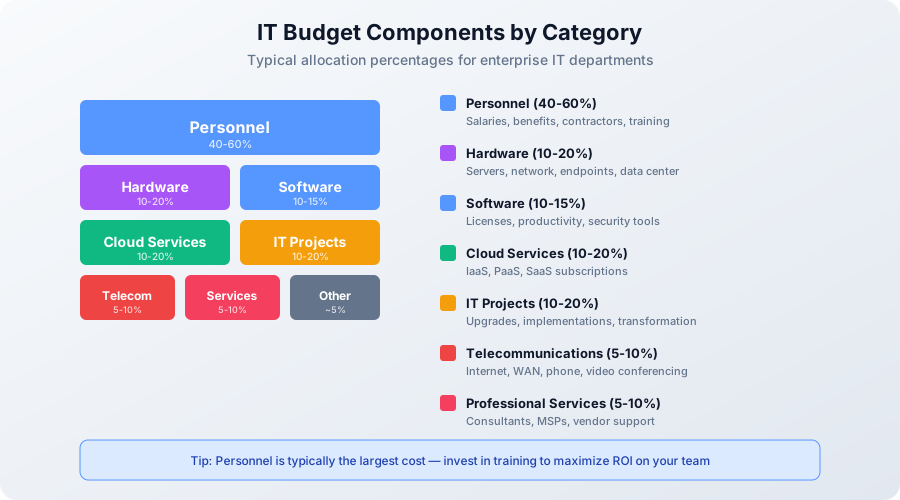
IT Budget Components (8 Categories)
1. Personnel Costs (40-60% of budget)
- Salaries & wages
- Benefits (health, 401k, etc.)
- Contractors & temporary staff
- Training & professional development
- Recruiting costs
2. Hardware (10-20%)
- Servers & storage
- Network equipment (routers, switches, firewalls)
- End-user devices (laptops, desktops, monitors)
- Peripherals (printers, docking stations)
- Data center equipment
3. Software (10-15%)
- Operating system licenses (Windows, Linux)
- Productivity suites (Microsoft 365, Google Workspace)
- Business applications (ERP, CRM, HRIS)
- Development tools
- Security software
4. Cloud Services (10-20% and growing)
- IaaS (AWS, Azure, GCP)
- PaaS (databases, application platforms)
- SaaS subscriptions (Salesforce, Workday, etc.)
5. Telecommunications (5-10%)
- Internet & WAN connectivity
- Phone systems (VoIP, mobile)
- Video conferencing
- Network carrier costs
6. Professional Services (5-10%)
- Consultants
- Managed Service Providers (MSP)
- Vendor support contracts
- Project-based contractors
7. IT Projects (10-20%)
- Infrastructure upgrades
- Application implementations
- Digital transformation initiatives
- Security improvements
8. Other (5%)
- Training & conferences
- Travel
- Office supplies
- Contingency (5-10% of total budget)
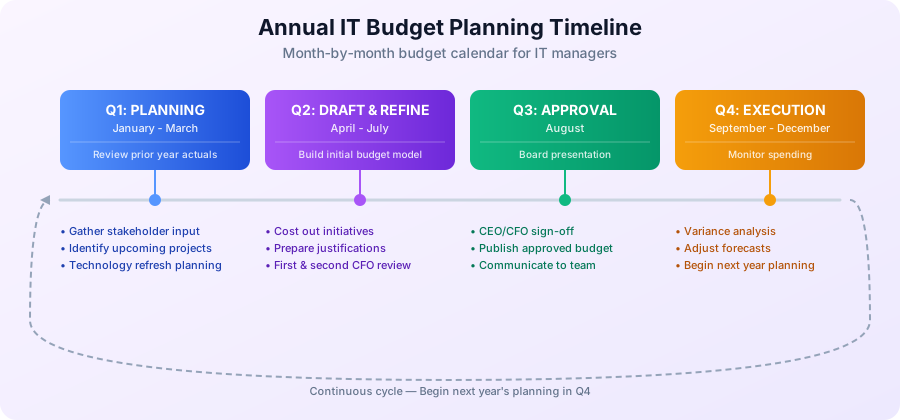
Annual Budget Planning Timeline
Month-by-Month Budget Calendar
January-March (Q1): Planning Begins
- Review prior year actuals
- Gather input from stakeholders
- Identify upcoming projects
- Technology refresh planning
April-May: Draft Budget
- Build initial budget model
- Cost out initiatives
- Prepare justifications
- First CFO review
June-July: Refinement
- Incorporate feedback
- Prioritize initiatives
- Scenario planning (best/worst case)
- Second CFO review
August: Final Approval
- Board presentation
- CEO/CFO sign-off
- Publish approved budget
September-December: Execution
- Monitor spending
- Variance analysis
- Adjust forecasts
- Begin next year's planning
Step-by-Step Budget Creation
Step 1: Review Last Year's Budget vs. Actuals
Gather Data:
- Budgeted amounts by category
- Actual spending (from finance system)
- Variance (over/under budget)
Analysis Questions:
- Where did we overspend? Why?
- Where did we underspend? Why?
- Were there surprise expenses?
- Did we achieve planned projects?
Example Analysis:
| Category | Budgeted | Actual | Variance | Variance % | Notes |
|---|---|---|---|---|---|
| Personnel | $600K | $625K | +$25K | +4.2% | Unplanned contractor for ERP project |
| Hardware | $120K | $95K | -$25K | -20.8% | Server refresh delayed to Q1 next year |
| Software | $150K | $165K | +$15K | +10% | Adobe licenses added mid-year |
| Cloud | $180K | $220K | +$40K | +22.2% | AWS usage higher than forecast |
| TOTAL | $1.8M | $1.9M | +$100K | +5.6% | Overall 5.6% over budget |
Lesson: Cloud costs exceeded forecast → Need better monitoring and forecasting
Step 2: Gather Business Requirements
Stakeholder Interviews (2-3 weeks):
Ask Each Department:
- What are your business goals for next year?
- What technology needs do you have?
- What's working well? What's not?
- Any new systems/tools needed?
- Any projects requiring IT support?
Sales Example:
- Goal: Grow from 100 to 150 customers
- IT Need: CRM upgrade to support more users, integrate with marketing automation
- Budget Impact: $50K (CRM licenses + implementation)
Finance Example:
- Goal: Faster financial close (5 days → 3 days)
- IT Need: Automate GL consolidation, upgrade reporting tools
- Budget Impact: $75K (software + consulting)
Document All Requests: Create prioritized list with cost estimates
Step 3: Technology Refresh Planning
Asset Lifecycle Management:
| Asset Type | Useful Life | Refresh Cycle | Budget Planning |
|---|---|---|---|
| Laptops | 3-4 years | 25-33% annually | Replace 1/3 of fleet each year |
| Desktops | 4-5 years | 20-25% annually | Replace 1/4 of fleet each year |
| Servers | 5-7 years | 15-20% annually | Plan 5-7 year refresh |
| Network Equipment | 5-7 years | Selective | Refresh based on capacity/support |
| Mobile Devices | 2-3 years | 33-50% annually | Plan for rapid replacement |
Example Refresh Plan:
Current Inventory:
- 300 laptops (average age: 2.5 years)
- 100 need replacement this year (>3 years old)
Replacement Budget:
- 100 laptops × $1,500 = $150K
Pro Tip: Plan 5 years out, smooth spending vs. big spikes
Step 4: Estimate Cloud & SaaS Costs
Cloud Cost Forecasting:
Method 1: Historical Trend
- Last year: $180K
- Growth: +20% (business growing, more cloud usage)
- Forecast: $180K × 1.20 = $216K
Method 2: Bottom-Up
- Compute: 50 EC2 instances × $150/mo × 12 = $90K
- Storage: 100 TB S3 × $25/TB/mo × 12 = $30K
- Database: RDS instances = $36K
- Other: Networking, Lambda, etc. = $30K
- Total: $186K
Best Practice: Use Method 2 (bottom-up) + 15% buffer for growth
SaaS Budgeting:
| Application | Users | Cost/User/Month | Annual Cost |
|---|---|---|---|
| Microsoft 365 E3 | 250 | $23 | $69,000 |
| Salesforce Sales Cloud | 50 | $150 | $90,000 |
| Slack Business+ | 250 | $12.50 | $37,500 |
| DocuSign | 25 | $40 | $12,000 |
| TOTAL | $208,500 |
Watch for:
- User count growth (add 10-20% for new hires)
- Tier changes (moving from Basic → Enterprise)
- Annual renewals (often increase 3-5%)
Step 5: Budget Capital vs. Operating Expenses
CapEx vs. OpEx:
| CapEx (Capital Expense) | OpEx (Operating Expense) |
|---|---|
| Asset purchased outright | Subscription/recurring cost |
| Depreciated over useful life | Expensed immediately |
| Examples: Servers, network gear | Examples: Cloud, SaaS, salaries |
| Better for: Large, infrequent purchases | Better for: Predictable, recurring costs |
Shifting to OpEx:
- Traditional: Buy server for $20K (CapEx), depreciate over 5 years
- Modern: AWS EC2 at $300/mo (OpEx), cancel anytime
CFO Preference: Often prefers OpEx (predictable, no large capital outlay)
Tax Implications: Consult finance team (CapEx vs. OpEx has different tax treatment)
Step 6: Allocate IT Costs to Departments
Why Cost Allocation?
- Transparency: Departments see what they consume
- Accountability: Encourages cost-conscious behavior
- Chargeback: (Optional) Departments pay for IT services
Cost Allocation Methods:
Method 1: Headcount-Based
- Allocation: % of total employees
- Example: Sales = 30% of employees → 30% of IT budget
- Pros: Simple, easy to understand
- Cons: Doesn't reflect actual IT usage
Method 2: Usage-Based
- Allocation: Actual consumption (storage, compute, licenses)
- Example: Marketing uses 500 GB storage → charged for 500 GB
- Pros: Fair, encourages efficiency
- Cons: Complex to track
Method 3: Activity-Based Costing (ABC)
- Allocation: Cost of services consumed (e.g., help desk tickets, projects)
- Example: Finance submitted 100 tickets, charged $5K (at $50/ticket)
- Pros: Most accurate
- Cons: Very complex
Recommended: Start with headcount, evolve to usage-based over time
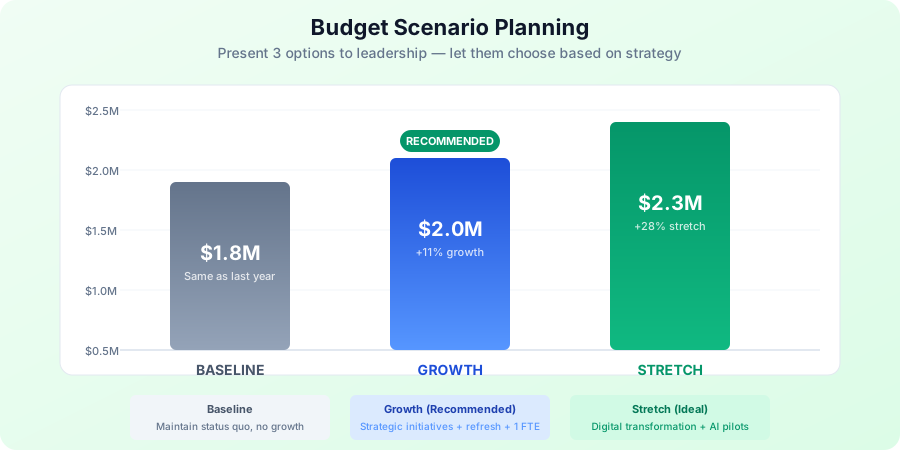
Step 7: Build Budget Scenarios
Create 3 Budget Versions:
1. Baseline Budget (Current State)
- Assumption: No growth, maintain current operations
- Amount: $1.8M (same as last year)
- Risk: Falling behind, technical debt accumulates
2. Growth Budget (Recommended)
- Assumption: 10% business growth, strategic initiatives
- Amount: $2.0M (+11% vs. baseline)
- Includes: Technology refresh, 2 new projects, headcount +1
- Risk: Managed, positions company for growth
3. Stretch Budget (Ideal)
- Assumption: Aggressive growth, digital transformation
- Amount: $2.3M (+28% vs. baseline)
- Includes: All growth items + security overhaul, AI/ML pilots
- Risk: Higher investment, higher return
Present All 3 to CFO: Let them choose based on company strategy
Budget Justification & Business Case
How to Justify IT Spending to CFO
Speak Their Language:
- ❌ Wrong: "We need to upgrade the SAN because it's end-of-life"
- ✅ Right: "This $50K storage upgrade prevents a $500K outage and speeds up month-end close by 2 days"
Frame IT Investments in Business Terms:
| IT Initiative | Technical Reason | Business Justification |
|---|---|---|
| CRM Upgrade | Old version unsupported | Revenue enablement: Sales team closes deals 20% faster, $2M additional revenue |
| Security Overhaul | NIST compliance gaps | Risk mitigation: Prevents $5M breach (avg cost per Ponemon Institute), enables SOC 2 certification (required for enterprise sales) |
| Cloud Migration | Data center EOL | Cost savings: Reduce infrastructure costs $200K/year, increase agility for new products |
| Help Desk Tool | Current system clunky | Productivity: Reduce IT support costs 30% ($100K/year), improve employee satisfaction (4.5/5 CSAT) |
Business Case Template
For Each Major Initiative (>$25K):
## [Project Name]

### Problem Statement
[What business problem are we solving?]

### Proposed Solution
[What are we buying/building?]

### Business Benefits
- **Quantitative:**
  - Increase revenue by $X
  - Reduce costs by $Y
  - Save Z hours/month
- **Qualitative:**
  - Improve customer satisfaction
  - Enable new capabilities
  - Reduce risk

### Cost Breakdown
- **Year 1:** $X (implementation)
- **Year 2-3:** $Y/year (ongoing)
- **Total 3-Year Cost:** $Z

### ROI Calculation
- **Total Benefit:** $A (3 years)
- **Total Cost:** $Z (3 years)
- **Net Benefit:** $A - $Z
- **ROI:** (Net Benefit / Cost) × 100 = X%
- **Payback Period:** X months

### Risks & Mitigation
- **Risk:** Project delays
  - **Mitigation:** Hire experienced consultant
- **Risk:** User adoption
  - **Mitigation:** Change management program, training

### Alternatives Considered
- **Option 1:** Do nothing → **Risk:** [describe]
- **Option 2:** Alternative solution → **Why not chosen:** [reason]

### Recommendation
[Proceed / Do not proceed]
ROI Calculation Example
Project: Upgrade Help Desk System
Cost: $50K implementation + $15K/year licenses
Benefit: Reduce help desk staffing by 0.5 FTE (automate password resets, knowledge base)
3-Year Calculation:
| Year | Cost | Benefit (0.5 FTE @ $80K) | Net Benefit |
|---|---|---|---|
| 1 | $65K ($50K + $15K) | $40K | -$25K |
| 2 | $15K | $40K | +$25K |
| 3 | $15K | $40K | +$25K |
| Total | $95K | $120K | +$25K |
ROI: ($120K - $95K) / $95K = 26% ROI
Payback Period: 1.6 years
Recommendation: Approve (positive ROI, reasonable payback)
Monthly Budget Tracking & Variance Analysis
Budget Tracking Process
Weekly:
- Review invoices and expenses
- Code to budget categories
- Flag unusual spending
Monthly:
- Generate variance report
- Explain variances >5%
- Update forecast
- Share with IT leadership
Quarterly:
- Deep dive analysis
- Budget reforecast (if needed)
- Report to CFO/CIO
- Plan adjustments
Variance Analysis
For Each Category, Ask:
1. Is variance positive (under budget) or negative (over budget)?
2. Is variance due to:
- Timing: Planned expense shifted to different month
- One-time: Unplanned purchase, won't recur
- Trend: Spending pattern changed
3. Should we:
- Accept: Variance is acceptable, no action
- Investigate: Dig deeper, identify root cause
- Correct: Take action to get back on budget
- Reforecast: Update budget if new information
Example Variance Report:
IT Budget Variance Report
Period: January 2025

SUMMARY:
Total Budget (Jan): $150K
Total Actual (Jan): $165K
Variance: +$15K (10% over budget)

ANALYSIS BY CATEGORY:

1. Personnel: $52K actual vs. $50K budget (+$2K, +4%)
   - Reason: Overtime for system upgrade
   - Action: One-time, no forecast change

2. Cloud Services: $25K actual vs. $18K budget (+$7K, +39%)
   - Reason: Unplanned AWS database instance for new project
   - Action: Reallocate from Projects category, update forecast

3. Software: $18K actual vs. $15K budget (+$3K, +20%)
   - Reason: Adobe licenses added (approved)
   - Action: None, within approved variance

4. Hardware: $10K actual vs. $15K budget (-$5K, -33%)
   - Reason: Laptop order delayed to February
   - Action: Expense will hit Feb budget
Reforecasting
When to Reforecast:
- Quarterly (at minimum)
- After major changes (acquisitions, layoffs, pivots)
- When variance exceeds 10% for 2+ months
Reforecast Process:
- Analyze YTD Actuals (what actually happened)
- Update Assumptions (growth, headcount, projects)
- Recalculate Remaining Months (new run rate)
- Compare to Original Budget (document changes)
- Get CFO Approval (if requesting more funds)
Reforecast Example:
| Category | Original Budget | Q1-Q2 Actual | Remaining (Q3-Q4) Original | Reforecast (Q3-Q4) | New Annual Total |
|---|---|---|---|---|---|
| Cloud | $200K | $120K | $80K | $110K | $230K (+15%) |
Explanation: Cloud usage 15% higher than expected due to new product launch. Requesting $30K additional funds.
Cost Optimization Strategies
10 Ways to Optimize IT Budget
1. Right-Size Cloud Resources
- Action: Analyze utilization, downsize unused instances
- Savings: 20-40% of cloud spend
- Tools: AWS Cost Explorer, Azure Advisor, CloudHealth
2. Negotiate Software Licenses
- Action: Consolidate vendors, commit to multi-year deals
- Savings: 10-30% discounts
- Timing: Negotiate 90 days before renewal
3. Eliminate Unused SaaS
- Action: Audit all subscriptions, cancel unused
- Savings: $5K-50K/year (typical)
- Process: Quarterly SaaS audit
4. Implement Software Asset Management (SAM)
- Action: Track license usage, reclaim unused licenses
- Savings: 15-30% of software spend
- ROI: 10:1 (every $1 spent on SAM saves $10)
5. Automate Manual Processes
- Action: Identify repetitive tasks, automate with scripts/tools
- Savings: 100+ hours/month (opportunity cost)
- Examples: User onboarding, backup verification, patching
6. Extend Hardware Refresh Cycles
- Action: Move from 3-year to 4-year laptop refresh (if feasible)
- Savings: 25% reduction in annual hardware budget
- Caution: Balance savings vs. performance/reliability
7. Leverage Open Source
- Action: Replace commercial tools with open source alternatives
- Savings: $10K-100K/year depending on tools
- Examples: Linux (vs. Windows Server), PostgreSQL (vs. Oracle), Zabbix (vs. SolarWinds)
8. Consolidate Vendors
- Action: Reduce number of vendors, negotiate volume discounts
- Savings: 10-20% through consolidated purchasing
- Benefit: Easier management, better support
9. Implement Chargeback
- Action: Bill departments for IT services consumed
- Savings: Reduces demand, encourages efficiency
- Caution: Can create friction, use carefully
10. Offshore/Nearshore Support
- Action: Use offshore help desk, development teams
- Savings: 30-50% labor costs
- Consideration: Quality, communication, time zones
Advanced Budgeting Techniques
Zero-Based Budgeting (ZBB)
Traditional Budgeting:
- Method: Take last year's budget, add 3-5%
- Problem: Perpetuates inefficiencies
Zero-Based Budgeting:
- Method: Start from zero, justify every dollar
- Process:
- List all activities/services
- Cost out each activity
- Prioritize based on value
- Fund in priority order until budget exhausted
When to Use:
- Every 3-5 years (full ZBB exercise)
- When budget cuts required
- After major organizational changes
Example:
| Activity | Cost | Business Value | Priority | Fund? |
|---|---|---|---|---|
| Service Desk (Tier 1) | $200K | Critical (users can't work) | 1 | ✅ Yes |
| Email System | $50K | Critical (business communication) | 2 | ✅ Yes |
| Project: AI Chatbot | $100K | Nice-to-have (improve experience) | 10 | ❌ No (cut) |
Activity-Based Budgeting (ABB)
Traditional: Budget by category (hardware, software)
ABB: Budget by activity (service desk, application support, project delivery)
Example:
| Activity | Cost Drivers | Annual Volume | Cost per Unit | Total Cost |
|---|---|---|---|---|
| Service Desk | # of tickets | 10,000 | $25/ticket | $250K |
| Application Support | # of applications | 50 apps | $3K/app | $150K |
| Infrastructure Ops | # of servers | 100 servers | $2K/server | $200K |
| Project Delivery | # of projects | 5 projects | $100K/project | $500K |
| TOTAL | $1.1M |
Benefits:
- Understand cost per service
- Identify efficiency opportunities
- Better cost allocation
Rolling Forecasts
Traditional: Annual budget, fixed for 12 months
Rolling: Continuous 12-month forecast, updated quarterly
Example (as of March 2025):
| Quarter | Status | Forecast |
|---|---|---|
| Q1 2025 | Actual | $450K |
| Q2 2025 | Forecast | $480K |
| Q3 2025 | Forecast | $500K |
| Q4 2025 | Forecast | $520K |
| Q1 2026 | Forecast | $540K |
Each Quarter:
- Remove oldest quarter (actual now known)
- Add new quarter at end (extend forecast)
- Always looking 12 months ahead
Benefits:
- More accurate than annual budgets
- Adjust for changing conditions
- Continuous planning vs. annual event
Budget Communication & Reporting
Monthly IT Finance Dashboard
Key Metrics for Leadership:
Budget Performance:
- YTD Budget: $900K
- YTD Actual: $925K
- Variance: +$25K (2.8% over)
- Forecast: $1.85M (vs. $1.8M budget, 2.8% over)
Top Variances:
- Cloud: +$40K (22% over) - New project, approved
- Hardware: -$25K (20% under) - Delayed purchases
- Software: +$10K (6% over) - Adobe licenses, approved
Projects:
- On Budget: 3 projects
- Over Budget: 1 project (+$15K)
- Under Budget: 1 project (-$10K)
Headcount:
- Budgeted: 10 FTE
- Actual: 10 FTE
- Open Reqs: 1 (backfill)
Executive Budget Presentation
Slide Deck Structure (10-15 slides):
1. Executive Summary (1 slide)
- Total budget request
- % change vs. prior year
- Key initiatives
- Expected business outcomes
2. Business Context (1-2 slides)
- Company strategy alignment
- Stakeholder requirements
- Technology trends
3. Budget Breakdown (2-3 slides)
- By category (pie chart)
- CapEx vs. OpEx
- Multi-year view
4. Major Initiatives (3-5 slides, 1 per initiative)
- Problem, solution, cost, ROI
- Risk mitigation
5. Cost Optimization (1 slide)
- Actions taken to reduce costs
- Savings achieved
6. Scenarios (1 slide)
- Baseline, growth, stretch budgets
- Trade-offs
7. Risks (1 slide)
- What if budget cut 10%?
- What services/projects at risk?
8. Appendix (backup slides)
- Detailed line items
- Historical trends
- Vendor contracts
Presentation Tips:
- ✅ Lead with business value, not technology
- ✅ Use visuals (charts, not tables)
- ✅ Tell a story (problem → solution → outcome)
- ✅ Anticipate questions (have data ready)
- ✅ Practice (rehearse with peer, get feedback)
IT Budget Template
Use Our Free Template
Download our IT Budget Planning Template with:
- 5 Worksheets: Dashboard, Annual Plan, Actuals, Variance, Forecast
- 10 Budget Categories: Pre-populated with common line items
- Automated Formulas: Variance calculations, year-end projections
- Professional Format: Ready to present to CFO/Board
What's Included:
Sheet 1: Dashboard
- Executive summary with KPIs
- Budget vs. actual charts
- Top variances highlighted
- Trend analysis
Sheet 2: Annual Budget Plan
- Monthly budget by category
- Category subtotals and totals
- Notes column for justifications
Sheet 3: Actuals Tracker
- Record every expense
- Auto-categorize
- Invoice tracking
Sheet 4: Variance Analysis
- Monthly variance calculations
- Explanations for variances >5%
- Action items
Sheet 5: Forecast
- YTD actual + projected remaining months
- Multiple forecast scenarios
- Year-end projection
Common Budget Challenges & Solutions
Challenge #1: Budget Cut Mid-Year
Scenario: CFO says "Cut 10% from IT budget effective immediately"
Response Strategy:
1. Understand the "Why" (company revenue miss, investor pressure, etc.)
2. Present Options (don't make CFO decide):
| Option | Savings | Impact | Risk |
|---|---|---|---|
| A: Delay Projects | $150K | New CRM pushed to next year | Sales team unhappy, revenue impact |
| B: Freeze Hiring | $100K | Leave 1 position unfilled 6 months | Overwork existing team, attrition risk |
| C: Reduce Cloud Spend | $50K | Right-size instances, delete unused | Low risk if done carefully |
| D: Defer Hardware Refresh | $75K | Extend laptop life 1 year | Aging equipment, support costs |
| E: Combination | $100K | C+D, spread the pain | Balanced approach |
3. Recommend Option E (combination, least impact)
4. Document Trade-offs (get it in writing)
Challenge #2: Shadow IT (Departments Buying Tech)
Problem: Marketing buys Mailchimp without IT approval, now you're on the hook for integration/support
Prevention:
- Policy: All technology purchases require IT approval
- Procurement Controls: IT approval required for software vendors
- Education: Explain risks (security, integration, duplication)
When It Happens:
- Assess: Is it valuable? Secure? Supported?
- Options:
- Adopt: If good, make it official
- Replace: If better alternative exists
- Tolerate: Low risk, not worth fighting
- Block: If security/compliance risk
Budget Impact: Add to budget with chargeback to department
Challenge #3: Unexpected Expenses
Examples:
- Emergency security breach response
- Critical system failure requiring hardware replacement
- Key employee resigns, need backfill
Mitigation:
- Contingency Fund: Budget 5-10% for unexpected
- Reserve: Keep $50K-100K unallocated for emergencies
- Reallocation: Delay low-priority projects to fund emergency
Process:
- Assess urgency (can it wait or not?)
- Estimate cost
- Identify funding source (contingency, reallocate, or request additional funds)
- Get approval (IT Director for <$10K, CFO for >$10K)
- Execute
- Document and explain in next variance report
Year-End Budget Activities
November-December: Budget Close-Out
Tasks:
1. Spend Remaining Budget
- Identify unspent funds
- Accelerate approved purchases
- Avoid: "Use it or lose it" wasteful spending
2. Sweep to Next Year (if allowed)
- Carry forward unspent funds
- Document rationale (delayed project, not waste)
3. Final Variance Report
- Year-end actual vs. budget
- Explanations for all variances
- Lessons learned
4. Accruals
- Record expenses incurred but not yet invoiced
- Ensure accurate year-end financials
5. Asset Capitalization
- Review assets purchased
- Ensure proper accounting treatment (CapEx vs. OpEx)
- Work with finance to close books
Key Takeaways
✅ Budget is a communication tool - Tell story of IT value
✅ Plan 12 months, forecast continuously - Rolling forecasts beat static budgets
✅ Justify in business terms - Revenue, cost savings, risk reduction
✅ Track monthly, explain variances - No surprises for CFO
✅ Optimize continuously - 10% cost reduction possible every year
✅ Build contingency - Expect the unexpected (5-10%)
Resources
Free Templates:
- IT Budget Planning Template - Complete Excel workbook
- TCO Analysis Template - Total Cost of Ownership calculator
Related Guides:
Books:
- IT Financial Management by ITIL/Axelos
- The Phoenix Project by Gene Kim (IT as business enabler)
Conclusion
Mastering IT budgeting is career-defining for IT managers. CFOs and CEOs who trust your financial management will fund your strategic initiatives.
Start with:
- Download our IT Budget Template
- Gather last year's actuals
- Interview stakeholders
- Build your first draft
In 4-6 weeks, you'll have a professional budget that gets approved and positions IT as a strategic partner.
Questions about IT budgeting? Drop them in the comments! 💬💰