Business Budget Toolkit
Complete business budgeting toolkit with annual budgets....
One-time purchase • Download link via email
Used by managers at
How This Template Works
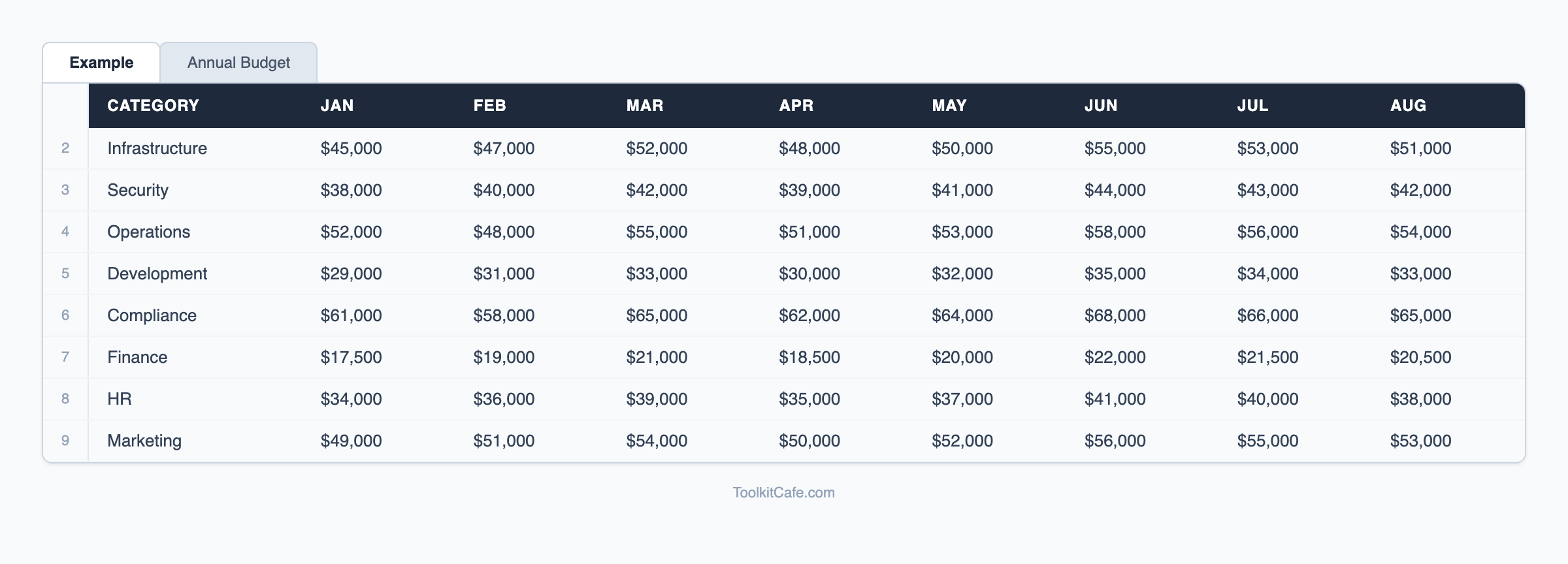
A solid annual budget is the foundation of every well-run business, yet most managers waste days wrestling with disconnected spreadsheets that don't talk to each other. The Business Budget Toolkit consolidates 12-month planning, year-over-year comparison, and department-level breakdowns into a single, professional workbook that finance teams actually want to use.
The toolkit walks you through revenue forecasting, cost-of-goods, operating expenses, and capital expenditure — organized by department so each cost center owns its numbers. Automated variance reports compare budget to actuals month by month, and YoY comparison charts instantly surface whether performance is improving or declining. Rolling totals and summary dashboards give leadership the high-level view while managers drill into the detail.
For organizations planning a more rigorous process, this toolkit pairs naturally with our [enterprise budgeting and forecasting templates](/templates/enterprise-budgeting-forecasting). And once your budget is set, our [financial reporting templates](/templates/financial-reporting) help you communicate results to stakeholders every quarter.
Complete Your Toolkit
Bundle these templates and save 20%
Accounting Setup Templates
Comprehensive accounting systems setup toolkit with chart of accounts....
Asset Management Templates
Comprehensive asset management toolkit with asset registers....
Break-Even Analysis Calculator
Professional break-even analysis calculator with scenario modeling, profitability analysis, and cost
Learn More About Financial Planning
Comprehensive guides and best practices to help you implement this template effectively
5 Essential IT Policies Every Business Needs: Complete Implementation Guide
Protect your business with these critical IT policies. From acceptable use to incident response, get detailed implementation guidance, compliance mapping, and templates for the five policies every organization needs.
Read guide →Break-Even Analysis: How to Calculate Your Break-Even Point [Examples]
How to calculate your break-even point with formulas, Excel examples, and sensitivity analysis. Covers fixed costs, variable costs, and contribution margin for product and service businesses.
Read guide →Budget Template: Complete Financial Planning & Expense Tracking Guide
Free budget template for financial planning and expense tracking. Includes monthly budgets, departmental budgets, project budgets, and zero-based budgeting frameworks for businesses and personal finance.
Read guide →Complete Resource Collection
Access our comprehensive collection of financial planning templates, guides, and tools all in one place.
Explore Financial Planning Resource CollectionExplore More Resources
Discover comprehensive guides and templates in our resource hub
Browse all financial planning resources, guides, and templates
Frequently Asked Questions
How many departments or cost centers can I track?
The toolkit supports up to 10 departments out of the box, each with its own tab. Adding more is straightforward — duplicate the department tab, update the name, and the rollup formulas automatically include the new sheet in the consolidated view.
Can this template handle both revenue and expense budgeting?
Yes. The toolkit includes revenue forecasting (by product line or service), cost of goods sold, operating expenses by category, headcount costs, and capital expenditure — providing a complete P&L budget in one workbook.
Is this suitable for a small business or only larger companies?
It works well for businesses of all sizes. Small businesses typically use the single consolidated view, while mid-size companies use the department tabs. The template scales from a sole trader tracking monthly costs to a 200-person company with multiple cost centers.
How do I update actuals each month?
The 'Actuals' section mirrors the budget structure — enter your monthly actual figures in the corresponding columns and the variance analysis updates automatically. Many users export a summary from their accounting software and paste the figures directly.
Ready to Get Started?
Stop wasting time building from scratch. Get instant access to our proven Business Budget Toolkit and see results today.
30-day money-back guarantee • Download link via email • Professional support