IT Cost Allocation Template & Methods

Organizations that implement IT cost allocation improve IT spending transparency by 40% and reduce overall IT costs by 15-25%. Yet 68% of IT departments struggle to accurately allocate costs to business units. This comprehensive guide provides methods, templates, and best practices for implementing effective IT cost allocation. For more resources, visit our IT Manager's Complete Handbook and Financial Planning Hub.
Quick Start: Use our free TCO Calculator to analyze the true cost of IT investments—including hidden costs, depreciation, and ongoing maintenance—before allocating to departments.
Why IT Cost Allocation Matters
The Cost Visibility Problem
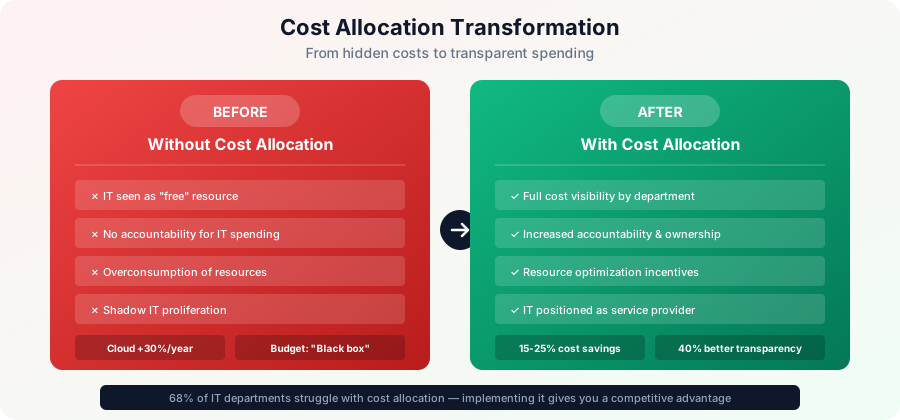
Common Problems Without Cost Allocation:
- IT seen as "free" resource
- Overconsumption of IT services
- No accountability for IT spending
- Difficult to justify IT budget
- Shadow IT proliferation
- Unfair cost distribution
- Business units don't understand IT value
- IT budget cuts hurt all equally
Benefits of Cost Allocation:
- Improved cost visibility and transparency
- Increased accountability for IT spending
- More informed technology decisions
- Reduced waste and overprovisioning
- Better business-IT alignment
- Fair distribution of costs
- Justification for IT investments
- Incentive for efficiency
Example Impact:
Before Cost Allocation:
- Sales department: "IT is free, give us more!"
- IT budget: $3M (no visibility)
- Cloud spending: Growing 30%/year unchecked
- Business view: IT is a cost center

After Cost Allocation:
- Sales department: "We're spending $500K on IT?"
- IT budget: $3M (transparent by department)
- Cloud spending: Optimized, saved $450K
- Business view: IT is a service provider
Cost Allocation Approaches
1. Showback vs. Chargeback
Showback (Informational):
- Definition: Report IT costs to departments without billing
- Purpose: Awareness and transparency
- Billing: No actual charges
- Best For: Starting cost allocation, cultural change
- Advantages:
- Less contentious
- Easier to implement
- Educational
- No billing system needed
- Disadvantages:
- No financial accountability
- Limited behavior change
- "Play money" perception
Chargeback (Transactional):
- Definition: Actually bill departments for IT services
- Purpose: Full cost recovery and accountability
- Billing: Real budget transfers
- Best For: Mature organizations, shared services
- Advantages:
- True accountability
- Drives behavior change
- Cost consciousness
- Fair cost distribution
- Disadvantages:
- Complex to implement
- Requires billing system
- Can be contentious
- Administrative overhead
Hybrid Approach:
- Some costs as chargeback (direct, controllable)
- Other costs as showback (shared, overhead)
- Common for cloud (chargeback) vs. infrastructure (showback)
2. Cost Allocation Methods
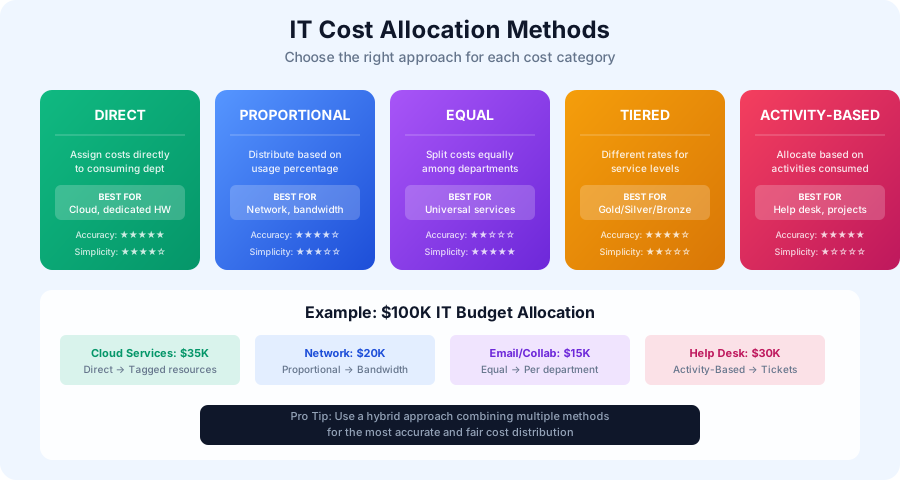
Direct Allocation:
- Description: Assign costs directly to consuming department
- Example: Cloud AWS account tagged to Marketing
- Pros: Most accurate, clear causation
- Cons: Not all costs are directly attributable
- Best For: Cloud services, dedicated resources
Proportional Allocation:
- Description: Distribute based on usage percentage
- Example: Network costs by bandwidth usage
- Pros: Fair based on consumption
- Cons: Requires usage measurement
- Best For: Shared infrastructure, utilities
Equal Allocation:
- Description: Split costs equally among departments
- Example: Email system costs / number of departments
- Pros: Simple, easy to understand
- Cons: Not fair if usage varies
- Best For: Universal services, small amounts
Tiered Allocation:
- Description: Different rates for different service levels
- Example: Gold/Silver/Bronze support tiers
- Pros: Allows choice and fairness
- Cons: More complex to administer
- Best For: Services with quality tiers
Activity-Based Costing (ABC):
- Description: Allocate based on activities consumed
- Example: Help desk tickets, projects, changes
- Pros: Very accurate, reflects work
- Cons: Complex, requires detailed tracking
- Best For: Support services, projects
Common Allocation Metrics
User-Based Metrics
Headcount:
- Allocation: Cost per employee
- Best For: Email, productivity software, general support
- Calculation: Total cost / number of employees
- Example: Office 365 costs allocated by headcount
- Pros: Simple, data readily available
- Cons: Doesn't reflect actual usage variations
Active Users:
- Allocation: Cost per active user
- Best For: Optional applications, specialized tools
- Calculation: Total cost / number of active users
- Example: CRM costs only to sales/support users
- Pros: More accurate than total headcount
- Cons: Requires user tracking
Resource-Based Metrics
CPU/Compute Usage:
- Allocation: Cost per CPU hour or vCPU
- Best For: Cloud compute, server resources
- Calculation: Total cost / total CPU hours used
- Example: AWS EC2 costs by department usage
- Pros: Directly reflects consumption
- Cons: Requires detailed metering
Storage Consumption:
- Allocation: Cost per GB or TB
- Best For: File storage, database storage, backups
- Calculation: Total cost / total GB consumed
- Example: $5 per GB per month
- Pros: Easy to meter and understand
- Cons: Different data types have different costs
Network Bandwidth:
- Allocation: Cost per GB transferred
- Best For: Internet bandwidth, WAN links
- Calculation: Total cost / total GB transferred
- Example: Allocate based on firewall logs
- Pros: Reflects actual consumption
- Cons: Requires monitoring tools
Transaction-Based Metrics
Transactions/API Calls:
- Allocation: Cost per transaction
- Best For: Payment processing, API services
- Calculation: Total cost / number of transactions
- Example: Credit card processing fees
- Pros: Direct usage correlation
- Cons: Requires transaction logging
Help Desk Tickets:
- Allocation: Cost per ticket
- Best For: IT support services
- Calculation: Help desk budget / ticket volume
- Example: $50 per ticket
- Pros: Reflects support consumption
- Cons: May discourage reporting issues
Projects and Changes:
- Allocation: Cost per project hour
- Best For: Development, implementation work
- Calculation: Time tracking by project
- Example: Bill actual hours to projects
- Pros: Accurate project costing
- Cons: Requires detailed time tracking
Financial Metrics
Revenue Allocation:
- Allocation: Based on department revenue
- Best For: IT supporting revenue generation
- Calculation: IT budget × (Dept revenue / Total revenue)
- Example: Sales IT costs proportional to sales revenue
- Pros: Aligns IT with business success
- Cons: Penalizes high-performing departments
Budget Size:
- Allocation: Based on department budget
- Best For: General corporate overhead
- Calculation: IT budget × (Dept budget / Total budget)
- Example: Large departments pay more
- Pros: Reflects department size/resources
- Cons: May not reflect IT usage
Cost Allocation Model
Building Your Cost Allocation Model
Step 1: Categorize IT Costs
Direct Costs (Easily Allocatable):
- Department-specific software
- Dedicated hardware/servers
- Individual cloud accounts
- Department-specific projects
- Custom applications
Shared Costs (Require Allocation Method):
- Network infrastructure
- Data center
- Help desk/support
- Email system
- Collaboration tools
- Security systems
- IT management tools
Corporate Overhead (May Not Allocate):
- IT leadership salaries
- IT strategy and planning
- Governance and compliance
- Enterprise architecture
- IT training and development
Step 2: Select Allocation Method per Cost
Example Allocation Map:
Cost Category → Allocation Method

Direct Costs:
- AWS/Azure accounts → Direct (tagged resources)
- Salesforce licenses → Direct (actual users)
- Department servers → Direct (dedicated)

Shared Infrastructure:
- Network equipment → Headcount or bandwidth
- Data center space → Rack space or server count
- File storage → GB consumed
- Email system → Headcount
- Backup services → GB backed up

Support Services:
- Help desk → Ticket count or headcount
- IT projects → Time tracking
- Security services → Headcount
- Monitoring → Server count

Corporate Overhead:
- IT management → Not allocated or equal split
- IT governance → Not allocated
Step 3: Create Rate Card
IT Service Rate Card:
Service Catalog with Pricing

Compute Services:
- Virtual machine (small): $50/month
- Virtual machine (medium): $120/month
- Virtual machine (large): $250/month
- Physical server hosting: $500/month

Storage Services:
- File storage: $5/GB/month
- Database storage: $8/GB/month
- Backup storage: $2/GB/month
- Archive storage: $0.50/GB/month

Network Services:
- Standard network access: $25/user/month
- VPN access: $10/user/month
- Internet bandwidth: $100/Mbps/month

Application Services:
- Email (Office 365): $20/user/month
- CRM (Salesforce): $75/user/month
- ERP access: $100/user/month

Support Services:
- Standard support: $50/user/month
- Premium support: $100/user/month
- Help desk ticket: $50/ticket
- Project work: $150/hour

Last Updated: January 2025
Review: Quarterly
Step 4: Collect Usage Data
Data Sources:
- Cloud billing systems (AWS, Azure, GCP)
- IT asset management system
- Help desk ticketing system
- Time tracking system
- Network monitoring tools
- Storage management tools
- Active Directory/HR system
- Project management system
Step 5: Calculate and Allocate
Monthly Allocation Process:
- Collect cost data (invoices, payroll, etc.)
- Collect usage data (metrics, logs)
- Apply allocation formulas
- Generate allocation reports
- Review for accuracy
- Distribute reports (showback) or bill (chargeback)
- Address questions and disputes
Cost Allocation Examples
Example 1: Help Desk Allocation
Scenario: $30,000/month help desk budget, 300 tickets
Method 1: Equal Split by Department
4 departments = $7,500 per department
Simple but unfair if usage varies
Method 2: Tickets
Cost per ticket: $30,000 / 300 = $100/ticket

Department A: 120 tickets × $100 = $12,000
Department B: 90 tickets × $100 = $9,000
Department C: 60 tickets × $100 = $6,000
Department D: 30 tickets × $100 = $3,000

Fair based on consumption
Method 3: Headcount
500 total employees = $60/employee

Department A (200 employees): $12,000
Department B (150 employees): $9,000
Department C (100 employees): $6,000
Department D (50 employees): $3,000

Simple, correlates with size
Example 2: Cloud Cost Allocation
Scenario: $50,000/month AWS bill
Method: Resource Tagging
Resources tagged by department:

Marketing:
- EC2 instances: $15,000
- S3 storage: $3,000
- RDS database: $7,000
Total: $25,000

Sales:
- EC2 instances: $8,000
- S3 storage: $2,000
- Data transfer: $3,000
Total: $13,000

IT/Operations:
- EC2 instances: $5,000
- Monitoring: $2,000
- Shared services: $5,000
Total: $12,000

Most accurate, requires good tagging discipline
Example 3: Network Costs Allocation
Scenario: $120,000/year network costs, 500 employees
Method 1: Headcount
$120,000 / 500 = $240/employee/year

Department A (200): $48,000
Department B (150): $36,000
Department C (100): $24,000
Department D (50): $12,000
Method 2: Bandwidth Usage
Total bandwidth: 1,000 Mbps

Department A: 400 Mbps (40%) = $48,000
Department B: 300 Mbps (30%) = $36,000
Department C: 200 Mbps (20%) = $24,000
Department D: 100 Mbps (10%) = $12,000

Requires monitoring but more accurate
Implementation Roadmap
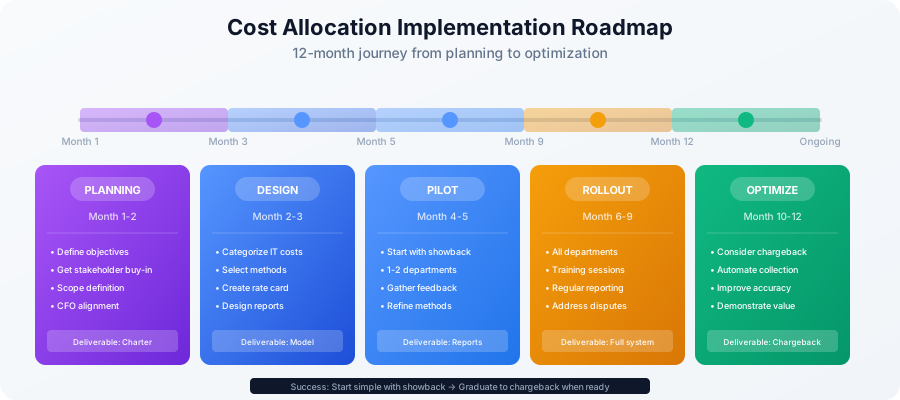
Phase 1: Planning (Month 1-2)
Define Objectives:
- Cost transparency
- Behavior change
- Budget accountability
- Fair cost distribution
Stakeholder Buy-In:
- Present benefits to leadership
- Address concerns
- Get CFO support
- Engage department heads
Scope Definition:
- What costs to allocate?
- Showback or chargeback?
- Which departments?
- What level of detail?
Phase 2: Design (Month 2-3)
Cost Categorization:
- Identify all IT costs
- Categorize as direct/shared/overhead
- Determine allocation methods
- Create rate card
Process Design:
- Data collection procedures
- Calculation methodology
- Reporting frequency
- Dispute resolution process
Tool Selection:
- Spreadsheet-based (simple)
- IT financial management tool (Apptio, CloudHealth)
- Integration with financial systems
Phase 3: Pilot (Month 4-5)
Start with Showback:
- Less contentious
- Build understanding
- Refine methodology
- Address issues
Limited Scope:
- 1-2 departments
- Most measurable costs
- Clear allocation methods
Gather Feedback:
- Are allocations accurate?
- Are reports understandable?
- What questions arise?
- What disputes occur?
Phase 4: Rollout (Month 6-9)
Expand Scope:
- All departments
- More cost categories
- Refined allocations
Communication:
- Training sessions
- Documentation
- Regular reporting
- Q&A forums
Monitor and Adjust:
- Review allocations monthly
- Refine methods
- Address disputes
- Update rates quarterly
Phase 5: Optimize (Month 10-12)
Consider Chargeback:
- If showback successful
- If organization ready
- Start with controllable costs
Continuous Improvement:
- Automate data collection
- Improve accuracy
- Reduce disputes
- Demonstrate value
Cost Allocation Templates
Monthly Allocation Report Template
IT Cost Allocation Report
Department: Marketing
Period: January 2025

DIRECT COSTS:
Cloud Services (AWS):
- EC2 compute: $15,000
- S3 storage (250 GB): $3,000
- RDS database: $7,000
Subtotal Direct: $25,000

SaaS Applications:
- Salesforce (25 users): $1,875
- Marketing automation: $5,000
- Analytics platform: $3,000
Subtotal SaaS: $9,875

ALLOCATED SHARED COSTS:
Infrastructure (based on 40% of compute usage):
- Network services: $2,400
- Data center: $1,600
- Backup services: $800
Subtotal Infrastructure: $4,800

Support Services (based on 50 employees):
- Help desk (15 tickets): $1,500
- IT projects (20 hours): $3,000
- Security services: $1,250
Subtotal Support: $5,750

TOTAL IT COSTS: $45,425

Breakdown:
- Direct/Controllable: $34,875 (77%)
- Shared/Allocated: $10,550 (23%)

Cost per Marketing Employee (50): $908.50

Comparison to Prior Month:
- January: $45,425
- December: $42,100
- Change: +$3,325 (+7.9%)

Primary Drivers:
- Increased cloud compute for campaign
- New marketing automation platform
- Additional project work hours
Annual Cost Allocation Summary
Annual IT Cost Allocation - FY2025

Total IT Budget: $3,000,000

Department Allocation:

Department A (Sales - 200 employees):
Annual Total: $900,000 (30%)
Per Employee: $4,500
Key Costs: Salesforce, laptops, support

Department B (Marketing - 50 employees):
Annual Total: $540,000 (18%)
Per Employee: $10,800
Key Costs: Cloud infrastructure, marketing tools

Department C (Finance - 100 employees):
Annual Total: $450,000 (15%)
Per Employee: $4,500
Key Costs: ERP system, compliance tools

Department D (Operations - 150 employees):
Annual Total: $660,000 (22%)
Per Employee: $4,400
Key Costs: Manufacturing systems, logistics

Corporate IT (Not Allocated):
Annual Total: $450,000 (15%)
Includes: IT leadership, strategy, governance

Cost Trends:
- Cloud costs up 15% (efficiency initiatives planned)
- SaaS costs up 10% (new tools, user growth)
- Infrastructure down 5% (server consolidation)
Handling Disputes and Challenges
Common Disputes
"These costs are too high!"
- Response: Provide detailed breakdown
- Show comparison to market rates
- Explain cost drivers
- Identify optimization opportunities
"Why am I paying for services I don't use?"
- Response: Distinguish direct vs. shared costs
- Explain shared infrastructure necessity
- Consider more granular allocation
- Review service catalog
"The allocation method is unfair!"
- Response: Explain methodology rationale
- Show alternative methods comparison
- Consider hybrid approach
- Engage in collaborative refinement
"I can get this cheaper from a vendor!"
- Response: Provide TCO comparison (not just unit price)
- Explain internal advantages (integration, support, security)
- If true, consider outsourcing
- Use as optimization opportunity
Best Practices for Dispute Resolution
1. Transparency
- Clear methodology documentation
- Detailed cost breakdowns
- Open communication
- Regular reviews
2. Fairness
- Consistent application of methods
- Objective metrics
- Regular rate reviews
- No special deals
3. Flexibility
- Willing to refine methods
- Respond to feedback
- Continuous improvement
- Balance simplicity and accuracy
4. Partnership
- IT and business collaboration
- Joint optimization efforts
- Shared goals
- Regular business reviews
Free Cost Allocation Resources
Complete Cost Allocation Package
Our IT cost allocation toolkit includes:
- Cost allocation model template (Excel)
- Rate card template
- Monthly allocation report template
- Annual summary template
- Chargeback invoice template
- Showback dashboard template
- Dispute resolution procedure
- Implementation roadmap
Download Free Cost Allocation Template →
Related Resources
IT Financial Management Templates:
Conclusion
Effective IT cost allocation improves transparency, drives accountability, and enables better technology decisions. By implementing appropriate allocation methods and starting with showback before moving to chargeback, organizations can achieve fair cost distribution while building a culture of IT cost consciousness.
Implementation Checklist:
- Download cost allocation template
- Define objectives and scope
- Get stakeholder buy-in
- Categorize IT costs
- Select allocation methods
- Create rate card
- Identify data sources
- Design reports
- Pilot with one department
- Refine based on feedback
- Roll out organization-wide
- Monitor and continuously improve
Key Success Factors:
- Start with showback (build understanding)
- Keep it simple initially
- Be transparent about methodology
- Engage business partners
- Respond to feedback
- Demonstrate value
- Continuously refine
- Consider chargeback when ready
Next Steps:
- Download cost allocation template →
- Review IT budget planning →
- Explore TCO analysis →
- Visit IT Budgeting hub →
Start improving IT cost transparency today. Download our comprehensive cost allocation template and implementation guide.