TCO Analysis Guide for IT Investments

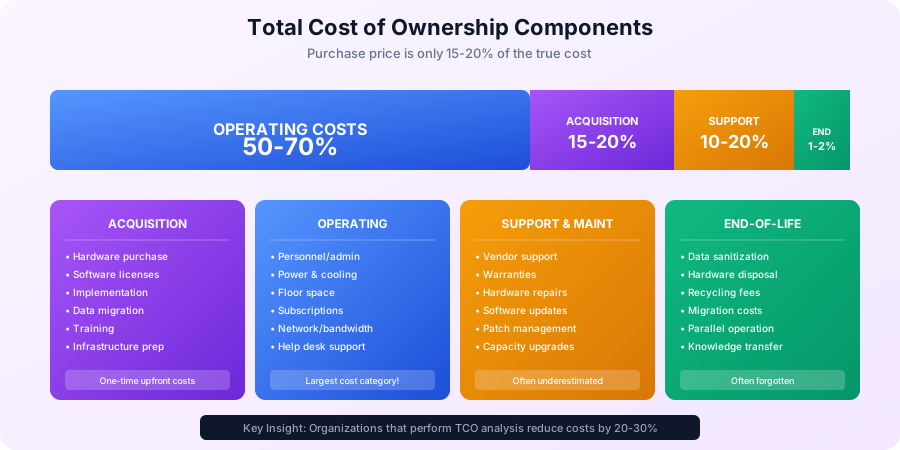
TCO analysis (total cost of ownership analysis) is a financial evaluation method that reveals the true cost of IT investments — not just the purchase price. Organizations that perform TCO analysis before technology decisions reduce costs by 20-30%. Yet many companies skip this step, missing up to 70% of lifetime costs. This guide walks you through a complete TCO analysis process with methodology, real-world examples, and free templates. For more resources, visit our IT Manager's Complete Handbook and Financial Planning Hub.
Quick Start: Use our free TCO Calculator to instantly calculate the true cost of any IT investment—including hidden costs, depreciation, and multi-year projections.
What is TCO Analysis?
TCO Analysis Definition
TCO analysis (total cost of ownership analysis) is the process of calculating the complete cost of acquiring, operating, and maintaining an IT asset over its entire lifecycle — not just the upfront purchase price.
What a TCO analysis reveals:
- Acquisition costs represent only 15-20% of total cost
- Operating costs make up 50-70% of TCO
- Support and maintenance add 10-20%
- Disposal costs account for 1-2%
Why TCO analysis matters:
- Exposes hidden costs that inflate budgets
- Enables apples-to-apples vendor comparisons
- Supports better decision-making with complete data
- Identifies cost optimization opportunities
- Justifies investments to stakeholders with a full picture
Example:
Server Purchase vs. TCO (5-year lifecycle)

Purchase Price Only:
Server hardware: $15,000
"This server costs $15,000"

Total Cost of Ownership:
Hardware: $15,000
Software licenses: $10,000
Implementation: $5,000
Power (5 years): $3,500
Cooling (5 years): $2,000
Space allocation: $2,500
Maintenance/support: $15,000
Administration (5 years): $25,000
End-of-life disposal: $500

Total 5-Year TCO: $78,500
"This server actually costs $78,500 over 5 years"
TCO Components
1. Acquisition Costs
Hardware Costs:
- Equipment purchase price
- Shipping and handling
- Sales tax
- Import duties (if applicable)
- Spare parts inventory
Software Costs:
- License purchases
- Initial subscriptions
- Volume licensing fees
- Maintenance agreements
Implementation Costs:
- Project management
- Installation and configuration
- Data migration
- Integration work
- Testing and validation
- Training
- Documentation
- Change management
- Travel expenses
Infrastructure Prep:
- Rack space preparation
- Power infrastructure
- Network connectivity
- Cooling requirements
- Physical security
2. Operating Costs
Personnel:
- System administration
- Help desk support
- Security management
- Backup administration
- User support
- Training time
Facilities:
- Power consumption
- Cooling costs
- Floor space allocation
- Physical security
- Environmental controls
Software:
- Subscription renewals
- Usage-based fees
- Additional licenses
- Upgrade costs
Network and Connectivity:
- Bandwidth costs
- Circuit fees
- Internet connectivity
- VPN licenses
3. Support and Maintenance
Vendor Support:
- Hardware warranties
- Software maintenance
- Support contracts
- Priority support fees
Internal Support:
- Troubleshooting time
- Incident response
- Performance monitoring
- Patch management
- Security updates
Upgrades and Updates:
- Hardware upgrades
- Software updates
- Capacity expansion
- Performance tuning
4. Downtime and Risk Costs
Planned Downtime:
- Maintenance windows
- Upgrade time
- Lost productivity
Unplanned Downtime:
- System failures
- Outage recovery
- Lost revenue
- Reputation damage
Security Incidents:
- Breach response
- Data recovery
- Legal and compliance
- Customer notification
5. End-of-Life Costs
Disposal:
- Data sanitization
- Hardware disposal
- Recycling fees
- Certificate of destruction
Migration:
- New system deployment
- Data migration
- User training
- Parallel operation period
Opportunity Cost:
- Alternative investment returns
- Delayed projects
Conducting TCO Analysis
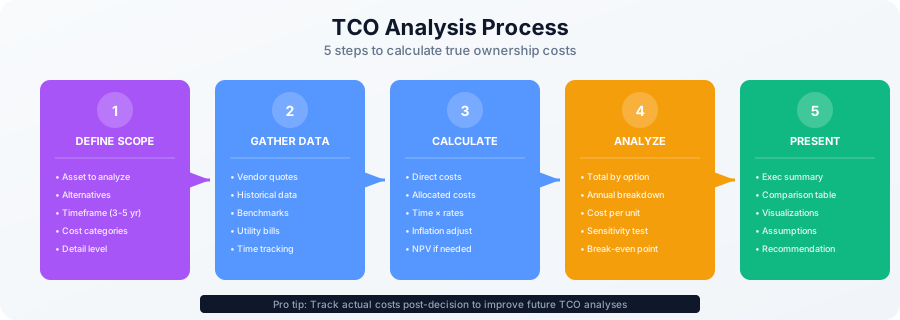
TCO Analysis Process
Step 1: Define Scope and Timeline
- What asset or solution are you analyzing?
- What alternatives are you comparing?
- What is the analysis timeframe? (typically 3-5 years)
- What cost categories to include?
- What level of detail needed?
Step 2: Gather Cost Data
Sources of Cost Information:
- Vendor quotes
- Historical spending data
- Industry benchmarks
- Internal time tracking
- Utility bills
- Contract documents
- IT asset management data
Data Collection Tips:
- Be comprehensive (don't miss hidden costs)
- Use actual data when available
- Document assumptions
- Get input from multiple stakeholders
- Consider inflation for future costs
Step 3: Calculate Costs
Cost Calculation Methods:
- Direct measurement (actual invoices)
- Allocation (shared costs)
- Estimation (industry averages)
- Time-based (hours × hourly rate)
Step 4: Analyze Results
- Total costs over lifecycle
- Annual cost breakdown
- Cost per user/transaction/unit
- Compare alternatives
- Identify cost drivers
- Sensitivity analysis
Step 5: Present Findings
- Executive summary
- Cost comparison table
- Visualizations (charts)
- Key assumptions documented
- Recommendations
- Risk factors
TCO Analysis Examples
Example 1: Cloud vs. On-Premise Server
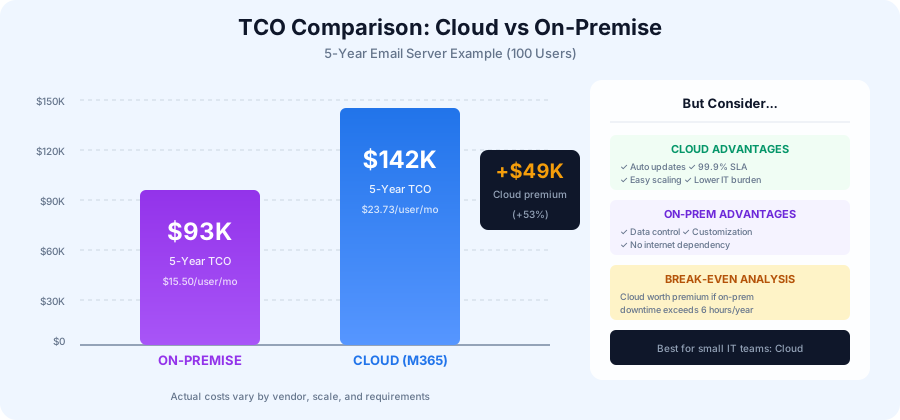
Scenario: 100-user company needs email server for 5 years
Option A: On-Premise Exchange Server
Year 0 (Acquisition):
Hardware (server): $15,000
Software license: $10,000
Implementation: $5,000
Total Year 0: $30,000

Years 1-5 (Annual Operating Costs):
Maintenance/support: $3,000/year
Power and cooling: $1,100/year
Administration (100 hours/year @ $75): $7,500/year
Backup software/storage: $1,000/year
Annual Total: $12,600/year × 5 = $63,000

Total 5-Year TCO: $93,000
Per User Per Month: $15.50
Option B: Microsoft 365 (Cloud)
Year 0 (Acquisition):
Migration services: $10,000
Training: $3,000
Total Year 0: $13,000

Years 1-5 (Annual Operating Costs):
Subscriptions (100 users @ $20/month): $24,000/year
Administration (25 hours/year @ $75): $1,875/year
Annual Total: $25,875/year × 5 = $129,375

Total 5-Year TCO: $142,375
Per User Per Month: $23.73
Analysis:
- On-premise appears $49,375 cheaper over 5 years
- But cloud offers: Automatic updates, better redundancy, easier scaling
- Break-even if on-premise downtime > 6 hours/year
- Cloud may be worth premium for small IT teams
Example 2: Desktop Refresh: Buy vs. Lease
Scenario: Replace 100 desktops, 4-year lifecycle
Option A: Purchase
Year 0:
Hardware (100 × $1,000): $100,000
Deployment (2 hours each @ $75): $15,000
Total Year 0: $115,000

Years 1-4 (Annual):
Warranty/support: $10,000/year
Help desk (200 hours @ $75): $15,000/year
Repairs and parts: $5,000/year
Annual Total: $30,000/year × 4 = $120,000

Year 4 (Disposal):
Removal and recycling: $2,000

Total 4-Year TCO: $237,000
Per Device Per Month: $49.38

Residual Value: $10,000 (10% of purchase)
Net TCO: $227,000
Option B: Lease (4-year term)
Years 1-4:
Lease payment (100 × $30/month): $36,000/year
Deployment: $15,000 (Year 1 only)
Help desk (150 hours @ $75): $11,250/year
(Fewer issues with newer equipment)

Year 1: $62,250
Years 2-4: $47,250/year × 3 = $141,750

Total 4-Year TCO: $204,000
Per Device Per Month: $42.50

Benefits:
- Lower upfront cost
- Newer equipment throughout
- End-of-lease refresh included
- Predictable monthly costs
Analysis:
- Leasing saves $23,000 over 4 years
- Leasing provides better cash flow
- Leasing ensures current technology
- Purchase better if keeping > 5 years
Example 3: Software Licensing Models
Scenario: Design software for 50 users
Option A: Perpetual License
Year 0:
Licenses (50 × $1,500): $75,000
Implementation: $5,000
Training: $10,000
Total Year 0: $90,000

Years 1-5 (Annual):
Maintenance (20% of license): $15,000/year
Training (new users): $2,000/year
Support: $3,000/year
Annual Total: $20,000/year × 5 = $100,000

Total 5-Year TCO: $190,000
Per User Per Year: $760
Option B: Subscription License
Years 1-5 (Annual):
Subscriptions (50 × $50/month): $30,000/year
Implementation (Year 1): $5,000
Training (Year 1): $10,000
Support included in subscription

Year 1: $45,000
Years 2-5: $30,000/year × 4 = $120,000

Total 5-Year TCO: $165,000
Per User Per Year: $660
Analysis:
- Subscription saves $25,000 over 5 years
- Subscription includes updates and support
- Subscription better for uncertain user count
- Perpetual better if keeping 7+ years
- Break-even point: ~6.3 years
TCO Calculation Templates
General TCO Template
TCO Analysis: [Asset/Solution Name]
Analysis Period: [X] years
Prepared By: [Name]
Date: [Date]

1. ACQUISITION COSTS
   Hardware: $___________
   Software: $___________
   Implementation: $___________
   Training: $___________
   Migration: $___________
   Other: $___________
   Subtotal Year 0: $___________

2. ANNUAL OPERATING COSTS (per year)
   Personnel (admin/support): $___________
   Facilities (power, space): $___________
   Software renewals: $___________
   Network/connectivity: $___________
   Supplies: $___________
   Other: $___________
   Annual Subtotal: $___________
   × [Years]: $___________

3. SUPPORT & MAINTENANCE (per year)
   Hardware maintenance: $___________
   Software maintenance: $___________
   Vendor support: $___________
   Upgrades: $___________
   Annual Subtotal: $___________
   × [Years]: $___________

4. END-OF-LIFE COSTS
   Disposal: $___________
   Migration to new system: $___________
   Subtotal: $___________

5. TOTAL COST OF OWNERSHIP
   Acquisition: $___________
   Operating ([X] years): $___________
   Support ([X] years): $___________
   End-of-life: $___________

   TOTAL TCO: $___________

   Annual Average: $___________
   Per User/Unit (if applicable): $___________
   Monthly Per User: $___________

6. LESS: RESIDUAL VALUE
   Estimated resale value: ($__________)

   NET TCO: $___________

ASSUMPTIONS:
- [List key assumptions]
- [Include any estimates]
- [Note what's excluded]
Desktop/Laptop TCO Template
Device TCO Analysis
Device Type: [Laptop/Desktop]
Quantity: [Number]
Lifecycle: [Years]

Per-Device Costs:
1. Hardware
   - Purchase price: $___________
   - Peripherals (monitor, etc.): $___________
   - Shipping: $___________

2. Software
   - OS license: $___________
   - Productivity suite: $___________
   - Security software: $___________
   - Other applications: $___________

3. Deployment
   - Imaging/setup (hours): _____ @ $_____ = $______
   - Asset tagging: $___________
   - Delivery to user: $___________

4. Annual Operating (per year)
   - Help desk support (hours): _____ @ $_____ = $______
   - Software updates: $___________
   - Security patches: $___________
   - Power consumption: $___________

5. Annual Maintenance
   - Warranty/support: $___________
   - Repairs: $___________
   - Hardware upgrades: $___________

6. End-of-Life
   - Data sanitization: $___________
   - Disposal/recycling: $___________

Per-Device Total: $___________
Fleet Total ([Quantity]): $___________
Monthly Per Device: $___________
TCO Best Practices
Conducting Effective TCO Analysis
1. Be Comprehensive
- Include all cost categories
- Don't forget hidden costs
- Consider indirect costs
- Factor in opportunity costs
2. Use Consistent Timeframes
- Match asset lifecycles
- Use same period for comparisons
- Consider technology refresh cycles
- Account for contracts and commitments
3. Document Assumptions
- Labor rates
- Utilization rates
- Growth projections
- Technology lifespan
- Discount rates (for NPV)
4. Consider Qualitative Factors
- User productivity
- Flexibility and scalability
- Risk and reliability
- Strategic alignment
- Vendor stability
5. Perform Sensitivity Analysis
- Test key assumptions
- Identify break-even points
- Assess risk scenarios
- Determine decision drivers
6. Update Regularly
- Refresh assumptions annually
- Track actual vs. estimated costs
- Learn from past analyses
- Build organizational knowledge
Common TCO Mistakes
Pitfalls to Avoid
1. Focusing Only on Purchase Price
- Missing 70-80% of total costs
- Making expensive "cheap" decisions
- Solution: Full lifecycle analysis
2. Ignoring Soft Costs
- User productivity impact
- Training time
- Change management
- Solution: Quantify indirect costs
3. Inconsistent Timeframes
- Comparing 3-year vs. 5-year costs
- Mixing upfront and recurring
- Solution: Normalize to same period
4. Missing Hidden Costs
- Integration complexity
- Data migration
- Downtime
- Shadow IT workarounds
- Solution: Comprehensive checklist
5. Unrealistic Assumptions
- Overly optimistic estimates
- Ignoring risk
- Assuming perfect utilization
- Solution: Conservative estimates, sensitivity analysis
6. Not Tracking Actuals
- Can't validate assumptions
- Repeat same mistakes
- Solution: Post-implementation cost tracking
TCO for Different Scenarios
Cloud Migration TCO
Special Considerations:
- Data transfer costs (initial and ongoing)
- Network bandwidth requirements
- Data egress fees
- Reserved vs. on-demand pricing
- Multi-year discounts
- Training on cloud platform
- Cloud management tools
- Potential for cost optimization over time
SaaS vs. On-Premise TCO
SaaS Advantages:
- Lower upfront costs
- Predictable monthly fees
- Automatic updates included
- Vendor-managed infrastructure
- Easier scaling
On-Premise Advantages:
- Lower long-term cost (maybe)
- Greater control
- Customization options
- No internet dependency
- Data sovereignty
Outsourcing vs. In-House TCO
Outsourcing Costs:
- Contract fees
- Transition costs
- Governance and oversight
- Vendor management
- Knowledge loss risk
In-House Costs:
- Personnel costs (loaded)
- Training and development
- Tools and equipment
- Management overhead
- Turnover costs
Free TCO Resources
Complete TCO Analysis Package
Our TCO toolkit includes:
- TCO calculator (Excel)
- Desktop/laptop TCO template
- Server TCO template
- Cloud vs. on-premise comparison
- Software licensing comparison
- TCO presentation template
- Assumption documentation template
- Sensitivity analysis worksheet
Download Free TCO Calculator →
Related Resources
IT Financial Planning Templates:
Conclusion
Total Cost of Ownership analysis is essential for making informed IT investment decisions. By considering all costs over the complete lifecycle, not just purchase price, you can identify the true cost of alternatives and make better decisions that optimize both cost and value.
Implementation Checklist:
- Download TCO calculator template
- Identify decision to analyze
- Define analysis timeframe
- List all cost categories
- Gather cost data
- Document assumptions
- Calculate TCO for each option
- Perform sensitivity analysis
- Compare alternatives
- Present findings
- Track actual costs post-decision
- Refine future analyses
TCO Analysis Tips:
- Start with template/checklist
- Be comprehensive (include all costs)
- Document every assumption
- Use conservative estimates
- Test sensitivity of key assumptions
- Consider qualitative factors
- Present clearly to stakeholders
- Track actuals vs. estimates
Next Steps:
- Download TCO calculator →
- Review IT budget planning →
- Explore cost allocation →
- Visit IT Budgeting hub →
Make better IT investment decisions today. Download our comprehensive TCO calculator and analysis templates.