Marketing KPI Dashboard Template: Campaign Performance Tracking Guide

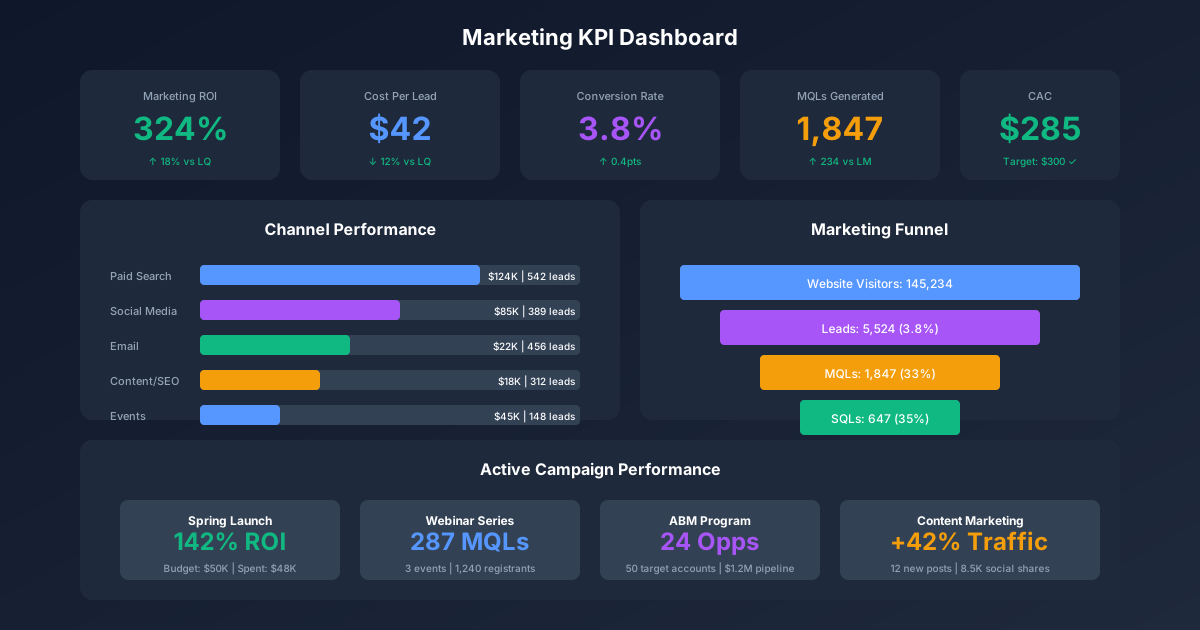
A well-designed marketing KPI dashboard transforms scattered data into strategic intelligence. Without centralized metrics visibility, marketing teams waste hours pulling reports from multiple platforms while executives question the value of marketing investments. This comprehensive guide provides the complete framework for building a marketing dashboard that tracks what matters, demonstrates ROI, and drives data-informed decisions. For additional marketing resources, visit our guide on proving marketing impact and explore our email marketing templates.
Quick Start: Access our Marketing Analytics Templates to implement the frameworks in this guide immediately.
Why Marketing Dashboards Matter
The Business Case for Centralized Marketing Metrics
Organizations with mature marketing analytics significantly outperform those relying on fragmented data:
Decision Quality:
- Companies using marketing dashboards make budget decisions 3x faster
- Centralized metrics reduce analysis errors by 60%
- Real-time visibility enables rapid campaign optimization
- Consistent KPIs align teams on what success means
Accountability:
- Clear metrics create ownership for outcomes
- Dashboard visibility drives performance improvement
- Attribution tracking justifies marketing investment
- Executive confidence in marketing increases with data transparency
Efficiency:
- Automated dashboards save 8-12 hours per week on reporting
- Self-service analytics reduce ad-hoc request volume
- Historical data enables trend analysis and forecasting
- Single source of truth eliminates conflicting numbers
The Cost of Dashboard Deficiency
MARKETING ANALYTICS MATURITY IMPACT

WITHOUT CENTRALIZED DASHBOARD:
├── Time spent on reporting: 12+ hours/week
├── Data sources manually reconciled: 5-10 platforms
├── Report delivery latency: 3-7 days
├── Executive confidence in marketing: Low
├── Budget defense: Reactive, spreadsheet-based
├── Optimization speed: Weekly at best
└── Attribution accuracy: Inconsistent or absent

WITH MARKETING KPI DASHBOARD:
├── Time spent on reporting: 2-3 hours/week (75% savings)
├── Data sources integrated: All in one view
├── Report delivery: Real-time or daily automated
├── Executive confidence: High (data-backed)
├── Budget defense: Proactive, evidence-based
├── Optimization speed: Daily or continuous
└── Attribution accuracy: Consistent methodology

EXAMPLE IMPACT (5-Person Marketing Team):
- Time savings: 10 hours/week × 50 weeks = 500 hours/year
- Cost savings: 500 hours × $75/hour = $37,500/year
- Better budget allocation (20% improvement): $50,000 on $250K budget
- Faster optimization cycles: 15% campaign performance lift
- TOTAL ANNUAL VALUE: $100,000+
Marketing KPI Categories
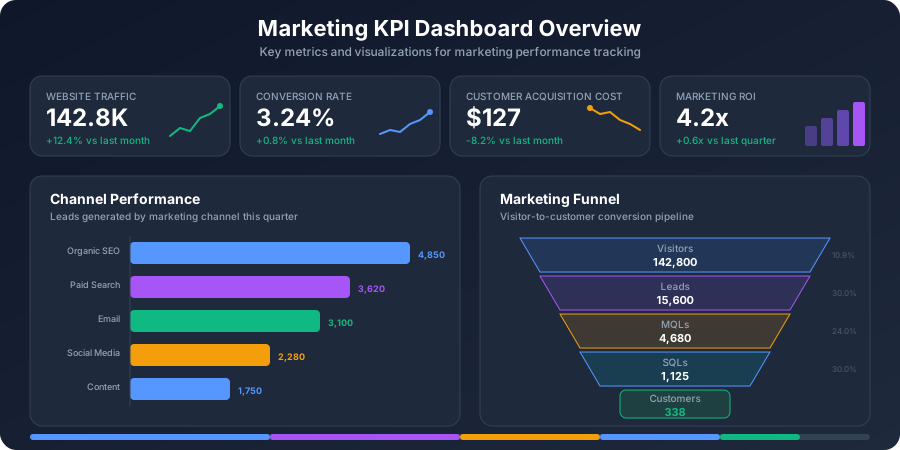
Effective marketing dashboards organize metrics into logical categories that tell a complete performance story.
Category 1: Traffic and Reach Metrics
Traffic metrics measure your ability to attract audience attention.
Website Traffic KPIs:
| Metric | Formula | Target/Benchmark | Tracking Frequency |
|---|---|---|---|
| Total Sessions | Sum of all website sessions | Growth MoM | Daily |
| Unique Visitors | Count of distinct users | Growth MoM | Daily |
| Pageviews | Total pages viewed | Context-dependent | Daily |
| Pages per Session | Pageviews / Sessions | 2.5-4.0 | Weekly |
| Avg Session Duration | Total time / Sessions | 2-3 minutes | Weekly |
| Bounce Rate | Single-page sessions / Total sessions | 40-60% | Weekly |
| New vs Returning | New visitors / Total visitors | 60-70% new | Weekly |
Traffic Source Breakdown:
TRAFFIC SOURCE ANALYSIS

Organic Search:
├── Sessions from organic
├── % of total traffic
├── YoY growth rate
├── Top landing pages
└── Keyword rankings (if available)

Paid Search:
├── Sessions from paid
├── Cost per session
├── Campaign breakdown
├── Quality score impact
└── Ad position metrics

Social Media:
├── Sessions by platform
├── Engagement-to-visit ratio
├── Top referring content
├── Organic vs paid social
└── Platform growth trends

Direct Traffic:
├── Sessions (direct)
├── % of total
├── Brand awareness indicator
├── Mobile vs desktop
└── New vs returning

Referral Traffic:
├── Sessions from referrals
├── Top referring domains
├── Backlink quality
├── Partnership impact
└── Earned media tracking

Email:
├── Sessions from email
├── Campaign attribution
├── Subscriber engagement
├── List health correlation
└── Conversion rate from email
Category 2: Conversion Metrics
Conversion metrics measure your ability to turn visitors into leads and customers.
Lead Generation KPIs:
| Metric | Formula | Target/Benchmark | Tracking Frequency |
|---|---|---|---|
| Total Leads | Count of new leads | Growth target | Daily |
| Conversion Rate | Leads / Sessions × 100 | 2-5% (B2B) | Daily |
| Lead Velocity Rate | (Leads this month - Last month) / Last month | Positive growth | Monthly |
| Cost Per Lead (CPL) | Marketing Spend / Leads | $50-200 (varies) | Weekly |
| Lead Quality Score | Qualified leads / Total leads | >40% | Weekly |
| Form Completion Rate | Submissions / Form views | 20-40% | Weekly |
| Landing Page Conversion | Conversions / Landing page visits | 10-25% | Weekly |
Funnel Conversion KPIs:
MARKETING FUNNEL METRICS

STAGE                     METRIC                    BENCHMARK
─────────────────────────────────────────────────────────────
Visitors                  Total Sessions            Baseline
    ↓ (2-5%)
Leads (MQL)               Marketing Qualified       40-60% of leads
    ↓ (30-50%)
Sales Accepted (SAL)      Sales Accepted Leads      60-70% of MQLs
    ↓ (20-40%)
Opportunities (SQL)       Sales Qualified Leads     40-60% of SALs
    ↓ (15-30%)
Customers                 Closed Won                20-30% of SQLs

STAGE CONVERSION CALCULATIONS:
Visitor to Lead Rate = Leads / Visitors × 100
Lead to MQL Rate = MQLs / Leads × 100
MQL to SAL Rate = SALs / MQLs × 100
SAL to SQL Rate = SQLs / SALs × 100
SQL to Customer Rate = Customers / SQLs × 100
Overall Conversion = Customers / Visitors × 100
Category 3: Engagement Metrics
Engagement metrics measure how deeply your audience interacts with your content.
Content Engagement KPIs:
| Metric | Formula | Target/Benchmark | Tracking Frequency |
|---|---|---|---|
| Avg Time on Page | Total time / Pageviews | 2-3 minutes | Weekly |
| Scroll Depth | % of page viewed | 50%+ average | Weekly |
| Content Downloads | Total downloads | Growth MoM | Weekly |
| Video Completion Rate | Completions / Starts × 100 | 30-50% | Weekly |
| Blog Comments | Total comments | Engagement indicator | Monthly |
| Social Shares | Total shares from content | Growth MoM | Weekly |
| Return Visitor Rate | Return visits / Total visits | 25-40% | Monthly |
Email Engagement KPIs:
| Metric | Formula | Target/Benchmark | Tracking Frequency |
|---|---|---|---|
| Open Rate | Opens / Delivered × 100 | 20-30% | Per campaign |
| Click Rate (CTR) | Clicks / Delivered × 100 | 2-5% | Per campaign |
| Click-to-Open Rate | Clicks / Opens × 100 | 10-15% | Per campaign |
| Unsubscribe Rate | Unsubscribes / Delivered × 100 | Under 0.5% | Per campaign |
| Bounce Rate | Bounces / Sent × 100 | Under 2% | Per campaign |
| List Growth Rate | (New - Unsubscribes) / Total × 100 | Positive | Monthly |
| Forwarding Rate | Forwards / Delivered × 100 | Engagement indicator | Per campaign |
Social Media Engagement KPIs:
| Metric | Formula | Target/Benchmark | Tracking Frequency |
|---|---|---|---|
| Engagement Rate | (Likes + Comments + Shares) / Followers × 100 | 1-5% | Weekly |
| Reach | Unique users who saw content | Growth MoM | Weekly |
| Impressions | Total times content displayed | Context-dependent | Weekly |
| Share of Voice | Brand mentions / Total industry mentions | Competitive target | Monthly |
| Follower Growth Rate | Net new followers / Starting followers | 2-5% monthly | Monthly |
| Amplification Rate | Shares / Posts × 100 | Platform-dependent | Weekly |
| Response Time | Avg time to respond | Under 1 hour | Weekly |
Category 4: Revenue and ROI Metrics
Revenue metrics connect marketing activities to business outcomes.
Revenue Attribution KPIs:
| Metric | Formula | Target/Benchmark | Tracking Frequency |
|---|---|---|---|
| Marketing-Sourced Revenue | Revenue from marketing-originated leads | % of total revenue | Monthly |
| Marketing-Influenced Revenue | Revenue where marketing touched | % of total revenue | Monthly |
| Pipeline Contribution | Marketing-sourced pipeline value | 30-50% of total | Monthly |
| Revenue Per Lead | Total revenue / Total leads | Positive trend | Monthly |
| Average Deal Size | Total revenue / Deals closed | By segment | Monthly |
| Customer Lifetime Value (CLV) | Avg revenue × Avg lifespan | By acquisition source | Quarterly |
ROI and Efficiency KPIs:
| Metric | Formula | Target/Benchmark | Tracking Frequency |
|---|---|---|---|
| Marketing ROI | (Revenue - Cost) / Cost × 100 | 5:1 or 500% | Monthly |
| Return on Ad Spend (ROAS) | Revenue from ads / Ad spend | 3:1 to 10:1 | Weekly |
| Customer Acquisition Cost (CAC) | Total marketing cost / New customers | Industry-dependent | Monthly |
| CAC Payback Period | CAC / Monthly revenue per customer | Under 12 months | Monthly |
| CLV:CAC Ratio | Customer lifetime value / CAC | 3:1 or higher | Quarterly |
| Marketing Efficiency Ratio | Revenue / Marketing spend | Positive trend | Monthly |
| Cost Per Acquisition (CPA) | Marketing spend / Conversions | Campaign-dependent | Per campaign |
Category 5: Campaign Performance Metrics
Campaign metrics measure individual marketing initiative effectiveness.
Campaign-Level KPIs:
| Metric | Formula | Purpose |
|---|---|---|
| Campaign Reach | Unique audience exposed | Awareness measurement |
| Campaign Engagement | Interactions / Reach | Content resonance |
| Campaign Conversion | Conversions from campaign | Direct response |
| Campaign Revenue | Revenue attributed to campaign | ROI calculation |
| Campaign ROI | (Revenue - Cost) / Cost × 100 | Investment return |
| Campaign Velocity | Time from launch to results | Efficiency measure |
| Campaign Influence | Deals touched by campaign | Pipeline impact |
Channel-Specific KPI Frameworks
SEO Dashboard
SEO PERFORMANCE DASHBOARD

VISIBILITY METRICS:
├── Organic Sessions: [value] (▲/▼ vs prior period)
├── Organic Traffic Share: [%] of total traffic
├── Keyword Rankings:
│   ├── Page 1 keywords: [count]
│   ├── Top 3 positions: [count]
│   └── New rankings this month: [count]
├── Search Impressions: [value] (Search Console)
└── Average Position: [value] (Search Console)

ENGAGEMENT METRICS:
├── Organic CTR: [%] (Search Console)
├── Organic Bounce Rate: [%]
├── Pages per Organic Session: [value]
├── Avg Session Duration (Organic): [time]
└── Top Landing Pages by Traffic: [list]

CONVERSION METRICS:
├── Organic Leads: [count]
├── Organic Conversion Rate: [%]
├── Organic Revenue: [$]
└── Revenue per Organic Session: [$]

TECHNICAL HEALTH:
├── Core Web Vitals: [pass/fail]
├── Indexed Pages: [count]
├── Crawl Errors: [count]
└── Mobile Usability Issues: [count]
SEO KPI Formulas:
Organic Click-Through Rate = Clicks / Impressions × 100
Organic Conversion Rate = Organic Conversions / Organic Sessions × 100
Revenue per Organic Session = Organic Revenue / Organic Sessions
Visibility Score = (P1 Keywords × 10 + P2 Keywords × 5 + P3 Keywords) / Total Tracked
Content ROI = Revenue from Content / Content Creation Cost
Paid Media Dashboard
PAID MEDIA PERFORMANCE DASHBOARD

SPEND & REACH:
├── Total Ad Spend: [$] (budget vs actual)
├── Impressions: [value]
├── Reach: [unique users]
├── Frequency: [avg impressions per user]
└── Share of Voice: [%] (vs competitors)

ENGAGEMENT:
├── Clicks: [count]
├── Click-Through Rate (CTR): [%]
├── Cost Per Click (CPC): [$]
├── Engagement Rate: [%]
└── Video Views / Completion Rate: [%]

CONVERSION:
├── Conversions: [count]
├── Conversion Rate: [%]
├── Cost Per Conversion: [$]
├── Conversion Value: [$]
└── Return on Ad Spend (ROAS): [X:1]

QUALITY:
├── Quality Score (Google): [1-10]
├── Relevance Score (Meta): [1-10]
├── Landing Page Experience: [rating]
└── Ad Relevance: [rating]

BY PLATFORM:
┌──────────────┬──────────┬────────┬────────┬────────┬────────┐
│ Platform     │ Spend    │ Conv   │ CPA    │ ROAS   │ Status │
├──────────────┼──────────┼────────┼────────┼────────┼────────┤
│ Google Ads   │ $15,000  │ 145    │ $103   │ 4.2x   │ ✓      │
│ Meta Ads     │ $8,000   │ 92     │ $87    │ 3.8x   │ ✓      │
│ LinkedIn     │ $5,000   │ 28     │ $179   │ 2.1x   │ ⚠      │
│ Twitter/X    │ $2,000   │ 12     │ $167   │ 1.9x   │ ✗      │
├──────────────┼──────────┼────────┼────────┼────────┼────────┤
│ TOTAL        │ $30,000  │ 277    │ $108   │ 3.6x   │        │
└──────────────┴──────────┴────────┴────────┴────────┴────────┘
Paid Media KPI Formulas:
Click-Through Rate = Clicks / Impressions × 100
Cost Per Click = Ad Spend / Clicks
Conversion Rate = Conversions / Clicks × 100
Cost Per Conversion = Ad Spend / Conversions
Return on Ad Spend = Revenue from Ads / Ad Spend
Cost Per Mille (CPM) = (Ad Spend / Impressions) × 1000
Quality Score Impact = Estimated savings from high quality scores
Email Marketing Dashboard
EMAIL MARKETING DASHBOARD

LIST HEALTH:
├── Total Subscribers: [count]
├── List Growth Rate: [%] month-over-month
├── Active Subscribers (90 days): [count] / [%]
├── Unsubscribe Rate (rolling): [%]
└── Bounce Rate (rolling): [%]

CAMPAIGN PERFORMANCE:
├── Emails Sent (MTD): [count]
├── Average Open Rate: [%]
├── Average Click Rate: [%]
├── Average CTOR: [%]
└── Spam Complaint Rate: [%]

AUTOMATION PERFORMANCE:
├── Active Sequences: [count]
├── Sequence Completion Rate: [%]
├── Automation-Driven Leads: [count]
├── Automation Revenue: [$]
└── Revenue per Automated Email: [$]

ENGAGEMENT TRENDS:
├── Opens Trend (6-month): [chart]
├── Clicks Trend (6-month): [chart]
├── Best Performing Day: [day]
├── Best Performing Time: [time]
└── Top Performing Subject Lines: [list]

REVENUE ATTRIBUTION:
├── Email-Sourced Revenue: [$]
├── Revenue per Email Sent: [$]
├── Revenue per Subscriber: [$]
├── Conversion from Email: [%]
└── Email ROI: [X:1]
Content Marketing Dashboard
CONTENT MARKETING DASHBOARD

PRODUCTION:
├── Content Published (MTD): [count]
├── Content Types:
│   ├── Blog Posts: [count]
│   ├── Ebooks/Guides: [count]
│   ├── Videos: [count]
│   └── Infographics: [count]
├── Content Velocity: [pieces per week]
└── Content Backlog: [count]

PERFORMANCE:
├── Total Content Views: [count]
├── Average Views per Post: [count]
├── Average Time on Page: [time]
├── Social Shares: [count]
├── Backlinks Earned: [count]
└── Top Performing Content: [list]

CONVERSION:
├── Content-Driven Leads: [count]
├── Lead Magnet Downloads: [count]
├── Content Conversion Rate: [%]
├── Gated vs Ungated Performance: [comparison]
└── Content-Influenced Pipeline: [$]

SEO CONTRIBUTION:
├── Organic Traffic from Content: [count]
├── Keywords Ranking from Content: [count]
├── Featured Snippets Won: [count]
└── Content Driving Backlinks: [list]

ROI:
├── Content Production Cost: [$]
├── Content-Attributed Revenue: [$]
├── Content ROI: [X:1]
└── Cost per Content Lead: [$]
Social Media Dashboard
SOCIAL MEDIA DASHBOARD

AUDIENCE:
├── Total Followers (All Platforms): [count]
├── Follower Growth Rate: [%]
├── Platform Breakdown:
│   ├── LinkedIn: [followers] / [growth %]
│   ├── Twitter/X: [followers] / [growth %]
│   ├── Instagram: [followers] / [growth %]
│   └── Facebook: [followers] / [growth %]
└── Audience Demographics: [summary]

REACH & IMPRESSIONS:
├── Total Reach: [count]
├── Total Impressions: [count]
├── Organic Reach: [count] / [%]
├── Paid Reach: [count] / [%]
└── Viral Reach: [count]

ENGAGEMENT:
├── Total Engagements: [count]
├── Engagement Rate: [%]
├── Engagement by Type:
│   ├── Likes/Reactions: [count]
│   ├── Comments: [count]
│   ├── Shares/Retweets: [count]
│   └── Saves/Bookmarks: [count]
├── Top Performing Posts: [list]
└── Best Posting Times: [times]

TRAFFIC & CONVERSION:
├── Website Sessions from Social: [count]
├── Conversion Rate from Social: [%]
├── Leads from Social: [count]
├── Revenue from Social: [$]
└── Social ROI: [X:1]
Dashboard Design Best Practices
Dashboard Layout Structure
MARKETING DASHBOARD LAYOUT

┌─────────────────────────────────────────────────────────────────────────┐
│                        EXECUTIVE SUMMARY                                │
├─────────────────────┬─────────────────────┬─────────────────────────────┤
│ Revenue Impact      │ Pipeline Generated  │ Marketing ROI               │
│ $425K attributed    │ $1.2M this month    │ 4.2x return                 │
│ ▲ 15% vs target     │ ▲ 8% vs last month  │ ▲ 0.3 vs last quarter       │
└─────────────────────┴─────────────────────┴─────────────────────────────┘

┌─────────────────────────────────────────────────────────────────────────┐
│                          FUNNEL OVERVIEW                                │
│  Visitors    →    Leads    →    MQLs    →    SQLs    →    Customers    │
│   45,230         1,128          485          142           28           │
│   (2.5%)        (43.0%)       (29.3%)      (19.7%)       =$425K        │
└─────────────────────────────────────────────────────────────────────────┘

┌─────────────────────────────────┬───────────────────────────────────────┐
│      TRAFFIC SOURCES            │      CHANNEL PERFORMANCE              │
│ ████████ Organic: 42%           │ Channel      Leads    CPL    Conv%   │
│ ██████   Paid: 28%              │ Organic       485    $32     3.8%    │
│ ████     Email: 18%             │ Paid          312    $87     2.1%    │
│ ██       Social: 8%             │ Email         198    $15     4.2%    │
│ █        Referral: 4%           │ Social         89    $45     1.8%    │
└─────────────────────────────────┴───────────────────────────────────────┘

┌─────────────────────────────────┬───────────────────────────────────────┐
│      CAMPAIGN SPOTLIGHT         │      TREND ANALYSIS                   │
│ Active Campaigns: 8             │ [6-month traffic chart]               │
│ Top Performer: Q1 Webinar       │ [Conversion rate trend]               │
│   - 245 registrations           │ [Lead volume trend]                   │
│   - 42 qualified leads          │ [Revenue attribution trend]           │
│   - $180K pipeline              │                                       │
└─────────────────────────────────┴───────────────────────────────────────┘

┌─────────────────────────────────────────────────────────────────────────┐
│                        ALERTS & ACTIONS                                 │
│ ⚠ LinkedIn Ads: ROAS below target (1.8x vs 3.0x) - Review targeting    │
│ ⚠ Email Open Rate: Declining trend (-3% MoM) - Test subject lines      │
│ ✓ Organic Traffic: Exceeding target (+18%) - Continue SEO investment   │
└─────────────────────────────────────────────────────────────────────────┘
Visual Hierarchy Principles
Above the Fold (Top Section):
- Executive summary with 3-5 key metrics
- Status indicators (on track, needs attention, at risk)
- Period-over-period comparisons
- Progress toward goals
Middle Section:
- Funnel visualization
- Channel breakdown
- Trend charts
- Campaign highlights
Bottom Section:
- Detailed data tables
- Action items and alerts
- Drill-down options
- Supporting metrics
Color Coding Standards
| Color | Meaning | Use Case |
|---|---|---|
| Green | On track / Positive | Above target, improving trend |
| Yellow | Caution / Monitor | Slightly below target, flat trend |
| Red | At risk / Action needed | Below target, declining trend |
| Blue | Informational | Neutral metrics, navigation |
| Gray | Historical / Context | Comparison periods, benchmarks |
Dashboard Update Frequency
| Dashboard Type | Update Frequency | Audience |
|---|---|---|
| Executive Summary | Weekly | C-suite, VP Marketing |
| Campaign Performance | Daily | Marketing managers |
| Channel Deep-Dive | Weekly | Channel specialists |
| Operational Metrics | Real-time | Marketing operations |
| Strategic Review | Monthly | Leadership team |
Excel Dashboard Template
Template Structure
Tab 1: Data Input
| Column | Description | Data Source |
|---|---|---|
| Date | Reporting date | Manual/API |
| Sessions | Website sessions | Google Analytics |
| Leads | New leads | CRM |
| MQLs | Marketing qualified | CRM |
| SQLs | Sales qualified | CRM |
| Customers | New customers | CRM |
| Revenue | Marketing-attributed | CRM |
| Ad Spend | Paid media cost | Ad platforms |
| Email Sent | Emails delivered | ESP |
| Email Opens | Email opens | ESP |
| Email Clicks | Email clicks | ESP |
| Social Followers | Total followers | Social platforms |
| Social Engagement | Total engagements | Social platforms |
Tab 2: Calculations
MARKETING KPI FORMULAS FOR EXCEL

Traffic Metrics:
Sessions Growth = (Current - Prior) / Prior
Bounce Rate = Bounces / Sessions
Pages per Session = Pageviews / Sessions

Conversion Metrics:
Conversion Rate = Leads / Sessions
MQL Rate = MQLs / Leads
SQL Rate = SQLs / MQLs
Win Rate = Customers / SQLs
Overall Conversion = Customers / Sessions

Revenue Metrics:
Revenue per Lead = Revenue / Leads
Customer Acquisition Cost = Total Spend / Customers
Marketing ROI = (Revenue - Spend) / Spend
ROAS = Revenue / Ad Spend

Email Metrics:
Open Rate = Opens / Delivered
Click Rate = Clicks / Delivered
CTOR = Clicks / Opens
Unsubscribe Rate = Unsubscribes / Delivered

Calculated Fields:
=IF(Sessions>0, Leads/Sessions, 0)
=IF(Spend>0, Revenue/Spend, 0)
=(CurrentPeriod-PriorPeriod)/ABS(PriorPeriod)
=IF(AND(Target>0, Actual>0), Actual/Target, 0)
Tab 3: Dashboard View
DASHBOARD LAYOUT IN EXCEL

SECTION 1: SCORECARDS (Row 1-6)
Use merged cells for KPI boxes
Apply conditional formatting:
  - Green if Actual >= Target
  - Yellow if Actual >= Target * 0.9
  - Red if Actual < Target * 0.9

SECTION 2: FUNNEL CHART (Row 7-15)
Create funnel using stacked bar chart
Add data labels for counts and percentages
Color-code by conversion rate vs target

SECTION 3: CHANNEL BREAKDOWN (Row 16-25)
Horizontal bar chart for traffic sources
Combo chart for leads and CPL by channel
Sparklines for trends

SECTION 4: TREND CHARTS (Row 26-40)
Line chart for 12-month traffic trend
Combo chart for leads and conversion rate
Rolling average overlays (3-month)

SECTION 5: DATA TABLE (Row 41+)
Sortable table with all metrics
Conditional formatting for status
Filter options by date range
Key Formulas
Conversion Rate with Error Handling:
=IFERROR(Leads/Sessions, 0)
Period-over-Period Growth:
=IFERROR((CurrentPeriod-PriorPeriod)/ABS(PriorPeriod), "N/A")
Goal Attainment:
=IF(Target=0, "No Target", Actual/Target)
Rolling Average (3-Month):
=AVERAGE(OFFSET(CurrentCell,-2,0,3,1))
YTD Calculation:
=SUMIFS(Revenue, Month, "<="&MONTH(TODAY()), Year, YEAR(TODAY()))
Conditional Status:
=IF(Actual>=Target, "✓ On Track",
  IF(Actual>=Target*0.9, "⚠ Monitor",
    "✗ At Risk"))
Weighted Funnel Value:
=SUMPRODUCT(Leads, ConversionProbability)
Attribution Model Integration
Attribution Model Options
| Model | Description | Best For |
|---|---|---|
| First Touch | 100% credit to first interaction | Understanding lead sources |
| Last Touch | 100% credit to final interaction | Direct response campaigns |
| Linear | Equal credit across all touches | Multi-touch journeys |
| Time Decay | More credit to recent touches | Long sales cycles |
| Position-Based (U-Shaped) | 40% first, 40% last, 20% middle | Balanced attribution |
| Data-Driven | ML-based credit distribution | Large datasets |
Dashboard Attribution Display
ATTRIBUTION COMPARISON VIEW

Revenue: $425,000

Attribution Model Comparison:
┌─────────────────┬────────────┬────────────┬────────────┬────────────┐
│ Channel         │ First      │ Last       │ Linear     │ Position   │
│                 │ Touch      │ Touch      │            │ Based      │
├─────────────────┼────────────┼────────────┼────────────┼────────────┤
│ Organic Search  │ $145,000   │ $85,000    │ $110,000   │ $118,000   │
│ Paid Search     │ $95,000    │ $142,000   │ $105,000   │ $112,000   │
│ Email           │ $62,000    │ $98,000    │ $85,000    │ $78,000    │
│ Social          │ $48,000    │ $35,000    │ $45,000    │ $42,000    │
│ Direct          │ $55,000    │ $48,000    │ $52,000    │ $52,000    │
│ Referral        │ $20,000    │ $17,000    │ $28,000    │ $23,000    │
├─────────────────┼────────────┼────────────┼────────────┼────────────┤
│ TOTAL           │ $425,000   │ $425,000   │ $425,000   │ $425,000   │
└─────────────────┴────────────┴────────────┴────────────┴────────────┘

INSIGHT: Organic Search drives awareness (first touch), but Paid Search
closes deals (last touch). Email nurtures through the middle of the funnel.
Executive Reporting Templates
Weekly Marketing Summary
WEEKLY MARKETING REPORT

Week of: February 3-9, 2025
Prepared by: Marketing Team

EXECUTIVE SUMMARY:
─────────────────────────────────────────────────────
Marketing delivered 285 new leads this week, 8% above
target. Pipeline contribution reached $380K. Cost per
lead decreased 12% due to organic content performance.
─────────────────────────────────────────────────────

KEY METRICS THIS WEEK:
                    Actual    Target    Status
─────────────────────────────────────────────────────
Leads Generated       285       264      ✓ +8%
MQLs Created         118       110      ✓ +7%
Pipeline Added      $380K     $350K     ✓ +9%
Marketing Spend     $24K      $25K      ✓ Under
Cost Per Lead        $84       $95      ✓ -12%
─────────────────────────────────────────────────────

CHANNEL HIGHLIGHTS:
✓ Organic: +22% traffic, 3 blog posts ranking page 1
✓ Email: 28% open rate on product launch campaign
⚠ Paid Social: CPL up 15%, testing new audiences
✗ LinkedIn Ads: ROAS below target, pausing campaign

CAMPAIGNS IN MARKET:
- Q1 Webinar Series: 312 registrations (78% to target)
- Product Launch Email: 4-email sequence in progress
- Content Syndication: 45 leads delivered

NEXT WEEK PRIORITIES:
1. Launch webinar #3 promotion
2. A/B test LinkedIn ad creative
3. Publish SEO content cluster

LOOKING AHEAD:
- Trade show in 3 weeks (booth setup this week)
- Q1 close push begins next week
Monthly Marketing Dashboard Report
MONTHLY MARKETING PERFORMANCE REPORT

Month: January 2025
Report Date: February 5, 2025

═══════════════════════════════════════════════════════════════════════
                           EXECUTIVE SUMMARY
═══════════════════════════════════════════════════════════════════════

Marketing delivered $1.8M in pipeline and $425K in attributed revenue,
exceeding targets by 12% and 8% respectively. Lead volume grew 15% YoY
while cost per lead decreased 8% through organic channel optimization.

═══════════════════════════════════════════════════════════════════════
                           KEY PERFORMANCE INDICATORS
═══════════════════════════════════════════════════════════════════════

REVENUE IMPACT:
                        January     Target      Variance    YoY Change
─────────────────────────────────────────────────────────────────────
Marketing Revenue       $425,000    $395,000    +7.6%       +18%
Pipeline Generated     $1,800,000  $1,600,000   +12.5%      +22%
Marketing ROI            4.2x        4.0x        +5%        +0.4

LEAD GENERATION:
                        January     Target      Variance    YoY Change
─────────────────────────────────────────────────────────────────────
Total Leads              1,128      1,000       +12.8%      +15%
MQLs                       485        450       +7.8%       +12%
SQLs                       142        130       +9.2%       +8%
New Customers               28         25       +12.0%      +10%

EFFICIENCY:
                        January     Target      Variance    YoY Change
─────────────────────────────────────────────────────────────────────
Cost Per Lead             $89        $100       -11.0%      -8%
Cost Per MQL             $206        $222       -7.2%       -5%
CAC                     $3,571      $4,000      -10.7%      -12%

═══════════════════════════════════════════════════════════════════════
                           CHANNEL PERFORMANCE
═══════════════════════════════════════════════════════════════════════

TRAFFIC SOURCES:
Channel         Sessions    % Total    Leads    Conv Rate   CPL
────────────────────────────────────────────────────────────────────
Organic Search   18,997      42%        485      2.6%       $32
Paid Search       9,042      20%        198      2.2%       $95
Email             8,141      18%        245      3.0%       $12
Social            3,610       8%         89      2.5%       $65
Direct            4,063       9%         78      1.9%        -
Referral          1,377       3%         33      2.4%       $45
────────────────────────────────────────────────────────────────────
TOTAL            45,230     100%       1,128     2.5%       $89

CHANNEL INSIGHTS:
• Organic Search: +22% YoY, driven by content cluster strategy
• Email: Highest conversion rate, lowest CPL - increase investment
• Paid Search: Stable performance, optimizing for quality score
• Social: Testing new LinkedIn content formats

═══════════════════════════════════════════════════════════════════════
                           CAMPAIGN PERFORMANCE
═══════════════════════════════════════════════════════════════════════

TOP CAMPAIGNS BY PIPELINE CONTRIBUTION:
Campaign                    Spend      Leads    Pipeline    ROI
────────────────────────────────────────────────────────────────────
Q1 Webinar Series          $8,500       245    $520,000    61x
Product Launch Email       $2,200       142    $380,000   173x
Content Syndication       $12,000        89    $245,000    20x
LinkedIn Sponsored        $15,000        68    $180,000    12x
Google Ads - Brand         $8,000       112    $165,000    21x

═══════════════════════════════════════════════════════════════════════
                           FEBRUARY PLAN
═══════════════════════════════════════════════════════════════════════

TARGETS:
- Leads: 1,200 (+6% vs January)
- MQLs: 520 (+7% vs January)
- Pipeline: $1,900,000 (+6% vs January)

KEY INITIATIVES:
1. Trade show presence (expected 150 leads)
2. Launch customer case study campaign
3. Scale webinar program to bi-weekly
4. Test TikTok ads for brand awareness

BUDGET ALLOCATION:
- Paid Media: $45,000 (45%)
- Content: $25,000 (25%)
- Events: $20,000 (20%)
- Tools/Tech: $10,000 (10%)
Implementation Checklist
Building Your Marketing Dashboard
Phase 1: Foundation (Week 1-2)
- Define key metrics aligned with business goals
- Identify data sources for each metric
- Create data input template
- Establish baseline measurements
- Set targets and benchmarks
Phase 2: Construction (Week 3-4)
- Build calculation layer with formulas
- Create executive summary section
- Design funnel visualization
- Build channel breakdown views
- Add trend charts
Phase 3: Integration (Week 5-6)
- Connect data sources (manual or automated)
- Implement conditional formatting
- Add alerting thresholds
- Create drill-down capabilities
- Test with sample data
Phase 4: Rollout (Week 7-8)
- Train stakeholders on dashboard use
- Establish update cadence
- Create reporting distribution list
- Document definitions and methodology
- Gather feedback and iterate
Ongoing Maintenance
Daily:
- Update campaign performance data
- Monitor alerting thresholds
- Check data accuracy
Weekly:
- Refresh all dashboard data
- Generate weekly summary report
- Review channel performance
- Identify optimization opportunities
Monthly:
- Comprehensive performance review
- Update targets if needed
- Benchmark against industry
- Present to leadership
Quarterly:
- Strategic review and planning
- Dashboard enhancement evaluation
- Goal recalibration
- Tool and process assessment
Related Resources
Marketing Templates
Explore our Marketing Analytics Templates and additional resources:
Related Guides:
- Proving Marketing Impact Guide - ROI demonstration
- Marketing Automation Templates - Email workflows
- Email Marketing Templates - Campaign templates
- Sales Operations Playbook - Sales-marketing alignment
Marketing Hub:
- Sales & Marketing Hub - Complete resources
- Campaign Management - Campaign resources
- Lead Generation - Lead gen resources
Conclusion
A well-designed marketing KPI dashboard transforms data chaos into strategic clarity. By tracking the right metrics across traffic, conversion, engagement, revenue, and campaign performance, marketing teams can demonstrate ROI, optimize investments, and make data-driven decisions that drive business growth.
Key Takeaways:
- Organize by category: Group metrics into traffic, conversion, engagement, revenue, and campaign performance for logical analysis
- Design for audience: Executive summaries for leadership, detailed views for practitioners
- Use consistent formulas: Standardize calculations to ensure data integrity
- Automate where possible: Reduce manual effort to focus on analysis over data gathering
- Act on insights: Dashboards drive value only when they inform decisions
- Iterate continuously: Refine metrics and visualizations based on stakeholder feedback
Implementation Priority:
- Define your 5-10 most important KPIs
- Build the executive summary view first
- Add channel-specific drill-downs
- Implement trend tracking
- Establish reporting cadence
Advanced Development:
- Integrate automated data pipelines
- Build predictive analytics models
- Create self-service stakeholder views
- Implement real-time alerting
- Develop attribution modeling sophistication
The investment in marketing analytics infrastructure pays dividends through better budget allocation, faster optimization, and credible executive reporting. Start with the fundamentals in this guide, prove value with quick wins, and progressively build sophistication as your analytics maturity develops.