Marketing Automation Templates: Email Workflows, Lead Nurturing & Campaign Sequences

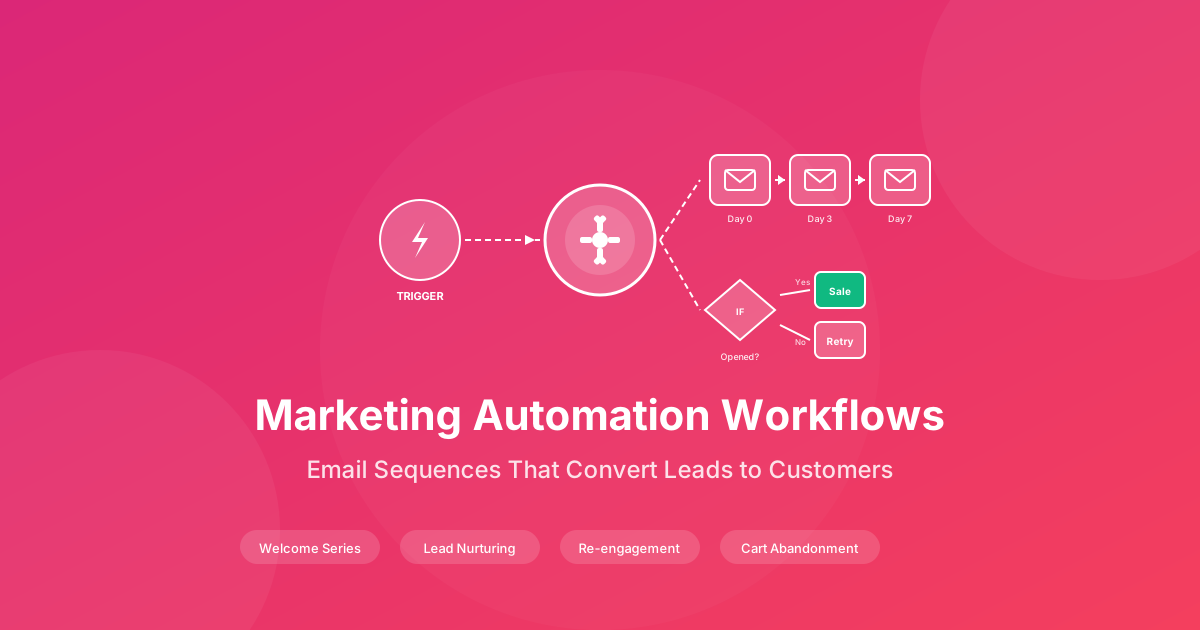
Marketing automation has transformed how businesses nurture leads and drive conversions. Yet many organizations struggle to implement effective automation strategies, often overwhelmed by the complexity of building multi-touch campaigns from scratch. The solution lies in proven marketing automation templates that provide the structure, timing, and messaging frameworks needed for successful implementation. Whether you are launching your first welcome sequence or optimizing an enterprise-scale nurture program, professional templates accelerate results while reducing costly trial and error. For comprehensive marketing resources, visit our Sales & Marketing Hub and Sales Operations Playbook. For ready-to-use templates, see our Content Marketing Strategy Template and Customer CRM Database Template.
Why Marketing Automation Templates Matter
Organizations that implement structured marketing automation consistently outperform those relying on manual processes. The data is compelling:
- Automated email campaigns generate 320% more revenue than non-automated campaigns
- Lead nurturing sequences produce 50% more sales-ready leads at 33% lower cost
- Trigger-based automation delivers 8x higher open rates than broadcast emails
- Personalized workflows increase click-through rates by 14% and conversions by 10%
- Properly timed sequences reduce sales cycle length by 23% on average
The cost of manual marketing processes
Without marketing automation, teams spend countless hours on repetitive tasks, leads go cold waiting for follow-up, and personalization becomes impossible at scale. Manual processes create inconsistent customer experiences and leave significant revenue on the table.
Understanding Email Automation Workflows
Email automation workflows are sequences of pre-written emails triggered by specific subscriber actions or time intervals. Unlike one-time broadcast campaigns, automated workflows run continuously, engaging prospects at exactly the right moment in their journey.
Trigger-Based vs. Time-Based Automation
Trigger-Based Automation responds to specific subscriber actions:
- Form submission or lead magnet download
- Website page visits or content engagement
- Purchase completion or cart abandonment
- Email opens, clicks, or replies
- Product usage milestones
Time-Based Automation follows scheduled intervals:
- Welcome series sent over the first 14 days
- Educational drip campaigns spread across weeks
- Re-engagement sequences after inactivity periods
- Anniversary or renewal reminder sequences
- Seasonal campaign preparations
The most effective marketing automation combines both trigger and time-based elements, creating responsive workflows that adapt to individual behavior while maintaining consistent touchpoints.
Essential Email Automation Workflows
1. Welcome Email Series
The welcome series is your most important automation workflow. New subscribers are at peak engagement, with welcome emails generating 4x higher open rates and 5x higher click rates than standard campaigns.
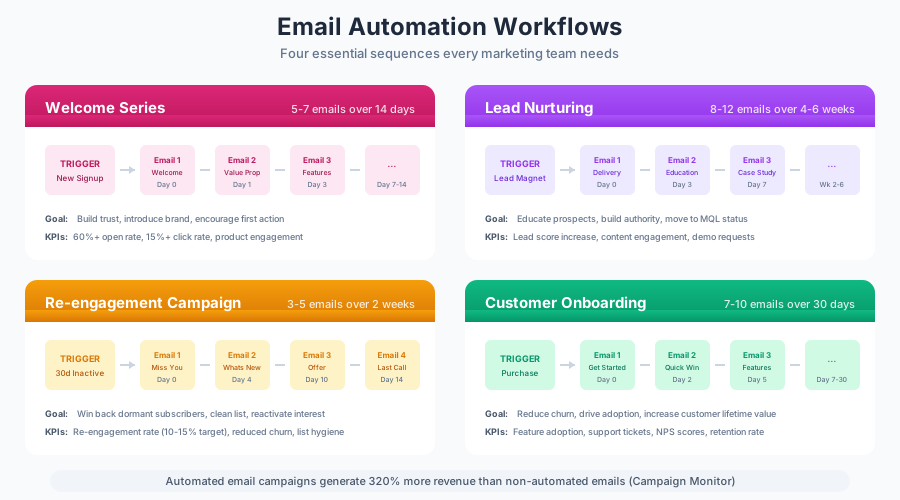
Welcome Series Template Structure:
| Timing | Purpose | Key Content | |
|---|---|---|---|
| Email 1 | Immediate | Deliver promised value | Lead magnet delivery, thank you message |
| Email 2 | Day 2 | Introduce your brand | Company story, mission, values |
| Email 3 | Day 4 | Provide value | Educational content, helpful tips |
| Email 4 | Day 7 | Social proof | Customer success stories, testimonials |
| Email 5 | Day 10 | Soft promotion | Product introduction, special offer |
| Email 6 | Day 14 | Clear CTA | Primary conversion action |
Welcome Email Best Practices:
- Send the first email within 5 minutes of signup
- Set clear expectations for future communication frequency
- Include a prominent unsubscribe option to maintain list health
- Segment by lead source to personalize the welcome experience
- A/B test subject lines to optimize open rates
2. Lead Nurturing Sequences
Lead nurturing workflows guide prospects through the buying journey, building trust and demonstrating value until they are ready to purchase. Effective nurturing addresses different stages of awareness and intent.
TOFU (Top of Funnel) Nurturing: Designed for leads who have shown initial interest but are not yet solution-aware:
| Week | Content Focus | Email Type |
|---|---|---|
| 1 | Problem identification | Educational blog content |
| 2 | Industry trends | Thought leadership article |
| 3 | Solution approaches | Comparison guide |
| 4 | Best practices | How-to content |
MOFU (Middle of Funnel) Nurturing: For leads actively researching solutions:
| Week | Content Focus | Email Type |
|---|---|---|
| 1 | Solution benefits | Product overview |
| 2 | Implementation details | Case study |
| 3 | ROI justification | ROI calculator, business case |
| 4 | Objection handling | FAQ content, comparison |
BOFU (Bottom of Funnel) Nurturing: For leads close to purchase decision:
| Week | Content Focus | Email Type |
|---|---|---|
| 1 | Social proof | Customer testimonials |
| 2 | Risk reduction | Guarantee, trial offer |
| 3 | Urgency creation | Limited-time offer |
| 4 | Decision support | Consultation invitation |
3. Abandoned Cart Recovery
For e-commerce and subscription businesses, abandoned cart sequences recover revenue that would otherwise be lost. The average cart abandonment rate exceeds 70%, making recovery automation essential.
Abandoned Cart Sequence Template:
| Timing | Subject Line Approach | Content Strategy | |
|---|---|---|---|
| Email 1 | 1 hour | Reminder | Cart contents, return link |
| Email 2 | 24 hours | Helpfulness | FAQ, support offer |
| Email 3 | 48 hours | Social proof | Reviews, testimonials |
| Email 4 | 72 hours | Incentive | Discount or free shipping |
| Email 5 | 7 days | Final attempt | Expiring offer, scarcity |
Recovery Email Best Practices:
- Include product images and pricing in every email
- Add customer service contact for questions
- Show related or alternative products
- Create urgency without being aggressive
- Test different incentive levels to optimize margin
4. Customer Onboarding Workflows
Post-purchase automation ensures customers successfully adopt your product, reducing churn and increasing lifetime value. Onboarding sequences should guide users through key activation milestones.
SaaS Onboarding Sequence:
| Day | Trigger | Email Focus |
|---|---|---|
| 0 | Purchase | Welcome, login instructions |
| 1 | No login | Gentle reminder, support offer |
| 3 | First login | Quick start guide, key features |
| 7 | Feature used | Advanced tips, next steps |
| 14 | Active usage | Success stories, referral request |
| 30 | Continued activity | Review request, upgrade options |
Onboarding Success Metrics:
- Time to first value (initial product use)
- Feature adoption rate
- Support ticket volume
- 30-day retention rate
- Net Promoter Score
5. Re-Engagement Campaigns
Re-engagement workflows target inactive subscribers before they become permanently disengaged. These sequences attempt to revive interest while cleaning your list of truly unresponsive contacts.
Re-Engagement Sequence Template:
| Timing | Approach | Goal | |
|---|---|---|---|
| Email 1 | Day 0 | "We miss you" | Acknowledge absence, offer value |
| Email 2 | Day 3 | Value reminder | Best content, key benefits |
| Email 3 | Day 7 | Preference update | Let them choose frequency/content |
| Email 4 | Day 14 | Final offer | Special incentive to return |
| Email 5 | Day 21 | Sunset warning | Inform of removal, final CTA |
Re-Engagement Timing Recommendations:
- B2C: Begin after 30-60 days of inactivity
- B2B: Begin after 60-90 days of inactivity
- High-frequency senders: Begin after 15-30 days
- Remove non-responders after the sequence completes
Advanced Marketing Automation Strategies
Behavioral Trigger Automation
Behavioral triggers create highly relevant, timely communications based on specific subscriber actions. These workflows achieve superior engagement because they respond to demonstrated interest.
Website Behavior Triggers:
- Pricing page visit: Send comparison guide or consultation offer
- Blog category engagement: Deliver related content series
- Product page views: Trigger product-specific nurture sequence
- Multiple visits without conversion: Offer assistance or incentive
- Documentation or support page visits: Proactive support outreach
Email Engagement Triggers:
- Opens without clicks: Send simplified, single-CTA follow-up
- Multiple link clicks: Accelerate to sales-ready sequence
- Forward or share: Request referral or testimonial
- Reply: Route to sales team for personal follow-up
Purchase Behavior Triggers:
- First purchase: Welcome to customer sequence
- Repeat purchase: Loyalty program invitation
- High-value purchase: VIP treatment sequence
- Product-specific: Cross-sell related items
- Purchase anniversary: Renewal or repurchase reminder
Lead Scoring Integration
Marketing automation becomes more powerful when integrated with lead scoring. As contacts engage with your content, their scores increase, triggering appropriate workflow transitions.
Lead Scoring Model Example:
| Action | Points | Workflow Trigger |
|---|---|---|
| Email open | 1 | None |
| Email click | 3 | None |
| Blog post view | 2 | Content interest sequence |
| Pricing page view | 10 | Sales-ready sequence |
| Webinar registration | 15 | Event follow-up sequence |
| Demo request | 25 | Sales team notification |
| Free trial signup | 30 | Onboarding sequence |
Score Thresholds:
- 0-25 points: Early-stage nurturing
- 26-50 points: Mid-funnel content
- 51-75 points: Bottom-funnel conversion focus
- 76+ points: Sales qualified, hand off to sales team
Dynamic Content Personalization
Dynamic content allows single emails to display different content blocks based on subscriber attributes, dramatically increasing relevance without creating multiple workflow versions.
Personalization Variables:
- Industry or company size
- Job title or role
- Geographic location
- Product interest or purchase history
- Engagement level or lifecycle stage
- Preferred content format
Dynamic Content Applications:
- Industry-specific case studies in nurture sequences
- Role-based feature highlights in product emails
- Localized offers and event invitations
- Personalized product recommendations
- Custom CTAs based on lifecycle stage
Email Template Best Practices
Subject Line Optimization
Subject lines determine whether your carefully crafted emails get opened. Follow these proven principles:
Effective Subject Line Formulas:
- Question format: "Struggling with [problem]?"
- How-to format: "How to [achieve desired outcome]"
- Number format: "5 ways to [solve problem]"
- Personalization: "[First name], your [resource] is ready"
- Curiosity gap: "The [thing] most [audience] overlook"
Subject Line Guidelines:
- Keep length between 30-50 characters for mobile optimization
- Front-load important words before truncation
- Avoid spam trigger words (free, guarantee, act now)
- Test emojis carefully, as they work differently by audience
- Match subject line promise to email content
Email Body Structure
Well-structured emails guide readers toward your desired action:
Optimal Email Structure:
- Hook (first 2 sentences): Capture attention, address pain point
- Value proposition (1-2 paragraphs): Explain the benefit
- Supporting content: Details, proof, or helpful information
- Clear CTA: Single, prominent call to action
- P.S. line: Reinforce key message or add secondary CTA
Formatting Best Practices:
- Use short paragraphs with 2-3 sentences maximum
- Include subheadings for scannable content
- Limit to one primary CTA per email
- Ensure mobile responsiveness with single-column layouts
- Maintain consistent brand voice throughout sequences
Timing Optimization
When you send matters almost as much as what you send. Optimal timing varies by audience and use case.
General Timing Guidelines:
| Audience Type | Best Days | Best Times |
|---|---|---|
| B2B | Tuesday-Thursday | 10 AM, 2 PM |
| B2C | Thursday-Sunday | 8 AM, 8 PM |
| E-commerce | Tuesday, Thursday | 10 AM, 7 PM |
| Newsletter | Same day weekly | Consistent time |
Sequence Spacing Recommendations:
- Welcome series: 2-3 days between emails
- Educational nurture: 3-5 days between emails
- Promotional sequences: 1-2 days between emails
- Re-engagement: 3-7 days between emails
Optimal send times vary significantly by industry and audience. Always A/B test timing with your specific subscriber base rather than relying solely on general benchmarks.
Measuring Marketing Automation Success
Key Performance Metrics
Track these metrics to evaluate and optimize your automation workflows:
Engagement Metrics:
- Open rate by sequence and email position
- Click-through rate (CTR) and click-to-open rate (CTOR)
- Reply rate for conversational sequences
- Unsubscribe rate by workflow
Conversion Metrics:
- Workflow completion rate
- Conversion rate by sequence goal
- Revenue attributed to automation
- Customer acquisition cost via automated channels
List Health Metrics:
- List growth rate
- Bounce rate (hard and soft)
- Spam complaint rate
- Inactive subscriber percentage
Workflow Performance Benchmarks
Compare your results against industry benchmarks:
| Metric | Average | Good | Excellent |
|---|---|---|---|
| Welcome series open rate | 50% | 60% | 70%+ |
| Nurture sequence open rate | 20% | 30% | 40%+ |
| Welcome series CTR | 10% | 15% | 20%+ |
| Nurture sequence CTR | 3% | 5% | 8%+ |
| Abandoned cart recovery rate | 5% | 10% | 15%+ |
| Re-engagement success rate | 10% | 20% | 30%+ |
Continuous Optimization
Marketing automation requires ongoing refinement:
A/B Testing Priorities:
- Subject lines (highest impact on open rates)
- CTA placement and copy
- Send timing and day of week
- Email length and format
- Personalization elements
Quarterly Review Checklist:
- Audit all active workflows for relevance
- Update content for current offers and messaging
- Review and adjust timing based on performance data
- Clean sequences of underperforming emails
- Add new triggers based on customer behavior patterns
Implementation Roadmap
Phase 1: Foundation (Weeks 1-2)
Goals:
- Define customer journey stages
- Map content to each stage
- Set up tracking and attribution
Deliverables:
- Customer journey documentation
- Content inventory by funnel stage
- UTM tracking conventions
- Basic automation platform setup
Phase 2: Core Workflows (Weeks 3-6)
Goals:
- Launch welcome series
- Implement basic lead nurturing
- Create first triggered sequences
Deliverables:
- 5-6 email welcome sequence
- TOFU nurture sequence
- Key behavioral triggers configured
- Initial performance benchmarks
Phase 3: Advanced Automation (Weeks 7-12)
Goals:
- Add scoring and segmentation
- Implement dynamic content
- Build full-funnel automation
Deliverables:
- Lead scoring model
- MOFU and BOFU sequences
- Abandoned cart or re-engagement workflows
- Comprehensive reporting dashboard
Phase 4: Optimization (Ongoing)
Goals:
- Continuous testing and improvement
- Scale successful workflows
- Expand trigger coverage
Activities:
- Weekly performance monitoring
- Monthly A/B testing program
- Quarterly workflow audits
- Annual strategy review
Common Marketing Automation Mistakes
1. Over-Automation
Sending too many automated emails overwhelms subscribers and increases unsubscribes. Implement frequency caps and coordinate across workflows.
2. Generic Content
Automation does not mean impersonal. Use segmentation and dynamic content to maintain relevance at scale.
3. Set and Forget
Automated workflows require ongoing attention. Review performance monthly and refresh content quarterly.
4. Missing Mobile Optimization
Over 60% of emails open on mobile devices. Test every automated email on multiple devices before activation.
5. Ignoring Deliverability
Automation amplifies deliverability issues. Monitor sender reputation, authenticate your domain, and maintain list hygiene.
6. Disconnected Workflows
Ensure workflows connect logically. Subscribers should not receive conflicting messages from different sequences simultaneously.
Marketing Automation Tools and Platforms
Platform Selection Criteria
When choosing automation software, evaluate:
- Ease of use: Visual workflow builders, intuitive interface
- Scalability: Pricing that grows with your list and needs
- Integration: Connections to your CRM, e-commerce, and analytics tools
- Deliverability: Reputation management and authentication features
- Support: Documentation, training, and customer service quality
- Advanced features: Lead scoring, dynamic content, A/B testing
Integration Requirements
Ensure your automation platform connects with:
- CRM system for lead and customer data
- E-commerce platform for purchase triggers
- Website analytics for behavior tracking
- Sales tools for handoff workflows
- Customer support for service-based triggers
For more on CRM integration, explore our CRM Implementation Guide.
Ready-to-Use Marketing Automation Templates
Our comprehensive marketing toolkit provides everything you need to build effective automation:
- Campaign Planning Templates - Content calendars and campaign frameworks
- Lead Generation Resources - Landing pages and lead magnet templates
- Sales Playbook Templates - Sales-marketing alignment guides
- CRM Implementation Guide - System setup and workflow configuration
Each template is tested, fully customizable, and includes implementation guidance to accelerate your automation success.
Transform Your Marketing Today
Effective marketing automation is no longer optional for businesses serious about growth. Professional templates and proven workflows provide the foundation for nurturing leads, driving conversions, and maximizing customer lifetime value.
Do not let manual processes and inconsistent follow-up limit your marketing potential. Implement structured automation workflows today and build the systems that drive predictable, scalable revenue growth.
Ready to automate your marketing? Explore our Sales & Marketing Hub and Campaign Resources to build world-class marketing automation that delivers consistent results.