CRM Implementation Checklist for SMBs: Complete Rollout Guide for Small Teams

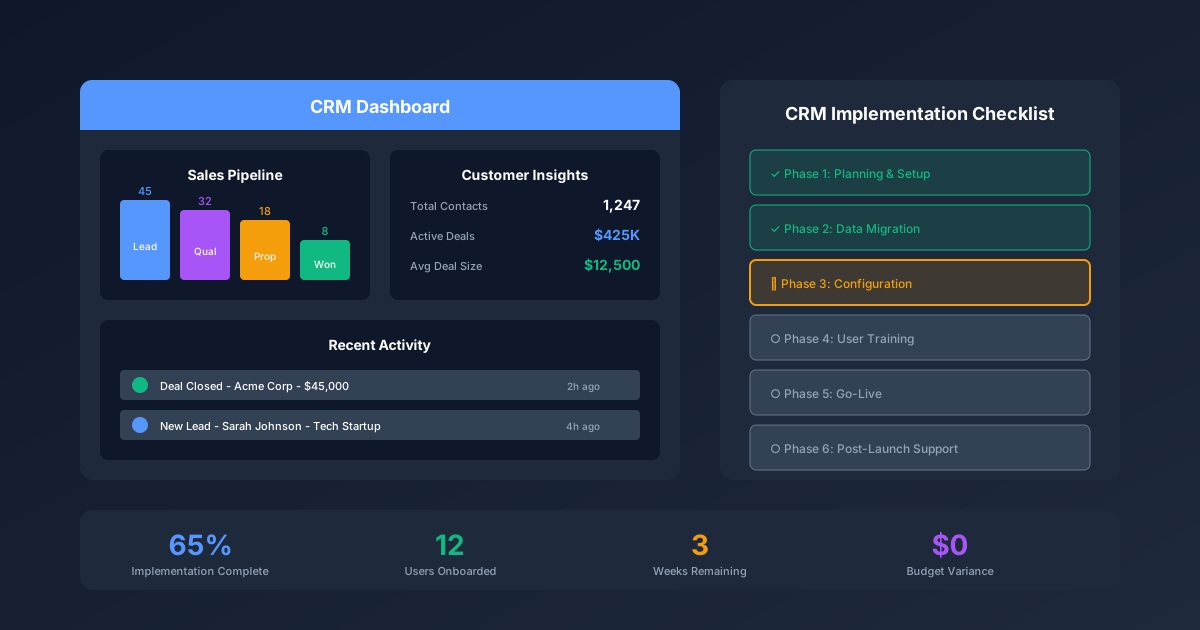
Implementing a CRM system as a small or medium-sized business presents unique challenges that enterprise guides simply do not address. You likely do not have a dedicated IT department, your budget is measured in hundreds rather than thousands per month, and you need results in weeks rather than quarters. The good news is that modern CRM platforms have made powerful sales tools accessible to businesses of any size. The challenge is implementing them correctly without the resources larger companies take for granted. For comprehensive sales resources, visit our Sales & Marketing Hub and explore our CRM templates.
Why SMBs Need a Different CRM Approach
Enterprise CRM implementation guides assume resources that small businesses simply do not have. Understanding these differences is the first step toward a successful implementation.
Enterprise assumptions that do not apply to SMBs:
- Dedicated project managers and implementation teams
- Six-figure implementation budgets
- Three to six month timelines
- IT staff to handle technical configuration
- Change management consultants
- Formal training departments
What SMBs actually have:
- One person wearing multiple hats as the CRM champion
- Monthly budgets under $500 for all sales tools
- Need for results within four to six weeks
- Limited technical expertise on staff
- Team members who resist new tools
- Existing data scattered across spreadsheets, email, and sticky notes
This guide addresses these realities with a practical, checklist-driven approach designed for teams under 50 employees.
The cost of getting it wrong
Failed CRM implementations waste more than money. They create organizational skepticism that makes future technology adoption harder. When a CRM rollout fails at an SMB, you typically see:
- Three to six months of wasted effort
- Team resistance to any future sales tools
- Data quality problems that compound over time
- Lost deals due to dropped follow-ups during transition
- The eventual return to spreadsheets
Successful SMB CRM implementations share common patterns: realistic timelines, focused feature adoption, strong executive sponsorship, and relentless attention to data quality.
Phase 1: CRM Selection (Week 1)
Choosing the right CRM is the most consequential decision in your implementation. The wrong choice creates friction that no amount of training can overcome.
Selection criteria for SMBs
Evaluate CRM platforms against these SMB-specific criteria:
1. Total cost of ownership
Look beyond the per-seat price:
| Cost Factor | Questions to Ask |
|---|---|
| Base subscription | What is the per-user monthly cost at your team size? |
| Required add-ons | Which features require paid upgrades? |
| Implementation | Is professional setup required or optional? |
| Training | Are training resources included or extra? |
| Integrations | Do essential integrations require paid tiers? |
| Data migration | Is migration assistance included? |
| Support | What support level is included vs premium? |
2. Ease of use
For teams without IT support, usability is paramount:
- Can a non-technical person configure basic workflows?
- Is the mobile app functional for field sales?
- How intuitive is the interface for reluctant users?
- What is the learning curve for daily tasks?
3. Integration capabilities
Identify your must-have integrations before selecting:
- Email (Gmail, Outlook)
- Calendar synchronization
- Marketing tools (if applicable)
- Accounting software
- Communication tools (Slack, Teams)
4. Scalability path
Consider where you will be in two to three years:
- What are the pricing tiers as you grow?
- Are there user limits that would force migration?
- Do enterprise features exist if you need them later?
CRM comparison by budget tier
Here is how popular CRMs compare for SMB needs:
Free tier (Under $0/month)
| Platform | Users | Key Limitations | Best For |
|---|---|---|---|
| HubSpot Free | Unlimited | Limited automation, HubSpot branding | Marketing-sales alignment |
| Zoho CRM Free | 3 users | Basic features only | Micro businesses |
| Freshsales Free | 3 users | Limited customization | Simple sales processes |
Starter tier ($15-30/user/month)
| Platform | Starting Price | Key Features | Best For |
|---|---|---|---|
| Pipedrive Essential | $15/user | Visual pipeline, email sync | Pipeline-focused teams |
| HubSpot Starter | $20/user | Marketing tools, automation | Inbound-focused SMBs |
| Zoho CRM Standard | $20/user | Workflows, forecasting | Budget-conscious teams |
| Salesforce Essentials | $25/user | Salesforce ecosystem | Future enterprise growth |
| Freshsales Growth | $18/user | AI scoring, sequences | Tech-forward SMBs |
Professional tier ($50-100/user/month)
| Platform | Starting Price | Key Features | Best For |
|---|---|---|---|
| Pipedrive Professional | $50/user | Advanced automation, reporting | Scaling sales teams |
| HubSpot Professional | $100/user | Full automation, sequences | Growth-stage companies |
| Zoho CRM Professional | $35/user | Blueprints, analytics | Process-driven teams |
Selection checklist
Before making your final decision, verify:
- Signed up for free trials of top two to three options
- Tested actual daily workflows in each platform
- Verified all required integrations work
- Calculated true cost for your team size
- Confirmed mobile app meets field requirements
- Checked customer support responsiveness
- Read recent reviews from similar-sized companies
- Verified data export capabilities (avoid lock-in)
Phase 2: Pre-Implementation Planning (Week 1-2)
Successful implementation requires preparation before touching the CRM platform. This phase prevents the most common SMB implementation failures.
Define your sales process
Before configuring any technology, document your actual sales process:
Pipeline stages
Map your real sales progression (keep it simple for SMBs):
| Stage | Definition | Exit Criteria | Typical Duration |
|---|---|---|---|
| Lead | New potential opportunity | Qualified as worth pursuing | 1-3 days |
| Qualified | Confirmed need, budget, authority | Discovery meeting scheduled | 3-7 days |
| Discovery | Understanding requirements | Proposal requested | 1-2 weeks |
| Proposal | Quote or proposal delivered | Verbal commitment or rejection | 1-2 weeks |
| Negotiation | Terms being finalized | Contract signed or lost | 1-2 weeks |
| Closed Won | Deal completed | Payment received | — |
| Closed Lost | Deal not happening | Reason documented | — |
SMB tip: Start with five to seven stages maximum. You can always add complexity later, but starting complex leads to poor adoption.
Required data fields
Identify the minimum information you need to track:
Contact fields:
- Name, email, phone (required)
- Company, title (required for B2B)
- Lead source (for marketing ROI)
- Owner (for accountability)
Deal fields:
- Deal name, amount (required)
- Stage, close date (required)
- Products or services (if multiple offerings)
- Competitor (if relevant)
Avoid field bloat: Every additional required field reduces data entry compliance. For SMBs, start with 10-15 total fields maximum.
Audit existing data
Before migration, assess your current data state:
Data source inventory
| Source | Records | Quality | Priority |
|---|---|---|---|
| Primary spreadsheet | ~500 contacts | Medium - some outdated | High |
| Email contacts | ~2,000 | Low - many personal | Medium |
| Business cards | ~100 | Varies | Low |
| Old CRM | ~300 | Medium | High |
| LinkedIn exports | ~400 | Medium | Low |
Data quality assessment
For your primary data sources, evaluate:
- What percentage of records have valid email addresses?
- How many duplicates exist?
- When was the data last updated?
- Are there obvious formatting inconsistencies?
- What percentage would you actually want to contact?
Clean data before migration. It is far easier to fix 500 records in a spreadsheet than 500 records scattered across a new CRM.
Identify your CRM champion
Every successful SMB implementation has one person who owns success:
CRM champion responsibilities:
- Lead platform selection and configuration
- Own data migration and quality
- Train team members
- Monitor adoption metrics
- Troubleshoot user issues
- Communicate with vendor support
Time commitment: Plan for 10-15 hours per week during implementation, dropping to 2-3 hours weekly for ongoing maintenance.
Ideal champion profile:
- Uses the CRM daily (not just manages it)
- Has credibility with the sales team
- Is comfortable with technology (not necessarily technical)
- Has authority to enforce adoption
Create your implementation timeline
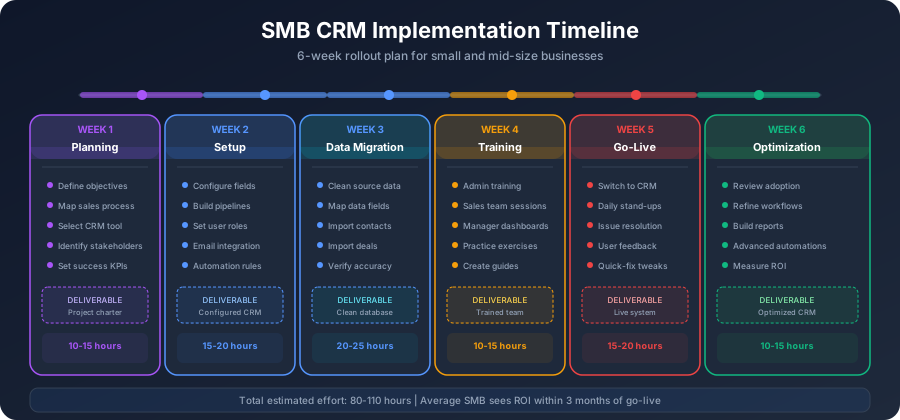
Realistic SMB timeline for a team of 5-15 users:
| Week | Phase | Key Activities |
|---|---|---|
| Week 1 | Selection | Evaluate options, make decision |
| Week 2 | Planning | Document process, audit data, clean records |
| Week 3 | Configuration | Set up CRM, customize fields, build pipeline |
| Week 4 | Migration | Import data, verify accuracy, set up integrations |
| Week 5 | Training | Train users, pilot with subset |
| Week 6 | Launch | Full team rollout, daily support |
| Week 7-8 | Optimization | Address issues, refine processes |
Phase 3: CRM Configuration (Week 3)
With planning complete, configure your CRM platform. The goal is a system that matches your sales process, not the other way around.
Account setup checklist
Complete these administrative tasks first:
- Create admin account with strong password
- Enable two-factor authentication
- Set company information and branding
- Configure timezone and currency
- Set up user roles (admin, standard user, read-only)
- Invite users but do not activate yet (wait for training)
Pipeline configuration
Build your pipeline based on the sales process you documented:
Stage setup best practices:
-
Name stages from the buyer's perspective
- Good: "Evaluating Options"
- Bad: "Sent Proposal"
-
Assign probability percentages
| Stage | Suggested Probability |
|---|---|
| Lead | 10% |
| Qualified | 20% |
| Discovery | 40% |
| Proposal | 60% |
| Negotiation | 80% |
| Closed Won | 100% |
| Closed Lost | 0% |
- Set stage requirements
- What fields must be completed to enter this stage?
- Keep requirements minimal for early stages
- Increase requirements as deals progress
Custom field configuration
Create only the fields you identified as necessary:
Contact/Company fields:
| Field Name | Type | Required | Purpose |
|---|---|---|---|
| Lead Source | Dropdown | Yes | Marketing attribution |
| Industry | Dropdown | No | Segmentation |
| Company Size | Dropdown | No | Qualification |
| Last Contact Date | Date | Auto | Activity tracking |
Deal fields:
| Field Name | Type | Required | Purpose |
|---|---|---|---|
| Deal Type | Dropdown | Yes | New vs expansion |
| Products | Multi-select | Yes | Revenue analysis |
| Competitor | Dropdown | No | Win/loss analysis |
| Lost Reason | Dropdown | If lost | Process improvement |
Automation setup
Start with simple automations that save time without adding complexity:
Recommended starter automations:
-
Task creation on stage change
- When deal enters "Proposal": Create task "Send proposal within 48 hours"
- When deal enters "Negotiation": Create task "Schedule contract review call"
-
Notification automations
- Email CRM champion when deal over $X enters pipeline
- Alert manager when deal stalls in stage for 14+ days
-
Data quality automations
- Flag contacts without email addresses
- Highlight deals without close dates
Avoid over-automation: Each automation adds complexity. Start with three to five automations maximum and add more only when needed.
Email integration
Connect email to reduce manual data entry:
Gmail integration checklist:
- Authorize Gmail connection
- Enable email tracking (opens, clicks)
- Configure email logging preferences
- Test two-way sync functionality
- Set up email templates
Outlook integration checklist:
- Install Outlook add-in
- Authorize connection
- Configure sync settings
- Test email logging
- Verify calendar sync
Dashboard setup
Create dashboards that drive behavior:
Sales team dashboard (individual view):
- My open deals by stage
- My tasks due today
- My activity this week
- My deals closing this month
Manager dashboard:
- Pipeline by rep
- Forecast vs target
- Activity metrics by rep
- Stalled deals requiring attention
Company dashboard:
- Total pipeline value
- Win rate trend
- Average deal size
- Sales cycle length
Phase 4: Data Migration (Week 4)
Data migration is where many SMB implementations fail. Careful execution prevents months of cleanup later.
Pre-migration data cleaning
Clean your data in spreadsheets before importing:
Step 1: Consolidate sources
Combine all data sources into a single master spreadsheet with consistent columns.
Step 2: Remove duplicates
Use spreadsheet functions or tools like:
- Excel: Remove Duplicates feature
- Google Sheets: Remove duplicates add-on
- Dedupe.io for complex matching
Step 3: Standardize formatting
| Field | Problem | Solution |
|---|---|---|
| Phone | Mixed formats | Standardize to (XXX) XXX-XXXX |
| State | Mix of full names and abbreviations | Convert all to two-letter codes |
| Company | Inc, Inc., Incorporated | Pick one format |
| Names | ALL CAPS or all lowercase | Convert to Title Case |
Step 4: Validate email addresses
Use email validation tools to identify:
- Invalid formats
- Non-existent domains
- Known spam traps
Step 5: Enrich missing data
For high-value contacts missing information:
- LinkedIn lookup for titles and companies
- Company website for phone numbers
- Email verification services
Migration execution
Follow this process for error-free migration:
1. Create field mapping document
| Spreadsheet Column | CRM Field | Notes |
|---|---|---|
| Contact Name | First Name, Last Name | Split during import |
| Direct mapping | ||
| Company | Company Name | Direct mapping |
| Phone | Phone | Format: (XXX) XXX-XXXX |
| Source | Lead Source | Map values to dropdown options |
2. Test with small batch
- Import 20-50 records first
- Verify all fields mapped correctly
- Check for duplicates created
- Confirm relationships intact
- Delete test records or mark clearly
3. Import in segments
Import data in logical batches:
- Companies first (if CRM requires)
- Contacts second, linked to companies
- Deals third, linked to contacts
- Activities last (if importing history)
4. Verify accuracy
After each import batch:
- Spot check 10% of records
- Run duplicate detection
- Verify dropdown values mapped correctly
- Check that relationships are intact
Post-migration validation checklist
- Total record count matches source
- No unexpected duplicates
- Required fields populated
- Dropdown values display correctly
- Email addresses valid format
- Phone numbers consistent format
- Deal amounts correct
- Deal stages accurate
- Contact-company relationships intact
- Contact-deal relationships intact
Phase 5: Integration Setup (Week 4)
Connect your CRM to the tools your team already uses. For SMBs, focus on high-impact integrations first.
Priority integrations for SMBs
Tier 1: Essential (implement immediately)
| Integration | Purpose | Benefit |
|---|---|---|
| Email (Gmail/Outlook) | Automatic email logging | Eliminates manual logging |
| Calendar | Meeting sync | Shows activities automatically |
Tier 2: High Value (implement week one)
| Integration | Purpose | Benefit |
|---|---|---|
| Marketing platform | Lead sync | Automatic lead creation |
| Proposal tool | Document tracking | Know when proposals viewed |
| Communication (Slack/Teams) | Notifications | Real-time deal alerts |
Tier 3: Operational (implement month one)
| Integration | Purpose | Benefit |
|---|---|---|
| Accounting (QuickBooks/Xero) | Invoice sync | Revenue tracking |
| Support (Zendesk/Freshdesk) | Ticket visibility | Customer context |
| Scheduling (Calendly) | Meeting booking | Lead capture |
Integration testing checklist
For each integration, verify:
- Connection established successfully
- Data flows in correct direction
- Field mapping accurate
- Duplicates not created
- Real-time vs batch sync understood
- Error handling configured
- Disconnect process known (if needed)
Common integration pitfalls
Duplicate creation
- Problem: Integration creates new contacts that already exist
- Solution: Configure duplicate detection rules before enabling sync
Field conflicts
- Problem: Same field updated by multiple systems
- Solution: Designate one system as source of truth for each field
Over-syncing
- Problem: Too much data flows between systems
- Solution: Sync only what is needed, exclude personal emails
Phase 6: User Training (Week 5)
Training determines whether your CRM becomes an asset or an expensive address book. For SMBs, training must be practical and immediate.
Training approach for small teams
Avoid the common mistakes:
- Do not schedule four-hour training sessions
- Do not train on features users will not use
- Do not expect one training to create proficiency
- Do not train everyone at once if possible
Effective SMB training model:
-
Champion training first (2-3 hours)
- Deep dive on administration
- Advanced features and troubleshooting
- Reporting and dashboard creation
-
Power user training (1-2 hours)
- One to two early adopters per team
- Full feature training
- These become peer resources
-
Team training (30-60 minutes)
- Focus on daily workflows only
- Hands-on practice with real data
- Immediate application to current deals
Training content by role
Sales representatives (30-45 minutes)
| Topic | Time | Outcome |
|---|---|---|
| Login and navigation | 5 min | Can access CRM |
| Contact creation | 5 min | Can add new contacts |
| Deal creation | 5 min | Can create opportunities |
| Pipeline management | 10 min | Can move deals through stages |
| Activity logging | 5 min | Can log calls, meetings, notes |
| Task management | 5 min | Can create and complete tasks |
| Email integration | 5 min | Can log emails automatically |
Sales managers (additional 30 minutes)
| Topic | Time | Outcome |
|---|---|---|
| Pipeline reporting | 10 min | Can view team pipeline |
| Activity reports | 10 min | Can monitor team activity |
| Forecasting | 10 min | Can generate forecasts |
Training reinforcement
Training is not complete after the session:
Week 1 post-training:
- Daily check-ins with each user
- Address questions immediately
- Celebrate early wins publicly
Week 2-4 post-training:
- Weekly office hours for questions
- Review individual adoption metrics
- One-on-one coaching for struggling users
Ongoing:
- Monthly tips via email or Slack
- Quarterly refresher sessions
- Training on new features as released
Overcoming resistance
Address common objections proactively:
"I do not have time for this"
- Show specific time savings (email logging, mobile access)
- Demonstrate how CRM prevents lost deals
- Start with minimal required fields
"My spreadsheet works fine"
- Acknowledge their system works for them
- Highlight limitations (collaboration, reporting, mobile)
- Frame CRM as evolution, not replacement
"This is micromanagement"
- Position CRM as tool for them, not surveillance
- Emphasize features that help them (reminders, history)
- Ensure managers use data supportively, not punitively
"The old CRM failed"
- Acknowledge past issues
- Explain what is different this time
- Start small and prove value
Phase 7: Launch and Adoption (Week 6)
Launch day is not the finish line—it is the starting line. Success depends on what happens in the weeks following launch.
Launch checklist
Day before launch:
- All users have active accounts
- All users completed training
- Data migration verified
- Integrations tested
- Dashboards configured
- Support escalation path clear
Launch day:
- Send launch announcement
- CRM champion available all day
- Quick reference guides distributed
- First day tasks assigned (add 5 contacts)
- End-of-day check-in scheduled
Week one:
- Daily adoption metrics review
- Individual user check-ins
- Issue tracking and resolution
- Quick wins celebrated
- Struggling users identified
Adoption metrics to track
Monitor these metrics weekly during rollout:
| Metric | Target | Red Flag |
|---|---|---|
| Daily active users | 80%+ of team | Under 50% |
| Contacts added per user | 5+ per week | Under 2 |
| Deals updated per user | 3+ per week | None |
| Emails logged | 10+ per user per week | Under 5 |
| Tasks completed | 5+ per user per week | Under 2 |
| Mobile app logins | 2+ per user per week | None |
Driving adoption
Make CRM usage non-optional
- Pipeline reviews use CRM only (no spreadsheets)
- Commissions calculated from CRM data
- Forecasts pulled from CRM
- Team meetings reference CRM dashboards
Remove friction
- Pre-populate fields where possible
- Create templates for common activities
- Enable mobile app for field access
- Set up keyboard shortcuts
Celebrate adoption
- Public recognition for CRM champions
- Share wins enabled by CRM data
- Highlight time saved with examples
- Create friendly competition around data quality
Phase 8: Optimization (Week 7-8 and Ongoing)
The first version of your CRM setup will not be perfect. Plan for iteration based on real usage.
Week 7-8 optimization sprint
Gather feedback systematically:
| Question | Purpose |
|---|---|
| What takes too many clicks? | Identify workflow friction |
| What information is hard to find? | Improve dashboard/layout |
| What are you still tracking outside CRM? | Identify missing fields |
| What feels like busywork? | Reduce unnecessary requirements |
Common first-month optimizations:
- Simplify pipeline stages (remove unused stages)
- Add missing dropdown values
- Create saved filters for common searches
- Build additional report templates
- Add automation for repetitive tasks
- Adjust required fields based on actual usage
Ongoing optimization cadence
Monthly:
- Review adoption metrics
- Address user-reported issues
- Add one to two small improvements
Quarterly:
- Deep dive on data quality
- Review and update automations
- Assess integration performance
- Training refresher on underused features
Annually:
- Full CRM audit
- Evaluate platform against alternatives
- Major process improvements
- Archive or purge old data
Data quality maintenance
Clean data requires ongoing attention:
Weekly tasks:
- Review records created without required fields
- Merge duplicates identified by CRM
- Update stale deal close dates
Monthly tasks:
- Run duplicate detection report
- Review and update inactive contacts
- Verify pipeline stage accuracy
- Clean up closed-lost deals
Quarterly tasks:
- Validate email addresses in bulk
- Archive contacts with no activity (2+ years)
- Review and update dropdown values
- Audit user permissions
Common SMB Implementation Mistakes
Learn from others' failures to avoid your own:
Mistake 1: Starting with too many features
Problem: Configuring every available feature creates complexity that kills adoption.
Solution: Start with core functionality only:
- Contacts and companies
- Deals and pipeline
- Basic activity tracking
- Email integration
Add features only when there is a clear need and user demand.
Mistake 2: Inadequate data cleaning
Problem: Migrating dirty data creates instant distrust in the CRM.
Solution: Spend more time cleaning than you think necessary. Users who find bad data on day one may never trust the system.
Mistake 3: No executive sponsorship
Problem: Without leadership buy-in, CRM becomes optional and dies slowly.
Solution: Ensure the business owner or sales leader:
- Uses the CRM themselves
- References CRM in every pipeline discussion
- Holds team accountable for adoption
- Celebrates CRM-enabled wins
Mistake 4: Training once and forgetting
Problem: One training session does not create lasting habits.
Solution: Plan for ongoing reinforcement:
- Weekly check-ins for first month
- Monthly tips and tricks
- Quarterly refreshers
- Annual feature updates
Mistake 5: Customizing before understanding
Problem: Heavy customization before learning the platform creates technical debt.
Solution: Use the CRM as-is for 30 days before customizing. Many perceived needs disappear once users understand the platform.
Mistake 6: Ignoring mobile
Problem: Field sales cannot access CRM when it matters most.
Solution: Test mobile experience thoroughly:
- Can users log calls from the parking lot?
- Can they look up contact info before meetings?
- Does the app work offline?
Mistake 7: No single source of truth
Problem: Allowing data in CRM and spreadsheets creates confusion about which is accurate.
Solution: Set a hard cutover date. After that date:
- Pipeline reviews use CRM only
- Spreadsheet pipelines are deleted
- No exceptions for anyone
CRM Implementation Checklist Summary
Use this master checklist to track your implementation:
Week 1: Selection
- Define requirements and budget
- Evaluate three to five CRM options
- Complete free trials with real workflows
- Make final selection
- Purchase subscription
Week 2: Planning
- Document sales process and stages
- Define required fields
- Audit existing data sources
- Appoint CRM champion
- Create implementation timeline
- Communicate plan to team
Week 3: Configuration
- Complete account setup
- Configure pipeline stages
- Create custom fields
- Set up basic automations
- Configure email integration
- Build initial dashboards
Week 4: Migration and Integration
- Clean data in spreadsheets
- Test import with small batch
- Execute full migration
- Verify data accuracy
- Connect priority integrations
- Test integration flows
Week 5: Training
- Train CRM champion (deep)
- Train power users
- Train full team
- Distribute quick reference guides
- Set up support channels
Week 6: Launch
- Execute launch day plan
- Monitor daily adoption
- Provide immediate support
- Track metrics weekly
- Address issues quickly
Week 7-8: Optimization
- Gather user feedback
- Implement quick fixes
- Refine workflows
- Establish ongoing cadence
Ready-to-Use CRM Implementation Resources
Our comprehensive CRM toolkit includes everything you need for successful implementation:
- CRM Implementation Guide - Complete setup documentation
- Sales Pipeline Template - Pipeline configuration framework
- Sales Operations Playbook - Process standardization
- Lead Generation Framework - Top-of-funnel optimization
- Customer Development CRM - Startup-specific CRM approach
Each resource is designed for SMB teams, fully customizable, and includes step-by-step implementation guidance.
Start Your CRM Implementation Today
A well-implemented CRM transforms how your small business sells. It eliminates the chaos of scattered data, provides visibility into your pipeline, and creates accountability across your team. The key is approaching implementation with realistic expectations, adequate preparation, and relentless focus on adoption.
Do not let the perfect be the enemy of the good. Start with the basics, prove value quickly, and iterate based on real usage. Your team does not need every feature—they need a system they will actually use.
Ready to implement your CRM the right way? Get our CRM Implementation Toolkit to access checklists, templates, and configuration guides designed specifically for small business teams.