Headcount Planning Template: Strategic Workforce Budgeting Guide

Headcount planning is the foundation of strategic workforce management. Without accurate headcount projections, organizations face budget overruns, understaffing crises, or costly overhiring that drains resources. Research shows that companies with mature workforce planning capabilities achieve 30% lower labor costs while maintaining higher productivity.
This comprehensive guide walks you through building a headcount planning template that integrates hiring timelines, attrition assumptions, and budget constraints into a single cohesive model. For additional HR resources, visit our HR Management Hub, HR Policy & Compliance Center, and Financial Planning Hub. For ready-to-use templates, see our Salary Planning Template and IT Departmental Budget Template.
Quick Start: Use our free Employee Cost Calculator to calculate the true fully-loaded cost of each position including taxes, benefits, and overhead.
What is Headcount Planning?
Headcount planning is the process of forecasting workforce needs by projecting the number of employees (full-time equivalents or FTEs) required to meet business objectives, then aligning those projections with budget constraints and hiring capacity.
A comprehensive headcount plan answers these critical questions:
- How many people do we need, by role and department?
- When do we need them (hiring timeline)?
- How many people will we lose (attrition forecast)?
- What will it cost (budget integration)?
- Can we hire fast enough (recruiting capacity)?
The Core Formula:
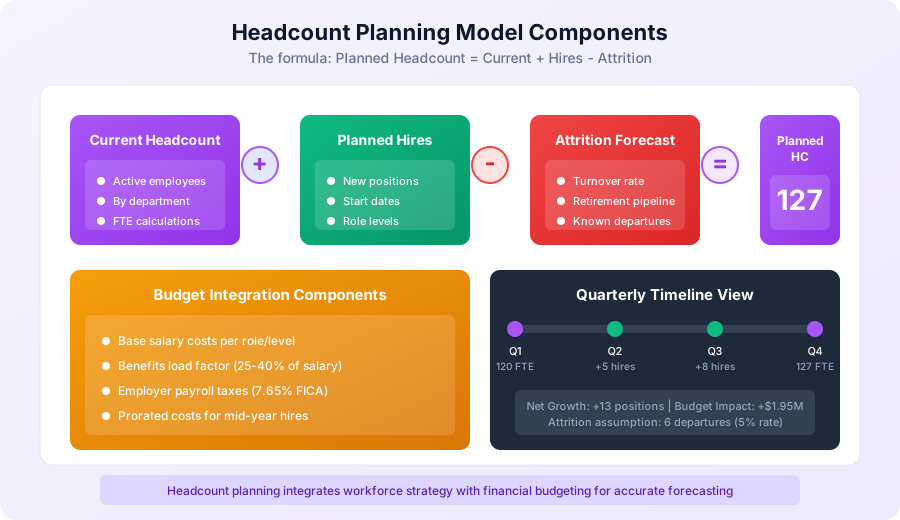
Planned Ending Headcount = Starting Headcount + New Hires - Attrition

Budget Impact = (Planned HC x Avg Fully-Loaded Cost) - Current Payroll
Why Strategic Headcount Planning Matters
Organizations without disciplined headcount planning face predictable problems:
Budget Problems:
- 58% of companies exceed their personnel budget annually
- Average overspend: 12-18% of planned labor costs
- Root cause: Uncoordinated hiring decisions and poor attrition forecasting
Operational Problems:
- Critical projects delayed due to understaffing
- Knowledge gaps when key employees depart
- Inconsistent service levels from staffing fluctuations
Strategic Problems:
- Inability to scale for growth opportunities
- Reactive hiring leads to poor-fit candidates
- No visibility into future workforce composition
Financial Problems:
- Recruiting costs surge with unplanned urgent hires
- Severance costs from over-hiring corrections
- Lost productivity during extended vacancy periods
A well-designed headcount planning template transforms workforce management from reactive firefighting to proactive strategy.
Understanding FTE Calculations
Before building your headcount plan, master Full-Time Equivalent (FTE) calculations—the universal currency of workforce planning.
What is an FTE?
An FTE (Full-Time Equivalent) represents the workload of one full-time employee. It standardizes headcount by converting part-time, contract, and variable-hour workers into a common metric.
Standard Definition:
- 1.0 FTE = 40 hours per week (2,080 hours annually in the US)
- 0.5 FTE = 20 hours per week (part-time)
- 0.75 FTE = 30 hours per week
FTE Calculation Methods
Method 1: Hours-Based Calculation
FTE = Actual Hours Worked / Standard Full-Time Hours

Example:
- Employee works 32 hours/week
- Standard full-time: 40 hours/week
- FTE = 32 / 40 = 0.80 FTE
Method 2: Schedule-Based Calculation
FTE = Days Worked Per Week / Standard Work Week

Example:
- Employee works Monday, Tuesday, Wednesday (3 days)
- Standard work week: 5 days
- FTE = 3 / 5 = 0.60 FTE
Method 3: Annual Hours (for variable schedules)
FTE = Total Annual Hours / 2,080

Example:
- Seasonal employee works 1,040 hours/year
- FTE = 1,040 / 2,080 = 0.50 FTE
FTE Categories in Headcount Planning
| Category | Definition | FTE Treatment |
|---|---|---|
| Full-time Regular | 40+ hours/week, permanent | 1.0 FTE |
| Part-time Regular | Less than 40 hours/week, permanent | Proportional (0.5-0.9) |
| Full-time Temporary | 40+ hours/week, fixed duration | 1.0 FTE (time-limited) |
| Contract/Consultant | External worker, variable | Often excluded or separate |
| Intern | Seasonal/learning role | 0.5-1.0 FTE (separate category) |
Best Practice: Track regular employees and contingent workers separately in your headcount plan, but include both in budget calculations.
FTE vs Headcount
Understanding when to use each metric:
| Metric | Best For | Example |
|---|---|---|
| Headcount | Benefits administration, desk/equipment planning | "We have 150 employees (150 health plans needed)" |
| FTE | Workload planning, productivity metrics, budgeting | "We have 142.5 FTEs (capacity for 142.5 full workloads)" |
Pro Tip: Most budget models use FTE for cost calculations because a 0.5 FTE costs roughly half of a 1.0 FTE in salary and proportional benefits.
Building Your Headcount Planning Template
A comprehensive headcount planning template includes six interconnected components.
Component 1: Current State Roster
Your baseline—every active employee with workforce planning attributes.
Required Fields:
| Field | Description | Example |
|---|---|---|
| Employee ID | Unique identifier | EMP-2847 |
| Name | Full name | Sarah Chen |
| Department | Org unit/cost center | Engineering |
| Team/Group | Sub-department | Platform Team |
| Job Title | Current role | Senior Software Engineer |
| Job Level | Grade/band | L5 |
| FTE | Full-time equivalent | 1.0 |
| Location | Work location | San Francisco |
| Start Date | Hire date | 2022-06-15 |
| Annual Salary | Base compensation | $165,000 |
| Manager | Reports to | David Park |
| Status | Active/LOA/Pending | Active |
Data Sources:
- HRIS system (Workday, BambooHR, ADP)
- Payroll system
- Org chart tool
Summary Calculations:
| Department | Headcount | FTEs | Avg Salary | Total Payroll |
|---|---|---|---|---|
| Engineering | 45 | 44.5 | $155,000 | $6,897,500 |
| Sales | 32 | 31.0 | $125,000 | $3,875,000 |
| Marketing | 18 | 17.5 | $105,000 | $1,837,500 |
| Operations | 22 | 22.0 | $78,000 | $1,716,000 |
| Finance | 12 | 12.0 | $115,000 | $1,380,000 |
| HR | 8 | 7.5 | $95,000 | $712,500 |
| Total | 137 | 134.5 | $120,441 | $16,418,500 |
Component 2: Hiring Plan
Your growth projections—new positions by role, department, and timing.
Hiring Plan Structure:
| Field | Description | Example |
|---|---|---|
| Requisition ID | Tracking number | REQ-2025-0042 |
| Job Title | Role to fill | Data Engineer |
| Department | Hiring department | Engineering |
| Level | Seniority/grade | L4 |
| FTE | Full/part-time | 1.0 |
| Target Start Date | Expected hire date | 2025-04-01 |
| Salary Range | Budgeted compensation | $130,000-$155,000 |
| Hiring Manager | Requesting manager | Sarah Chen |
| Justification | Business rationale | Data infrastructure expansion |
| Status | Pipeline stage | Approved/Sourcing |
| Backfill | Replacing departure? | No (new position) |
Hiring Plan by Quarter:
| Department | Q1 Hires | Q2 Hires | Q3 Hires | Q4 Hires | Annual Total |
|---|---|---|---|---|---|
| Engineering | 3 | 5 | 6 | 4 | 18 |
| Sales | 2 | 4 | 3 | 3 | 12 |
| Marketing | 1 | 2 | 2 | 1 | 6 |
| Operations | 1 | 2 | 2 | 2 | 7 |
| Finance | 0 | 1 | 1 | 0 | 2 |
| HR | 0 | 1 | 0 | 1 | 2 |
| Total | 7 | 15 | 14 | 11 | 47 |
Component 3: Attrition Forecast
Your shrinkage projection—expected departures based on historical patterns and known events.
Attrition Types:
| Type | Definition | Predictability |
|---|---|---|
| Voluntary Resignation | Employee-initiated departure | Low (model with rate) |
| Involuntary Termination | Company-initiated separation | Medium (planned) |
| Retirement | Age/tenure-based departure | High (predictable) |
| End of Contract | Fixed-term completion | High (known date) |
| Internal Transfer | Movement within company | Medium (often planned) |
| Leave of Absence | Extended unpaid leave | Medium (known duration) |
Historical Attrition Analysis:
| Department | 2023 Exits | 2024 Exits | HC (2024) | Turnover Rate | 2025 Forecast |
|---|---|---|---|---|---|
| Engineering | 5 | 7 | 45 | 15.6% | 7 |
| Sales | 8 | 9 | 32 | 28.1% | 9 |
| Marketing | 2 | 3 | 18 | 16.7% | 3 |
| Operations | 4 | 3 | 22 | 13.6% | 3 |
| Finance | 1 | 1 | 12 | 8.3% | 1 |
| HR | 1 | 0 | 8 | 0% | 1 |
| Total | 21 | 23 | 137 | 16.8% | 24 |
Attrition Forecast Formula:
Forecasted Attrition = Current Headcount x Expected Turnover Rate

Example:
- Engineering headcount: 45
- Historical turnover: 15.6%
- Forecasted exits: 45 x 0.156 = 7.0 departures
Adjusting for Known Factors:
- Announced retirements (add to forecast)
- Performance improvement plans (probability-weight terminations)
- Visa expirations (known departure risk)
- Contract end dates (definite departures)
- Market conditions (adjust rate up/down)
Component 4: Net Headcount Projection
Your consolidated view—combining hiring and attrition into monthly/quarterly FTE projections.
Monthly Headcount Projection:
| Month | Starting HC | Hires | Attrition | Ending HC | FTE |
|---|---|---|---|---|---|
| Jan | 137 | 2 | 2 | 137 | 134.5 |
| Feb | 137 | 2 | 2 | 137 | 134.5 |
| Mar | 137 | 3 | 2 | 138 | 135.5 |
| Apr | 138 | 5 | 2 | 141 | 138.5 |
| May | 141 | 5 | 2 | 144 | 141.5 |
| Jun | 144 | 5 | 2 | 147 | 144.5 |
| Jul | 147 | 5 | 2 | 150 | 147.5 |
| Aug | 150 | 5 | 2 | 153 | 150.5 |
| Sep | 153 | 4 | 2 | 155 | 152.5 |
| Oct | 155 | 4 | 2 | 157 | 154.5 |
| Nov | 157 | 4 | 2 | 159 | 156.5 |
| Dec | 159 | 3 | 2 | 160 | 157.5 |
Net Change Summary:
- Starting Headcount: 137
- Total Hires: 47
- Total Attrition: 24
- Net Growth: +23
- Ending Headcount: 160
- Growth Rate: 16.8%
Component 5: Department Allocation Model
Your distribution framework—allocating headcount growth across departments based on strategic priorities.
Allocation Methods:
Method 1: Revenue-Linked Allocation
Department Allocation = Department Revenue Contribution x Total Planned Hires

Example:
- Engineering drives 40% of product value
- Total hires planned: 47
- Engineering allocation: 47 x 0.40 = 18.8 (round to 19)
Method 2: Ratio-Based Allocation
Maintain department ratios to total headcount

Example:
- Engineering target ratio: 33% of company
- End-of-year headcount: 160
- Engineering target: 160 x 0.33 = 53 FTEs
- Current Engineering: 45
- Engineering hires needed: 53 - 45 + attrition = 15
Method 3: Workload-Driven Allocation
Hires = (Projected Workload - Current Capacity) / Productivity per FTE

Example (Sales):
- Target accounts for 2025: 2,400
- Current capacity: 32 reps x 60 accounts = 1,920
- Gap: 480 accounts
- Hires needed: 480 / 60 = 8 new reps
Department Allocation Summary:
| Department | Current | End-Year Target | Net Hires | % of Total Hires |
|---|---|---|---|---|
| Engineering | 45 | 56 | 18 | 38.3% |
| Sales | 32 | 35 | 12 | 25.5% |
| Marketing | 18 | 21 | 6 | 12.8% |
| Operations | 22 | 26 | 7 | 14.9% |
| Finance | 12 | 12 | 2 | 4.3% |
| HR | 8 | 10 | 2 | 4.3% |
| Total | 137 | 160 | 47 | 100% |
Component 6: Budget Integration
Your financial translation—converting headcount plans into dollar impacts.
Fully-Loaded Cost Components:
| Cost Category | Calculation | Typical % of Salary |
|---|---|---|
| Base Salary | Negotiated pay | 100% (base) |
| Employer FICA | Social Security + Medicare | 7.65% |
| FUTA/SUTA | Unemployment taxes | 0.5-2% |
| Health Insurance | Medical/dental/vision | 10-20% |
| 401(k) Match | Retirement contribution | 3-6% |
| Other Benefits | Life, disability, wellness | 2-5% |
| Total Burden | All employment costs | 125-140% |
Fully-Loaded Cost Formula:
Fully-Loaded Cost = Base Salary x Burden Rate

Example:
- Base salary: $100,000
- Burden rate: 1.35 (35% load)
- Fully-loaded cost: $100,000 x 1.35 = $135,000
Budget Model by Department:
| Department | Avg Salary | Burden | Fully-Loaded | Net Hires | Annual Cost Impact |
|---|---|---|---|---|---|
| Engineering | $155,000 | 1.32 | $204,600 | 18 | $3,682,800 |
| Sales | $125,000 | 1.28 | $160,000 | 12 | $1,920,000 |
| Marketing | $105,000 | 1.35 | $141,750 | 6 | $850,500 |
| Operations | $78,000 | 1.38 | $107,640 | 7 | $753,480 |
| Finance | $115,000 | 1.32 | $151,800 | 2 | $303,600 |
| HR | $95,000 | 1.35 | $128,250 | 2 | $256,500 |
| Total | 47 | $7,766,880 |
Proration for Mid-Year Hires:
Current Year Cost = Fully-Loaded Annual Cost x (Months Remaining / 12)

Example (April 1 start):
- Annual fully-loaded: $150,000
- Months remaining: 9 (Apr-Dec)
- Current year cost: $150,000 x (9/12) = $112,500
Hiring Timeline Planning
Effective headcount planning requires realistic hiring timelines. Overly aggressive hiring assumptions lead to budget underspend and understaffing.
Time-to-Fill Benchmarks
| Role Category | Average Time-to-Fill | Range |
|---|---|---|
| Entry Level | 30-45 days | 20-60 days |
| Individual Contributor | 45-60 days | 30-90 days |
| Senior/Staff IC | 60-90 days | 45-120 days |
| Manager | 60-75 days | 45-100 days |
| Director | 75-90 days | 60-120 days |
| VP/Executive | 90-120 days | 75-180 days |
| Specialized/Niche | 90-120 days | 60-180 days |
Hiring Capacity Planning
Recruiter Capacity Model:
Recruiter Capacity = Hires per Recruiter per Month x Number of Recruiters

Industry Benchmark: 3-5 hires per recruiter per month (varies by role type)

Example:
- Recruiting team: 4 recruiters
- Capacity: 4 recruiters x 4 hires/month = 16 hires/month max
- Annual capacity: 16 x 12 = 192 hires
- Planned hires: 47
- Capacity buffer: 145 hires (adequate)
Hiring Ramp Planning:
| Quarter | Planned Hires | Required Capacity | Recruiter Months | Notes |
|---|---|---|---|---|
| Q1 | 7 | 2.3/month | 0.75 | Low volume, focus on pipeline |
| Q2 | 15 | 5.0/month | 1.67 | Peak hiring season |
| Q3 | 14 | 4.7/month | 1.57 | Sustained hiring |
| Q4 | 11 | 3.7/month | 1.23 | Ramp down, holiday slowdown |
Backfill vs New Position Timing
Backfill Strategy:
- Trigger: Employee resignation received
- Timeline: Start search immediately (2-week notice period)
- Goal: Minimize vacancy gap
- Budget: Already allocated in current headcount budget
New Position Strategy:
- Trigger: Approved headcount requisition
- Timeline: Plan for full time-to-fill plus onboarding
- Goal: Align start date with business need
- Budget: Incremental budget required
Vacancy Cost Calculation:
Vacancy Cost = (Daily Fully-Loaded Cost + Lost Productivity Value) x Vacancy Days

Example:
- Annual fully-loaded cost: $150,000
- Daily cost: $150,000 / 260 work days = $577/day
- Productivity loss estimate: $300/day
- Total daily cost: $877
- Average vacancy: 60 days
- Total vacancy cost: $877 x 60 = $52,620
Attrition Modeling Best Practices
Accurate attrition forecasting prevents budget surprises and staffing gaps.
Building Your Attrition Model
Step 1: Calculate Historical Turnover
Annual Turnover Rate = (Departures / Average Headcount) x 100

Example:
- Departures in 2024: 23
- Average headcount: (130 + 137) / 2 = 133.5
- Turnover rate: 23 / 133.5 = 17.2%
Step 2: Segment by Department and Role
| Department | 2022 Rate | 2023 Rate | 2024 Rate | 3-Year Avg | 2025 Forecast |
|---|---|---|---|---|---|
| Engineering | 12% | 14% | 16% | 14% | 15% |
| Sales | 25% | 28% | 28% | 27% | 27% |
| Marketing | 15% | 18% | 17% | 17% | 17% |
| Operations | 18% | 15% | 14% | 16% | 14% |
| Finance | 8% | 10% | 8% | 9% | 9% |
| HR | 12% | 10% | 0% | 7% | 10% |
Step 3: Adjust for Known Factors
Add or subtract from baseline forecast:
| Factor | Impact | Example |
|---|---|---|
| Announced retirements | +1 per announcement | +2 in Finance |
| Visa expirations | +1 per expiring | +1 in Engineering |
| Performance plans | +0.5 per plan | +1.5 (3 PIPs at 50% exit rate) |
| Acquisition integration | +5-10% to rate | N/A |
| Major layoff planned | Known headcount | +20 planned reductions |
| Market salary pressure | +2-5% to rate | +2% in Engineering |
| Recent raises/retention | -2-5% to rate | -2% in Sales |
Step 4: Model Scenarios
| Scenario | Attrition Rate Assumption | Forecasted Exits | Budget Impact |
|---|---|---|---|
| Optimistic | Historical - 3% | 19 | $2.85M backfill cost |
| Expected | Historical average | 24 | $3.60M backfill cost |
| Pessimistic | Historical + 5% | 31 | $4.65M backfill cost |
Voluntary vs Involuntary Attrition
Track and plan for each type separately:
Voluntary Attrition:
- Harder to predict
- Often tied to market conditions, engagement, management
- Mitigation: Competitive pay, career paths, strong culture
Involuntary Attrition:
- More predictable (planned terminations, RIFs)
- Budget for severance costs
- Mitigation: Better hiring, performance management
Attrition Category Planning:
| Category | 2025 Forecast | Severance Budget | Replacement Cost |
|---|---|---|---|
| Voluntary (resignations) | 18 | $0 | $1,350,000 |
| Involuntary (terminations) | 4 | $80,000 | $300,000 |
| Retirements | 2 | $0 | $150,000 |
| Total | 24 | $80,000 | $1,800,000 |
Budget Integration Strategies
Transform your headcount plan into financial projections that finance teams can use.
Annual Budget Model
Comprehensive Workforce Budget:
| Budget Line | Calculation | Amount |
|---|---|---|
| Current payroll (baseline) | Existing HC x Avg cost | $22,164,975 |
| Merit increases (3.5%) | Baseline x 3.5% | $775,774 |
| Promotion budget (1%) | Baseline x 1% | $221,650 |
| New hire costs (gross) | 47 hires x avg cost x proration | $4,660,128 |
| Attrition savings | 24 exits x avg cost x timing | -$2,160,000 |
| Net Workforce Budget | $25,662,527 |
Monthly Budget Phasing
Account for timing of hires and departures:
| Month | Starting Payroll | Hires ($) | Attrition ($) | Ending Payroll |
|---|---|---|---|---|
| Jan | $1,847,081 | $28,500 | -$30,000 | $1,845,581 |
| Feb | $1,845,581 | $28,500 | -$30,000 | $1,844,081 |
| Mar | $1,844,081 | $42,750 | -$30,000 | $1,856,831 |
| Apr | $1,856,831 | $71,250 | -$30,000 | $1,898,081 |
| May | $1,898,081 | $71,250 | -$30,000 | $1,939,331 |
| Jun | $1,939,331 | $71,250 | -$30,000 | $1,980,581 |
| Jul | $1,980,581 | $71,250 | -$30,000 | $2,021,831 |
| Aug | $2,021,831 | $71,250 | -$30,000 | $2,063,081 |
| Sep | $2,063,081 | $57,000 | -$30,000 | $2,090,081 |
| Oct | $2,090,081 | $57,000 | -$30,000 | $2,117,081 |
| Nov | $2,117,081 | $57,000 | -$30,000 | $2,144,081 |
| Dec | $2,144,081 | $42,750 | -$30,000 | $2,156,831 |
Scenario Planning
Build three budget scenarios for leadership:
Conservative Scenario:
- Hiring: 80% of plan (38 hires)
- Attrition: Historical + 3% (28 exits)
- Net growth: +10
- Budget impact: +$1.8M
Base Scenario:
- Hiring: 100% of plan (47 hires)
- Attrition: Historical average (24 exits)
- Net growth: +23
- Budget impact: +$3.5M
Aggressive Scenario:
- Hiring: 120% of plan (56 hires)
- Attrition: Historical - 3% (20 exits)
- Net growth: +36
- Budget impact: +$5.4M
Cost Per Hire Tracking
Monitor actual vs planned:
| Metric | Plan | Actual | Variance |
|---|---|---|---|
| Total hires (YTD) | 22 | 19 | -3 (14% under) |
| Avg time-to-fill | 60 days | 72 days | +12 days |
| Avg salary (Engineering) | $155,000 | $162,000 | +$7,000 (4.5% over) |
| Recruiting cost/hire | $8,000 | $9,200 | +$1,200 (15% over) |
| Total hiring spend | $800,000 | $720,000 | -$80,000 (10% under) |
Headcount Planning Template Structure
Tab 1: Current State
Purpose: Baseline roster of all employees
Key Columns:
- Employee ID, Name, Department, Team
- Job Title, Level, FTE
- Location, Start Date
- Base Salary, Fully-Loaded Cost
- Manager, Status
Calculations:
- Department totals (headcount, FTE, payroll)
- Average salary by department/level
- FTE distribution percentage
Tab 2: Hiring Plan
Purpose: Track all planned and approved hires
Key Columns:
- Requisition ID, Job Title, Department
- Level, FTE, Location
- Target Start Date, Salary Range
- Hiring Manager, Justification
- Status (Approved/Sourcing/Offer/Filled)
Calculations:
- Monthly/quarterly hire projections
- Budget impact by hire (prorated)
- Department allocation tracking
Tab 3: Attrition Forecast
Purpose: Project expected departures
Key Columns:
- Department, Historical Rate, Adjusted Rate
- Starting Headcount, Forecasted Exits
- Known Departures (specific employees)
- Timing assumptions
Calculations:
- Monthly attrition distribution
- Backfill requirements
- Savings from departures
Tab 4: Net Headcount Projection
Purpose: Monthly/quarterly consolidated view
Key Columns:
- Period (month/quarter)
- Starting Headcount, FTE
- Hires (count and FTE)
- Attrition (count and FTE)
- Ending Headcount, FTE
Calculations:
- Cumulative headcount trajectory
- Net growth by period
- Year-end projection
Tab 5: Budget Integration
Purpose: Financial translation of headcount plan
Key Columns:
- Department, Current Payroll
- New Hire Costs (prorated)
- Attrition Savings
- Merit/Promotion Budget
- Net Budget Impact
Calculations:
- Monthly payroll projection
- Annual budget by category
- Variance to plan
Tab 6: Dashboard
Purpose: Executive summary and KPIs
Key Metrics:
- Current headcount vs plan
- Year-end projection
- Budget utilization
- Time-to-fill actuals
- Attrition rate tracking
Common Headcount Planning Mistakes
Mistake 1: Ignoring Attrition
Problem: Planning only for hires without accounting for departures.
Impact: Budget overestimation, understaffing surprises.
Solution: Always model attrition using historical rates and known factors.
Mistake 2: Unrealistic Hiring Timelines
Problem: Assuming all hires start January 1.
Impact: Budget underspend in early months, overspend later.
Solution: Phase hires monthly based on realistic time-to-fill.
Mistake 3: Forgetting the Burden Rate
Problem: Budgeting base salary only.
Impact: 25-40% budget shortfall for actual costs.
Solution: Always use fully-loaded costs (salary x burden rate).
Mistake 4: Static Annual Plan
Problem: Setting plan once and never updating.
Impact: Plans diverge from reality, no course correction.
Solution: Monthly actuals tracking and quarterly reforecasting.
Mistake 5: Department Silos
Problem: Each department plans independently.
Impact: Inconsistent assumptions, double-counting, gaps.
Solution: Centralized HR/Finance coordination with standard templates.
Mistake 6: No Scenario Planning
Problem: Single-point estimate without range.
Impact: Unprepared for variances.
Solution: Always model conservative, base, and aggressive scenarios.
Headcount Planning Calendar
Follow this timeline for effective workforce planning:
| Timeline | Activity | Owner |
|---|---|---|
| Q3 (Sept) | Strategic planning kickoff | Executive Team |
| Q3 (Oct) | Department headcount requests | Department Heads |
| Q3 (Nov) | Attrition modeling | HR Analytics |
| Q3 (Nov) | Budget modeling scenarios | Finance + HR |
| Q4 (Dec) | Executive review and approval | CEO/CFO |
| Q4 (Dec) | Finalize hiring plan | HR |
| Q1 (Jan) | Open requisitions | Hiring Managers |
| Ongoing | Monthly actuals tracking | HR Ops |
| Quarterly | Reforecast and adjustment | Finance + HR |
Key Takeaways
-
FTE is your currency: Convert all workers to FTE for consistent planning and budgeting.
-
The formula is simple: Ending HC = Starting + Hires - Attrition. The challenge is accurate inputs.
-
Attrition matters as much as hiring: Ignoring departures leads to significant planning errors.
-
Fully-loaded costs are 125-140% of salary: Always budget for the total employment cost.
-
Timing drives budget impact: Mid-year hires cost less in year one but more in year two.
-
Scenarios protect you: Build conservative, base, and aggressive plans for decision flexibility.
-
Update continuously: Monthly tracking and quarterly reforecasting keep plans relevant.
For comprehensive HR planning resources, explore our HR Management Hub, use our Employee Cost Calculator to model position costs, and review our Salary Planning Spreadsheet Guide for compensation integration.
Related Resources:
- Compensation Budgeting Guide - Salary and raise planning
- HR Policy Templates - Employment policy frameworks
- Financial Planning Templates - Budget and forecast tools
- Employee Cost Calculator - Calculate fully-loaded costs
Build a headcount plan that aligns your workforce strategy with business objectives and financial reality.