Salary Planning Spreadsheet: Free Excel Template for HR & Finance Teams

Salary planning season brings anxiety to HR and Finance teams alike. Juggling budget constraints, market competitiveness, retention goals, and pay equity concerns in a single spreadsheet can feel overwhelming. The wrong approach leads to budget overruns, compliance risks, and employee turnover.
A well-designed salary planning spreadsheet transforms this chaos into a structured, data-driven process. This guide walks you through building a comprehensive salary planning tool—or you can download our free template and start immediately.
For more compensation resources, visit our HR Management Hub, HR Policy & Compliance Center, and Financial Planning Hub. For ready-to-use templates, see our Salary Planning Template.
Quick Start: Use our free Employee Cost Calculator to calculate the true cost of salary increases including taxes and benefits impact.
What is a Salary Planning Spreadsheet?
A salary planning spreadsheet is a structured Excel or Google Sheets workbook that helps HR and Finance teams plan, allocate, and track salary increases across the organization. It combines employee data, market benchmarks, budget constraints, and performance ratings to calculate appropriate salary adjustments.
Core Functions:
- Consolidate employee salary data in one place
- Apply merit increase matrices based on performance and position
- Track budget utilization by department, level, or cost center
- Ensure pay equity and market competitiveness
- Generate increase letters and HRIS upload files
Why You Need a Structured Salary Planning Process
Companies without structured salary planning tools face predictable problems:
Budget Problems:
- 67% of companies exceed their salary increase budget
- Average overspend: 0.8% of total payroll
- Cause: Manager advocacy without budget visibility
Equity Problems:
- Unintentional pay gaps emerge over time
- Similar roles with 20%+ salary variance
- Lawsuit and regulatory risk increases
Retention Problems:
- High performers leave when underpaid
- Average cost of turnover: 50-200% of salary
- Competitors with market data advantage
Process Problems:
- Last-minute scrambling during planning season
- Inconsistent criteria across managers
- No audit trail for decisions
A salary planning spreadsheet solves these problems by creating transparency, consistency, and accountability.
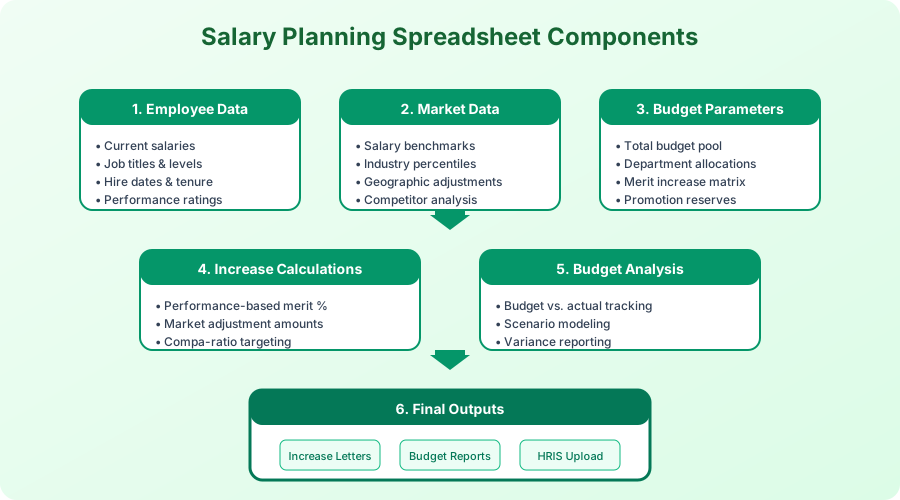
Essential Components of a Salary Planning Spreadsheet
1. Employee Master Data Tab
Your foundation tab includes every employee with current compensation details:
| Field | Description | Example |
|---|---|---|
| Employee ID | Unique identifier | EMP-1234 |
| Name | Full name | Jane Smith |
| Department | Cost center | Engineering |
| Manager | Direct supervisor | John Doe |
| Job Title | Current role | Senior Software Engineer |
| Job Level | Grade/band | L5 |
| Hire Date | Start date | 2021-03-15 |
| Last Increase Date | Previous raise | 2024-01-01 |
| Current Salary | Base pay | $125,000 |
| FTE | Full-time equivalent | 1.0 |
Data Sources:
- HRIS export (Workday, ADP, BambooHR)
- Payroll system
- Performance management system
2. Market Data Tab
Benchmark data enables market-competitive decisions:
| Field | Description | Source |
|---|---|---|
| Job Family | Role category | Radford, Mercer |
| Level | Seniority band | Survey mapping |
| P25 Salary | 25th percentile | $95,000 |
| P50 Salary | Median | $115,000 |
| P75 Salary | 75th percentile | $138,000 |
| Geographic Factor | Location adjustment | 1.15 (SF Bay Area) |
Common Survey Sources:
- Radford (tech industry standard)
- Mercer (broad industry coverage)
- Culpepper (startup-friendly)
- Levels.fyi (tech crowdsourced)
- Glassdoor/LinkedIn (directional)
3. Performance Ratings Tab
Link performance management to compensation:
| Rating | Description | Population Target |
|---|---|---|
| 5 - Exceptional | Top 5% contributor | 5-10% |
| 4 - Exceeds | Consistently above expectations | 20-25% |
| 3 - Meets | Solid performer | 50-60% |
| 2 - Developing | Growth areas identified | 10-15% |
| 1 - Below | Performance concerns | 0-5% |
Critical Tip: Calibrate ratings before salary planning to prevent grade inflation.
4. Merit Increase Matrix Tab
The heart of your salary planning—a matrix that determines increases based on performance AND position in salary range:
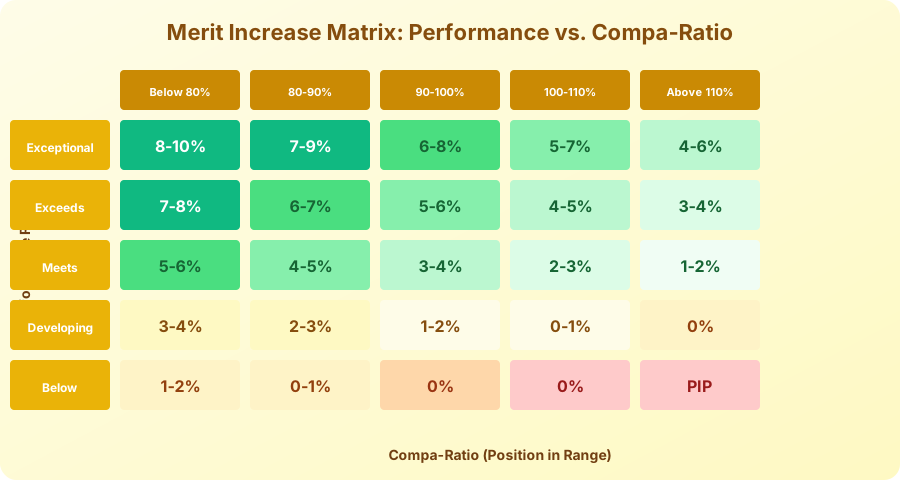
How to Read the Matrix:
- Rows: Performance rating (Exceptional to Below)
- Columns: Compa-ratio (position in salary range)
- Cells: Recommended increase percentage
Compa-Ratio Formula:
Compa-Ratio = (Current Salary / Market Midpoint) × 100
Example:
- Employee salary: $100,000
- Market midpoint: $110,000
- Compa-ratio: 91% (in the 90-100% column)
- Performance rating: Exceeds (row 2)
- Recommended increase: 5-6%
5. Budget Allocation Tab
Track spending against approved budget:
| Department | Headcount | Current Payroll | Budget % | Budget $ | Planned $ | Variance |
|---|---|---|---|---|---|---|
| Engineering | 45 | $5,850,000 | 4.5% | $263,250 | $251,100 | $12,150 |
| Sales | 30 | $3,200,000 | 4.0% | $128,000 | $134,400 | -$6,400 |
| Marketing | 15 | $1,425,000 | 4.0% | $57,000 | $55,575 | $1,425 |
| Operations | 25 | $1,750,000 | 3.5% | $61,250 | $59,500 | $1,750 |
| Total | 115 | $12,225,000 | 4.2% | $509,500 | $500,575 | $8,925 |
6. Individual Planning Tab
Where managers input recommendations:
| Employee | Current | Compa-Ratio | Rating | Matrix % | Manager Rec | Final % | New Salary | Notes |
|---|---|---|---|---|---|---|---|---|
| J. Smith | $85,000 | 89% | 4 | 6-7% | 6.5% | 6.5% | $90,525 | Promotion candidate |
| M. Chen | $92,000 | 95% | 3 | 3-4% | 4.0% | 3.5% | $95,220 | Market adjustment |
| A. Patel | $78,500 | 82% | 4 | 6-7% | 7.0% | 7.0% | $83,995 | Retention risk |
Step-by-Step: Building Your Salary Planning Spreadsheet
Step 1: Gather and Validate Data (Week 1-2)
Export from HRIS:
Required fields:
- Employee demographics
- Current compensation
- Job information
- Manager hierarchy
- Performance ratings
Data Quality Checks:
- No duplicate employee IDs
- All employees have current salary > $0
- Job titles mapped to market data
- Performance ratings complete (flag missing)
- Manager assignments valid
Step 2: Import Market Data (Week 2)
Match Jobs to Survey Data:
- Create job family mapping table
- Assign each employee to survey match
- Apply geographic differentials
- Calculate compa-ratios
Compa-Ratio Distribution Analysis:
- Below 80%: Urgent market adjustment needed
- 80-90%: Below market, prioritize for increases
- 90-110%: At market, standard merit
- 110-120%: Above market, smaller increases
- Above 120%: Significantly overpaid, minimal increases
Step 3: Build Merit Matrix (Week 3)
Design Principles:
- Higher performers get larger increases
- Lower compa-ratios get larger increases
- Total matrix should average to budget %
- Include differentiation (avoid uniform increases)
Budget Calibration Formula:
Weighted Average = Σ(Cell % × Population %) = Budget Target

Example: 4.0% budget
- 10% of employees at 6% = 0.6%
- 25% at 5% = 1.25%
- 50% at 3.5% = 1.75%
- 15% at 2% = 0.3%
- Total = 3.9% ≈ 4.0% ✓
Step 4: Manager Input Collection (Week 4-5)
Provide Managers:
- Pre-populated spreadsheet with their team
- Matrix recommendation for each employee
- Budget pool for their department
- Guidelines for exceptions
Exception Request Process:
- Above-matrix: Requires VP approval + justification
- Promotion: Separate budget, documented criteria
- Market adjustment: Data-backed, HR review
Step 5: HR Review and Calibration (Week 6)
Review for:
- Pay equity (gender, ethnicity, age)
- Consistency across similar roles
- Budget compliance by department
- Outlier identification
Equity Analysis Queries:
Compare average increases by:
- Gender within same job family/level
- Ethnicity within same job family/level
- Tenure cohorts
- Age groups
Step 6: Executive Approval (Week 7)
Approval Package:
- Total budget utilization summary
- Department breakdown
- Promotion count and cost
- Equity analysis summary
- Exception list with justifications
Step 7: Communication and Implementation (Week 8)
Generate from Spreadsheet:
- Individual increase letters (mail merge)
- Manager talking points
- HRIS upload file (CSV/Excel format)
- Budget tracking dashboard
Advanced Features for Your Salary Spreadsheet
Scenario Modeling
Build multiple scenarios to stress-test your budget:
Scenario A: Conservative (3.5% budget)
- Lower matrix values across the board
- Fewer promotions approved
- Market adjustments deferred
Scenario B: Target (4.0% budget)
- Standard matrix application
- Approved promotions funded
- Critical market adjustments included
Scenario C: Aggressive (4.5% budget)
- Enhanced matrix for retention
- Additional promotions
- Comprehensive market corrections
Proration Logic
Handle mid-year hires appropriately:
Proration Factor = Months Employed / 12

Example: Hired July 1 (6 months employed)
- Full merit recommendation: 4%
- Prorated merit: 4% × (6/12) = 2%
Compa-Ratio Targeting
Set targets for where employees should be after increases:
| Performance | Target Compa-Ratio |
|---|---|
| Exceptional | 100-110% |
| Exceeds | 95-105% |
| Meets | 90-100% |
| Developing | 85-95% |
| Below | Hold at current |
Pay Equity Flags
Add conditional formatting to highlight risks:
Flag if:
- Gender pay gap > 3% for same role/level
- Compa-ratio variance > 15% for same role
- Years since last increase > 24 months
- Below 80% compa-ratio for 2+ years
Common Salary Planning Mistakes to Avoid
Mistake 1: Peanut Butter Spreading
Problem: Giving everyone the same percentage increase Impact: Demotivates top performers, overpays underperformers Solution: Use merit matrix with meaningful differentiation
Mistake 2: Ignoring Compa-Ratio
Problem: Giving high increases to already overpaid employees Impact: Budget waste, compressed ranges, internal equity issues Solution: Factor position in range into increase decisions
Mistake 3: No Manager Guidelines
Problem: Managers advocate for their team without constraints Impact: Budget overruns, inconsistent treatment Solution: Provide clear budgets, matrices, and exception processes
Mistake 4: Last-Minute Planning
Problem: Rushing through salary planning in 2 weeks Impact: Poor data quality, no time for calibration Solution: 8-week process with defined milestones
Mistake 5: Skipping Equity Review
Problem: Not analyzing increases by protected categories Impact: Legal risk, reputational damage, trust erosion Solution: Mandatory equity analysis before approval
Integration with HR Systems
HRIS Export/Import
Common HRIS Platforms:
- Workday: Use EIB (Enterprise Interface Builder) templates
- ADP: Standard export reports + import utilities
- BambooHR: CSV export/import with field mapping
- UKG: Integration studio connectors
Export File Format:
employee_id,effective_date,new_salary,increase_type,increase_pct
EMP-1234,2025-03-01,90525,MERIT,6.5
EMP-1235,2025-03-01,95220,MERIT,3.5
EMP-1236,2025-03-01,83995,MERIT,7.0
Payroll System Updates
Timeline Coordination:
- HRIS update: 2 weeks before effective date
- Payroll notification: 1 week before
- First new-rate paycheck: Effective date
- Retroactive adjustment: If needed
Download Our Free Salary Planning Template
Our Excel template includes:
Tab 1: Employee Data
- Pre-formatted columns for all required fields
- Data validation dropdowns
- Conditional formatting for data quality
Tab 2: Market Data
- Survey data input structure
- Geographic factor calculator
- Compa-ratio auto-calculation
Tab 3: Merit Matrix
- Customizable 5×5 performance/compa matrix
- Budget calibration calculator
- Visual formatting for easy reading
Tab 4: Planning Worksheet
- Manager input columns
- Auto-calculated recommendations
- Budget tracking by department
Tab 5: Reports
- Summary dashboard
- Equity analysis pivot tables
- HRIS upload file generator
Tab 6: Instructions
- Step-by-step setup guide
- Formula documentation
- Best practice tips
Salary Planning Calendar
Follow this timeline for stress-free salary planning:
| Week | Activity | Owner |
|---|---|---|
| 1-2 | Data gathering and validation | HRIS/HR Ops |
| 2-3 | Market data update and matching | Compensation |
| 3 | Merit matrix calibration | Compensation + Finance |
| 4-5 | Manager input collection | Managers |
| 5-6 | HR review and calibration | HR Business Partners |
| 6-7 | Executive review and approval | Leadership |
| 7-8 | Communication and implementation | HR + Managers |
Key Takeaways
-
Structure creates fairness: A well-designed spreadsheet ensures consistent treatment across the organization
-
Data quality matters: Garbage in, garbage out—validate your data before planning
-
Differentiation drives performance: Merit matrices should reward high performers meaningfully
-
Budget discipline is essential: Track spending in real-time to avoid overruns
-
Equity review is non-negotiable: Analyze increases by protected categories before finalizing
-
Start early: An 8-week timeline prevents last-minute scrambling
For comprehensive compensation strategy guidance, explore our Compensation Budgeting Guide, HR Policy Templates, and use our Employee Cost Calculator to model total compensation costs.
Frequently Asked Questions
What is a salary planning spreadsheet?
A salary planning spreadsheet is a structured Excel or Google Sheets workbook that helps HR and finance teams plan, allocate, and track salary increases across an organization. It consolidates employee compensation data, market benchmarks, performance ratings, and budget constraints into a single tool that calculates recommended increases and tracks spending against approved budgets by department.
How do you calculate merit increases for employees?
Merit increases are typically determined using a merit matrix that cross-references two variables: the employee's performance rating and their position in the salary range, measured by compa-ratio. Higher performers and employees below market midpoint receive larger percentage increases, while those already above market receive smaller adjustments. This approach rewards performance while addressing market competitiveness simultaneously.
What is a compa-ratio and why does it matter?
A compa-ratio compares an employee's current salary to the market midpoint for their role, calculated as current salary divided by market midpoint times 100. A compa-ratio of 90 percent means the employee earns 90 percent of market midpoint. This metric identifies underpaid employees needing market corrections and overpaid employees where smaller increases are appropriate, ensuring pay equity and budget efficiency.
When should organizations conduct annual salary planning?
Most organizations begin salary planning six to eight weeks before the effective date of increases, which is typically at the start of the fiscal year. The process includes data gathering, market data updates, merit matrix calibration, manager input collection, HR calibration and equity review, executive approval, and communication. Starting early prevents last-minute scrambling that leads to poor decisions.
How much should a company budget for annual salary increases?
The typical annual merit increase budget ranges from 3 to 5 percent of total payroll, with the exact amount depending on industry, market conditions, and company performance. This budget should be differentiated through a merit matrix rather than applied uniformly, with top performers receiving 5 to 7 percent and average performers receiving 2 to 4 percent. Promotion budgets are usually tracked separately.
How do you ensure pay equity during salary planning?
Run equity analysis queries comparing average increases across gender, ethnicity, age, and tenure groups within the same job family and level before finalizing recommendations. Add conditional formatting to flag gender pay gaps exceeding 3 percent or compa-ratio variances exceeding 15 percent for similar roles. This mandatory equity review step should occur after manager input and before executive approval.