Department Budget Template [Free Excel] — Planning Guide for Managers

![Department Budget Template [Free Excel] — Planning Guide for Managers](/images/department-budget-hero.svg?dpl=dpl_At1SKoA9zh8NKaLECzqhv4yEjB9o)
Department budgeting is one of the most critical responsibilities for any manager, yet studies show that nearly 70% of managers feel inadequately prepared to create and manage their departmental budgets. Whether you're managing an IT department, marketing team, operations unit, or any other business function, mastering budget planning is essential for achieving your objectives and demonstrating fiscal responsibility. This comprehensive guide provides the framework, templates, and best practices you need to excel at department budget management. For additional resources, explore our Financial Planning Hub and IT Budgeting section.
Quick Start: Download our free Department Budget Template to get started immediately with a professional, pre-built spreadsheet that covers all budget categories discussed in this guide.
Why Department Budget Planning Matters
The Business Case for Effective Budgeting
A well-crafted department budget serves multiple critical functions within an organization:
Resource Allocation: Budgets ensure your department has the necessary resources to achieve its objectives. Without a clear budget, you risk running short on critical resources mid-year or overspending in areas that don't deliver value.
Strategic Alignment: Your department budget should directly support the organization's strategic goals. Every line item should tie back to specific business outcomes, making it easier to justify expenditures and demonstrate value.
Performance Measurement: Budgets provide a benchmark against which to measure actual performance. Variance analysis helps identify areas of concern and opportunities for improvement.
Accountability: A detailed budget creates clear accountability for spending decisions. When managers own their budgets, they become more thoughtful about resource utilization.
Common Budgeting Challenges
Problems Managers Face:
- Insufficient historical data for accurate forecasting
- Pressure to reduce costs while maintaining output
- Unexpected expenses disrupting planned spending
- Difficulty justifying budget requests to leadership
- Lack of visibility into actual vs. budgeted spending
- Competing priorities requiring difficult trade-offs
- Mid-year budget cuts affecting planned initiatives
Consequences of Poor Budgeting:
- Projects delayed or canceled due to funding gaps
- Team morale impacted by resource constraints
- Missed business opportunities
- Strained relationships with finance and leadership
- Career impact for managers who consistently miss budgets
- Organizational inefficiency from reactive spending
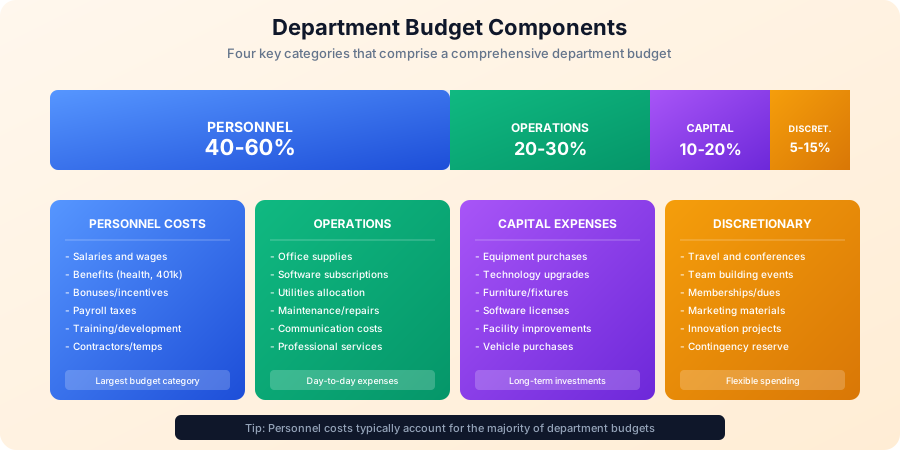
Understanding Budget Categories
Effective department budgeting requires a clear understanding of the four primary budget categories. Each category has distinct characteristics, planning requirements, and management considerations.
1. Personnel Costs (40-60% of Department Budget)
Personnel costs typically represent the largest portion of any department budget. These are often the most predictable but also the most scrutinized expenses.
Components of Personnel Costs:
| Category | Description | Typical % of Personnel |
|---|---|---|
| Base Salaries | Annual compensation for all employees | 65-70% |
| Benefits | Health insurance, retirement contributions | 20-25% |
| Payroll Taxes | Employer FICA, unemployment insurance | 7-8% |
| Bonuses/Incentives | Performance-based compensation | 3-10% |
| Training | Professional development, certifications | 1-3% |
Personnel Budget Example:
Department: Marketing (15 FTEs)
Fiscal Year: 2025

PERSONNEL BUDGET DETAIL

Salaries:
- Director (1): $145,000
- Senior Managers (2): $240,000 ($120K each)
- Marketing Managers (4): $360,000 ($90K each)
- Marketing Specialists (6): $420,000 ($70K each)
- Marketing Coordinators (2): $110,000 ($55K each)
Subtotal Salaries: $1,275,000

Benefits (28% of salaries): $357,000
Payroll Taxes (7.65%): $97,538
Bonuses (8% target): $102,000
Training Budget: $25,000

TOTAL PERSONNEL: $1,856,538
Planning Considerations:
- Account for annual merit increases (typically 3-4%)
- Factor in open positions and hiring timelines
- Include contingency for unplanned departures
- Consider contractor vs. employee trade-offs
- Track FTE counts and cost per FTE
2. Operations Costs (20-30% of Department Budget)
Operational expenses cover the day-to-day costs of running your department. These costs are generally recurring and predictable.
Operational Expense Categories:
Software and Technology:
- SaaS subscriptions
- Software licenses
- Cloud services
- Support and maintenance
Facilities Allocation:
- Office space costs
- Utilities
- Facility services
- Equipment leases
Professional Services:
- Consulting fees
- Legal services
- Audit costs
- Outsourced services
Supplies and Materials:
- Office supplies
- Printing and reproduction
- Shipping and postage
- Department-specific materials
Operations Budget Example:
OPERATIONS BUDGET DETAIL

Software/Technology:
- CRM Platform (Salesforce): $36,000
- Marketing Automation (HubSpot): $24,000
- Analytics Tools: $12,000
- Design Software: $8,000
Subtotal Technology: $80,000

Facilities Allocation:
- Office Space (15 people @ $500/month): $90,000
- Utilities Allocation: $12,000
Subtotal Facilities: $102,000

Professional Services:
- Agency Retainer: $60,000
- Research Services: $25,000
- Legal Review: $10,000
Subtotal Services: $95,000

Supplies/Materials:
- Office Supplies: $5,000
- Marketing Materials: $15,000
- Shipping/Postage: $8,000
Subtotal Supplies: $28,000

TOTAL OPERATIONS: $305,000
3. Capital Expenses (10-20% of Department Budget)
Capital expenditures are investments in assets that provide value over multiple years. These expenses are typically capitalized on the balance sheet and depreciated over time.
Capital Expense Characteristics:
- One-time purchases with multi-year useful life
- Generally require special approval processes
- Subject to capitalization thresholds (often $1,000-$5,000+)
- Depreciated according to accounting policies
Common Capital Items:
| Asset Type | Useful Life | Example Cost |
|---|---|---|
| Computer Equipment | 3-5 years | $1,500-$3,000 each |
| Furniture | 5-7 years | $500-$2,000 each |
| Specialized Equipment | 5-10 years | Varies widely |
| Software (perpetual license) | 3-5 years | $5,000-$50,000+ |
| Leasehold Improvements | Lease term | Project-dependent |
Capital Budget Example:
CAPITAL BUDGET DETAIL

Equipment:
- Laptop Refresh (5 units): $10,000
- Monitors (10 units): $5,000
- Conference Room Display: $3,000
Subtotal Equipment: $18,000

Furniture:
- Workstation Upgrades (3): $4,500
- Conference Table: $2,500
Subtotal Furniture: $7,000

Software:
- Video Production Suite: $8,000
- Data Visualization Platform: $12,000
Subtotal Software: $20,000

TOTAL CAPITAL: $45,000
4. Discretionary Expenses (5-15% of Department Budget)
Discretionary expenses are non-essential costs that enhance department operations or employee experience. These are typically the first items cut when budgets are constrained.
Discretionary Categories:
- Travel and entertainment
- Conferences and events
- Team building activities
- Professional memberships
- Innovation and experimentation
- Contingency reserve
Discretionary Budget Example:
DISCRETIONARY BUDGET DETAIL

Travel:
- Client Visits: $20,000
- Conference Attendance: $15,000
- Team Travel: $10,000
Subtotal Travel: $45,000

Events and Entertainment:
- Client Entertainment: $12,000
- Team Events: $8,000
Subtotal Events: $20,000

Professional Development:
- Conference Registrations: $10,000
- Memberships/Subscriptions: $5,000
Subtotal Prof Dev: $15,000

Contingency Reserve (5%): $25,000

TOTAL DISCRETIONARY: $105,000
IT Department Budget: A Detailed Example
IT departments face unique budgeting challenges due to the pace of technology change, complex vendor relationships, and the critical nature of IT services. Here's a comprehensive IT department budget example.
IT Budget Structure
IT DEPARTMENT BUDGET FY2025
Total Budget: $2,850,000

1. PERSONNEL (55%): $1,567,500
   Salaries & Wages:
   - IT Director: $160,000
   - Infrastructure Manager: $125,000
   - Application Manager: $120,000
   - Network Engineers (2): $210,000
   - System Administrators (3): $270,000
   - Help Desk Lead: $75,000
   - Help Desk Analysts (4): $220,000
   - Security Analyst: $110,000
   - Database Administrator: $115,000
   Subtotal Salaries: $1,405,000

   Benefits (30%): $421,500
   Training/Certifications: $45,000
   Contractors (Project): $75,000
   Recruiting: $20,000

2. INFRASTRUCTURE (18%): $513,000
   Hardware:
   - Server Refresh: $80,000
   - Storage Expansion: $45,000
   - Network Equipment: $60,000
   - End-User Devices (50): $75,000
   - Backup Infrastructure: $35,000
   Subtotal Hardware: $295,000

   Maintenance:
   - Hardware Support Contracts: $85,000
   - Spare Parts/Repairs: $25,000
   Subtotal Maintenance: $110,000

   Data Center:
   - Power/Cooling Allocation: $48,000
   - Rack Space: $60,000
   Subtotal Data Center: $108,000

3. SOFTWARE (15%): $427,500
   Enterprise Applications:
   - Microsoft 365 (300 users): $108,000
   - ERP System Maintenance: $75,000
   - CRM Platform: $45,000
   Subtotal Enterprise: $228,000

   IT Management Tools:
   - Monitoring Platform: $35,000
   - Service Desk Software: $28,000
   - Asset Management: $18,000
   - Backup Software: $25,000
   Subtotal IT Tools: $106,000

   Security Software:
   - Endpoint Protection: $42,000
   - Firewall/UTM: $18,000
   - SIEM Platform: $33,500
   Subtotal Security: $93,500

4. CLOUD SERVICES (8%): $228,000
   - AWS Infrastructure: $120,000
   - Azure Services: $60,000
   - SaaS Applications: $48,000

5. TELECOMMUNICATIONS (4%): $114,000
   - Internet Circuits: $48,000
   - WAN/MPLS: $36,000
   - Voice Services: $30,000
IT Budget Variance Analysis
Tracking actual spending against budget is critical for IT departments. Here's an example quarterly variance report:
| Category | Annual Budget | Q1 Budget | Q1 Actual | Variance | % Var |
|---|---|---|---|---|---|
| Personnel | $1,567,500 | $391,875 | $385,200 | $6,675 | -1.7% |
| Infrastructure | $513,000 | $128,250 | $142,800 | ($14,550) | +11.3% |
| Software | $427,500 | $106,875 | $104,500 | $2,375 | -2.2% |
| Cloud Services | $228,000 | $57,000 | $62,400 | ($5,400) | +9.5% |
| Telecom | $114,000 | $28,500 | $27,800 | $700 | -2.5% |
| Total | $2,850,000 | $712,500 | $722,700 | ($10,200) | +1.4% |
Variance Analysis Notes:
- Infrastructure over budget due to unplanned switch replacement ($12,000)
- Cloud services trending high - implement cost optimization measures
- Personnel under budget due to delayed hire (position filled in February)
Variance Analysis: Tracking Budget Performance
Variance analysis is the process of comparing budgeted amounts to actual spending to identify discrepancies and take corrective action.
Types of Variance
Favorable Variance: When actual spending is less than budgeted
- Indicates cost savings or efficiency gains
- May also indicate under-delivery or delayed activities
- Requires investigation to understand root cause
Unfavorable Variance: When actual spending exceeds budget
- Indicates cost overruns or scope creep
- May require budget reallocation or supplemental funding
- Triggers corrective action planning
Variance Thresholds
Establish variance thresholds that trigger review and action:
| Variance Level | Threshold | Action Required |
|---|---|---|
| Minor | Less than 5% | Monitor and document |
| Moderate | 5-10% | Manager review and explanation |
| Significant | 10-20% | Director approval for variance |
| Critical | Greater than 20% | Executive review and action plan |
Monthly Variance Report Template
DEPARTMENT VARIANCE REPORT
Period: January 2025

SUMMARY
Budget: $245,000
Actual: $258,500
Variance: ($13,500) - 5.5% UNFAVORABLE

CATEGORY DETAIL

Personnel: $142,000 budget vs $141,200 actual
Variance: $800 FAVORABLE
Notes: On track

Operations: $68,000 budget vs $72,300 actual
Variance: ($4,300) UNFAVORABLE (6.3%)
Notes: Unplanned software license renewal ($3,200)
       Higher than expected cloud usage ($1,100)
Action: Review cloud resource allocation

Capital: $15,000 budget vs $24,500 actual
Variance: ($9,500) UNFAVORABLE (63%)
Notes: Emergency laptop replacements due to hardware failures
Action: Request budget reallocation from contingency

Discretionary: $20,000 budget vs $20,500 actual
Variance: ($500) UNFAVORABLE (2.5%)
Notes: Within acceptable threshold

FORECAST IMPACT
Current run rate projects year-end spending of $3,102,000
vs annual budget of $2,940,000 (5.5% over)

RECOMMENDED ACTIONS
1. Defer Q3 equipment purchases to offset Q1 overrun
2. Implement cloud cost optimization (estimated savings: $8,000)
3. Request contingency release for laptop replacements
Budget Forecasting Techniques
Accurate forecasting is essential for creating realistic budgets and managing spending throughout the year.
Forecasting Methods
1. Historical Trend Analysis Use past spending patterns to predict future costs:
- Analyze 2-3 years of historical data
- Identify seasonal patterns and trends
- Adjust for known changes (growth, new initiatives)
2. Zero-Based Budgeting Build budget from scratch each year:
- Justify every expense from zero
- Eliminates inherited inefficiencies
- More time-intensive but more accurate
3. Incremental Budgeting Adjust previous year's budget by a percentage:
- Quick and easy to implement
- May perpetuate inefficiencies
- Good for stable operations
4. Activity-Based Budgeting Link costs to specific activities and outputs:
- Provides clear cost-to-value relationships
- Supports better decision-making
- Requires detailed activity tracking
Forecasting Best Practices
Document Assumptions: Every budget should include documented assumptions:
- Headcount assumptions (hiring plans, attrition)
- Inflation rates applied
- Growth projections
- Known price increases
- Planned initiatives
Build in Contingency: Include appropriate contingency reserves:
- 5-10% for operational departments
- 10-15% for project-based work
- Higher for new initiatives with uncertainty
Scenario Planning: Develop multiple budget scenarios:
| Scenario | Description | Budget Impact |
|---|---|---|
| Baseline | Expected case | 100% of request |
| Growth | Business expansion | 115% of request |
| Constraint | Budget pressure | 85% of request |
| Worst Case | Major cuts needed | 70% of request |
Budget Approval Workflows
A well-defined approval workflow ensures appropriate oversight while maintaining efficiency.
Typical Approval Hierarchy
BUDGET APPROVAL MATRIX

Budget Request Type          Approval Authority
----------------------------------------
Under $5,000               Department Manager
$5,000 - $25,000          Director
$25,000 - $100,000        VP/Executive
$100,000 - $500,000       CFO
Over $500,000             CEO/Board
Capital Expenses          Finance + Above thresholds
New Headcount             HR + VP + Finance
Budget Approval Process
Step 1: Preparation (Month 1-2)
- Gather historical data and actuals
- Identify department needs and initiatives
- Build draft budget with supporting detail
- Document assumptions and justifications
Step 2: Manager Review (Month 2-3)
- Review with direct reports
- Validate assumptions
- Prioritize requests
- Prepare presentation materials
Step 3: Director/VP Review (Month 3)
- Present to leadership
- Answer questions and provide detail
- Negotiate priorities
- Receive preliminary approval or guidance
Step 4: Finance Review (Month 3-4)
- Validate calculations
- Check alignment with company budget
- Review for compliance with policies
- Consolidate with other departments
Step 5: Executive Approval (Month 4-5)
- Present to executive leadership
- Final negotiations
- Budget approval or revision
- Communicate final budget
Step 6: Communication (Month 5-6)
- Share approved budget with team
- Set up tracking and reporting
- Establish variance thresholds
- Begin fiscal year execution
Justifying Budget Requests
Strong budget justifications include:
1. Business Alignment How does this expense support business objectives?
2. Return on Investment What is the expected ROI or payback period?
3. Risk Mitigation What risks does this expense address?
4. Competitive Necessity Is this required to remain competitive?
5. Compliance Requirements Is this mandated by regulation or policy?
Example Justification:
BUDGET REQUEST JUSTIFICATION

Item: Security Information and Event Management (SIEM) Platform
Amount: $45,000 (Year 1) / $33,500 (ongoing)

Business Alignment:
Supports corporate security initiative and SOC 2 compliance requirements.
Enables 24/7 threat monitoring to protect customer data.

ROI Analysis:
- Average cost of data breach: $4.45M (IBM Cost of Data Breach Report)
- SIEM reduces breach likelihood by estimated 25%
- Risk reduction value: $1.1M annually
- ROI: 2,400%+ (conservative estimate)

Risk Mitigation:
Without SIEM, we lack visibility into security events across systems.
Current manual log review is insufficient and reactive.
Audit finding from Q3 requires improved monitoring capabilities.

Compliance:
Required for SOC 2 Type II certification (customer requirement)
Supports GDPR Article 32 security requirements

Competitive:
All major competitors have implemented SIEM solutions.
Customer RFPs increasingly require security certifications.

Recommendation: Approve - Critical for compliance and risk management
Budget Management Best Practices
Monthly Budget Reviews
Conduct monthly reviews to stay on track:
Weekly Tasks:
- Monitor purchase orders and invoices
- Track spending against budget
- Address issues promptly
Monthly Tasks:
- Run variance reports
- Forecast year-end position
- Document explanations for variances
- Adjust spending as needed
Quarterly Tasks:
- Comprehensive variance analysis
- Reforecast remaining year
- Present to leadership
- Reallocate funds if needed
Common Mistakes to Avoid
1. Underestimating Personnel Costs Remember to include benefits, taxes, and all compensation elements.
2. Ignoring Inflation Build in appropriate cost increases for multi-year contracts and renewals.
3. Forgetting One-Time Costs Account for implementation, migration, training, and transition costs.
4. Overconfident Forecasting Include contingency for unexpected expenses.
5. Poor Documentation Document all assumptions so budgets can be understood and defended.
6. Reactive Rather Than Proactive Monitor budgets continuously, not just at month-end.
Building Budget Credibility
Managers who consistently deliver accurate budgets build credibility:
Track Record Matters:
- Document your budget accuracy history
- Show variance trending over time
- Demonstrate learning from past variances
Transparency Builds Trust:
- Acknowledge uncertainties
- Explain assumptions clearly
- Report variances promptly
- Propose solutions, not just problems
Add Value Beyond Numbers:
- Provide insights, not just data
- Suggest cost optimization opportunities
- Demonstrate ROI awareness
- Connect spending to business outcomes
Free Department Budget Resources
Complete Budget Template Package
Our comprehensive department budget toolkit includes:
- Department budget template (Excel)
- Personnel planning worksheet
- Capital expense tracker
- Variance analysis template
- Budget presentation deck
- Approval request form
- Monthly reporting template
Download Free Budget Template Package
Related Resources
Financial Planning Templates:
- IT Budget Planning Masterclass
- IT Cost Allocation Methods
- Total Cost of Ownership Guide
- Investment Analysis Template
Budgeting Guides:
Essential Excel Formulas for Departmental Budget Templates
Whether you're building a departmental budget template from scratch or customizing a downloaded template, these Excel formulas will save hours of manual work.
Personnel Cost Formulas
Fully Loaded Cost per Employee:
= Base Salary + (Base Salary x Benefits Rate) + Annual Bonus Target
= $85,000 + ($85,000 x 0.30) + ($85,000 x 0.10)
= $85,000 + $25,500 + $8,500 = $119,000

Monthly Personnel Budget:
= SUM(Fully Loaded Cost for All Employees) / 12

New Hire Prorated Cost:
= Fully Loaded Annual Cost x (Months Remaining / 12)
Example: June hire = $119,000 x (7/12) = $69,417
Variance Analysis Formulas
Dollar Variance:
= Actual - Budget
(Negative = under budget/favorable, Positive = over budget/unfavorable)

Percentage Variance:
= (Actual - Budget) / Budget x 100

Year-End Projection (Run Rate):
= (YTD Actual / Months Elapsed) x 12

Remaining Budget:
= Annual Budget - YTD Actual

Monthly Burn Rate:
= YTD Actual / Months Elapsed
Budget Allocation Formulas
Department Share of Company Budget:
= Department Budget / Total Company Budget x 100

Per-Employee Budget:
= Department Operating Budget / Department Headcount

Cost Per Unit (for production departments):
= Total Department Cost / Units Produced

Budget Utilization Rate:
= YTD Actual / YTD Budget x 100
Target: 90-100% (below 90% = underspending, above 100% = overspending)
Forecasting Formulas
Incremental Budget (next year):
= Current Year Actual x (1 + Inflation Rate + Growth Adjustment)
= $500,000 x (1 + 0.03 + 0.05) = $540,000

Quarterly Budget Distribution (seasonal):
= Annual Budget x Seasonal Weight
Q1: $500,000 x 0.22 = $110,000
Q2: $500,000 x 0.25 = $125,000
Q3: $500,000 x 0.28 = $140,000
Q4: $500,000 x 0.25 = $125,000

Contingency Reserve:
= Total Budget x Contingency Rate (typically 5-10%)
= $500,000 x 0.07 = $35,000
Conclusion
Effective department budget planning is a fundamental skill for every manager. By understanding budget categories, implementing robust variance analysis, using proven forecasting techniques, and following structured approval workflows, you can create and manage budgets that support your department's success while demonstrating fiscal responsibility.
Implementation Checklist:
- Download department budget template
- Gather historical spending data
- Identify all personnel costs including benefits
- Catalog operational expenses
- Plan capital expenditures
- Allocate discretionary spending
- Document all assumptions
- Build contingency reserve
- Prepare budget justifications
- Submit for approval
- Set up monthly tracking
- Conduct regular variance analysis
Key Takeaways:
- Personnel costs dominate most department budgets (40-60%)
- Document assumptions to support budget defense
- Build in contingency for unexpected expenses
- Track variances monthly, not quarterly
- Strong justifications focus on business value and ROI
- Build credibility through accuracy and transparency
- Use the right forecasting method for your situation
Next Steps:
- Download department budget template
- Review IT budget planning guide
- Explore cost allocation methods
- Visit Financial Planning hub
Start building your department budget today with our free templates and proven frameworks.