Escape Spreadsheet Hell: The Finance Manager's Guide to Systems That Scale

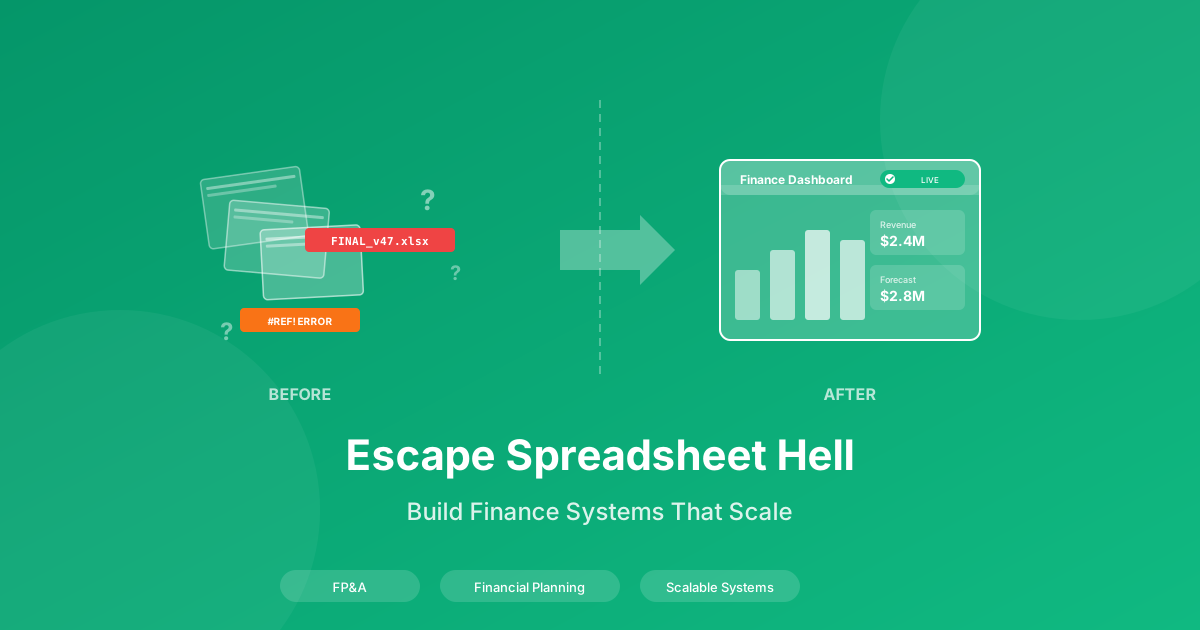
It's 11pm on a Wednesday. The board deck is due tomorrow morning. You just discovered that the revenue forecast in slide 12 doesn't match the model because someone updated the assumptions tab last week and didn't tell you. Your inbox has three different versions of "FY25_Budget_FINAL" from three different people, and you're not entirely sure which one is actually final. Spoiler: none of them are.
Sound familiar?
If you've spent any time in FP&A or finance management, you know this scenario isn't an exaggeration. It's a weekly reality. The late nights. The frantic Slack messages. The cold sweat when you realize a formula broke somewhere and you have no idea when. For comprehensive resources on financial planning, visit our Financial Planning Hub and Budgeting section.
Reality Check: The average FP&A professional spends 75% of their time on data gathering and reconciliation, leaving only 25% for actual analysis and strategic work.
This guide is for every finance manager who's tired of spreadsheet chaos and ready to build systems that actually scale. No more "FINAL_v47" file names. No more Sunday night reconciliation sessions. No more praying that your board deck numbers are right.
This guide incorporates insights from FP&A leaders and finance executives across SaaS, manufacturing, and professional services who have built scalable financial planning systems.
The Reality of Spreadsheet Hell
Let's paint the full picture, because if we're going to fix this, we need to acknowledge just how broken things can get.
The Version Control Nightmare
You open your shared drive and see:
FY25_Budget_FINAL.xlsxFY25_Budget_FINAL_v2.xlsxFY25_Budget_FINAL_v2_JohnEdits.xlsxFY25_Budget_FINAL_ACTUALLY_FINAL.xlsxFY25_Budget_USE_THIS_ONE.xlsx
Each one has different numbers. Each one was "the right one" at some point. And somewhere in the chain, someone made a change that didn't propagate to the other versions. Now your revenue forecast doesn't match your expense assumptions, and your cash flow model is showing numbers that make no sense.
The Manual Consolidation Marathon
Every month, you collect budget updates from eight department heads. Each sends their data in a slightly different format. Marketing uses columns A through G. Sales somehow added extra rows. Engineering renamed their cost centers without telling anyone. You spend two days just getting the data into a format you can work with before you can even start analyzing it.
The "Can You Just Run The Numbers?" Requests
Your CFO pops in at 4:30pm on a Friday: "Can you quickly model what happens if we cut marketing spend by 15% and accelerate the product launch by two quarters?" This isn't quick. This is a weekend project. But you nod and say "sure" because that's what you do.
The Last-Minute Executive Changes
The board meeting is in three hours. You've triple-checked everything. Then your CEO calls: "Actually, I want to present a different scenario. Can you update all the slides?" You realize with horror that "all the slides" means rebuilding charts that are linked to data that's linked to other data that's linked to a model someone built in 2019 and nobody fully understands anymore.
The Fear That Keeps You Up at Night
Here's what nobody talks about: the constant, low-grade anxiety that there's an error somewhere. A broken formula. A reference that's pointing to the wrong cell. A circular reference that's been quietly corrupting your numbers for months. You presented these numbers to the board. What if they're wrong?
This fear isn't irrational. According to research, 88% of spreadsheets contain errors. For large organizations, spreadsheet mistakes have caused losses of $10 million or more. That's not a typo. Million.
The Hidden Costs of Spreadsheet Chaos
Let's quantify what this chaos actually costs you and your organization.
Time Cost: Where Your Hours Actually Go
Studies consistently show that FP&A teams spend:
- 75% of time on data gathering, cleaning, and reconciliation
- 15% on report formatting and presentation
- Only 10% on actual analysis and strategic insights
Think about that. You were hired for your analytical skills and business acumen. But three-quarters of your time goes to fighting with data instead of interpreting it.
Error Cost: The Price of "Good Enough"
The average material spreadsheet error in a large organization costs approximately $300,000 to identify and fix. Major errors—the ones that affect strategic decisions—can cost millions. And these aren't rare. A study of corporate spreadsheets found that 94% contained errors.
Opportunity Cost: The Strategic Work That Never Happens
When you're spending all your time on data wrangling, you're not doing:
- Proactive scenario planning for market changes
- Deep analysis of business drivers and trends
- Building relationships with department heads as a strategic partner
- Developing forecasting models that actually improve decision-making
- Presenting insights that change the direction of the business
Career Cost: Stuck in the Weeds
Here's the uncomfortable truth: if you're known as "the spreadsheet person" instead of "the strategic finance partner," you're limiting your career trajectory. The path to CFO runs through strategic impact, not formula expertise. But it's hard to be strategic when you're drowning in consolidation work.
Stress Cost: The Personal Toll
Sunday night anxiety is real. The dread of monthly close. The fear before every board meeting. The constant vigilance for errors. This isn't sustainable, and it takes a toll on your health, relationships, and job satisfaction.
The Framework: Building a Finance Planning System
Here's the good news: there's a better way. The finance managers who've escaped spreadsheet hell didn't buy expensive software or hire massive teams. They built systems. Methodical, documented, repeatable systems that scale.
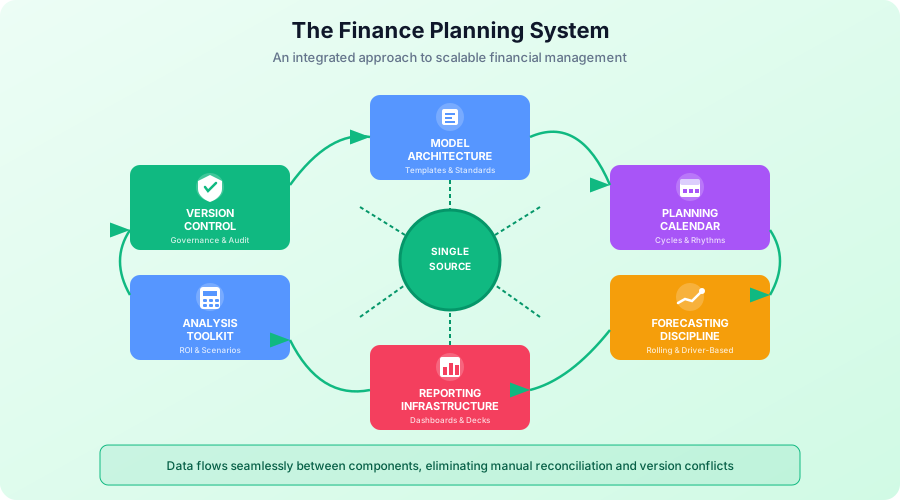
Let me walk you through the five components of a Finance Planning System.
Component 1: Model Architecture
Your financial models shouldn't be black boxes that only you understand. They should be structured, documented, and accessible.
The Three-Layer Model Structure:
-
Inputs Layer: All assumptions and data inputs in one place. Color-coded cells (typically blue for inputs). Clear labels. Date stamps for when values were updated.
-
Calculations Layer: All formulas and business logic. No hardcoded numbers. Clear documentation of methodology. Error checks built in.
-
Outputs Layer: The answers, summaries, and charts. Linked directly to calculations. Formatted for presentation. Ready to export.
This separation means you can change an assumption in one place and watch it flow through to your outputs automatically. No hunting for cells to update. No broken links.
Version Control Discipline:
- One "golden" model that's the single source of truth
- Clear naming conventions (date + description + owner)
- Changelog documentation for every significant update
- Archive folder for historical versions (labeled clearly)
Explore our Financial Modeling Templates to see this structure in action.
Component 2: Planning Calendar
Ad-hoc financial planning is chaos. Structured planning is manageable. Build a calendar that maps out your entire planning cycle.
Annual Planning Rhythm:
- Q4: Annual budget process begins (October)
- Q4: Strategic planning and target setting (November)
- Q4: Department budget submissions (December)
- Q1: Budget finalization and board approval (January)
- Q1-Q4: Quarterly forecast updates
Monthly Close Rhythm:
- Day 1-3: Close books, gather actuals
- Day 4-5: Variance analysis
- Day 6-7: Management reporting package
- Day 8: Leadership review meeting
- Day 10: Forecast updates if needed
Key Dependencies Mapped:
When does Sales need their commission numbers? When does HR need headcount data? When does the CFO need the executive summary? Map these dependencies so nothing falls through the cracks.
Visit our Budgeting Resources for calendar templates and planning guides.
Component 3: Forecasting Discipline
Stop treating forecasting as a once-a-year ordeal. Build it into your rhythm.
Rolling Forecasts vs. Static Budgets:
Traditional budgets go stale the moment they're approved. Rolling forecasts keep you current:
- Always looking 12-18 months ahead
- Updated quarterly or monthly
- Focused on trends, not point-in-time accuracy
- Enables faster decision-making
Driver-Based Planning:
Stop forecasting every line item. Identify the drivers that matter:
- Revenue: Deal pipeline, conversion rates, average deal size
- Headcount: Hiring velocity, attrition rate, productivity
- Expenses: Per-head costs, variable vs. fixed, growth rates
Model the drivers, and let the details calculate themselves.
Variance Analysis Framework:
When actuals differ from forecast, have a system:
- Materiality threshold (what variance is worth investigating?)
- Root cause categories (timing, volume, price, mix, one-time)
- Action triggers (what variance level requires a decision?)
Explore our Forecasting Resources for implementation guides.
Component 4: Reporting Infrastructure
If your board deck takes all week to prepare, your reporting infrastructure is broken.
Board Deck Templates:
Build once, refresh easily:
- Standard format that executives expect
- Linked directly to your models (no copy-paste)
- Commentary sections with prompts
- Backup slides for anticipated questions
Management Reporting Package:
Monthly reporting should be a 2-hour refresh, not a 2-day project:
- Automated data pulls where possible
- Standardized charts and formats
- Clear narrative structure
- Distribution list and timing defined
Self-Service Dashboards:
For questions that don't need your personal attention:
- Real-time metrics for department heads
- Drill-down capability for details
- Alert thresholds for exceptions
- Reduces "can you pull this data?" requests
Check out our Financial Reporting Templates for ready-to-use structures.
Component 5: Analysis Toolkit
When someone asks for analysis, you shouldn't be starting from scratch.
ROI Framework:
Standard template for investment decisions:
- Costs (one-time and ongoing)
- Benefits (revenue, cost savings, risk reduction)
- Timeline and assumptions
- Sensitivity analysis
- Decision recommendation
Use our ROI Calculator Template Guide to get started immediately.
Scenario Modeling:
Three scenarios ready to customize:
- Base case (most likely)
- Upside case (optimistic, with assumptions)
- Downside case (pessimistic, with assumptions)
When the CEO says "what if," you have a framework ready.
Investment Analysis:
For capital allocation decisions:
- NPV/IRR calculations
- Payback period
- Risk-adjusted returns
- Comparison framework
Explore our Investment Analysis Resources for detailed methodologies.
The Toolkit: Templates That Transform
Here's how specific templates solve specific pain points:
| Problem | Template Solution | Outcome |
|---|---|---|
| "Which version is correct?" | Standardized model templates with version control | Single source of truth |
| "Board deck takes all week" | Financial reporting templates with linked data | 2-hour refresh, not 20 |
| "Can you model this scenario?" | Scenario planning templates with standard structure | Quick turnaround, consistent format |
| "What's the ROI on this?" | ROI calculator guide with built-in formulas | Credible analysis in minutes |
| "Budget is rejected again" | Department budget templates with validation | Bottom-up validation, fewer surprises |
| "I don't trust these numbers" | Reconciliation templates with error checks | Confidence in data integrity |
| "Actuals don't match forecast" | Variance analysis templates with root cause framework | Faster diagnosis, better explanations |
The Integration Advantage
The key insight: these templates work as an integrated system. Your budget template feeds your forecast template. Your forecast template feeds your reporting template. Your reporting template feeds your board deck. Change an assumption once, and it flows through everything.
Consider how this works in practice:
-
Department Budget Template: Each business unit inputs their headcount, salary assumptions, and operating expenses. Built-in validation flags unrealistic inputs before they become problems.
-
Consolidation Template: Pulls automatically from department budgets. No manual copy-paste. No reconciliation nightmares. Aggregates to company-level view with drill-down capability.
-
Forecast Template: Uses the same structure as budget, making variance analysis straightforward. Driver-based inputs mean updates take minutes, not hours.
-
Board Deck Template: Charts linked directly to the forecast model. Refresh the links, review the commentary, done. The CEO's last-minute scenario request? Update the driver, refresh, present.
-
Analysis Toolkit: Standard frameworks for ROI, investment analysis, and scenario planning. When someone asks "what if," you're not reinventing the wheel.
This is how you escape spreadsheet hell. Not by working harder, but by building smarter. The upfront investment in template development pays dividends every month, every quarter, every board meeting.
Quick Wins: Start Today
You don't need to transform everything at once. Here are immediately actionable steps:
This Week: The Version Audit
Time required: 2 hours
Go through your shared drive and answer these questions:
- How many versions of your main budget model exist?
- Which one is actually current?
- Who has edit access?
- When was the last significant change, and is it documented?
Action: Consolidate to one "golden" version. Archive everything else. Label clearly.
This Month: The Model Changelog
Time required: 30 minutes to set up, then 5 minutes per update
Create a simple log (can be a tab in your model or a separate document):
| Date | Change Made | Changed By | Reason | Version |
|---|---|---|---|---|
| 01/15 | Updated Q2 revenue assumptions | Sarah | New pipeline data | v1.2 |
| 01/18 | Fixed OPEX formula error | Mike | Found during audit | v1.3 |
Action: Start logging every significant change. Make it a habit.
This Quarter: The Golden Template
Time required: 8-16 hours initially
Pick your most-used analysis type (probably budget vs. actual, or a standard forecast). Build one "golden" template:
- Clear input/calculation/output structure
- Error checking formulas built in
- Documentation of methodology
- Standard formatting
Action: Next time you need this analysis, use the template. Refine it each time.
Ongoing: Model Maintenance Time
Time required: 2-4 hours per week
Block Friday afternoons (or another consistent time) for model maintenance:
- Review and update documentation
- Run error checks
- Clean up formatting
- No new analysis requests during this time
Action: Protect this time ruthlessly. It's not "non-productive time" it's "system reliability time."
Your Spreadsheet Health Check
Rate yourself honestly on each of these criteria:
- Can someone else use your main model without calling you for help?
- Do you have a single "source of truth" for key metrics?
- Is your monthly close taking 5 days or fewer? (Benchmark target)
- When did you last validate your model's key formulas?
- Do you have a documented assumptions log?
- Can you update your board deck in 2 hours or less?
- Do you have standard templates for common analysis requests?
- Is your forecast driver-based rather than line-item-based?
Scoring Your Results:
- 7-8 checks: You're ahead of most FP&A teams. Focus on optimization and automation.
- 4-6 checks: Solid foundation with clear improvement areas. Prioritize version control and templates.
- 1-3 checks: Significant opportunity for transformation. Start with the version audit this week.
- 0 checks: You're not alone. Most finance teams start here. The good news: improvement is entirely achievable.
If you answered "no" to more than half of these, you have significant opportunity for improvement. That's not a criticism, it's an invitation. Every "no" represents a specific problem you can solve with a specific solution.
The Transformation: What Success Looks Like
Let me paint a different picture of your future. This isn't aspirational marketing. This is what happens when you invest in systems instead of just surviving each deadline.
Board Meeting Prep: 2 Hours, Not 2 Days
You open your board deck template. It's already connected to your live data. You refresh the links. The charts update automatically. Revenue, expenses, cash flow, all synchronized with your latest forecast.
You spend your time on what actually matters: writing insightful commentary, anticipating board questions, preparing thoughtful responses to strategic concerns. The mechanics are handled. You focus on the substance.
When the CEO calls with a last-minute request to add a scenario, you don't panic. You update one assumption, refresh the model, and the new numbers propagate through. Done in fifteen minutes, not fifteen hours.
"Can You Model This Scenario?": 15 Minutes, Not a Weekend
Your CEO asks about a potential acquisition target. You open your standard investment analysis template. The structure is already there: inputs clearly defined, calculations pre-built, outputs formatted for executive consumption.
You input the key assumptions: purchase price, synergies, integration costs, timeline. The NPV, IRR, and payback calculations update automatically. Sensitivity analysis shows the key risk factors. You add a few slides of commentary explaining the assumptions and recommendations.
Done by lunch. You even have time to prepare a few alternative scenarios for the discussion.
Your Role: Strategic Partner, Not Spreadsheet Jockey
Your CFO invites you to the strategic planning session. Not to take notes or run numbers afterward, but to contribute your perspective on financial implications. You're at the table because you have insights, not just spreadsheets.
During the meeting, someone asks about the financial impact of entering a new market. You pull up your scenario model, input some quick assumptions, and provide a preliminary view. Right there in the room. You're enabling the conversation, not slowing it down.
After the meeting, department heads reach out to you for advice on their plans. They see you as a partner who helps them succeed, not a gatekeeper who challenges their numbers.
Monthly Close: Clockwork, Not Chaos
It's day 5 of the month, and you're done. Variance analysis complete. Root causes identified. Management reporting package distributed. The CFO has already reviewed the highlights and has no urgent questions.
You spend the rest of the week on proactive analysis. That market trend you've been wanting to investigate? You finally have time. The pricing analysis that could improve margins by 200 basis points? You dig in. The competitive benchmarking that will inform next year's strategy? You start building it.
You're adding value, not just producing reports.
Sunday Nights: Relaxation, Not Reconciliation
It's Sunday evening. You're not thinking about work. Your systems are solid. Your numbers are right. Your documentation is current. Your models are validated.
You can trust the infrastructure you've built. There's nothing to dread about Monday. When you get to the office, you'll spend your time on interesting problems, not firefighting.
This is what success looks like. Not just surviving each deadline, but thriving between them.
Your Next Step
The path out of spreadsheet hell isn't dramatic. It's systematic. Pick one thing from this guide and implement it this week. Then another next week. Small improvements compound.
For comprehensive resources to support your journey, explore:
- Financial Planning Hub - Complete resource center for FP&A
- Budgeting Resources - Budget templates and planning guides
- Forecasting Tools - Rolling forecast and driver-based planning
- Financial Model Templates - Professionally structured templates
- ROI Calculator Guide - Investment analysis guide
You became a finance professional to drive business decisions, not to fight with spreadsheets. Build the systems that let you do that work.
Your future self, enjoying a peaceful Sunday evening will thank you.