Workflow Automation Best Practices: Templates & Implementation Guide

Manual processes drain productivity. Employees spend 4.5 hours weekly on repetitive tasks that could be automated—that's over 200 hours annually per person. Yet most automation initiatives fail not from technology limitations, but from poor process selection and implementation.
Successful workflow automation requires systematic identification, prioritization, and design. This guide provides frameworks and templates for building automation that delivers measurable ROI while avoiding common pitfalls.
For related operations resources, explore our Project Management Hub, IT Management Hub, and Business Process Documentation Guide. For templates, see our SOP Template Library.
Understanding Workflow Automation
What is Workflow Automation?
Workflow automation uses technology to execute recurring business processes with minimal human intervention. This includes:
- Rule-based automation: If X happens, then do Y
- Scheduled automation: Run process at specific times
- Event-driven automation: Trigger on system events
- Approval workflows: Route decisions through defined chains
- Integration automation: Connect systems and transfer data
Automation Maturity Levels
| Level | Description | Examples | Typical ROI |
|---|---|---|---|
| 0 - Manual | Fully human-executed | Paper forms, manual data entry | Baseline |
| 1 - Basic | Simple notifications and reminders | Email alerts, calendar invites | 10-20% |
| 2 - Structured | Defined workflows with routing | Approval chains, task assignment | 25-40% |
| 3 - Integrated | Connected systems with data flow | ERP to CRM sync, automated reporting | 40-60% |
| 4 - Intelligent | AI-enhanced decision support | Predictive routing, exception handling | 60-80% |
| 5 - Autonomous | Self-optimizing processes | Dynamic resource allocation | 80%+ |
Automation Technology Landscape
| Technology | Best For | Complexity | Cost |
|---|---|---|---|
| No-code platforms (Zapier, Make) | Simple integrations | Low | $ |
| Low-code platforms (Power Automate) | Business workflows | Medium | $$ |
| RPA (UiPath, Automation Anywhere) | Legacy system automation | Medium-High | $$$ |
| BPM suites (Appian, Pega) | Complex enterprise processes | High | $$$$ |
| Custom development | Unique requirements | Very High | $$$$$ |
Process Assessment Template
Automation Candidate Identification
Not every process should be automated. Use this template to evaluate candidates:
Process Identification Worksheet
| Field | Description | Example |
|---|---|---|
| Process Name | Descriptive name | Invoice Processing |
| Process Owner | Accountable person | AP Manager |
| Current State | Manual steps count | 12 steps |
| Frequency | How often executed | 500/month |
| Duration | Time per execution | 15 minutes |
| Error Rate | Defect frequency | 8% |
| Cost per Execution | Labor + materials | $12.50 |
| Pain Points | Key issues | Data entry errors, slow approval |
Automation Suitability Scoring
Rate each criterion 1-5:
| Criterion | Weight | Score | Weighted Score |
|---|---|---|---|
| Process Stability | 15% | ||
| Volume/Frequency | 20% | ||
| Rule-Based Logic | 20% | ||
| Digital Data Availability | 15% | ||
| Integration Complexity | 10% | ||
| Business Impact | 15% | ||
| Compliance/Audit Need | 5% | ||
| Total | 100% | /5.0 |
Scoring Guide:
- 4.0-5.0: Excellent candidate - prioritize
- 3.0-3.9: Good candidate - plan for automation
- 2.0-2.9: Moderate candidate - consider partial automation
- Below 2.0: Poor candidate - improve process first
Process Complexity Matrix
Map processes on this matrix to prioritize:
                    High Business Value
                           │
    ┌──────────────────────┼──────────────────────┐
    │                      │                      │
    │   TRANSFORM          │   AUTOMATE           │
    │   (Redesign then     │   (High priority)    │
    │    automate)         │                      │
High├──────────────────────┼──────────────────────┤
Comp│                      │                      │
    │   ELIMINATE          │   SIMPLIFY           │
    │   (Low value, high   │   (Quick wins)       │
    │    effort)           │                      │
    │                      │                      │
    └──────────────────────┼──────────────────────┘
                    Low Business Value
ROI Calculation Template
Automation Business Case
Cost Savings Analysis
| Metric | Current State | Automated State | Savings |
|---|---|---|---|
| Time per transaction | 15 min | 2 min | 13 min |
| Transactions per month | 500 | 500 | - |
| Monthly labor hours | 125 hrs | 16.7 hrs | 108.3 hrs |
| Fully loaded labor cost | $45/hr | $45/hr | - |
| Monthly labor savings | - | - | $4,874 |
| Error rate | 8% | 1% | 7% |
| Error correction cost | $25/error | $25/error | - |
| Monthly error savings | - | - | $875 |
| Total Monthly Savings | $5,749 | ||
| Annual Savings | $68,988 |
Implementation Cost
| Cost Category | One-Time | Annual |
|---|---|---|
| Platform licensing | $0 | $12,000 |
| Development/configuration | $25,000 | $0 |
| Integration costs | $10,000 | $0 |
| Training | $5,000 | $1,000 |
| Change management | $3,000 | $0 |
| Testing and QA | $7,000 | $0 |
| Total | $50,000 | $13,000 |
ROI Calculation
Year 1 ROI = (Annual Savings - Annual Costs - One-Time Costs) / One-Time Costs
          = ($68,988 - $13,000 - $50,000) / $50,000
          = $5,988 / $50,000
          = 12%

Year 2+ ROI = (Annual Savings - Annual Costs) / One-Time Costs
            = ($68,988 - $13,000) / $50,000
            = 112%

Payback Period = One-Time Costs / (Annual Savings - Annual Costs)
               = $50,000 / $55,988
               = 10.7 months
Intangible Benefits
Quantify where possible:
| Benefit | Impact | Value Estimate |
|---|---|---|
| Faster cycle time | 90% reduction | Customer satisfaction +15% |
| Improved compliance | 100% audit trail | Audit findings -50% |
| Employee satisfaction | Less repetitive work | Turnover -10% |
| Scalability | Handle 3x volume | Avoid 2 FTE hires |
| 24/7 availability | Process anytime | SLA improvement |
Workflow Design Templates
Process Flow Template
Document each workflow step:
| Step # | Step Name | Actor | System | Input | Output | Rules | Exception |
|---|---|---|---|---|---|---|---|
| 1 | Receive request | Customer | Portal | Form data | Request record | Validate fields | Reject if incomplete |
| 2 | Auto-classify | System | Workflow | Request record | Classified request | ML model rules | Route to human if uncertain |
| 3 | Route to handler | System | Workflow | Classified request | Assigned task | Workload balancing | Escalate if no capacity |
| 4 | Process request | Agent | CRM | Task + data | Resolution | SLA timer starts | Alert if SLA risk |
| 5 | Quality check | System | QA Tool | Resolution | Approved resolution | QA rules | Route to senior if failed |
| 6 | Notify customer | System | Resolution | Confirmation | Template selection | Retry if failed |
Decision Logic Template
Document business rules:
Rule: Invoice Approval Routing
| Condition | Action | Priority |
|---|---|---|
| Amount < $1,000 | Auto-approve | 1 |
| Amount $1,000-$5,000 | Route to Manager | 2 |
| Amount $5,000-$25,000 | Route to Director | 3 |
| Amount $25,000-$100,000 | Route to VP | 4 |
| Amount > $100,000 | Route to CFO | 5 |
| Vendor = New | Add Finance review | Always |
| Category = IT | Add IT approval | Always |
| Requestor = Budget Owner | Skip one level | If applicable |
Exception Handling Template
Plan for failures:
| Exception Type | Detection | Response | Escalation |
|---|---|---|---|
| System unavailable | Health check fails | Retry 3x, then queue | Alert IT after 15 min |
| Invalid data | Validation rules | Return to source with error | Auto-escalate if 3+ failures |
| Approval timeout | SLA clock | Reminder at 50%, escalate at 100% | Skip to next approver |
| Business rule conflict | Multiple rules match | Apply highest priority | Human review for ambiguity |
| Integration failure | API error response | Log and retry | Alert integration team |
Department-Specific Automation Templates
HR Workflow Automation
Employee Onboarding Workflow
| Step | Trigger | Automated Action | Integration |
|---|---|---|---|
| 1 | Offer accepted | Create employee record | ATS → HRIS |
| 2 | Start date -14 days | Order equipment | HRIS → IT Service |
| 3 | Start date -7 days | Provision accounts | HRIS → Active Directory |
| 4 | Start date -3 days | Send welcome packet | HRIS → Email |
| 5 | Start date | Assign training | HRIS → LMS |
| 6 | Start date +1 day | Schedule orientation | HRIS → Calendar |
| 7 | Start date +7 days | Check-in survey | HRIS → Survey tool |
| 8 | Start date +30 days | Manager review reminder | HRIS → Email |
Time-Off Request Workflow
Employee submits request
        │
        ▼
┌─────────────────┐
│ Validate dates  │──Invalid──▶ Return with error
│ and balance     │
└────────┬────────┘
         │ Valid
         ▼
┌─────────────────┐
│ Check conflicts │──Conflict──▶ Alert employee
│ with team       │
└────────┬────────┘
         │ No conflict
         ▼
┌─────────────────┐
│ Route to        │──Approved──▶ Update balance,
│ manager         │              notify employee
└────────┬────────┘
         │ Denied
         ▼
    Notify employee
    with reason
Finance Workflow Automation
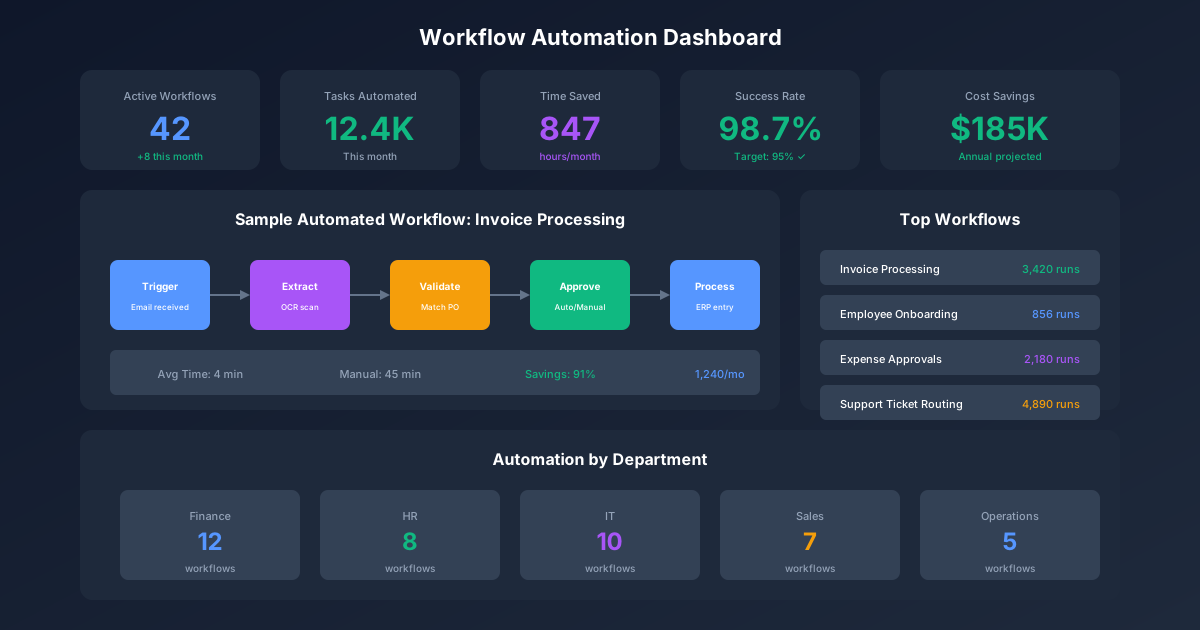
Invoice Processing Workflow
| Step | Manual Time | Automated Time | Automation Method |
|---|---|---|---|
| Receive invoice | 2 min | 0 min | Email ingestion |
| Extract data | 5 min | 30 sec | OCR + AI extraction |
| Match to PO | 3 min | 10 sec | Database lookup |
| Validate amounts | 2 min | 5 sec | Rule-based comparison |
| Route for approval | 1 min | Instant | Workflow routing |
| Post to ERP | 2 min | Instant | API integration |
| Schedule payment | 1 min | Instant | Payment rules |
| Total | 16 min | < 1 min | 94% reduction |
Expense Report Workflow
| Checkpoint | Rule | Auto-Action |
|---|---|---|
| Receipt required | Amount > $25 | Block without receipt |
| Category validation | Expense type matches vendor | Flag mismatch |
| Duplicate check | Same vendor, date, amount | Alert for review |
| Policy compliance | Within category limits | Auto-approve or escalate |
| Budget check | Cost center has funds | Route to manager if over |
| Tax compliance | Correct tax treatment | Calculate automatically |
IT Workflow Automation
Incident Management Workflow
| Stage | Automation | Integration |
|---|---|---|
| Detection | Monitoring alerts | Datadog → ServiceNow |
| Classification | ML-based categorization | ServiceNow AI |
| Assignment | Skills-based routing | ServiceNow → On-call |
| Notification | Alert stakeholders | ServiceNow → Slack/PagerDuty |
| Diagnosis | Auto-run diagnostics | ServiceNow → Ansible |
| Resolution | Known-error auto-fix | ServiceNow → Scripts |
| Verification | Service health check | Scripts → Monitoring |
| Closure | Satisfaction survey | ServiceNow → Survey |
Access Request Workflow
User submits request
        │
        ▼
┌─────────────────┐
│ Validate user   │──Invalid──▶ Reject + notify
│ identity        │
└────────┬────────┘
         │ Valid
         ▼
┌─────────────────┐
│ Check existing  │──Exists──▶ Skip to verification
│ access          │
└────────┬────────┘
         │ New access needed
         ▼
┌─────────────────┐
│ Manager         │──Denied──▶ Close with reason
│ approval        │
└────────┬────────┘
         │ Approved
         ▼
┌─────────────────┐
│ Security review │──Denied──▶ Close with reason
│ (if sensitive)  │
└────────┬────────┘
         │ Approved
         ▼
┌─────────────────┐
│ Provision       │──Failed──▶ Alert IT, manual queue
│ access          │
└────────┬────────┘
         │ Success
         ▼
    Notify user,
    update audit log
Operations Workflow Automation
Purchase Order Workflow
| Step | Trigger | System | Auto-Action |
|---|---|---|---|
| Requisition | User submits | Procurement | Create PR, validate budget |
| Sourcing | PR approved | Procurement | Check preferred vendors, get quotes |
| Selection | Quotes received | Procurement | Score vendors, recommend selection |
| PO Creation | Vendor selected | ERP | Generate PO, send to vendor |
| Receipt | Goods delivered | Warehouse | Match to PO, update inventory |
| Invoice Match | Invoice received | AP | 3-way match, queue for payment |
| Payment | Match approved | Treasury | Schedule per payment terms |
Quality Control Workflow
| Checkpoint | Automation | Exception Handling |
|---|---|---|
| Incoming inspection | Barcode scan triggers checklist | Auto-quarantine if no scan |
| Sampling rules | Calculate sample size by lot | Alert QA for high-risk items |
| Test execution | Populate test forms from specs | Route to lab if special test |
| Results capture | Digital entry with validation | Flag out-of-spec immediately |
| Disposition | Apply accept/reject rules | Hold for engineer if borderline |
| Documentation | Auto-generate COA | Route for signature if required |
Implementation Roadmap Template
Phase 1: Discovery (Weeks 1-4)
| Week | Activity | Deliverable |
|---|---|---|
| 1 | Process inventory | List of candidate processes |
| 2 | Stakeholder interviews | Pain points and requirements |
| 3 | Current state documentation | Process maps and metrics |
| 4 | Prioritization workshop | Ranked automation backlog |
Phase 2: Design (Weeks 5-8)
| Week | Activity | Deliverable |
|---|---|---|
| 5 | Future state design | Automated workflow diagrams |
| 6 | Technology selection | Platform recommendation |
| 7 | Integration planning | API and data requirements |
| 8 | Business case finalization | ROI analysis and approval |
Phase 3: Build (Weeks 9-14)
| Week | Activity | Deliverable |
|---|---|---|
| 9-10 | Platform setup and configuration | Working environment |
| 11-12 | Workflow development | Functional automation |
| 13 | Integration development | Connected systems |
| 14 | Testing and QA | Test results and fixes |
Phase 4: Deploy (Weeks 15-18)
| Week | Activity | Deliverable |
|---|---|---|
| 15 | User acceptance testing | Sign-off from business |
| 16 | Training and documentation | Trained users, user guides |
| 17 | Pilot deployment | Limited production use |
| 18 | Full deployment | Production launch |
Phase 5: Optimize (Ongoing)
| Activity | Frequency | Deliverable |
|---|---|---|
| Performance monitoring | Daily | Dashboard metrics |
| Issue resolution | As needed | Bug fixes |
| Process refinement | Monthly | Optimization updates |
| ROI tracking | Quarterly | Business case validation |
| Expansion planning | Semi-annual | Next automation candidates |
Common Automation Mistakes
Mistake 1: Automating Broken Processes
Problem: Encoding existing inefficiencies into automation Impact: Fast garbage is still garbage Solution: Improve processes before automating
Checklist Before Automating:
- Process has been recently reviewed
- Unnecessary steps eliminated
- Handoffs minimized
- Variations standardized
- Stakeholders aligned on future state
Mistake 2: Insufficient Exception Handling
Problem: Happy path automation without error handling Impact: Process breaks, manual intervention worse than before Solution: Design for exceptions from the start
Exception Categories to Plan:
- Invalid input data
- System unavailability
- Timeout conditions
- Business rule conflicts
- Approval delays/denials
Mistake 3: Ignoring Change Management
Problem: Technical solution without people preparation Impact: Resistance, workarounds, adoption failure Solution: Invest in communication and training
Change Management Checklist:
- Stakeholders identified and engaged
- Communication plan in place
- Training developed and scheduled
- Support resources available
- Feedback mechanisms established
Mistake 4: Over-Automation
Problem: Automating decisions requiring human judgment Impact: Poor outcomes, compliance risk, user frustration Solution: Keep humans in the loop for complex decisions
Keep Human When:
- Ethical considerations involved
- High-value or irreversible decisions
- Complex pattern recognition needed
- Empathy or relationship important
- Regulatory requirements mandate human review
Mistake 5: No Maintenance Plan
Problem: "Set and forget" mentality Impact: Drift, degradation, eventual failure Solution: Build in ongoing governance
Maintenance Activities:
- Monitor performance metrics
- Review and update business rules
- Test integrations after system changes
- Refresh training materials
- Validate ROI assumptions
Automation Governance Framework
Roles and Responsibilities
| Role | Responsibilities |
|---|---|
| Process Owner | Define requirements, validate outcomes, approve changes |
| Automation Lead | Design, build, deploy automation solutions |
| IT Operations | Infrastructure, integrations, security |
| Business Analyst | Requirements gathering, testing, documentation |
| Change Manager | Communication, training, adoption |
Automation Standards
Development Standards:
- Version control for all automation code
- Code review before deployment
- Standardized naming conventions
- Reusable components library
- Documentation requirements
Security Standards:
- Least privilege access
- Credential management (no hardcoded passwords)
- Audit logging enabled
- Data encryption in transit and at rest
- Regular security reviews
Quality Standards:
- Unit testing for components
- Integration testing for workflows
- User acceptance testing sign-off
- Performance benchmarks met
- Error handling validated
Monitoring Dashboard
Track these metrics:
| Metric | Target | Alert Threshold |
|---|---|---|
| Process success rate | > 98% | < 95% |
| Average processing time | < baseline | > 2x baseline |
| Exception rate | < 5% | > 10% |
| Queue depth | < 1 hour | > 4 hours |
| User satisfaction | > 4.0/5 | < 3.5/5 |
Key Takeaways
-
Assess before automating: Not every process is a good automation candidate—use scoring criteria
-
Fix first, then automate: Automating broken processes just creates faster problems
-
Plan for exceptions: Design error handling as carefully as the happy path
-
Invest in change management: Technical success means nothing without user adoption
-
Start small, prove value: Pilot before scaling to build confidence and skills
-
Maintain continuously: Automation requires ongoing attention, not "set and forget"
For related resources, explore our SOP Template Library, IT Service Level Management Guide, and Project Tracker Template.