Software Documentation Templates for Development Teams

Development teams with comprehensive documentation ship 50% faster and experience 40% fewer support escalations. Yet studies show that 65% of engineering teams consider their documentation inadequate or severely outdated. This comprehensive guide provides essential templates and proven practices for creating effective software documentation that scales with your team. For more resources, visit our IT Management Hub and explore our IT Documentation Templates.
Why Software Documentation Matters
The Hidden Cost of Poor Documentation
Common Documentation Problems:
- Tribal knowledge locked in senior engineers' heads
- Onboarding takes months instead of weeks
- Repeated questions consuming valuable engineering time
- Integration partners struggling with API adoption
- Production incidents lasting longer due to missing runbooks
- Technical debt compounding from undocumented decisions
Business Impact:
- 23% of developer time spent searching for information or asking colleagues
- 3-6 month onboarding instead of 2-4 weeks with good docs
- 40% longer incident resolution without runbooks
- Lower API adoption rates from poor developer experience
- Knowledge loss when key engineers leave the team
- Slower feature velocity from repeated context-switching
Benefits of Good Documentation:
- Faster developer onboarding and productivity ramp-up
- Reduced interruptions and context-switching
- Better API adoption by internal and external consumers
- Faster incident response and resolution
- Preserved institutional knowledge
- Improved code quality through design documentation
- Easier compliance and audit processes
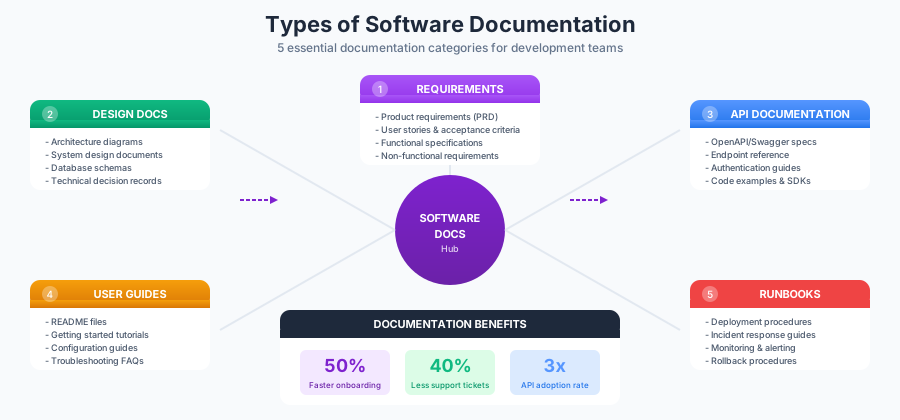
Essential Software Documentation Categories
1. Requirements Documentation
Requirements documentation captures what the software should do before any code is written. This foundational documentation aligns stakeholders and prevents costly rework.
Product Requirements Document (PRD) Template:
# Product Requirements Document

## Document Information
- **Product Name:** [Name]
- **Version:** [Version]
- **Author:** [Product Manager]
- **Last Updated:** [Date]
- **Status:** Draft | Review | Approved

## Executive Summary
[2-3 paragraph overview of the product/feature, its purpose, and expected outcomes]

## Problem Statement
### Current State
[Description of the current situation and pain points]

### Desired State
[Description of what success looks like]

### Success Metrics
| Metric | Current | Target | Measurement Method |
|--------|---------|--------|-------------------|
| [Metric 1] | [Value] | [Value] | [How measured] |

## User Personas
### Persona 1: [Name]
- **Role:** [Job title/role]
- **Goals:** [What they want to achieve]
- **Pain Points:** [Current frustrations]
- **Technical Proficiency:** [Low/Medium/High]

## User Stories
### Epic: [Epic Name]

#### US-001: [User Story Title]
**As a** [persona]
**I want** [capability]
**So that** [benefit]

**Acceptance Criteria:**
- [ ] Given [context], when [action], then [outcome]
- [ ] Given [context], when [action], then [outcome]

**Priority:** P0 | P1 | P2
**Estimated Effort:** [T-shirt size or story points]

## Functional Requirements
### FR-001: [Requirement Name]
- **Description:** [Detailed description]
- **Priority:** Must Have | Should Have | Nice to Have
- **Dependencies:** [List any dependencies]

## Non-Functional Requirements
### Performance
- Response time: [e.g., < 200ms for 95th percentile]
- Throughput: [e.g., 1000 requests/second]
- Availability: [e.g., 99.9% uptime]

### Security
- Authentication: [Requirements]
- Authorization: [Requirements]
- Data encryption: [Requirements]

### Scalability
- Expected user growth: [Projections]
- Data volume growth: [Projections]

## Out of Scope
- [Explicitly list what is NOT included]

## Dependencies and Risks
| Risk | Likelihood | Impact | Mitigation |
|------|------------|--------|------------|
| [Risk 1] | High/Med/Low | High/Med/Low | [Strategy] |

## Timeline
| Milestone | Target Date | Description |
|-----------|-------------|-------------|
| Design Complete | [Date] | [Details] |
| Development Complete | [Date] | [Details] |
| QA Complete | [Date] | [Details] |
| Launch | [Date] | [Details] |

## Appendix
- [Links to mockups, research, related documents]
Best Practices for Requirements Docs:
- Keep requirements atomic and testable
- Use consistent terminology throughout
- Include clear acceptance criteria for every user story
- Review with engineering before finalizing
- Version control all changes
- Link to related design documents
Explore IT Management Templates
2. Design Documentation
Design documents capture the how of your software system. They preserve architectural decisions and enable effective code reviews.
Technical Design Document Template:
# Technical Design Document

## Metadata
- **Title:** [Feature/System Name]
- **Author:** [Engineer Name]
- **Reviewers:** [List of reviewers]
- **Created:** [Date]
- **Last Updated:** [Date]
- **Status:** Draft | In Review | Approved | Implemented

## Overview
### Summary
[1-2 paragraph summary of what this design covers]

### Goals
- [Primary goal 1]
- [Primary goal 2]

### Non-Goals
- [Explicitly state what this design does NOT cover]

## Background
### Current State
[Describe existing system/architecture if applicable]

### Problem Statement
[Clear articulation of the problem being solved]

### Related Work
[Links to related designs, RFCs, or prior art]

## Proposed Solution

### High-Level Architecture
[Include architecture diagram]
┌─────────────┐ ┌─────────────┐ ┌─────────────┐ │ Client │────▶│ API GW │────▶│ Service │ └─────────────┘ └─────────────┘ └─────────────┘ │ ▼ ┌─────────────┐ │ Database │ └─────────────┘
### Component Design

#### Component 1: [Name]
**Responsibility:** [What this component does]

**Interface:**
```typescript
interface UserService {
  createUser(request: CreateUserRequest): Promise<User>;
  getUser(id: string): Promise<User | null>;
  updateUser(id: string, updates: Partial<User>): Promise<User>;
  deleteUser(id: string): Promise<void>;
}
Implementation Notes:
- [Key implementation detail 1]
- [Key implementation detail 2]
Data Model
CREATE TABLE users (
    id UUID PRIMARY KEY DEFAULT gen_random_uuid(),
    email VARCHAR(255) UNIQUE NOT NULL,
    name VARCHAR(255) NOT NULL,
    created_at TIMESTAMP DEFAULT NOW(),
    updated_at TIMESTAMP DEFAULT NOW()
);

CREATE INDEX idx_users_email ON users(email);
API Design
[See API Documentation section for detailed endpoints]
Alternatives Considered
Alternative 1: [Name]
Description: [Brief description] Pros:
- [Pro 1]
- [Pro 2]
Cons:
- [Con 1]
- [Con 2]
Why Not Chosen: [Explanation]
Alternative 2: [Name]
[Same structure as above]
Security Considerations
- Authentication: [How users are authenticated]
- Authorization: [How permissions are enforced]
- Data Protection: [Encryption, PII handling]
- Threat Model: [Key threats and mitigations]
Performance Considerations
- Expected Load: [Requests/second, data volume]
- Latency Requirements: [Target response times]
- Bottlenecks: [Potential performance issues]
- Optimization Strategies: [Caching, indexing, etc.]
Observability
- Logging: [Key events to log]
- Metrics: [Key metrics to track]
- Alerts: [Critical conditions to alert on]
- Dashboards: [Key visualizations needed]
Testing Strategy
- Unit Tests: [Coverage expectations]
- Integration Tests: [Key integration points]
- Load Tests: [Performance validation approach]
- E2E Tests: [Critical user flows]
Rollout Plan
Phase 1: [Name]
- Scope: [What's included]
- Timeline: [Duration]
- Success Criteria: [How to measure success]
Phase 2: [Name]
[Same structure]
Open Questions
- [Question 1]
- [Question 2]
References
- [Link to PRD]
- [Link to related designs]
- [External references]
**Architecture Decision Records (ADR) Template:**
```markdown
# ADR-[NUMBER]: [TITLE]

## Status
Proposed | Accepted | Deprecated | Superseded by ADR-XXX

## Context
[Describe the context and problem statement]

## Decision
[Describe the decision and rationale]

## Consequences

### Positive
- [Benefit 1]
- [Benefit 2]

### Negative
- [Drawback 1]
- [Drawback 2]

### Neutral
- [Observation 1]

## References
- [Related documents]
3. API Documentation
API documentation is critical for both internal developers and external integrators. Well-documented APIs see 3x higher adoption rates.
OpenAPI/Swagger Specification Template:
openapi: 3.0.3
info:
  title: User Management API
  description: |
    API for managing user accounts, authentication, and profiles.

    ## Authentication
    All endpoints require Bearer token authentication unless marked as public.

    ## Rate Limits
    - Standard tier: 100 requests/minute
    - Premium tier: 1000 requests/minute

    ## Error Handling
    All errors follow RFC 7807 Problem Details format.
  version: 1.0.0
  contact:
    name: API Support
    email: api-support@company.com
    url: https://developer.company.com/support

servers:
  - url: https://api.company.com/v1
    description: Production
  - url: https://api.staging.company.com/v1
    description: Staging

tags:
  - name: Users
    description: User account management
  - name: Authentication
    description: Authentication and session management

paths:
  /users:
    post:
      summary: Create a new user
      description: |
        Creates a new user account. Email must be unique across the system.
        Upon successful creation, a verification email is sent to the user.
      operationId: createUser
      tags:
        - Users
      requestBody:
        required: true
        content:
          application/json:
            schema:
              $ref: '#/components/schemas/CreateUserRequest'
            example:
              email: "user@example.com"
              name: "John Doe"
              password: "SecurePassword123!"
      responses:
        '201':
          description: User created successfully
          content:
            application/json:
              schema:
                $ref: '#/components/schemas/User'
        '400':
          $ref: '#/components/responses/BadRequest'
        '409':
          description: User with this email already exists
          content:
            application/json:
              schema:
                $ref: '#/components/schemas/Error'
      security:
        - BearerAuth: []

  /users/{userId}:
    get:
      summary: Get user by ID
      description: Retrieves user details by their unique identifier.
      operationId: getUserById
      tags:
        - Users
      parameters:
        - name: userId
          in: path
          required: true
          description: Unique user identifier (UUID format)
          schema:
            type: string
            format: uuid
          example: "550e8400-e29b-41d4-a716-446655440000"
      responses:
        '200':
          description: User details retrieved successfully
          content:
            application/json:
              schema:
                $ref: '#/components/schemas/User'
        '404':
          $ref: '#/components/responses/NotFound'
      security:
        - BearerAuth: []

components:
  schemas:
    User:
      type: object
      properties:
        id:
          type: string
          format: uuid
          description: Unique identifier for the user
          example: "550e8400-e29b-41d4-a716-446655440000"
        email:
          type: string
          format: email
          description: User's email address
          example: "user@example.com"
        name:
          type: string
          description: User's display name
          example: "John Doe"
        createdAt:
          type: string
          format: date-time
          description: Account creation timestamp
        updatedAt:
          type: string
          format: date-time
          description: Last update timestamp

    CreateUserRequest:
      type: object
      required:
        - email
        - name
        - password
      properties:
        email:
          type: string
          format: email
          maxLength: 255
        name:
          type: string
          minLength: 1
          maxLength: 255
        password:
          type: string
          format: password
          minLength: 8
          maxLength: 128
          description: |
            Password must contain:
            - At least 8 characters
            - One uppercase letter
            - One lowercase letter
            - One number
            - One special character

    Error:
      type: object
      properties:
        type:
          type: string
          format: uri
        title:
          type: string
        status:
          type: integer
        detail:
          type: string
        instance:
          type: string

  responses:
    BadRequest:
      description: Invalid request parameters
      content:
        application/json:
          schema:
            $ref: '#/components/schemas/Error'
    NotFound:
      description: Resource not found
      content:
        application/json:
          schema:
            $ref: '#/components/schemas/Error'

  securitySchemes:
    BearerAuth:
      type: http
      scheme: bearer
      bearerFormat: JWT
      description: |
        JWT token obtained from the /auth/login endpoint.
        Include in the Authorization header: `Bearer <token>`
API Documentation Best Practices:
- Include Real Examples: Always provide working request and response examples
- Document Error Cases: Cover all possible error responses with causes and resolutions
- Versioning Strategy: Clearly communicate your API versioning approach
- Authentication Guide: Provide step-by-step authentication setup instructions
- Rate Limiting: Document rate limits and how to handle 429 responses
- Changelog: Maintain a changelog of API changes and deprecations
- SDK References: Link to official client libraries and code samples
- Interactive Testing: Enable "Try it out" functionality when possible
API Getting Started Guide Template:
# Getting Started with [Product] API

## Quick Start

### Step 1: Get Your API Key
1. Sign up at [developer portal URL]
2. Navigate to API Keys section
3. Click "Create New Key"
4. Copy your API key (you won't see it again!)

### Step 2: Make Your First Request

```bash
curl -X GET "https://api.company.com/v1/users/me" \
  -H "Authorization: Bearer YOUR_API_KEY" \
  -H "Content-Type: application/json"
Step 3: Explore the API
- API Reference (
/docs/api-reference) - Code Examples (
/docs/examples) - SDKs (
/docs/sdks)
Authentication
All API requests require authentication using Bearer tokens:
Authorization: Bearer <your-api-key>
Rate Limits
| Plan | Requests/Minute | Requests/Day |
|---|---|---|
| Free | 60 | 1,000 |
| Pro | 600 | 50,000 |
| Enterprise | Custom | Custom |
Common Use Cases
Create a User
import requests

response = requests.post(
    "https://api.company.com/v1/users",
    headers={"Authorization": "Bearer YOUR_API_KEY"},
    json={
        "email": "newuser@example.com",
        "name": "New User"
    }
)
print(response.json())
Need Help?
### 4. User Guides and README Documentation
README files are often the first documentation developers encounter. A well-crafted README dramatically improves project adoption and contribution rates.
**Comprehensive README Template:**
```markdown
# Project Name
[]()
[]()
[]()
[]()
Short description of what this project does and who it's for.
## Features
- Feature 1: Brief description
- Feature 2: Brief description
- Feature 3: Brief description
## Table of Contents
- [Installation](#installation)
- [Quick Start](#quick-start)
- [Usage](#usage)
- [Configuration](#configuration)
- [API Reference](#api-reference)
- [Contributing](#contributing)
- [License](#license)
## Installation
### Prerequisites
- Node.js >= 18.0.0
- npm >= 9.0.0
- PostgreSQL >= 14
### Package Installation
```bash
# Using npm
npm install package-name
# Using yarn
yarn add package-name
# Using pnpm
pnpm add package-name
From Source
git clone https://github.com/org/project.git
cd project
npm install
npm run build
Quick Start
Get up and running in under 5 minutes:
import { Client } from 'package-name';

// Initialize the client
const client = new Client({
  apiKey: process.env.API_KEY,
});

// Make your first request
const result = await client.doSomething();
console.log(result);
Usage
Basic Usage
// Example with detailed comments
const client = new Client({ apiKey: 'your-api-key' });

// Perform an operation
const response = await client.createResource({
  name: 'My Resource',
  type: 'example',
});

console.log(response.id); // Resource ID
Advanced Usage
// More complex example
const client = new Client({
  apiKey: 'your-api-key',
  timeout: 30000,
  retries: 3,
});

// Batch operations
const results = await client.batchCreate([
  { name: 'Resource 1' },
  { name: 'Resource 2' },
]);
Configuration
Environment Variables
| Variable | Description | Default | Required |
|---|---|---|---|
API_KEY | Your API key | - | Yes |
API_URL | API base URL | https://api.example.com | No |
TIMEOUT | Request timeout (ms) | 30000 | No |
LOG_LEVEL | Logging verbosity | info | No |
Configuration File
Create a .projectrc file in your project root:
{
  "apiKey": "your-api-key",
  "environment": "production",
  "features": {
    "caching": true,
    "retries": 3
  }
}
API Reference
[object Object]
Constructor
new Client(options: ClientOptions)| Option | Type | Description |
|---|---|---|
apiKey | string | Your API key (required) |
timeout | number | Request timeout in ms |
retries | number | Number of retry attempts |
Methods
createResource(data: ResourceData): Promise<Resource>
Creates a new resource.
const resource = await client.createResource({
  name: 'My Resource',
  type: 'example',
});
getResource(id: string): Promise<Resource | null>
Retrieves a resource by ID.
const resource = await client.getResource('resource-id');Examples
Find more examples in the /examples directory:
- Basic Usage (
/examples/basic.js) - Authentication (
/examples/auth.js) - Error Handling (
/examples/errors.js) - Pagination (
/examples/pagination.js)
Troubleshooting
Common Issues
"Authentication Failed" Error
Cause: Invalid or expired API key.
Solution:
- Verify your API key in the dashboard
- Regenerate if expired
- Ensure no extra whitespace
Timeout Errors
Cause: Network issues or slow responses.
Solution:
const client = new Client({
  apiKey: 'your-key',
  timeout: 60000, // Increase timeout
});
Contributing
We welcome contributions! Please see our Contributing Guide (CONTRIBUTING.md) for details.
Development Setup
# Clone the repo
git clone https://github.com/org/project.git
cd project

# Install dependencies
npm install

# Run tests
npm test

# Start development server
npm run dev
Pull Request Process
- Fork the repository
- Create a feature branch (
git checkout -b feature/amazing-feature) - Commit your changes (
git commit -m 'Add amazing feature') - Push to the branch (
git push origin feature/amazing-feature) - Open a Pull Request
Changelog
See CHANGELOG.md for release history.
License
This project is licensed under the MIT License - see the LICENSE file for details.
Support
- Documentation: docs.example.com
- Issue Tracker: GitHub Issues
- Community: Discord
- Email: support@example.com
Acknowledgments
**CONTRIBUTING.md Template:**
```markdown
# Contributing to [Project Name]

Thank you for your interest in contributing! This document provides guidelines and information for contributors.

## Code of Conduct

Please read and follow our [Code of Conduct](CODE_OF_CONDUCT.md).

## How to Contribute

### Reporting Bugs

1. Search existing issues to avoid duplicates
2. Use the bug report template
3. Include:
   - Clear description
   - Steps to reproduce
   - Expected vs actual behavior
   - Environment details

### Suggesting Features

1. Search existing feature requests
2. Use the feature request template
3. Explain the use case and benefits

### Submitting Code

1. Fork the repository
2. Create a feature branch from `main`
3. Write tests for new functionality
4. Ensure all tests pass
5. Update documentation as needed
6. Submit a pull request

## Development Setup

```bash
# Install dependencies
npm install

# Run tests
npm test

# Run linting
npm run lint

# Build the project
npm run build
Coding Standards
- Use TypeScript for all new code
- Follow existing code style (enforced by ESLint/Prettier)
- Write meaningful commit messages
- Add tests for new features
- Update documentation
Pull Request Guidelines
- Keep PRs focused on a single change
- Include tests for new functionality
- Update relevant documentation
- Reference related issues
Review Process
- Automated checks must pass
- Code review by maintainer
- Address feedback
- Merge upon approval
Questions?
Open a discussion or reach out to maintainers.
### 5. Runbooks and Operations Documentation

Runbooks provide step-by-step procedures for operational tasks, enabling any team member to handle incidents and deployments consistently.

**Production Runbook Template:**
```markdown
# Runbook: [Service Name] Operations

## Service Overview

| Property | Value |
|----------|-------|
| **Service Name** | [Name] |
| **Team** | [Owning team] |
| **Tier** | Critical / High / Medium / Low |
| **On-Call Rotation** | [PagerDuty link or schedule] |
| **Dashboards** | [Link to Grafana/DataDog] |
| **Logs** | [Link to logging system] |

## Architecture
┌─────────────┐ ┌─────────────┐ ┌─────────────┐ │ Client │────▶│ API GW │────▶│ Service │ └─────────────┘ └─────────────┘ └─────────────┘ │ ┌───────────────────────────┤ │ │ ▼ ▼ ┌─────────────┐ ┌─────────────┐ │ Redis │ │ PostgreSQL │ └─────────────┘ └─────────────┘
### Dependencies

| Dependency | Type | Impact if Down |
|------------|------|----------------|
| PostgreSQL | Database | Complete outage |
| Redis | Cache | Degraded performance |
| Auth Service | Internal | Auth failures |

## Health Checks

### Endpoints

| Endpoint | Expected Response | Check Frequency |
|----------|------------------|-----------------|
| `/health` | `200 OK` | 10 seconds |
| `/ready` | `200 OK` | 30 seconds |

### Key Metrics

| Metric | Normal Range | Alert Threshold |
|--------|--------------|-----------------|
| Response Time (p99) | < 200ms | > 500ms |
| Error Rate | < 0.1% | > 1% |
| CPU Usage | < 60% | > 80% |
| Memory Usage | < 70% | > 85% |

## Common Incidents

### High Error Rate

**Symptoms:**
- Error rate > 1%
- Increased 5xx responses
- User complaints

**Diagnosis:**
1. Check error logs:
   ```bash
   kubectl logs -l app=service-name --tail=100 | grep ERROR
- Check dependent services status
- Review recent deployments
Resolution:
- If due to recent deployment: Rollback procedure
- If database issue: Database troubleshooting
- If resource exhaustion: Scaling procedure
Escalation:
- After 15 minutes: Page senior engineer
- After 30 minutes: Page engineering manager
High Latency
Symptoms:
- Response time > 500ms (p99)
- Timeout errors
- Queue depth increasing
Diagnosis:
- Check database query performance:
SELECT * FROM pg_stat_activity WHERE state != 'idle' ORDER BY query_start; - Check Redis connectivity:
redis-cli ping - Review APM traces for slow endpoints
Resolution:
- If slow queries: Add missing indexes or optimize queries
- If Redis timeout: Check Redis memory/connections
- If load-related: Scale horizontally
Database Issues
Connection Pool Exhausted:
# Check active connections
psql -c "SELECT count(*) FROM pg_stat_activity WHERE datname='dbname';"

# Kill idle connections if needed
psql -c "SELECT pg_terminate_backend(pid) FROM pg_stat_activity
         WHERE datname='dbname' AND state='idle' AND query_start < now() - interval '10 minutes';"
Replication Lag:
# Check replication status
psql -c "SELECT client_addr, state, sent_lsn, write_lsn,
         pg_wal_lsn_diff(sent_lsn, write_lsn) as lag_bytes
         FROM pg_stat_replication;"
Operational Procedures
Deployment
Pre-Deployment Checklist:
- All tests passing
- Code review approved
- Changelog updated
- Feature flags configured
- Rollback plan reviewed
Deployment Steps:
- Announce deployment in #deployments channel
- Deploy to staging:
kubectl set image deployment/service-name \ service-name=registry.company.com/service:$VERSION \ -n staging - Verify staging health
- Deploy to production:
kubectl set image deployment/service-name \ service-name=registry.company.com/service:$VERSION \ -n production - Monitor for 15 minutes
- Announce completion
Rollback
When to Rollback:
- Error rate > 5%
- Response time > 2x baseline
- Critical functionality broken
Rollback Steps:
- Identify last known good version:
kubectl rollout history deployment/service-name -n production - Rollback:
kubectl rollout undo deployment/service-name -n production - Verify health
- Announce rollback and create incident ticket
Scaling
Horizontal Scaling:
# Scale to desired replicas
kubectl scale deployment/service-name --replicas=10 -n production

# Or use autoscaling
kubectl autoscale deployment/service-name \
  --min=3 --max=20 --cpu-percent=70 -n production
Vertical Scaling:
# Update resource limits
kubectl set resources deployment/service-name \
  --limits=cpu=2000m,memory=4Gi \
  --requests=cpu=1000m,memory=2Gi \
  -n production
Database Maintenance
Schema Migrations:
- Review migration script
- Backup database:
pg_dump -h hostname -U user dbname > backup_$(date +%Y%m%d).sql - Run migration during low-traffic window:
npm run migrate:production - Verify data integrity
Contacts
| Role | Name | Contact |
|---|---|---|
| Primary On-Call | [Rotation] | [PagerDuty] |
| Team Lead | [Name] | [Email/Slack] |
| Database Admin | [Name] | [Email/Slack] |
| Platform Team | - | #platform-support |
External Resources
- Service Documentation (
/docs/services/service-name) - Architecture Decision Records (
/docs/adrs) - Incident History (
/incidents?service=service-name) - Postmortem Database (
/postmortems?service=service-name)
**Incident Response Template:**
```markdown
# Incident Response: [Incident Title]

## Incident Summary
| Field | Value |
|-------|-------|
| **Incident ID** | INC-XXXX |
| **Severity** | SEV1 / SEV2 / SEV3 |
| **Status** | Investigating / Identified / Monitoring / Resolved |
| **Commander** | [Name] |
| **Start Time** | YYYY-MM-DD HH:MM UTC |
| **Resolution Time** | YYYY-MM-DD HH:MM UTC |
| **Duration** | X hours Y minutes |

## Timeline

| Time (UTC) | Event |
|------------|-------|
| HH:MM | Alert triggered for [condition] |
| HH:MM | On-call acknowledged alert |
| HH:MM | Root cause identified: [brief description] |
| HH:MM | Mitigation applied: [action taken] |
| HH:MM | Service restored to normal |

## Impact

- **Users Affected:** [Number or percentage]
- **Business Impact:** [Revenue, reputation, SLA breach]
- **Services Affected:** [List of affected services]

## Root Cause

[Detailed explanation of what caused the incident]

## Resolution

[Steps taken to resolve the incident]

## Action Items

| Action | Owner | Due Date | Status |
|--------|-------|----------|--------|
| [Action 1] | [Name] | YYYY-MM-DD | Open |
| [Action 2] | [Name] | YYYY-MM-DD | Open |

## Lessons Learned

### What Went Well
- [Point 1]
- [Point 2]

### What Went Poorly
- [Point 1]
- [Point 2]

### Where We Got Lucky
- [Point 1]
Documentation Best Practices
Writing Effective Technical Documentation
Core Principles:
-
Write for Your Audience
- Developer docs: Include code examples, technical details
- User guides: Focus on tasks and outcomes
- Operations docs: Prioritize actionable steps
-
Keep It Current
- Update docs with every code change
- Include documentation in code review checklist
- Automate API doc generation where possible
-
Make It Discoverable
- Consistent organization and naming
- Good search functionality
- Cross-linking between related docs
-
Include Examples
- Working code samples for every feature
- Common use case walkthroughs
- Edge case handling
-
Version Your Documentation
- Match docs to software versions
- Maintain docs for supported versions
- Clear deprecation notices
Documentation Tools and Platforms
Documentation Generators:
- OpenAPI/Swagger: API documentation from spec
- TypeDoc/JSDoc: Generate docs from code comments
- Docusaurus: React-based documentation sites
- GitBook: Collaborative documentation platform
- Read the Docs: Python-focused but language-agnostic
- Mintlify: Modern API documentation
Diagramming Tools:
- Mermaid: Markdown-based diagrams
- PlantUML: Text-based UML diagrams
- Excalidraw: Collaborative whiteboard
- Lucidchart: Professional diagramming
- Draw.io: Free diagramming tool
Collaboration Platforms:
- Notion: Wiki-style documentation
- Confluence: Enterprise knowledge base
- GitHub Wiki: Repository-integrated docs
- Slite: Team documentation
Documentation as Code
Treat documentation like code for better maintenance:
# .github/workflows/docs.yml
name: Documentation CI

on:
  pull_request:
    paths:
      - 'docs/**'
      - 'src/**/*.ts'

jobs:
  validate:
    runs-on: ubuntu-latest
    steps:
      - uses: actions/checkout@v3

      - name: Lint documentation
        run: npm run lint:docs

      - name: Check for broken links
        run: npm run check:links

      - name: Validate code examples
        run: npm run test:docs

      - name: Generate API docs
        run: npm run docs:api
Implementation Checklist
Ready to improve your team's documentation? Use this checklist:
Foundation:
- Audit existing documentation
- Identify critical documentation gaps
- Choose documentation platform(s)
- Establish documentation standards
- Create template library
Requirements Documentation:
- Create PRD template
- Standardize user story format
- Define acceptance criteria guidelines
- Establish review process
Design Documentation:
- Create design doc template
- Implement ADR process
- Define architecture diagram standards
- Set up design review workflow
API Documentation:
- Adopt OpenAPI specification
- Generate interactive API docs
- Create getting started guides
- Document authentication flows
User Guides:
- Create README template
- Standardize CONTRIBUTING guide
- Write installation guides
- Build troubleshooting section
Runbooks:
- Document critical services
- Create incident response procedures
- Define escalation paths
- Establish runbook review cadence
Related Resources
IT Management Resources:
- IT Documentation Templates Every Manager Needs
- Change Management Process for IT Teams
- Incident Response Plan Guide
- IT Service Desk Best Practices
Project Management:
- Requirements Gathering Template Best Practices
- Agile Scrum Methodology for IT Projects
- IT Project Management Guide
Templates:
Conclusion
Effective software documentation is a multiplier for development team productivity. By implementing standardized templates for requirements, design, API documentation, user guides, and runbooks, your team can dramatically reduce onboarding time, improve code quality, and accelerate incident resolution.
Key Takeaways:
- Start with templates - Consistency reduces cognitive load and speeds up documentation creation
- Document as you code - Real-time documentation stays accurate; retroactive documentation often never happens
- Automate where possible - Generate API docs from specs, validate examples in CI
- Assign ownership - Every document needs an owner responsible for accuracy
- Review regularly - Schedule quarterly documentation audits
Quick Wins to Start Today:
- Create a README template and apply it to your top 5 repositories
- Implement ADRs for capturing architectural decisions
- Generate OpenAPI specs for your APIs
- Write runbooks for your three most critical services
- Add documentation checks to your CI pipeline
The best time to improve your documentation was when the code was written. The second best time is now.
Next Steps: