Stakeholder Communication Templates: Project Updates & Executive Reporting Guide

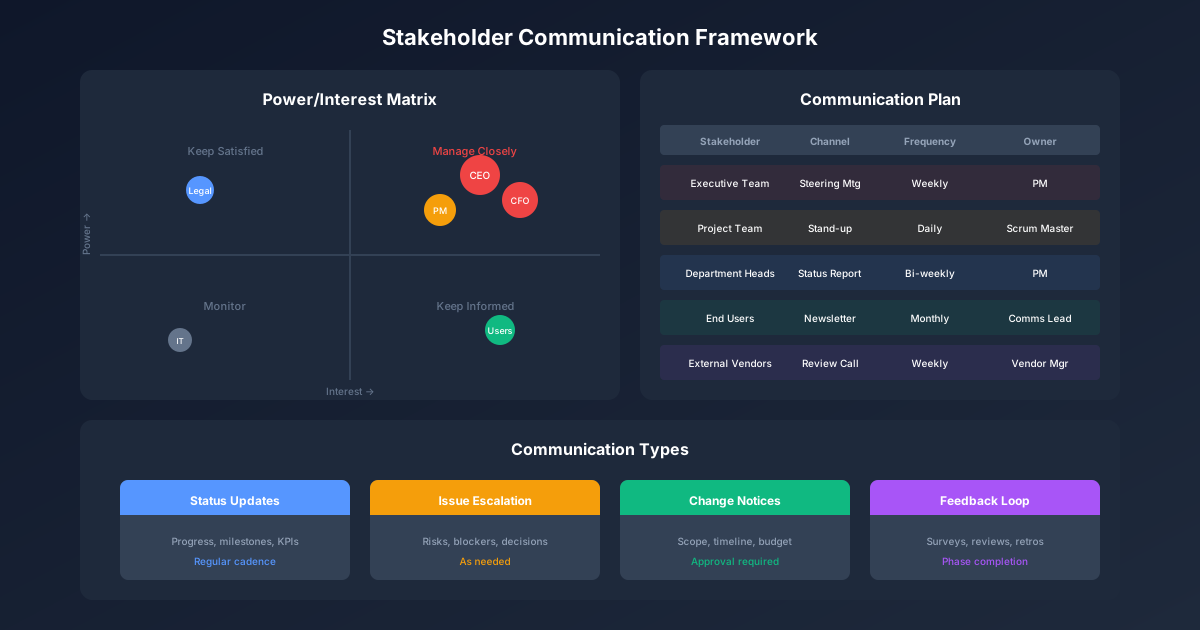
Project success depends as much on communication as execution. Stakeholders who are surprised by issues, confused about status, or unclear on their role become obstacles rather than supporters. Yet most project managers struggle to communicate effectively—drowning executives in details or leaving teams uninformed.
Effective stakeholder communication is targeted, actionable, and appropriately detailed for each audience. This guide provides templates for every communication need: status reports, executive updates, escalations, and team communications.
For related project management resources, explore our Project Management Hub, Change Management Framework, and Project Portfolio Management Guide. For templates, see our Project Tracker Template. To keep your stakeholder meetings productive and focused, try our Meeting Agenda Template.
Stakeholder Communication Framework
Communication by Audience
| Audience | Needs | Frequency | Format | Detail Level |
|---|---|---|---|---|
| Executive Sponsor | Strategic view, decisions needed | Weekly/Bi-weekly | Executive summary | High-level |
| Steering Committee | Progress, issues, trade-offs | Bi-weekly/Monthly | Presentation | Medium |
| Project Team | Tasks, coordination, blockers | Daily/Weekly | Stand-up, email | Detailed |
| Functional Managers | Resource needs, impacts | Weekly | Email, meeting | Medium |
| End Users | Changes, timeline, training | As needed | Email, intranet | High-level |
| Vendors | Requirements, deliverables | Per contract | Formal communication | Detailed |
Communication Planning Matrix
| Stakeholder | Message Type | Channel | Frequency | Owner |
|---|---|---|---|---|
| CEO | Executive summary | Monthly | PM | |
| CFO | Budget status | Report | Monthly | PM |
| VP Operations | Progress, risks | Meeting | Bi-weekly | PM |
| Department Heads | Impact, timeline | Monthly | PM | |
| Project Team | Tasks, issues | Stand-up | Daily | PM |
| IT Team | Technical details | Meeting | Weekly | Tech Lead |
Status Report Templates
Weekly Status Report
Project: [Name] | Week Ending: [Date]
| Section | Content |
|---|---|
| Executive Summary | One paragraph: Overall status, key accomplishments, immediate priorities |
| Status Indicators | |
| Schedule: 🟢 🟡 🔴 | |
| Budget: 🟢 🟡 🔴 | |
| Scope: 🟢 🟡 🔴 | |
| Resources: 🟢 🟡 🔴 | |
| Accomplishments This Week | |
| • Completed [specific deliverable] | |
| • Achieved [milestone] | |
| • Resolved [issue] | |
| Planned Next Week | |
| • Complete [specific task] | |
| • Begin [next phase] | |
| • Review [deliverable] | |
| Issues/Risks | |
| Issue 1: [Description] - Impact: [X] - Action: [Y] | |
| Risk 1: [Description] - Mitigation: [Z] | |
| Decisions Needed | |
| Decision 1: [What] - Needed by: [Date] - From: [Who] | |
| Metrics | |
| % Complete: X% |
Executive Summary Format
For senior leadership who have 30 seconds to read:
PROJECT: [Name]
STATUS: 🟢 On Track / 🟡 At Risk / 🔴 Off Track

KEY MESSAGE:
[One sentence: The most important thing to know]

PROGRESS:
• [Major accomplishment 1]
• [Major accomplishment 2]

ATTENTION NEEDED:
• [Issue or decision requiring executive attention]

NEXT MILESTONE:
[Name] - [Date]
Detailed Status Report
For stakeholders who need more information:
| Section | Template |
|---|---|
| Header | |
| Project Name | |
| Reporting Period | |
| Report Date | |
| Prepared By | |
| Distribution | |
| Overall Status | |
| Schedule | Status: [G/Y/R] Variance: [+/- days] |
| Budget | Status: [G/Y/R] Spent: [$X of $Y] |
| Scope | Status: [G/Y/R] Change requests: [#] |
| Quality | Status: [G/Y/R] Defects: [#] |
| Milestone Progress | |
| Milestone | Baseline Date |
| [Name] | [Date] |
| Deliverable Status | |
| Deliverable | Owner |
| [Name] | [Name] |
| Budget Detail | |
| Category | Budget |
| Labor | $ |
| Equipment | $ |
| Other | $ |
| Risk Register | |
| Risk | Probability |
| [Risk] | H/M/L |
| Issue Log | |
| Issue | Impact |
| [Issue] | [Impact] |
| Action Items | |
| Action | Owner |
| [Action] | [Name] |
Executive Communication Templates
Executive Briefing Email
Subject: [Project Name] - Executive Update [Date]
[Executive Name],

Quick update on [Project Name]:

STATUS: [GREEN/YELLOW/RED]

KEY POINTS:
• [Most important item - usually progress or issue]
• [Second most important item]
• [Third most important item]

ACTION NEEDED:
[Specific ask with deadline, or "None - informational only"]

UPCOMING:
• [Next major milestone and date]

Happy to discuss further. [Optional: scheduling link]

[Your Name]
Board/Executive Presentation Template
| Slide | Content | Time |
|---|---|---|
| 1. Title | Project name, date, presenter | 30 sec |
| 2. Executive Summary | 3-4 bullet overview | 1 min |
| 3. Status Dashboard | Visual RAG status, key metrics | 2 min |
| 4. Accomplishments | Major achievements with business impact | 2 min |
| 5. Challenges | Issues, risks, with mitigation | 3 min |
| 6. Financial Summary | Budget status, forecast | 2 min |
| 7. Timeline | Key milestones, critical path | 2 min |
| 8. Decisions/Support Needed | Clear asks with options | 2 min |
| 9. Next Steps | Immediate priorities | 1 min |
Escalation Email Template
Subject: [ESCALATION] [Project Name] - [Issue] - Decision Needed by [Date]
[Executive Name],

I'm escalating [issue] which requires your decision/intervention.

SITUATION:
[Brief description of what happened/is happening]

IMPACT:
• Schedule: [X days delay if not resolved]
• Budget: [$X additional cost]
• Business: [Business impact description]

OPTIONS:
1. [Option A]: [Description] - Impact: [X] - Recommended: [Yes/No]
2. [Option B]: [Description] - Impact: [Y]
3. [Option C]: [Description] - Impact: [Z]

RECOMMENDATION:
[Your recommendation with brief rationale]

DECISION NEEDED BY:
[Date] - [Reason for urgency]

I'm available to discuss at your convenience. [Contact info/calendar link]

[Your Name]
Team Communication Templates
Kick-off Meeting Communication
Subject: [Project Name] Kick-off Meeting - [Date/Time]
Team,

Please join us for the [Project Name] kick-off meeting.

WHEN: [Date, Time, Duration]
WHERE: [Location/Link]
WHO: [Attendees]

AGENDA:
• Project overview and objectives (15 min)
• Roles and responsibilities (15 min)
• Timeline and milestones (15 min)
• Communication and governance (10 min)
• Q&A (15 min)

PREPARATION:
• Review attached project charter
• Come with questions

Looking forward to kicking off this important initiative together.

[Your Name]
Stand-up/Huddle Format
| Question | Purpose | Time |
|---|---|---|
| What did you complete yesterday? | Progress tracking | 1-2 min each |
| What will you work on today? | Coordination | 1-2 min each |
| Any blockers or help needed? | Issue identification | As needed |
Total meeting time: 15 minutes maximum
Issue Notification Email
Subject: [Project Name] - Issue: [Brief Description]
Team,

Alerting you to an issue that may impact our timeline/deliverables.

ISSUE:
[Clear description of what's wrong]

IMPACT:
• [Impact on deliverables]
• [Impact on timeline]
• [Impact on team members]

IMMEDIATE ACTIONS:
• [Action 1] - [Owner] - [Due]
• [Action 2] - [Owner] - [Due]

HELP NEEDED:
[Specific assistance required, or "None at this time"]

I'll send updates as we work through this. Questions? Reach out.

[Your Name]
Specialized Communications
Go-Live Communication
Subject: [Project Name] Go-Live - [Date]
[Audience],

[Project Name] goes live on [Date]. Here's what you need to know:

WHAT'S CHANGING:
• [Change 1 - user impact]
• [Change 2 - user impact]
• [Change 3 - user impact]

WHEN:
• Go-live: [Date/Time]
• Training available: [Dates]
• Old system sunset: [Date]

WHAT YOU NEED TO DO:
1. [Action 1 - e.g., complete training by X date]
2. [Action 2 - e.g., update your bookmarks]
3. [Action 3 - e.g., test before go-live]

SUPPORT:
• Training materials: [Link]
• Help desk: [Contact]
• FAQs: [Link]
• Floor support: [Dates/Locations]

Questions? Contact [Name/Email].

[Your Name]
Project Closure Communication
Subject: [Project Name] - Project Complete!
Team and Stakeholders,

I'm pleased to announce that [Project Name] has successfully completed!

SUMMARY:
• Duration: [X months] (on time / X days early/late)
• Budget: $[X] (on budget / X% under/over)
• Key deliverables: All delivered ✓

ACHIEVEMENTS:
• [Major achievement 1]
• [Major achievement 2]
• [Business benefit realized]

RECOGNITION:
Special thanks to:
• [Name] - [Contribution]
• [Name] - [Contribution]
• The entire team for exceptional effort

WHAT'S NEXT:
• Support transition: [Plan]
• Benefits tracking: [Owner]
• Lessons learned session: [Date]

Thank you all for your contributions to this success.

[Your Name]
Change Request Communication
Subject: [Project Name] - Change Request: [Brief Description]
Steering Committee,

A change request has been submitted for your review.

CHANGE REQUEST: [CR Number]
Submitted by: [Name]
Date: [Date]

DESCRIPTION:
[What is being requested]

REASON:
[Why this change is needed]

IMPACT:
• Schedule: [+/- X days]
• Budget: [+/- $X]
• Scope: [What's added/removed]
• Resources: [Additional needs]

OPTIONS:
1. Approve as submitted
2. Approve with modifications: [Describe]
3. Reject

RECOMMENDATION: [Your recommendation]

Please respond by [Date] or we'll discuss at the next steering committee.

[Your Name]
Communication Best Practices
The SBAR Format
For urgent/clinical communications:
| Element | Description | Example |
|---|---|---|
| Situation | What's happening now | "The database migration failed overnight" |
| Background | Context, history | "We're migrating 5TB of data; this was attempt 2" |
| Assessment | Your analysis | "Root cause is network timeout; data is intact" |
| Recommendation | What you suggest | "Recommend retry tonight with increased timeout" |
Bad News Delivery Framework
| Principle | Application |
|---|---|
| Lead with the news | Don't bury bad news—state it clearly first |
| Own it | Take responsibility; don't blame |
| Explain impact | Be honest about consequences |
| Present solutions | Come with options, not just problems |
| State your ask | Be clear about what you need |
| Follow up | Commit to updates and keep commitment |
Communication Frequency Guide
| Situation | Frequency | Format |
|---|---|---|
| Project running smoothly | Weekly report | |
| Issue being worked | Daily updates | |
| Crisis | Multiple daily | Email + call |
| Major milestone | Immediate | Email + optional meeting |
| Scope change | Before decision | Meeting + documentation |
| Budget overrun | Immediate | Meeting + documentation |
Communication Metrics
Communication Effectiveness
| Metric | Measurement | Target |
|---|---|---|
| Response rate | Replies to status reports | > 80% when input requested |
| Decision cycle time | Request to decision | < 5 business days |
| Escalation resolution | Time to resolve escalation | < 3 business days |
| Stakeholder satisfaction | Survey score | > 4.0/5.0 |
| Meeting effectiveness | Action items completed | > 90% |
Common Communication Failures
| Failure | Cause | Prevention |
|---|---|---|
| Surprise | Not communicating early | Regular updates, early warning |
| Confusion | Too much detail | Tailor to audience |
| Inaction | Unclear asks | Specific requests with deadlines |
| Distrust | Inconsistent messaging | Single source of truth |
| Disengagement | Irrelevant information | Targeted communication |
Key Takeaways
-
Know your audience: Executives need summaries; teams need details
-
Lead with the headline: Put the most important information first
-
Be action-oriented: Every communication should have a clear "so what"
-
Communicate bad news early: Surprises destroy trust
-
Be consistent: Regular cadence builds confidence
-
Follow up: Communication isn't complete until the loop is closed
For related resources, explore our Change Management Framework, Project Portfolio Management Guide, and Project Tracker Template.