Resource Planning Template: Capacity Planning & Workload Management Guide

Resource constraints kill more projects than technical challenges. Teams overcommit, key people burn out, and critical work slips through the cracks. Without visibility into capacity and demand, organizations make staffing decisions based on guesswork rather than data.
Effective resource planning matches supply (your people) with demand (the work) across time. This guide provides templates for capacity planning, workload management, skills tracking, and demand forecasting—giving you control over your most valuable asset: your team.
For related project management resources, explore our Project Management Hub, Agile Project Management Templates, and Financial Planning Hub. For templates, see our Project Tracker Template.
Resource Planning Fundamentals
What is Resource Planning?
Resource planning is the process of identifying, allocating, and managing the people, skills, and capacity needed to deliver projects and operations. It answers these questions:
- Do we have enough people for the work ahead?
- Are the right skills available when needed?
- Who is overloaded? Who has capacity?
- When should we hire, contract, or defer work?
Resource Planning Levels
| Level | Time Horizon | Focus | Decisions |
|---|---|---|---|
| Strategic | 12-36 months | Headcount planning | Hiring plans, capability development |
| Tactical | 3-12 months | Capacity allocation | Project prioritization, contractor needs |
| Operational | 0-3 months | Workload management | Task assignment, daily balancing |
Key Metrics
| Metric | Formula | Target Range | Purpose |
|---|---|---|---|
| Utilization | Billable hours / Available hours | 70-85% | Measure productive time |
| Allocation | Assigned hours / Available hours | 80-100% | Measure planned workload |
| Capacity | Available hours - Assigned hours | > 0 | Identify availability |
| Demand | Total hours required by work | - | Understand work volume |
Capacity Planning Template
Individual Capacity Worksheet
Calculate available capacity for each team member:
| Factor | Hours | Calculation |
|---|---|---|
| Calendar days in period | 65 days | Q1 (Jan-Mar) |
| Weekends | -18 days | 9 weekends × 2 |
| Holidays | -3 days | Company holidays |
| PTO planned | -5 days | Scheduled vacation |
| Working days | 39 days | Net available days |
| Hours per day | 8 hours | Standard workday |
| Gross capacity | 312 hours | Working days × hours |
| Admin/overhead | -15% | Meetings, email, etc. |
| Net capacity | 265 hours | Available for project work |
Team Capacity Summary
Roll up individual capacity to team level:
| Team Member | Role | FTE | Gross Capacity | Overhead % | Net Capacity | Skills |
|---|---|---|---|---|---|---|
| Sarah Chen | Senior Dev | 1.0 | 312 hrs | 15% | 265 hrs | Java, Python, AWS |
| Mike Johnson | Developer | 1.0 | 312 hrs | 10% | 281 hrs | Python, React |
| Lisa Park | Developer | 0.8 | 250 hrs | 10% | 225 hrs | Java, SQL |
| Tom Wilson | QA Lead | 1.0 | 312 hrs | 20% | 250 hrs | Automation, Manual QA |
| Emily Davis | BA | 1.0 | 280 hrs | 25% | 210 hrs | Requirements, Agile |
| Team Total | 4.8 | 1,466 hrs | 1,231 hrs |
Capacity Adjustment Factors
| Factor | Impact | How to Calculate |
|---|---|---|
| New hire ramp-up | -50% first month, -25% second | Reduce capacity proportionally |
| Training | -100% during training | Subtract training hours |
| On-call rotation | -10% average | Reduce for on-call weeks |
| Support duties | Varies | Track actual support time |
| Management | -20% to -50% | Based on span of control |
Demand Planning Template
Project Demand Worksheet
Accurate demand estimation starts with a clear breakdown of project deliverables. Use a Work Breakdown Structure Template to decompose each project into tasks before estimating hours.
Estimate hours needed for each project:
| Project | Phase | Role | Hours Needed | Start | End | Priority |
|---|---|---|---|---|---|---|
| CRM Upgrade | Development | Senior Dev | 160 | Jan 15 | Mar 31 | High |
| CRM Upgrade | Development | Developer | 240 | Jan 15 | Mar 31 | High |
| CRM Upgrade | Testing | QA | 80 | Feb 15 | Mar 31 | High |
| Mobile App | Design | BA | 40 | Jan 1 | Jan 31 | Medium |
| Mobile App | Development | Developer | 320 | Feb 1 | May 31 | Medium |
| API Migration | Analysis | BA | 60 | Jan 15 | Feb 28 | High |
| API Migration | Development | Senior Dev | 200 | Mar 1 | May 31 | High |
Demand by Period
Aggregate demand across time:
Q1 2025 Demand Summary:
| Role | Jan Hours | Feb Hours | Mar Hours | Q1 Total | Available | Gap |
|---|---|---|---|---|---|---|
| Senior Dev | 80 | 80 | 80 | 240 | 265 | +25 |
| Developer | 160 | 200 | 200 | 560 | 506 | -54 |
| QA | 20 | 40 | 60 | 120 | 250 | +130 |
| BA | 60 | 50 | 40 | 150 | 210 | +60 |
| Total | 320 | 370 | 380 | 1,070 | 1,231 | +161 |
Demand Categories
| Category | Description | Planning Approach |
|---|---|---|
| Committed projects | Approved, funded work | Schedule resources first |
| Pipeline projects | Probable but not approved | Hold tentative capacity |
| Support/maintenance | Ongoing operational work | Reserve % of capacity |
| Strategic initiatives | Innovation, improvement | Allocate remaining capacity |
| Contingency | Unexpected work | Buffer 10-15% |
Resource Allocation Template
Allocation Matrix (Heatmap View)
Color-code allocation levels:
| Resource | Week 1 | Week 2 | Week 3 | Week 4 | Week 5 | Week 6 |
|---|---|---|---|---|---|---|
| Sarah Chen | 🟢 75% | 🟢 80% | 🟡 95% | 🔴 110% | 🟡 90% | 🟢 70% |
| Mike Johnson | 🟡 90% | 🔴 120% | 🔴 115% | 🟡 95% | 🟢 80% | 🟢 75% |
| Lisa Park | 🟢 70% | 🟢 75% | 🟢 80% | 🟢 85% | 🟡 90% | 🟡 95% |
| Tom Wilson | ⚪ 40% | ⚪ 50% | 🟢 70% | 🟢 80% | 🟡 90% | 🟢 85% |
| Emily Davis | 🟢 80% | 🟢 85% | 🟢 75% | 🟢 70% | 🟢 75% | 🟢 80% |
Legend:
- 🟢 Green: 70-85% (optimal)
- 🟡 Yellow: 86-100% (watch)
- 🔴 Red: >100% (overloaded)
- ⚪ White: Under 70% (underutilized)
Detailed Allocation by Person
Sarah Chen - Q1 Allocation:
| Project/Activity | Jan | Feb | Mar | Total |
|---|---|---|---|---|
| CRM Upgrade - Development | 60 | 60 | 40 | 160 |
| API Migration - Analysis | 20 | 20 | 0 | 40 |
| API Migration - Development | 0 | 0 | 40 | 40 |
| Support rotation | 8 | 8 | 8 | 24 |
| Total Allocated | 88 | 88 | 88 | 264 |
| Available Capacity | 88 | 88 | 88 | 265 |
| Remaining | 0 | 0 | 0 | +1 |
Resource Leveling Techniques
When demand exceeds capacity:
| Technique | Description | When to Use |
|---|---|---|
| Re-prioritize | Defer lower priority work | Flexible deadlines |
| Re-allocate | Move work to available resources | Skills overlap exists |
| Extend timeline | Stretch work over more time | Deadline flexibility |
| Add resources | Hire, contract, borrow | Budget available |
| Reduce scope | Do less | Business willing |
| Overtime | Temporary capacity increase | Short-term, urgent |
Skills Matrix Template
Skills Inventory
Track team capabilities:
| Skill Category | Skill | Sarah | Mike | Lisa | Tom | Emily |
|---|---|---|---|---|---|---|
| Languages | Java | ⭐⭐⭐ | ⭐⭐ | |||
| Languages | Python | ⭐⭐ | ⭐⭐⭐ | |||
| Languages | JavaScript | ⭐ | ⭐⭐⭐ | ⭐ | ||
| Frameworks | React | ⭐⭐⭐ | ||||
| Frameworks | Spring Boot | ⭐⭐⭐ | ⭐⭐ | |||
| Cloud | AWS | ⭐⭐⭐ | ⭐ | ⭐ | ||
| Database | SQL | ⭐⭐ | ⭐⭐ | ⭐⭐⭐ | ⭐ | ⭐ |
| Testing | Automation | ⭐ | ⭐ | ⭐⭐⭐ | ||
| Analysis | Requirements | ⭐⭐⭐ | ||||
| Process | Agile/Scrum | ⭐⭐ | ⭐⭐ | ⭐⭐ | ⭐⭐ | ⭐⭐⭐ |
Rating Scale:
- ⭐⭐⭐ Expert: Can lead, mentor, and handle complex work
- ⭐⭐ Proficient: Can work independently
- ⭐ Basic: Can contribute with guidance
- (blank) No proficiency
Skills Gap Analysis
Compare required skills to available:
| Skill | Required (Hours) | Expert Available | Proficient Available | Gap? |
|---|---|---|---|---|
| Java | 400 | 265 (Sarah) | 225 (Lisa) | No |
| Python | 320 | 281 (Mike) | 265 (Sarah) | No |
| React | 240 | 281 (Mike) | 0 | Watch |
| AWS | 160 | 265 (Sarah) | 506 (Mike, Lisa) | No |
| Testing | 200 | 250 (Tom) | 546 (Sarah, Mike) | No |
| Mobile Dev | 320 | 0 | 0 | Gap |
Skills Development Plan
Address gaps:
| Gap | Current State | Target State | Development Action | Timeline | Cost |
|---|---|---|---|---|---|
| Mobile Dev | 0 experts | 1 expert | Train Mike on React Native | Q2 | $5K |
| React | 1 expert | 2 experts | Cross-train Lisa | Q2 | Internal |
| AWS | 1 expert | 2 experts | Certify Mike | Q1 | $3K |
Workload Balancing Template
Weekly Workload View
Manage operational allocation:
Week of January 20, 2025:
| Resource | Mon | Tue | Wed | Thu | Fri | Total | Target | Status |
|---|---|---|---|---|---|---|---|---|
| Sarah | CRM (6) | CRM (6) | CRM (4) API (2) | API (6) | API (4) Support (2) | 36 | 40 | Under |
| Mike | CRM (8) | CRM (8) | CRM (8) | CRM (8) | CRM (6) Support (2) | 40 | 40 | OK |
| Lisa | CRM (6) | CRM (6) | CRM (6) | CRM (6) | CRM (4) | 28 | 32 | Under |
| Tom | CRM (2) | Mobile (4) | Mobile (4) | CRM (4) | Mobile (4) | 18 | 40 | Under |
| Emily | API (4) CRM (2) | API (6) | API (4) | Mobile (6) | Mobile (4) | 26 | 32 | Under |
Rebalancing Actions
| Issue | Current | Action | Result |
|---|---|---|---|
| Tom underutilized | 18 hours | Add CRM testing in Week 2 | 32 hours |
| Mike at capacity | 40 hours | Shift 8 hours to Lisa | Mike: 32, Lisa: 36 |
| Sarah support conflict | Thursday API | Move support to Friday AM | Continuous API work |
Resource Request Template
For requesting additional resources:
| Field | Content |
|---|---|
| Requestor | Project Manager - CRM Upgrade |
| Resource Type | Developer - Python/React |
| Hours Needed | 160 hours |
| Duration | 8 weeks (Feb 1 - Mar 31) |
| Justification | Scope increase for mobile integration; current team at 95% capacity |
| Skills Required | Python (expert), React (proficient), API development |
| Alternatives Considered | 1. Defer mobile to Q2 (rejected - customer commitment), 2. Contractor (approved fallback) |
| Budget Impact | $12,000 contractor cost OR internal reallocation |
| Decision Needed By | January 25, 2025 |
Forecasting Templates
Demand Forecasting Model
Predict future resource needs:
Historical Trend Analysis:
| Quarter | Projects | Avg Hours/Project | Total Demand | Resources | Utilization |
|---|---|---|---|---|---|
| Q1 2024 | 8 | 450 | 3,600 | 5 | 72% |
| Q2 2024 | 10 | 420 | 4,200 | 5 | 84% |
| Q3 2024 | 12 | 400 | 4,800 | 6 | 80% |
| Q4 2024 | 11 | 430 | 4,730 | 6 | 79% |
| Q1 2025 (forecast) | 13 | 420 | 5,460 | ? | target 80% |
Forecast Calculation:
Required capacity = Forecasted demand / Target utilization
                  = 5,460 / 0.80 = 6,825 hours

Available capacity (6 resources) = 6 × 265 = 1,590 hours/month × 3 = 4,770 hours

Gap = 6,825 - 4,770 = 2,055 hours short

Additional resources needed = 2,055 / 795 (per person/quarter) = 2.6 → 3 FTEs
Hiring Plan Template
Plan for headcount changes:
| Role | Current | Q1 Target | Q2 Target | Q3 Target | Q4 Target | Rationale |
|---|---|---|---|---|---|---|
| Senior Dev | 1 | 1 | 2 | 2 | 2 | API project requires additional senior |
| Developer | 2 | 3 | 3 | 4 | 4 | Growing project pipeline |
| QA | 1 | 1 | 1 | 2 | 2 | Quality focus for mobile |
| BA | 1 | 1 | 1 | 1 | 1 | Stable requirement |
| Total | 5 | 6 | 7 | 9 | 9 |
Contractor vs. FTE Analysis
| Factor | Full-Time Employee | Contractor |
|---|---|---|
| Hourly cost | $75 (fully loaded) | $125 |
| Availability | 2,000 hrs/year | As needed |
| Ramp-up time | 2-3 months | 1-2 weeks |
| Knowledge retention | Yes | Limited |
| Flexibility | Low | High |
| Management overhead | Medium | High |
Decision Matrix:
- Work duration > 12 months → Consider FTE
- Specialized skills needed short-term → Contractor
- Core competency work → FTE
- Surge capacity needs → Contractor
- Budget constraints → Analyze breakeven
Breakeven Analysis:
FTE annual cost: $75 × 2,000 = $150,000
Contractor cost: $125/hour

Breakeven hours = $150,000 / $125 = 1,200 hours

If need > 1,200 hours/year → FTE is more economical
If need < 1,200 hours/year → Contractor is more economical
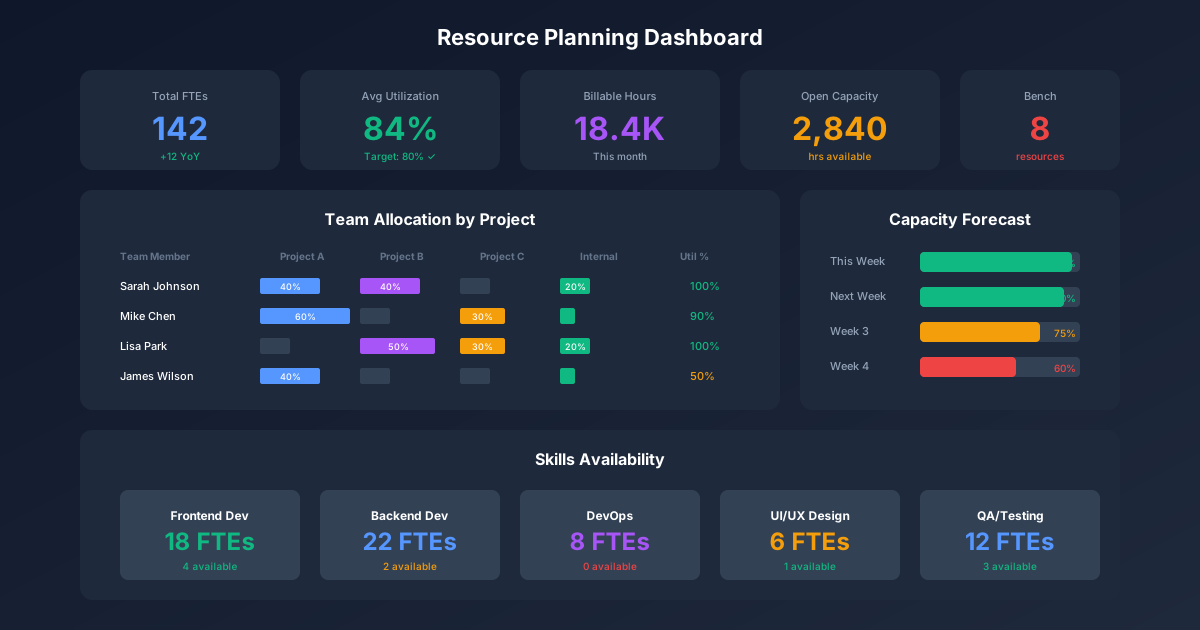
Resource Planning Dashboard
Executive Summary View
┌─────────────────────────────────────────────────────────────┐
│              RESOURCE PLANNING DASHBOARD                     │
│                     Q1 2025                                  │
├─────────────┬─────────────┬─────────────┬───────────────────┤
│  CAPACITY   │   DEMAND    │ UTILIZATION │    SKILLS GAP     │
├─────────────┼─────────────┼─────────────┼───────────────────┤
│   6,825 hrs │  5,460 hrs  │    80%      │   1 Critical      │
│   Available │   Required  │   Target    │   (Mobile Dev)    │
├─────────────┼─────────────┼─────────────┼───────────────────┤
│   +1,365    │   +15%      │    🟢 On    │   Action: Hire    │
│   Buffer    │   vs Q4     │   Target    │   by Feb 15       │
└─────────────┴─────────────┴─────────────┴───────────────────┘

┌───────────────────────┬─────────────────────────────────────┐
│   RISK ALERTS         │           TEAM ALLOCATION           │
├───────────────────────┤                                     │
│ 🔴 Mike: 120% in Feb  │   [Stacked bar chart by person      │
│ 🟡 React skills gap   │    showing project allocation]      │
│ 🟡 Q2 demand increase │                                     │
└───────────────────────┴─────────────────────────────────────┘
Key Performance Indicators
| KPI | Target | Current | Trend | Action |
|---|---|---|---|---|
| Overall utilization | 75-85% | 82% | → | On track |
| Overallocation incidents | 0 | 2 | ↗ | Address Mike, Sarah |
| Skills coverage | 100% | 90% | → | Mobile dev gap |
| Resource request cycle time | < 5 days | 4 days | ↘ | Improving |
| Forecast accuracy | ±10% | ±8% | ↘ | Within target |
Implementation Guide
Phase 1: Foundation (Weeks 1-2)
- Inventory all resources and their capacity
- Document current allocation method
- Create skills matrix
- Identify data sources for demand
Phase 2: Baseline (Weeks 3-4)
- Build capacity planning template
- Document current project demand
- Calculate utilization baseline
- Identify immediate gaps
Phase 3: Process (Weeks 5-6)
- Define resource request process
- Establish allocation meeting cadence
- Create reporting dashboard
- Train managers on templates
Phase 4: Optimization (Ongoing)
- Review and adjust weekly
- Track forecast accuracy
- Refine skills matrix quarterly
- Update capacity factors based on actuals
Common Resource Planning Mistakes
Mistake 1: 100% Allocation
Problem: Planning people at 100% capacity Impact: No room for unexpected work, meetings, or learning Solution: Target 75-85% allocation; reserve buffer
Mistake 2: Ignoring Skills
Problem: Treating all resources as interchangeable Impact: Wrong skills assigned, rework, delays Solution: Match skills to requirements; plan development
Mistake 3: Static Planning
Problem: Annual plans that don't update Impact: Plans become irrelevant quickly Solution: Weekly operational reviews, monthly tactical updates
Mistake 4: Hiding Overload
Problem: Team doesn't report overallocation Impact: Burnout, quality issues, turnover Solution: Create safe environment for raising concerns
Mistake 5: No Contingency
Problem: All capacity committed to planned work Impact: Emergency work disrupts everything Solution: Reserve 10-15% for unplanned demand
Key Takeaways
-
Balance supply and demand: Resource planning matches available capacity to required work
-
Plan at multiple horizons: Strategic (hiring), tactical (allocation), operational (daily)
-
Track skills, not just hours: Having the right skills matters as much as having enough hours
-
Build in buffer: 100% allocation means 0% flexibility for reality
-
Update continuously: Static plans become fiction; review weekly
-
Visualize allocation: Heatmaps and dashboards reveal problems faster than spreadsheets
For related resources, explore our Agile Project Management Templates, Salary Planning Spreadsheet, and Project Tracker Template.