PO Tracker Template [Free Excel] — Purchase Order Tracking for Procurement

![PO Tracker Template [Free Excel] — Purchase Order Tracking for Procurement](/images/purchase-order-tracker-hero.svg?dpl=dpl_8QxePeLMf7mrobmHnRy4AXZ6GrA6)
Procurement teams managing $1M+ in annual purchases without proper PO tracking lose an average of 3-5% to maverick spending, duplicate orders, and missed early payment discounts. A well-structured purchase order tracker transforms chaotic procurement into a controlled, auditable process that delivers cost savings and operational efficiency. This comprehensive guide covers everything you need to build and maintain an effective PO tracking system. For more resources, visit our IT Management Hub and explore our vendor management best practices.
Quick Start: Download our free Purchase Order Tracking Template to implement a professional PO management system immediately.
Why Purchase Order Tracking Matters
The Hidden Cost of Poor PO Management
Common PO Management Problems:
- Duplicate orders placed with different vendors
- Unauthorized purchases bypassing approval workflows
- Lost early payment discounts (typically 2/10 Net 30)
- Receiving discrepancies going undetected
- Invoice fraud due to weak controls
- Budget overruns from lack of visibility
- Vendor relationship issues from payment delays
- Audit findings and compliance failures
Financial Impact of Poor Tracking:
- 3-5% additional spend from maverick purchasing
- 2-3% lost in early payment discounts
- 15-20 hours/week spent on manual reconciliation
- $50-100 average cost to process one PO manually
- 25% of invoices require exception handling
- 5-10% of invoices contain errors or discrepancies
Benefits of Effective PO Tracking:
- 15-25% reduction in procurement costs
- 80% faster purchase requisition to order cycle
- 99%+ three-way match rate
- Complete spend visibility and control
- Stronger vendor relationships
- Audit-ready documentation
- Early payment discount capture
- Reduced fraud risk
Understanding the PO Lifecycle
The Five Stages of Purchase Order Management
A purchase order moves through five distinct stages, each requiring specific tracking fields and controls to ensure proper management.
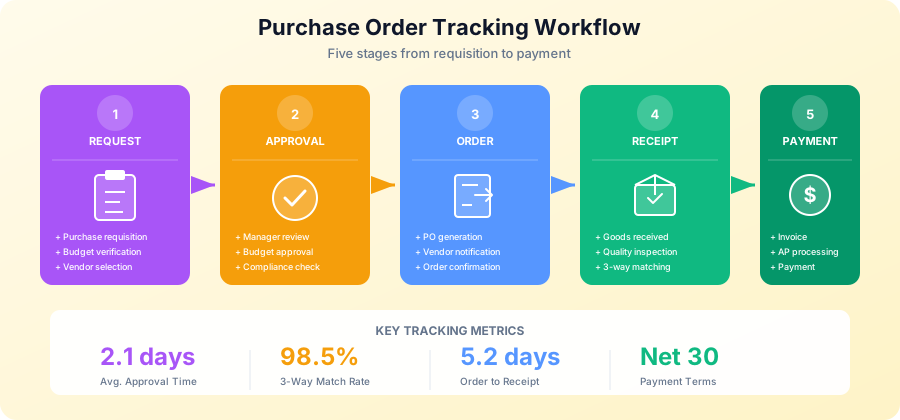
Stage 1: Purchase Requisition
The PO lifecycle begins when a department or employee identifies a need for goods or services.
Requisition Tracking Fields:
- Requisition number
- Requestor name and department
- Date submitted
- Item description and specifications
- Quantity required
- Estimated unit cost
- Total estimated value
- Budget code/cost center
- Required delivery date
- Business justification
- Attachments (quotes, specifications)
Requisition Workflow:
- Employee submits purchase requisition
- System validates budget availability
- Routes to appropriate approver(s)
- Captures approval/rejection with timestamp
- Approved requisitions convert to PO
Requisition Status Values:
- Draft - Not yet submitted
- Pending Approval - Awaiting review
- Approved - Ready for PO creation
- Rejected - Denied with reason
- Cancelled - Withdrawn by requestor
Stage 2: Approval Workflow
Proper approval routing ensures purchases align with budget and policy requirements.
Approval Matrix Example:
Approval Authority by Amount:

$0 - $1,000:       Department Manager
$1,001 - $5,000:   Department Director
$5,001 - $25,000:  VP/Senior Director + Finance Review
$25,001 - $100,000: CFO + Procurement Review
$100,000+:         Executive Committee

Special Approvals Required:
- IT purchases > $500: IT Director
- Capital equipment > $5,000: Finance + Asset Management
- Consulting services: HR + Legal
- Software/SaaS: IT Security + Legal
Approval Tracking Fields:
- Approver name and title
- Approval level/tier
- Approval date/time
- Approval status (Approved/Rejected/Pending)
- Comments or conditions
- Delegation indicator (if proxy approval)
Approval Workflow Best Practices:
- Automatic routing based on amount and category
- Email notifications with approve/reject links
- Escalation after 48-72 hours of inactivity
- Mobile-friendly approval interface
- Complete audit trail of all actions
- Proxy approval for vacations
Stage 3: Purchase Order Creation
Once approved, the requisition converts to an official purchase order sent to the vendor.
Essential PO Header Fields:
- PO number (unique identifier)
- PO date
- Vendor ID and name
- Vendor address
- Ship-to address
- Bill-to address
- Payment terms
- Delivery terms (Incoterms)
- Required delivery date
- Buyer name
- Currency
- Total PO value
PO Line Item Fields:
- Line number
- Item number/SKU
- Item description
- Quantity ordered
- Unit of measure
- Unit price
- Extended price (Qty x Unit Price)
- Tax amount
- Discount (if applicable)
- Account code/GL code
- Cost center
- Project code (if applicable)
PO Footer Fields:
- Subtotal
- Tax total
- Shipping/freight
- Grand total
- Special instructions
- Terms and conditions reference
- Authorized signature
Download Free PO Tracking Template
Stage 4: Goods Receipt
When goods arrive, the receiving process captures delivery details for three-way matching.
Goods Receipt Tracking Fields:
- Receipt number
- Receipt date
- PO number reference
- Vendor name
- Packing slip number
- Carrier/shipping method
- Received by (employee name)
- Delivery location
Receipt Line Item Fields:
- Line number
- Item description
- Quantity ordered
- Quantity received
- Quantity backordered
- Condition (Good/Damaged/Wrong Item)
- Serial numbers (if applicable)
- Lot numbers (if applicable)
- Notes/comments
Receiving Best Practices:
- Inspect all deliveries against packing slip
- Verify quantities and item descriptions
- Document any discrepancies immediately
- Photo document damaged items
- Notify vendor within 24 hours of issues
- Enter receipt into system same day
- Match receipt to open PO
Handling Receipt Discrepancies:
Discrepancy Type          | Action Required
--------------------------|----------------------------------
Quantity short            | Partial receipt, contact vendor
Quantity over             | Accept/reject excess, document
Wrong item                | Reject, RMA process, contact vendor
Damaged goods             | Document, photo, file claim
Quality issue             | QC hold, notify vendor
Missing documentation     | Contact vendor for paperwork
Stage 5: Invoice Processing and Payment
The final stage matches invoices to POs and receipts for payment authorization.
Three-Way Matching Process:
Three-way matching compares three documents to authorize payment:
- Purchase Order - What was ordered (items, quantities, prices)
- Goods Receipt - What was received (items, quantities, condition)
- Vendor Invoice - What vendor is billing (items, quantities, prices)
Match Criteria:
- PO number matches invoice PO reference
- Vendor name/ID matches
- Line items match (within tolerance)
- Quantities match (within tolerance)
- Unit prices match (within tolerance)
- Total amount matches (within tolerance)
Tolerance Settings Example:
Match Element       | Tolerance
--------------------|------------------
Quantity variance   | +/- 5%
Price variance      | +/- 2%
Total variance      | +/- $50 or 1%
Tax variance        | +/- 1%
Invoice Status Values:
- Received - Invoice entered into system
- Matched - Passed three-way match
- Exception - Failed match, needs review
- Approved - Ready for payment
- Scheduled - In payment batch
- Paid - Payment processed
- Disputed - Issue with vendor
Building Your PO Tracker in Excel
Excel Template Structure
A comprehensive PO tracker requires multiple interconnected worksheets for effective management.
Recommended Worksheet Structure:
- Dashboard - Summary view with KPIs and charts
- PO Log - Master list of all purchase orders
- Line Items - Detailed line item tracking
- Vendors - Vendor master data
- Receipts - Goods receipt log
- Invoices - Invoice tracking
- Budget Codes - Chart of accounts reference
- Settings - Dropdown lists and parameters
PO Log Worksheet Design
Column Structure:
A: PO Number
B: PO Date
C: Vendor ID
D: Vendor Name (VLOOKUP from Vendors)
E: Description
F: Total Amount
G: Currency
H: Requestor
I: Department
J: Cost Center
K: Budget Code
L: Status
M: Approval Date
N: Approver
O: Expected Delivery
P: Actual Delivery
Q: Days Variance (calculated)
R: Receipt Status
S: Invoice Status
T: Payment Status
U: Notes
Essential Excel Formulas
Auto-Generate PO Numbers:
=CONCATENATE("PO-",YEAR(TODAY()),"-",TEXT(COUNTA(A:A),"0000"))Calculate Days Until Expected Delivery:
=IF(O2="","",IF(O2<TODAY(),CONCATENATE("Overdue by ",TODAY()-O2," days"),O2-TODAY()&" days remaining"))Status-Based Conditional Formatting:
Cell Value Contains "Open" = Green fill
Cell Value Contains "Pending" = Yellow fill
Cell Value Contains "Overdue" = Red fill
Cell Value Contains "Closed" = Gray fill
VLOOKUP Vendor Details:
=VLOOKUP(C2,Vendors!A:D,2,FALSE)  ' Vendor Name
=VLOOKUP(C2,Vendors!A:D,3,FALSE)  ' Payment Terms
=VLOOKUP(C2,Vendors!A:D,4,FALSE)  ' Contact Email
Calculate Total Spend by Vendor:
=SUMIF(C:C,C2,F:F)Three-Way Match Status:
=IF(AND(R2="Received",S2="Matched"),"Ready for Payment",
  IF(R2="","Awaiting Receipt",
    IF(S2="","Awaiting Invoice",
      IF(S2="Exception","Match Exception","In Process"))))
Budget Utilization:
=SUMIF(K:K,K2,F:F)/VLOOKUP(K2,BudgetCodes!A:C,3,FALSE)Days in Status:
=TODAY()-MAX(B2,M2,P2)Aging Analysis:
=IF(TODAY()-B2<=30,"0-30 Days",
  IF(TODAY()-B2<=60,"31-60 Days",
    IF(TODAY()-B2<=90,"61-90 Days","Over 90 Days")))
Dashboard KPIs
Build a dashboard that provides instant visibility into procurement operations.
Key Performance Indicators:
-
Open PO Count and Value
=COUNTIF(L:L,"Open") =SUMIF(L:L,"Open",F:F) -
Average Days to Delivery
=AVERAGEIF(P:P,"<>",P:P-O:O) -
On-Time Delivery Rate
=COUNTIFS(P:P,"<>",Q:Q,"<=0")/COUNTIF(P:P,"<>") -
Three-Way Match Rate
=COUNTIF(S:S,"Matched")/COUNTIF(S:S,"<>") -
Pending Approvals
=COUNTIF(L:L,"Pending Approval") -
Spend by Category (PivotTable)
- Rows: Budget Code or Category
- Values: Sum of Amount
- Filter: Date range
-
Top Vendors by Spend
- SUMIF by vendor with LARGE function
- Or PivotTable sorted descending
Approval Workflow Design
Designing Effective Approval Hierarchies
Factors for Approval Routing:
- Dollar amount/value
- Purchase category
- Department/cost center
- Budget status (within/over budget)
- Vendor status (approved/new)
- Contract existence
- Capital vs. operational expense
Multi-Level Approval Example:
Purchase Request: $15,000 IT Equipment

Level 1: Department Manager (Required)
         - Validates business need
         - Confirms budget availability

Level 2: IT Director (Category-Based)
         - Reviews technical requirements
         - Confirms alignment with IT strategy

Level 3: Finance Director (Amount-Based)
         - Reviews budget impact
         - Validates vendor selection

Parallel: Procurement (All > $5,000)
         - Reviews pricing
         - Confirms vendor compliance
Approval Delegation Rules:
- Delegation requires written authorization
- Maximum delegation period: 2 weeks
- Delegate must be at same or higher level
- Original approver receives notification
- All delegated approvals logged with reason
Handling Approval Exceptions
Split Purchase Prevention:
- Flag requests from same department within 7 days
- Alert on similar items ordered separately
- Require justification for split orders
- Automatic escalation for suspected splitting
Emergency Purchase Process:
Emergency Criteria:
- Production shutdown imminent
- Safety hazard
- Customer commitment at risk
- Regulatory deadline

Emergency Process:
1. Verbal approval from authorized manager
2. Same-day email confirmation required
3. Retroactive PO within 24 hours
4. Exception documented with justification
5. Monthly review of emergency purchases
Approval Escalation:
- Day 1: Initial email notification
- Day 2: Reminder email
- Day 3: Escalate to approver's manager
- Day 5: Auto-approval or rejection based on policy
Vendor Management Integration
Linking POs to Vendor Performance
Your PO tracker should integrate with vendor management for comprehensive supplier oversight.
Vendor Master Fields:
- Vendor ID
- Company name
- Contact name and email
- Phone number
- Address
- Payment terms (Net 30, 2/10 Net 30, etc.)
- Vendor category (Strategic, Preferred, Transactional)
- Tax ID/W-9 status
- Insurance certificate status
- Contract reference
- Performance score
- Approved categories
Vendor Performance Metrics from PO Data:
-
On-Time Delivery Rate
=COUNTIFS(VendorID,[@VendorID],DeliveryVariance,"<=0")/ COUNTIF(VendorID,[@VendorID]) -
Quality Score (Receipt Issues)
=1-(COUNTIFS(VendorID,[@VendorID],ReceiptIssue,"Yes")/ COUNTIF(VendorID,[@VendorID])) -
Price Consistency
=STDEV.IF(VendorID,[@VendorID],UnitPrice)/ AVERAGEIF(VendorID,[@VendorID],UnitPrice) -
Invoice Accuracy
=COUNTIFS(VendorID,[@VendorID],MatchStatus,"Matched")/
 COUNTIF(VendorID,[@VendorID])
Vendor Scorecard Template:
Vendor Quarterly Scorecard

Vendor: [Name]
Period: Q1 2025
Reviewer: [Name]

DELIVERY (25%):
- On-time delivery rate: 95% (Target: 98%)
- Score: 8/10

QUALITY (25%):
- Defect rate: 1.2% (Target: <2%)
- Score: 9/10

PRICING (25%):
- Price variance from quote: 0.5%
- Score: 10/10

SERVICE (25%):
- Response time: 4 hours (Target: <8 hours)
- Issue resolution: 95%
- Score: 9/10

OVERALL SCORE: 9.0/10 - Preferred Vendor

Action Items:
1. Discuss delivery improvement plan
2. Schedule quarterly business review
For detailed vendor management strategies, see our Vendor Management Best Practices Guide and IT Vendor Sourcing Guide.
Common PO Tracking Challenges
Challenge 1: Rogue Spending
Problem: Purchases made without POs (maverick spending)
Solution:
- Require PO for all purchases over $100
- No invoice payment without valid PO
- Monthly reporting on non-PO spend
- Training on procurement process
- Easy-to-use requisition system
- Procurement card program for small purchases
Tracking Maverick Spend:
=SUMIF(PONumber,"NONE",InvoiceAmount)/SUM(InvoiceAmount)Target: Less than 5% of total spend
Challenge 2: Approval Bottlenecks
Problem: Approvals delayed, slowing procurement
Solution:
- Automatic escalation rules
- Mobile approval capability
- Delegation during absence
- Approval time tracking
- Management reporting on approval delays
- Review threshold levels quarterly
Approval Cycle Time Tracking:
=AVERAGE(ApprovalDate-SubmitDate)Target: Less than 2 business days
Challenge 3: Receipt Discrepancies
Problem: Receiving errors causing match failures
Solution:
- Standard receiving procedures
- Training for receiving staff
- Same-day receipt entry
- Photo documentation
- Direct vendor communication
- Clear escalation process
Discrepancy Rate Tracking:
=COUNTIF(ReceiptStatus,"Discrepancy")/COUNT(ReceiptStatus)Target: Less than 3% of receipts
Challenge 4: Invoice Matching Failures
Problem: High exception rate on three-way matching
Solution:
- Tight tolerances on PO creation
- Vendor education on invoicing requirements
- Clear PO terms and conditions
- Electronic invoicing (EDI/portal)
- Dedicated exception handling team
- Root cause analysis on exceptions
Match Exception Analysis:
Exception Category      | % of Exceptions | Root Cause
------------------------|-----------------|------------------
Quantity mismatch       | 35%            | Partial shipments
Price mismatch          | 28%            | Contract updates
Wrong PO referenced     | 20%            | Vendor error
Missing receipt         | 12%            | Late entry
Duplicate invoice       | 5%             | Vendor error
Challenge 5: Budget Overruns
Problem: Spending exceeds budget without warning
Solution:
- Real-time budget commitment tracking
- Encumbrance accounting
- Budget alerts at 80% and 90%
- Pre-PO budget validation
- Monthly budget vs. actual reporting
- Quarterly budget reviews
Budget Tracking Formula:
Committed = SUMIF(CostCenter,[@CostCenter],POAmount)
Spent = SUMIF(CostCenter,[@CostCenter],InvoicePaid)
Available = Budget - Committed
% Used = (Committed + Spent) / Budget
Advanced PO Tracking Features
Blanket Purchase Orders
Blanket POs (BPOs) cover recurring purchases from a single vendor over a defined period.
BPO Tracking Fields:
- BPO number
- Vendor
- Contract period (start/end)
- Total authorized amount
- Amount released to date
- Remaining balance
- Release frequency
- Authorized items/categories
BPO Release Tracking:
BPO Number: BPO-2025-001
Vendor: Office Supply Co.
Period: Jan 1 - Dec 31, 2025
Authorized Amount: $50,000

Releases:
Release # | Date     | Amount  | Running Total | Balance
----------|----------|---------|---------------|--------
001       | Jan 15   | $2,500  | $2,500       | $47,500
002       | Feb 3    | $1,800  | $4,300       | $45,700
003       | Feb 20   | $3,200  | $7,500       | $42,500
Capital Expenditure Tracking
CapEx purchases require additional tracking for asset management and depreciation.
CapEx-Specific Fields:
- Asset category
- Useful life (years)
- Depreciation method
- Asset tag (assigned at receipt)
- Installation date
- Warranty period
- Maintenance schedule
- Disposal instructions
CapEx Approval Requirements:
- Business case/justification
- ROI analysis
- IT review (for technology)
- Facilities review (for equipment)
- Finance review (for capitalization)
- Executive approval (based on amount)
For capital expense planning, see our IT Budget Planning Guide.
Multi-Currency Support
For global organizations managing international vendors.
Currency Tracking Fields:
- Transaction currency
- Exchange rate at PO date
- Local currency equivalent
- Exchange rate at payment
- Realized gain/loss
Exchange Rate Formula:
=POAmount*ExchangeRateAtPO  ' Local currency value at order
=InvoiceAmount*ExchangeRateAtPayment  ' Value at payment
=[@PaymentValue]-[@OrderValue]  ' Realized gain/loss
Implementation Best Practices
Phased Implementation Approach
Phase 1: Foundation (Weeks 1-4)
- Define PO numbering convention
- Create vendor master list
- Establish approval matrix
- Build basic Excel tracker
- Train procurement team
Phase 2: Process (Weeks 5-8)
- Roll out requisition process
- Implement approval workflow
- Begin goods receipt tracking
- Connect invoicing process
- Monitor and adjust
Phase 3: Optimization (Weeks 9-12)
- Add dashboard and reporting
- Implement vendor scorecards
- Automate notifications
- Integrate with finance systems
- Refine based on feedback
Phase 4: Maturity (Ongoing)
- Continuous process improvement
- Advanced analytics
- Vendor collaboration
- System automation
- Audit and compliance reviews
Change Management Considerations
Stakeholder Communication:
- Executive sponsorship announcement
- Department manager briefings
- End-user training sessions
- Vendor notification letters
- Regular progress updates
Training Requirements:
- Requisition submission (all employees)
- Approval process (managers)
- PO creation (procurement team)
- Goods receipt (receiving team)
- Invoice processing (AP team)
- Reporting and analytics (management)
Success Metrics
Operational Metrics:
- PO cycle time (requisition to order)
- Approval turnaround time
- On-time delivery rate
- Three-way match rate
- Invoice processing time
Financial Metrics:
- Cost savings from negotiation
- Early payment discount capture
- Maverick spend reduction
- Processing cost per PO
- Budget variance
Compliance Metrics:
- Policy compliance rate
- Audit findings
- Unauthorized purchase rate
- Contract compliance
Free PO Tracking Resources
Complete PO Management Package
Our purchase order tracking toolkit includes:
- PO log template (Excel)
- Requisition form template
- Approval matrix template
- Goods receipt form
- Invoice tracking sheet
- Vendor scorecard template
- Dashboard with KPIs
- Three-way match calculator
Download Free PO Tracking Template
Related Resources
Procurement and Operations Templates:
Related Blog Posts:
Conclusion
Effective purchase order tracking transforms procurement from a reactive administrative function into a strategic driver of cost savings and operational efficiency. By implementing proper PO lifecycle management, approval workflows, and vendor integration, organizations can achieve significant benefits.
Implementation Checklist:
- Download PO tracking template
- Define PO numbering convention
- Create vendor master data
- Establish approval matrix
- Document requisition process
- Set up goods receipt tracking
- Implement three-way matching
- Build dashboard and reporting
- Train all stakeholders
- Launch with pilot department
- Expand to full organization
- Review and optimize quarterly
Key Success Factors:
- Executive sponsorship and support
- Clear policies and procedures
- User-friendly tools and templates
- Comprehensive training program
- Consistent enforcement
- Regular monitoring and reporting
- Continuous improvement mindset
- Integration with finance processes
Expected Outcomes:
- 15-25% procurement cost reduction
- 80% faster PO processing
- 99%+ three-way match rate
- Complete spend visibility
- Stronger vendor relationships
- Audit-ready documentation
Next Steps:
- Download PO tracking template
- Review vendor management practices
- Explore IT budgeting resources
- Visit IT Management Hub
Start tracking purchase orders effectively today. Download our comprehensive PO tracking template and implementation guide to transform your procurement operations.
Frequently Asked Questions
What is a purchase order tracker?
A purchase order tracker is a structured spreadsheet or system that manages the complete lifecycle of purchase orders from requisition through payment. It records PO numbers, vendor details, line items, quantities, prices, approval status, delivery dates, goods receipt status, and invoice matching results, providing complete visibility into procurement spending and enabling three-way matching for payment authorization.
Why is it important to track purchase orders?
Without proper PO tracking, organizations lose 3 to 5 percent of spend to maverick purchasing, duplicate orders, and missed early payment discounts. Tracking purchase orders provides complete spend visibility, ensures proper approval workflows are followed, enables three-way matching to prevent invoice fraud, supports budget control, strengthens vendor relationships through timely payments, and creates audit-ready documentation for compliance.
What fields should a purchase order tracker include?
Essential fields include PO number, date, vendor ID and name, item descriptions, quantities ordered and received, unit prices, total amounts, department and cost center, budget code, approval status with approver name and date, expected and actual delivery dates, goods receipt status, invoice status, payment status, and notes. Additional fields for blanket POs, capital expenditures, or multi-currency transactions may be needed.
How can purchase order tracking be automated?
Automation starts with Excel formulas for auto-generating PO numbers, VLOOKUP for vendor details, and conditional formatting for status tracking. More advanced automation includes email notifications for approval routing with escalation after 48 to 72 hours, three-way matching calculations with configurable tolerances, and budget validation before PO creation. Dedicated procurement platforms like Coupa or SAP Ariba provide end-to-end automation.
Who is responsible for managing purchase orders in an organization?
The procurement or purchasing team typically owns the PO tracking system and creates purchase orders from approved requisitions. Department managers approve requisitions and validate business need. Receiving staff record goods receipts. Accounts payable processes invoices and executes three-way matching. Finance oversees budget compliance. Clear role definition across these groups prevents bottlenecks and ensures accountability.
What is three-way matching in purchase order management?
Three-way matching compares three documents before authorizing payment: the purchase order showing what was ordered, the goods receipt confirming what was received, and the vendor invoice showing what is being billed. All three must agree on items, quantities, and prices within configurable tolerances, typically 2 to 5 percent. This control prevents payment for undelivered goods, incorrect quantities, or unauthorized price changes.