IT Asset Management: Complete Implementation Guide

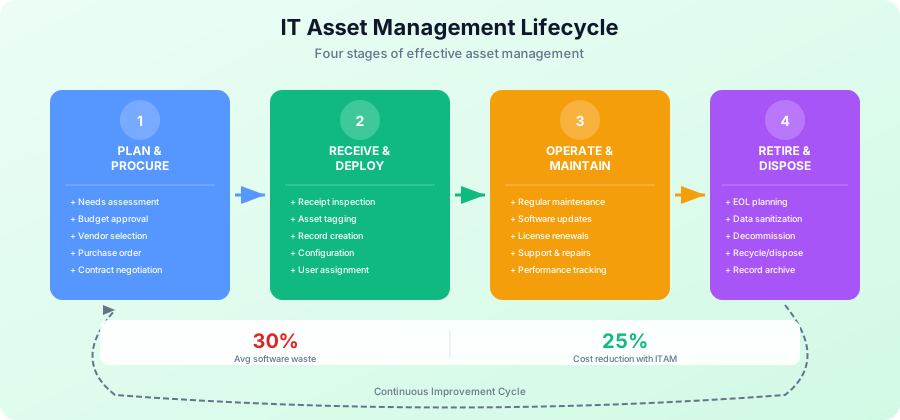
Organizations without effective IT asset management waste an average of 30% of their software budget and face significant compliance risks. Proper IT asset management (ITAM) helps you track assets, optimize costs, ensure compliance, and make informed decisions. This comprehensive guide shows you how to implement a successful ITAM program. For more resources, visit our IT Management Hub and IT Operations section.
Cost Analysis: Use our free TCO Calculator to understand the true cost of your IT assets including hardware, software, and operational expenses.
Why IT Asset Management Matters
The Asset Management Challenge
Common Problems:
- Unknown number of assets (shadow IT)
- Software license non-compliance
- Unused or underutilized software ($30B wasted annually)
- Hardware sprawl and duplication
- Missing or inaccurate documentation
- Security vulnerabilities from untracked assets
- Audit failures and penalties
- Budget overruns
Impact of Poor Asset Management:
- Average 30% software waste
- $259 per endpoint in software waste
- Audit penalties: $100K-$10M
- Security breaches from unknown assets
- Inefficient IT spending
- Compliance violations
- Operational inefficiencies
Benefits of Effective ITAM:
- 30% reduction in software costs
- 25% reduction in hardware costs
- Improved compliance (avoid penalties)
- Better security posture
- Informed purchasing decisions
- Optimized license usage
- Faster incident resolution
- Accurate budgeting
IT Asset Management Framework
Asset Lifecycle Stages
1. Planning and Procurement
- Needs assessment
- Business justification
- Budget approval
- Vendor selection
- Purchase order
- Contract negotiation
2. Receipt and Deployment
- Asset receipt and inspection
- Asset tagging
- Record creation
- Configuration
- Deployment to user
- User training
3. Operations and Maintenance
- Regular maintenance
- Software updates
- Hardware upgrades
- License renewals
- Support and repairs
- Performance monitoring
4. Disposal and Retirement
- End-of-life identification
- Data sanitization
- Asset decommissioning
- Disposal or recycling
- License termination
- Record archiving
Asset Categories
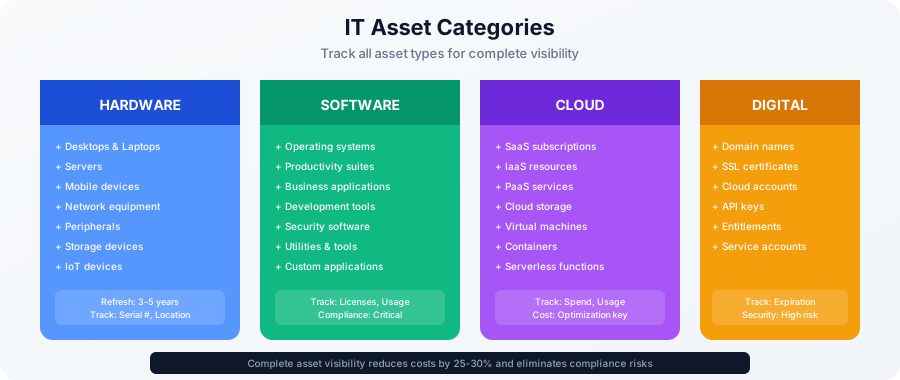
Hardware Assets:
- Desktops and laptops
- Servers
- Mobile devices (phones, tablets)
- Network equipment (routers, switches, firewalls)
- Peripherals (monitors, printers, scanners)
- Storage devices
- IoT devices
Software Assets:
- Operating systems
- Productivity software (Office 365, Google Workspace)
- Business applications (CRM, ERP)
- Development tools
- Security software
- Utilities and tools
Cloud Assets:
- SaaS subscriptions
- IaaS resources
- PaaS services
- Cloud storage
- Virtual machines
Digital Assets:
- Domain names
- SSL certificates
- Cloud accounts
- API keys
- Licenses and entitlements
Building Your Asset Inventory
Initial Asset Discovery
Discovery Methods:
1. Automated Discovery:
- Network scanning tools
- Agent-based discovery
- Active Directory queries
- Cloud API integration
- Mobile device management (MDM)
- Software asset management (SAM) tools
2. Manual Discovery:
- Physical audits
- Spreadsheet submissions
- Employee surveys
- Department inventories
- Procurement records review
Discovery Tools:
- Lansweeper
- SolarWinds Network Discovery
- Spiceworks Inventory
- ManageEngine AssetExplorer
- Snipe-IT (open source)
- Microsoft Intune
- Jamf (for Apple devices)
Asset Data Collection
Essential Asset Information:
Hardware Assets:
- Asset tag/serial number
- Manufacturer and model
- Purchase date and cost
- Warranty information
- Location and assigned user
- Status (active, storage, retired)
- Configuration details
- IP address/hostname
- Operating system
- Last seen/updated date
Software Assets:
- Software name and version
- Publisher/vendor
- License type (perpetual, subscription)
- License count and usage
- Purchase date and cost
- Renewal date
- License key/proof of purchase
- Installed locations
- Compliance status
Get Free IT Asset Management Templates →
Asset Tagging
Physical Asset Tags:
- Barcode labels: Cost-effective, widely supported
- QR codes: More data storage, smartphone readable
- RFID tags: No line-of-sight needed, batch scanning
- Tamper-evident tags: Prevent removal
Tag Placement:
- Visible but not obtrusive
- Consistent location (e.g., top right corner)
- Durable and weather-resistant
- Not covering vents or important labels
Naming Conventions:
- Location prefix (NYC, LON, SF)
- Asset type (LAP, DSK, SRV)
- Sequential number
- Example: NYC-LAP-0001, LON-SRV-0042
Hardware Asset Management
Hardware Inventory Management
Asset Record Template:
Asset ID: NYC-LAP-0157
Asset Type: Laptop
Make/Model: Dell Latitude 5420
Serial Number: ABC123XYZ789
Purchase Date: 2024-01-15
Purchase Cost: $1,299
Warranty Expiration: 2027-01-14
Location: New York Office
Department: Marketing
Assigned To: John Smith (jsmith@company.com)
Status: Active
Condition: Good
OS: Windows 11 Pro
RAM: 16GB
Storage: 512GB SSD
Last Audit: 2025-01-20
Notes: Standard configuration
Hardware Lifecycle Management
Refresh Cycles:
- Laptops/Desktops: 3-4 years
- Servers: 4-5 years
- Mobile devices: 2-3 years
- Network equipment: 5-7 years
- Printers: 5 years
Factors Affecting Refresh:
- Performance degradation
- Warranty expiration
- Security patch availability
- Business requirements
- Total cost of ownership
- Residual value
Hardware Maintenance
Preventive Maintenance:
- Regular cleaning
- Software updates
- Disk defragmentation
- Health checks
- Warranty tracking
- Backup verification
Maintenance Records:
- Date of service
- Service performed
- Parts replaced
- Cost
- Technician
- Next scheduled maintenance
Software Asset Management
Software License Management
License Types:
Perpetual Licenses:
- One-time purchase
- Indefinite use rights
- Maintenance optional
- Transferable (usually)
Subscription Licenses:
- Recurring payment (monthly/annual)
- Time-limited usage
- Includes updates and support
- Auto-renewal (watch for this)
Volume Licenses:
- Bulk purchasing discounts
- Enterprise agreements
- Concurrent vs. named user
- True-up requirements
Open Source:
- Free to use
- Review license obligations (GPL, MIT, Apache)
- Support considerations
- Compliance with terms
License Compliance
Compliance Risks:
- Under-licensing (using more than purchased)
- Over-licensing (paying for unused licenses)
- Wrong license type (not permitted use)
- Expired maintenance (no support or updates)
- Audit penalties ($100K-$10M)
Compliance Best Practices:
- Regular license audits (quarterly)
- Automated license tracking
- Software whitelisting
- Uninstall unused software
- License harvesting (reassign unused)
- Vendor relationship management
- Documentation maintenance
Software Audit Preparation
Vendor Audit Triggers:
- Significant company growth
- M&A activity
- Renewal negotiations
- Former employee reports
- Random selection
Audit Preparation:
- Know your license entitlements
- Document all purchases
- Run usage reports
- Identify gaps immediately
- Remediate before audit
- Centralize all license documentation
- Assign audit point of contact
- Review license terms
- Engage legal counsel if needed
Common Audit Vendors:
- Microsoft (frequent audits)
- Oracle (aggressive auditing)
- Adobe
- Autodesk
- IBM
- SAP
Cloud Asset Management
Cloud Service Tracking
SaaS Application Management:
- Application inventory
- User assignments
- License utilization
- Renewal dates
- Costs per app
- Redundant applications
- Shadow IT discovery
Discovery Methods:
- SSO logs analysis
- Expense report review
- Credit card statement review
- Cloud access security broker (CASB)
- Employee surveys
Common SaaS Applications:
- Microsoft 365
- Google Workspace
- Salesforce
- Slack/Teams
- Zoom
- Dropbox
- Adobe Creative Cloud
- Atlassian Suite
Cloud Cost Optimization
Cost Management Strategies:
- Right-size instances
- Use reserved instances
- Terminate unused resources
- Automate start/stop schedules
- Use spot instances
- Monitor and alert on spending
- Tag resources for chargeback
Cloud Cost Tools:
- AWS Cost Explorer
- Azure Cost Management
- Google Cloud Cost Management
- CloudHealth
- Cloudability
- Apptio
Mobile Device Management
Mobile Asset Tracking
Device Information:
- Device type (iPhone, Android)
- Model and OS version
- Serial number/IMEI
- Phone number
- Carrier and plan
- Monthly cost
- Assigned user
- Enrollment status
- Last check-in
MDM Solutions:
- Microsoft Intune
- Jamf (Apple devices)
- VMware Workspace ONE
- MobileIron
- Cisco Meraki
- Google Workspace (Android)
Mobile Device Policies
BYOD vs. Corporate-Owned:
- BYOD: Employee-owned, partial management
- COPE: Corporate-owned, personally enabled
- COBO: Corporate-owned, business only
Mobile Security:
- Device encryption
- PIN/biometric requirements
- Remote wipe capability
- App whitelisting/blacklisting
- VPN requirements
- Jailbreak/root detection
Financial Asset Management
Asset Financial Tracking
Financial Metrics:
- Purchase cost
- Depreciation schedule
- Current book value
- Residual value
- Total cost of ownership (TCO)
- Cost per user/department
- Maintenance costs
- License costs
Depreciation Schedules:
- Computers: 3-5 years straight-line
- Servers: 3-5 years
- Software: Per accounting policy
- Mobile devices: 2-3 years
Budget Planning
IT Asset Budget Components:
- Hardware purchases
- Software licenses
- Maintenance and support
- Cloud subscriptions
- Mobile devices and plans
- Asset management tools
- Asset disposal costs
Budget Forecasting:
- Historical spend analysis
- Refresh cycle planning
- Growth projections
- Technology roadmap alignment
- Vendor price trends
- Contract renewal dates
Asset Disposal and Retirement
End-of-Life Management
Retirement Triggers:
- End of warranty
- End of vendor support
- Performance inadequacy
- Security vulnerabilities
- Business requirement changes
- Cost-benefit analysis
Retirement Process:
- Identify assets for retirement
- Obtain approval
- Schedule decommissioning
- Back up data
- Remove from production
- Sanitize data
- Remove asset tags/labels
- Physically dispose or sell
- Update asset records
- Document disposal
Data Sanitization
Data Destruction Methods:
Software-Based:
- DoD 5220.22-M (7-pass overwrite)
- Gutmann method (35-pass)
- Secure erase commands
- Cryptographic erasure
Physical Destruction:
- Hard drive shredding
- Degaussing (magnetic erasure)
- Incineration
- Crushing/pulverizing
Certifications:
- NIST 800-88 guidelines
- Certificate of destruction required
- Chain of custody documentation
- Compliance with regulations (HIPAA, GDPR)
Asset Disposal Options
Reuse:
- Redeploy to less critical use
- Donate to charity (tax deduction)
- Employee purchase program
Resale:
- IT asset disposition (ITAD) vendors
- Online marketplaces
- Trade-in programs
- Residual value recovery
Recycling:
- Certified e-waste recycler
- R2 or e-Stewards certified
- Environmental compliance
- Material recovery
ITAM Governance and Processes
Policies and Procedures
Asset Management Policy:
- Asset acquisition procedures
- Asset tracking requirements
- Asset assignment procedures
- Acceptable use policy
- Asset disposal procedures
- Compliance requirements
- Roles and responsibilities
Standard Operating Procedures:
- New asset onboarding
- Asset transfer process
- Asset maintenance
- Audit procedures
- Exception handling
- Documentation requirements
Roles and Responsibilities
IT Asset Manager:
- Oversee ITAM program
- Maintain asset repository
- Generate reports
- Ensure compliance
- Manage vendor relationships
- Budget tracking
Asset Custodians:
- Department-level asset tracking
- User assignment management
- Physical audits
- Asset requests
Procurement:
- Purchase assets per policy
- Provide purchase documentation
- Negotiate contracts
- Manage vendor relationships
End Users:
- Proper asset use
- Report issues
- Return assets when no longer needed
- Comply with policies
Asset Management Tools
ITAM Software Solutions
Enterprise Solutions:
-
ServiceNow IT Asset Management
- Comprehensive ITAM
- Integration with ITSM
- Cloud and on-premise
- High cost
-
Flexera (Snow Software)
- Software asset management focus
- License optimization
- Compliance management
- Mid to large enterprises
-
IBM Maximo
- Enterprise asset management
- Complex environments
- High customization
- Large organizations
Mid-Market Solutions:
-
ManageEngine AssetExplorer
- Affordable
- Hardware and software tracking
- Barcode support
- Good for SMBs
-
Lansweeper
- Automatic discovery
- Software metering
- Network inventory
- Flexible pricing
-
SysAid
- ITSM with asset management
- User-friendly
- Mobile app
- Good value
Small Business/Open Source:
-
Snipe-IT
- Open source
- Free to use
- Feature-rich
- Self-hosted
-
Spiceworks
- Free
- Community support
- Ad-supported
- Easy to use
-
GLPI
- Open source
- ITIL-aligned
- Help desk included
- Plugin ecosystem
Tool Selection Criteria
Key Considerations:
- Organization size
- Budget
- Integration requirements
- Cloud vs. on-premise
- Ease of use
- Reporting capabilities
- Vendor support
- Scalability
Asset Management Metrics
Key Performance Indicators
Inventory Accuracy:
- Target: >95%
- Physical count vs. system records
- Measure quarterly
License Compliance:
- Compliance rate: >98%
- Over-licensing percentage
- Under-licensing risk
Asset Utilization:
- Asset usage percentage
- Idle assets count
- Reassignment rate
Financial Metrics:
- Total asset value
- Depreciation rate
- Cost per employee
- ROI on asset investments
Process Metrics:
- Time to deploy new assets
- Audit completion rate
- Request fulfillment time
- Disposal processing time
Reporting and Dashboards
Standard Reports:
- Asset inventory summary
- Software license compliance
- Assets by location/department
- Assets due for refresh
- Warranty expiration report
- Cost analysis by category
- Audit findings
Executive Dashboard:
- Total asset value
- Compliance status
- Budget vs. actual
- Risk indicators
- Key trends
Best Practices
ITAM Best Practices
1. Automate Discovery
- Use automated tools
- Regular scans
- Multiple discovery methods
- Validate findings
2. Maintain Accurate Data
- Regular audits
- Data quality checks
- User verification
- Reconciliation processes
3. Integrate with ITSM
- Link assets to incidents
- Change management integration
- Service catalog integration
- Configuration management database (CMDB)
4. Lifecycle Management
- Track entire lifecycle
- Plan refresh cycles
- Proactive replacement
- Proper disposal
5. Vendor Management
- Centralized vendor data
- Contract repository
- Renewal tracking
- Relationship management
6. User Education
- Asset responsibility training
- Policy awareness
- Proper use guidelines
- Reporting procedures
7. Continuous Improvement
- Regular process review
- Metric analysis
- Stakeholder feedback
- Technology updates
Free IT Asset Management Resources
Complete ITAM Template Package
Our IT asset management toolkit includes:
- Hardware inventory template
- Software inventory template
- License tracking spreadsheet
- Asset request form
- Disposal checklist
- Audit procedures
- Policy templates
- KPI dashboard
Download Free ITAM Templates →
Related Resources
IT Operations Templates:
Conclusion
Effective IT asset management is essential for controlling costs, ensuring compliance, and maintaining security. By implementing proper tracking, processes, and tools, your organization can optimize IT investments and reduce risks.
Implementation Checklist:
- Download ITAM templates
- Conduct initial asset discovery
- Create asset inventory
- Implement asset tagging
- Select ITAM tool
- Define processes and procedures
- Assign roles and responsibilities
- Conduct software license audit
- Set up regular reporting
- Train staff on procedures
- Schedule regular audits
- Establish continuous improvement
Quick Wins:
- Discover all assets (automated scan)
- Track software licenses
- Implement asset tagging
- Create basic inventory
- Establish disposal procedures
- Set up renewal alerts
Next Steps:
- Download ITAM templates →
- Review ITIL service management →
- Explore IT budgeting →
- Visit IT Operations hub →
Start optimizing your IT assets today. Download our comprehensive asset management template package and implementation guide.