IT Support Documentation Template for Help Desks & Service Teams

Organizations with comprehensive IT support documentation achieve 50% faster ticket resolution times and 40% higher first-call resolution rates. Yet many help desks operate with incomplete, outdated, or non-existent documentation, leading to inconsistent service, longer resolution times, and frustrated users. This guide provides everything you need to build a world-class IT support documentation system. For more resources, explore our IT Management Hub and IT Operations section.
Quick Planning: Use our free IT Budget Calculator to estimate documentation project costs and ROI based on your team size and ticket volume.
Why IT Support Documentation Matters
The Hidden Cost of Poor Documentation
Without proper documentation:
- New technicians take 6+ months to become fully productive
- Same issues are researched and solved repeatedly
- Resolution quality varies dramatically between shifts
- Knowledge walks out the door when employees leave
- Escalations happen unnecessarily
- Customer satisfaction suffers
With comprehensive documentation:
- Onboarding time reduced by 60%
- First-call resolution improves by 25-40%
- Mean time to resolution decreases by 50%
- Consistent service quality across all shifts
- Institutional knowledge is preserved
- Self-service adoption increases significantly
Business Impact Metrics
Documentation ROI:
- Ticket deflection: 20-30% of tickets resolved via self-service
- Handle time reduction: 15-25% faster resolution with runbooks
- Training efficiency: 50% reduction in new hire ramp-up time
- Escalation reduction: 30% fewer unnecessary escalations
- Customer satisfaction: 15-20% CSAT improvement
Types of IT Support Documentation
Effective IT support requires multiple documentation types, each serving specific purposes within the service delivery ecosystem.
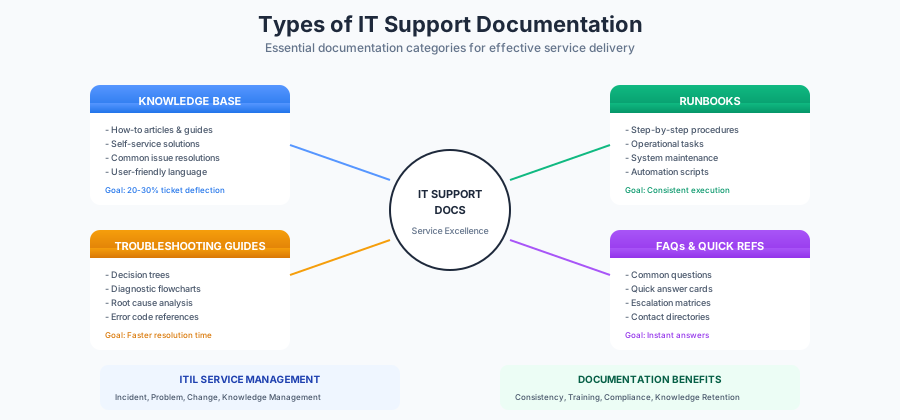
1. Knowledge Base Articles
Purpose: Self-service solutions and reference for support staff
Characteristics:
- Written in user-friendly language
- Step-by-step instructions with screenshots
- Searchable and categorized
- Both internal (staff) and external (user) versions
- Regular review and updates
Common Article Types:
- How-to guides
- Feature explanations
- Configuration instructions
- Best practices
- Tips and tricks
Example Structure:
Title: How to Reset Your Password

Applies To: All employees, Windows 10/11

Problem/Question:
I forgot my password and cannot log in to my computer.

Solution:
1. Go to the Self-Service Password Reset portal
   [Screenshot of portal URL]
2. Click "Forgot Password"
3. Enter your username (email address)
4. Select verification method (phone or email)
5. Enter the verification code
6. Create a new password following the requirements
7. Click "Reset Password"

Related Articles:
- Password Requirements and Best Practices
- Setting Up Multi-Factor Authentication
- What to Do If Your Account Is Locked

Keywords: password, forgot, reset, login, locked out
2. Runbooks
Purpose: Standardized procedures for operational tasks
Characteristics:
- Step-by-step technical procedures
- Written for IT staff, not end users
- Include commands, scripts, and configurations
- Define expected outcomes at each step
- Include rollback procedures
Common Runbook Types:
- System restart procedures
- Backup verification
- Patch deployment
- User provisioning
- Access management
- Scheduled maintenance
Example Structure:
Runbook: Monthly Server Patching

Purpose: Apply security patches to Windows servers

Prerequisites:
- [ ] Maintenance window approved
- [ ] Backup completed successfully
- [ ] Change ticket opened
- [ ] Stakeholders notified

Procedure:
Step 1: Pre-Patching Checks
1.1 Verify backup status: [command]
1.2 Check disk space: Get-WmiObject Win32_LogicalDisk
1.3 Document current patch level: systeminfo | findstr KB
Expected: All checks pass

Step 2: Apply Patches
2.1 Open Windows Update
2.2 Download pending updates
2.3 Install updates
2.4 Document installed patches
Expected: Updates install without errors

Step 3: Post-Patching Verification
3.1 Reboot server
3.2 Verify services started: Get-Service | Where Status -eq "Stopped"
3.3 Test application functionality
3.4 Confirm with application owner
Expected: All services running, applications functional

Rollback Procedure:
If issues occur:
1. Boot to recovery mode
2. Select "Uninstall latest update"
3. Follow prompts
4. Verify system stability
5. Open incident ticket

Completion:
- [ ] Update change ticket
- [ ] Document results
- [ ] Notify stakeholders
3. Troubleshooting Guides
Purpose: Systematic diagnosis and resolution of issues
Characteristics:
- Decision tree format
- If-then-else logic
- Error code references
- Diagnostic commands
- Escalation criteria
Common Troubleshooting Topics:
- Network connectivity issues
- Printer problems
- Email/Outlook issues
- VPN connection failures
- Application errors
- Performance problems
Example Structure:
Troubleshooting: VPN Connection Failures

Symptom: User cannot connect to corporate VPN

Step 1: Verify Internet Connectivity
- Can user browse external websites?
  - YES: Proceed to Step 2
  - NO: Troubleshoot internet connection first

Step 2: Check VPN Client
- Is VPN client installed and updated?
  - Version should be: 4.10.x or higher
  - If outdated: Download latest from [link]
  - If not installed: Follow installation guide

Step 3: Test Connection
- Try connecting to vpn.company.com
  - SUCCESS: Issue resolved
  - ERROR: "Connection refused"
    - Check if connected to blocked network (hotels, airports)
    - Try alternate VPN server: vpn2.company.com
  - ERROR: "Authentication failed"
    - Verify AD password not expired
    - Check MFA token is synced
    - Reset MFA if needed

Step 4: Advanced Diagnostics
- Collect VPN logs: [instructions]
- Run connectivity test: vpn-diag.exe
- Check firewall rules

Escalation Criteria:
- Issue persists after all steps
- Multiple users affected
- VPN server appears down
- Escalate to: Network Operations Team
4. Escalation Procedures
Purpose: Clear paths for issue escalation
Characteristics:
- Tier definitions and responsibilities
- Contact information
- Escalation triggers
- Communication templates
- SLA requirements
Escalation Matrix Example:
| Priority | Definition | Response | Resolution | Escalation Path |
|---|---|---|---|---|
| P1 - Critical | Service down, all users affected | 15 min | 4 hours | Tier 1 -> Tier 2 (15 min) -> Manager (1 hr) |
| P2 - High | Major feature broken, many users | 1 hour | 8 hours | Tier 1 -> Tier 2 (30 min) -> Manager (2 hrs) |
| P3 - Medium | Feature degraded, workaround exists | 4 hours | 24 hours | Tier 1 -> Tier 2 (4 hrs) |
| P4 - Low | Minor issue, minimal impact | 8 hours | 5 days | Tier 1 only |
5. FAQ Documents
Purpose: Quick answers to common questions
Characteristics:
- Concise answers
- Frequently updated
- Easy to search
- Categorized by topic
- Links to detailed articles
Example FAQ Categories:
- Account and access
- Email and calendar
- Hardware and devices
- Software and applications
- Network and connectivity
- Security and compliance
ITIL Service Desk Documentation Requirements
Incident Management Documentation
Required Documents:
- Incident categorization matrix
- Priority classification guidelines
- Initial diagnosis procedures
- Escalation procedures
- Major incident procedures
- Incident closure criteria
Incident Record Template:
Incident ID: INC0012345
Status: [New/In Progress/Resolved/Closed]
Priority: [P1/P2/P3/P4]

Reported By: [User name]
Contact: [Phone/Email]
Date/Time: [Timestamp]
Channel: [Phone/Email/Portal/Chat]

Category: [Hardware/Software/Network/Access]
Subcategory: [Specific type]
Configuration Item: [Affected system]

Short Description:
[One-line summary]

Detailed Description:
[Full description of issue]

Business Impact:
[How this affects business operations]

Assignment Group: [Team]
Assigned To: [Technician]

Resolution:
[Steps taken to resolve]

Root Cause:
[If known]

Related Records:
- Problems: [PRB links]
- Changes: [CHG links]
- Knowledge: [KB links]
Problem Management Documentation
Required Documents:
- Problem identification criteria
- Root cause analysis procedures
- Known error database (KEDB)
- Workaround documentation
- Problem resolution procedures
Known Error Template:
Known Error ID: KE0000123
Related Problem: PRB0000456

Title: Outlook crashes when opening large attachments

Symptoms:
- Outlook freezes when opening attachments > 25MB
- Error: "Microsoft Outlook is not responding"
- Requires force close and restart

Root Cause:
Memory allocation issue in Outlook 2019 build 16.0.x

Workaround:
1. Save attachment to desktop first
2. Open file directly (not from Outlook)
3. Alternative: Use Outlook web app for large files

Permanent Fix:
- Upgrade to Outlook 2021 or Microsoft 365
- Install KB5001234 patch

Affected Systems:
- Windows 10/11 with Outlook 2019
- Approximately 500 users affected

Status: Workaround Available
Resolution Target: Q2 2025
Change Management Documentation
Required Documents:
- Change request templates
- Change categories and types
- Change Advisory Board (CAB) procedures
- Implementation plans
- Rollback procedures
- Post-implementation reviews
Knowledge Management Documentation
Required Documents:
- Knowledge article templates
- Review and approval workflows
- Article lifecycle policies
- Quality standards
- Contribution guidelines
Article Lifecycle:
- Draft: Initial creation, not visible
- Review: Technical and editorial review
- Published: Visible to target audience
- Retired: Outdated, archived
Building Your Knowledge Base
Content Strategy
Identify High-Value Topics:
- Analyze ticket data for top 20 issues
- Review escalation patterns
- Survey support staff for knowledge gaps
- Collect user feedback
- Monitor search queries with no results
Prioritization Matrix:
| Frequency | Complexity | Priority |
|---|---|---|
| High | Low | Create self-service article |
| High | High | Create detailed guide + training |
| Low | Low | FAQ entry |
| Low | High | Specialized runbook |
Writing Effective Articles
Title Best Practices:
- Use action words: "How to," "Troubleshoot," "Fix"
- Include specific terms users search for
- Keep under 60 characters
- Examples:
- "How to Connect to VPN from Home"
- "Fix: Outlook Not Syncing Emails"
- "Reset Your Password Self-Service"
Content Structure:
- Clear title (searchable keywords)
- Applies to (who/what this helps)
- Problem statement (what issue this solves)
- Solution (step-by-step instructions)
- Screenshots (visual aids)
- Related articles (additional resources)
- Keywords (search optimization)
Writing Guidelines:
- Use simple, clear language
- One instruction per step
- Number all steps
- Include expected results
- Add troubleshooting tips
- Test procedures before publishing
Article Templates
How-To Article:
# How to [Task]
**Applies To:** [Audience]
**Last Updated:** [Date]
## Overview
Brief description of what this article covers.
## Before You Begin
- Prerequisite 1
- Prerequisite 2
## Instructions
### Step 1: [Action]
Detailed instruction with screenshot.

### Step 2: [Action]
Detailed instruction.
### Step 3: [Action]
Detailed instruction.
## Verification
How to confirm the task was successful.
## Troubleshooting
Common issues and solutions.
## Related Articles
- [Related Topic 1]
- [Related Topic 2]Troubleshooting Article:
# Troubleshoot: [Issue]

**Symptoms:**
- Symptom 1
- Symptom 2

**Possible Causes:**
- Cause 1
- Cause 2

## Solution 1: [Most Common Fix]
Steps to resolve.

## Solution 2: [Alternative Fix]
Steps if Solution 1 doesn't work.

## Solution 3: [Advanced Fix]
Technical steps for complex cases.

## When to Escalate
Conditions that require escalation.

## Prevention
How to avoid this issue in the future.
Creating Effective Runbooks
Runbook Development Process
1. Identify Procedures:
- List all recurring operational tasks
- Document tribal knowledge from senior staff
- Review incident history for repeated resolutions
- Map out maintenance activities
2. Document Current State:
- Shadow experienced technicians
- Record actual steps taken
- Note decision points and variations
- Capture workarounds and exceptions
3. Standardize and Optimize:
- Remove unnecessary steps
- Clarify ambiguous instructions
- Add validation checkpoints
- Include automation opportunities
4. Validate and Test:
- Have different team members test
- Verify in non-production environment
- Check for edge cases
- Gather feedback
Runbook Components
Essential Elements:
Runbook Title: [Clear, descriptive name]
Version: [Version number]
Last Updated: [Date]
Owner: [Responsible team/person]

PURPOSE
What this runbook accomplishes.

SCOPE
What systems/services this covers.
What is NOT covered (out of scope).

PREREQUISITES
- Required access/permissions
- Required tools/software
- Required knowledge/training
- Pre-conditions that must be met

PROCEDURE
[Detailed step-by-step instructions]

VERIFICATION
How to confirm successful completion.

ROLLBACK
Steps to undo if something goes wrong.

TROUBLESHOOTING
Common issues and resolutions.

RELATED DOCUMENTS
- Related runbooks
- Reference documentation
- Escalation contacts
Runbook Best Practices
Writing:
- Use numbered steps (not bullets)
- Include command syntax and examples
- Specify expected output at each step
- Use clear, unambiguous language
- Include timing estimates
Maintenance:
- Review quarterly at minimum
- Update after every use that reveals gaps
- Version control all changes
- Test after significant updates
Accessibility:
- Store in searchable repository
- Tag for easy discovery
- Link from related documents
- Make mobile-friendly for on-call use
Troubleshooting Guide Development
Decision Tree Format
Structure:
START: [Initial symptom/issue]
    |
    v
Question 1: [Diagnostic question]
    |
    +-- YES --> [Next step or resolution]
    |
    +-- NO --> [Alternative path]
    |
    v
Question 2: [Follow-up diagnostic]
    |
    +-- Result A --> [Resolution A]
    |
    +-- Result B --> [Resolution B]
    |
    +-- Result C --> [Escalate]
Example: Network Connectivity Troubleshooting
User reports: "Cannot access network"
    |
    v
Can user ping localhost (127.0.0.1)?
    |
    +-- NO --> Check if NIC is disabled/damaged
    |           Reinstall network drivers
    |
    +-- YES --> Continue
    |
    v
Can user ping default gateway?
    |
    +-- NO --> Check cable/WiFi connection
    |           Verify DHCP is working
    |           Check for IP conflicts
    |
    +-- YES --> Continue
    |
    v
Can user ping external IP (8.8.8.8)?
    |
    +-- NO --> Check firewall rules
    |           Verify ISP connection
    |           Check proxy settings
    |
    +-- YES --> Continue
    |
    v
Can user resolve DNS (ping google.com)?
    |
    +-- NO --> Check DNS settings
    |           Try alternate DNS
    |           Flush DNS cache
    |
    +-- YES --> Issue is application-specific
              Check specific service
Error Code Reference
Template:
Error Code: [CODE]
Message: [Full error message text]
Meaning: [What this error indicates]
Common Causes:
1. [Cause 1]
2. [Cause 2]
3. [Cause 3]
Resolution:
1. [Try this first]
2. [If #1 fails, try this]
3. [Advanced resolution]
Related Errors: [Similar codes]
Documentation Management
Governance Structure
Roles and Responsibilities:
Knowledge Manager:
- Overall documentation strategy
- Quality standards
- Review process oversight
- Metrics and reporting
- Tool administration
Subject Matter Experts:
- Content creation for specialty areas
- Technical review
- Accuracy validation
- Update requests
Content Contributors:
- Article drafting
- Procedure documentation
- Feedback submission
- Error reporting
Reviewers:
- Technical accuracy review
- Editorial review
- Compliance review
- Approval authority
Review and Approval Process
New Article Workflow:
- Author drafts article
- Peer review (technical accuracy)
- Editorial review (clarity, format)
- Approval (SME or manager)
- Publication
- Promotion (if user-facing)
Update Triggers:
- System changes or upgrades
- Process modifications
- User feedback indicating issues
- Ticket trends showing gaps
- Scheduled periodic review
- Compliance requirements
Review Schedule:
- Critical procedures: Monthly
- Standard articles: Quarterly
- Reference materials: Semi-annually
- Archive outdated content: Annually
Quality Standards
Article Quality Checklist:
- Clear, searchable title
- Accurate information verified
- Steps tested and validated
- Screenshots current and clear
- Links working
- Formatting consistent
- Keywords included
- Related articles linked
- Review date set
- Owner assigned
Common Quality Issues:
- Outdated screenshots
- Broken links
- Missing steps
- Ambiguous instructions
- Inconsistent terminology
- Missing prerequisites
- No verification steps
Tools and Platforms
Knowledge Management Systems
Popular Options:
ServiceNow Knowledge Management:
- Integrated with ITSM
- Workflow automation
- Advanced search
- Version control
- Best for: Enterprise IT
Atlassian Confluence:
- Flexible wiki format
- Jira integration
- Collaboration features
- Reasonable cost
- Best for: Mid-size teams
Document360:
- Purpose-built for knowledge bases
- AI-powered search
- Analytics dashboard
- API integrations
- Best for: Customer-facing KB
Notion/Coda:
- Modern interface
- Flexible structure
- Collaboration friendly
- Lower cost
- Best for: Startups, small teams
Selection Criteria
Must-Have Features:
- Full-text search
- Category/tagging
- Version history
- Access controls
- Mobile accessibility
- Integration with ticketing
Nice-to-Have Features:
- AI-powered suggestions
- Analytics and reporting
- Workflow automation
- Multi-language support
- Offline access
- Video embedding
Measuring Documentation Effectiveness
Key Metrics
Usage Metrics:
- Article views
- Search queries
- Search success rate
- Self-service adoption
- Time on page
Quality Metrics:
- Article ratings/feedback
- "Was this helpful?" responses
- Ticket reopens after KB reference
- Content freshness (age since review)
Impact Metrics:
- Ticket deflection rate
- First-call resolution rate
- Average handle time
- Training time reduction
- Escalation rate
Analytics Dashboard
Weekly Metrics:
- Top viewed articles
- Top search terms
- Failed searches (no results)
- New articles published
- Articles updated
Monthly Metrics:
- Overall KB usage trends
- Self-service resolution rate
- Content gap analysis
- Quality scores
- Author contributions
Quarterly Metrics:
- Ticket deflection ROI
- Coverage analysis
- Accuracy audit results
- User satisfaction scores
Implementation Roadmap
Phase 1: Foundation (Weeks 1-4)
Week 1-2: Assessment
- Audit existing documentation
- Analyze ticket data for top issues
- Survey support staff
- Identify critical gaps
- Select/configure platform
Week 3-4: Standards
- Define templates
- Create style guide
- Establish governance
- Set up workflows
- Train initial contributors
Phase 2: Core Content (Weeks 5-12)
Week 5-8: Critical Procedures
- Document top 20 issues
- Create essential runbooks
- Build escalation guides
- Develop troubleshooting trees
Week 9-12: Expansion
- Add next 30 articles
- Create FAQ sections
- Develop self-service content
- Build training materials
Phase 3: Optimization (Ongoing)
Monthly Activities:
- Review usage metrics
- Update popular articles
- Address content gaps
- Retire outdated content
- Recognize contributors
Quarterly Activities:
- Full content audit
- Quality review
- Strategy adjustment
- Tool evaluation
- Training refresh
Best Practices Summary
Content Creation:
- Start with most common issues
- Write for the audience (users vs. technicians)
- Test all procedures before publishing
- Include visual aids (screenshots, diagrams)
- Keep articles focused and scannable
- Update promptly when things change
Organization:
- Use consistent categorization
- Tag for multiple discovery paths
- Link related content
- Maintain clear hierarchy
- Archive rather than delete
Maintenance:
- Assign ownership to every article
- Schedule regular reviews
- Track and address feedback
- Monitor for outdated content
- Celebrate contributions
Adoption:
- Make documentation easy to find
- Link from ticket system
- Reference in training
- Measure and report usage
- Gather and act on feedback
Free IT Support Documentation Templates
Complete Documentation Package
Our IT support documentation toolkit includes:
- Knowledge base article templates
- Runbook templates
- Troubleshooting guide templates
- Escalation matrix templates
- FAQ templates
- Quality checklist
- Review schedule template
- Governance framework
Download Free IT Documentation Templates
Related Resources
IT Operations Templates:
Conclusion
Comprehensive IT support documentation is not a luxury - it is a fundamental requirement for delivering consistent, efficient, and high-quality service. By investing in knowledge bases, runbooks, troubleshooting guides, and proper escalation procedures, your help desk can dramatically improve resolution times, increase first-call resolution rates, and enhance customer satisfaction.
Implementation Checklist:
- Assess current documentation state
- Analyze ticket data for top issues
- Select documentation platform
- Create templates and standards
- Document top 20 issues first
- Build essential runbooks
- Create escalation procedures
- Train team on contributing
- Launch and promote
- Measure and optimize continuously
Quick Wins:
- Document the 5 most common issues this week
- Create a troubleshooting guide for #1 ticket type
- Build your escalation matrix
- Set up a simple article template
- Establish a weekly review habit
- Link knowledge articles in ticket responses
Next Steps:
- Download IT documentation templates
- Review service desk best practices
- Explore ITIL service management
- Visit IT Operations hub
Start building your IT support documentation library today. Download our comprehensive template package and implementation guide to accelerate your journey to service excellence.