IT Cost Allocation Model Template: Fair Distribution of Technology Costs


IT cost allocation remains one of the most challenging aspects of IT financial management. Research shows that organizations with mature cost allocation practices achieve 25-35% better cost visibility and reduce IT spending disputes by 60%. Yet many IT leaders struggle to implement a fair, transparent system that business units actually trust. This comprehensive guide walks you through the three primary allocation methodologies, helps you choose between chargeback and showback models, and provides detailed allocation factor examples you can implement immediately.
For additional IT financial management resources, visit our IT Management Hub, explore our IT Budgeting section, and review our IT Budget Planning Masterclass for complementary guidance on the annual budgeting process.
Quick Start: Use our free TCO Calculator to understand the true cost of your IT services before allocating them to business units. Accurate cost identification is the foundation of fair allocation.
Why IT Cost Allocation Matters for Modern Enterprises
The Business Case for Cost Allocation
Most IT departments operate as cost centers, with their budgets viewed as overhead rather than strategic investment. Without proper cost allocation, this perception persists because business units cannot see what IT services they consume or how much those services cost. Cost allocation transforms IT from an invisible overhead into a transparent service provider.
Financial Impact Without Cost Allocation:
- Business units treat IT as "free" unlimited resource
- No accountability for technology consumption
- IT budget seen as discretionary and easily cut
- Shadow IT proliferates as departments buy their own solutions
- Cross-subsidization where some departments pay for others
- CFO lacks visibility into technology spending patterns
- IT investments cannot be tied to business outcomes
Financial Impact With Cost Allocation:
- 20-30% reduction in unnecessary IT consumption
- Business units make informed technology decisions
- IT spending directly tied to business activities
- Reduced shadow IT through competitive internal pricing
- Fair distribution of costs based on actual usage
- CFO gains complete transparency into technology ROI
- IT positioned as strategic partner, not cost center
Real-World Impact Example
Consider a mid-sized manufacturing company with $2M in annual IT spending. Before implementing cost allocation, the sales department consumed 45% of IT support resources but was only charged 25% of the help desk budget based on headcount. Marketing, with heavy cloud usage for campaigns, paid the same per-employee rate as accounting despite using 5x more compute resources.
After implementing activity-based cost allocation:
- Sales help desk charges increased to reflect actual ticket volume
- Marketing received accurate cloud cost attribution
- Total IT budget remained $2M but distribution became fair
- Both departments began optimizing their IT consumption
- Overall efficiency improved by 18% within 12 months
The Three Core Allocation Methodologies
Understanding the differences between allocation methods is crucial for selecting the right approach for your organization. Each method offers different levels of accuracy, complexity, and organizational fit.
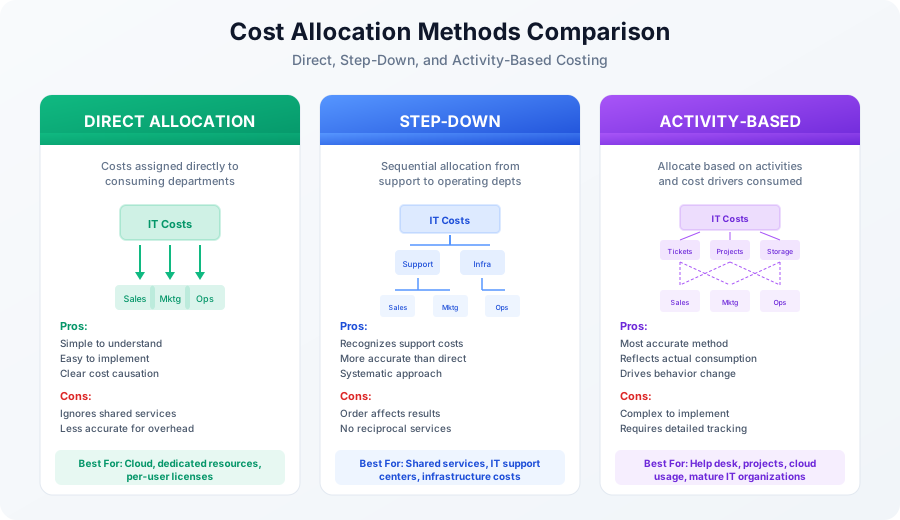
Method 1: Direct Allocation
Direct allocation is the simplest approach, assigning IT costs directly to the departments that consume them without considering intermediate cost pools or shared services.
How Direct Allocation Works:
The IT cost pool is divided and assigned directly to operating departments based on a single allocation base. For example, if you have $100K in software license costs and 200 employees, each department pays $500 per employee regardless of actual software usage patterns.
Direct Allocation Formula:
Department Cost = (Total IT Cost) x (Department's Share of Allocation Base)

Example:
Total Software Costs: $100,000
Total Employees: 200
Sales Department (50 employees): $100,000 x (50/200) = $25,000
Marketing (30 employees): $100,000 x (30/200) = $15,000
Operations (80 employees): $100,000 x (80/200) = $40,000
Finance (40 employees): $100,000 x (40/200) = $20,000
When to Use Direct Allocation:
- Cloud services with clear department ownership (tagged AWS accounts)
- Dedicated hardware or servers assigned to specific teams
- Per-user licenses that can be counted by department
- Organizations new to cost allocation seeking simplicity
- Costs that have obvious, measurable consumption patterns
Limitations of Direct Allocation:
- Ignores the reality that IT provides shared services
- Cannot handle IT-to-IT cost transfers (infrastructure supporting applications)
- May significantly over or under-allocate shared infrastructure costs
- Does not reflect the true cost of supporting different department types
Method 2: Step-Down Allocation (Sequential Allocation)
Step-down allocation recognizes that some IT cost centers provide services to other IT cost centers before serving business departments. Costs flow sequentially from support functions to operating departments.
How Step-Down Allocation Works:
IT costs are organized into a hierarchy, with support cost centers allocated first. Once a cost center's costs are allocated out, it receives no further allocations from subsequent centers. The order typically flows from most shared (infrastructure) to least shared (department-specific applications).
Step-Down Allocation Example:
Step 1: Allocate Infrastructure Costs ($200K)
- To Application Support: 40% ($80K)
- To Help Desk: 30% ($60K)
- To Sales: 15% ($30K)
- To Marketing: 10% ($20K)
- To Operations: 5% ($10K)

Step 2: Allocate Application Support Costs ($150K + $80K = $230K)
- To Help Desk: 20% ($46K)
- To Sales: 35% ($80.5K)
- To Marketing: 25% ($57.5K)
- To Operations: 20% ($46K)

Step 3: Allocate Help Desk Costs ($100K + $60K + $46K = $206K)
- To Sales: 40% ($82.4K)
- To Marketing: 25% ($51.5K)
- To Operations: 35% ($72.1K)

Final Department Allocations:
Sales: $30K + $80.5K + $82.4K = $192.9K
Marketing: $20K + $57.5K + $51.5K = $129K
Operations: $10K + $46K + $72.1K = $128.1K
Total: $450K (matches original IT budget)
When to Use Step-Down Allocation:
- Organizations with clear IT support hierarchies
- Shared services centers that support multiple areas
- IT departments with defined infrastructure and application layers
- Medium complexity organizations wanting better accuracy than direct allocation
- Situations where IT-to-IT cost transfers are significant
Limitations of Step-Down Allocation:
- Allocation order affects final results
- Does not account for reciprocal services (A supports B and B supports A)
- Requires careful determination of allocation sequence
- Can be perceived as arbitrary by recipient departments
Method 3: Activity-Based Costing (ABC)
Activity-based costing identifies the specific activities IT performs, determines cost drivers for each activity, and allocates costs based on actual consumption of those activities by each department.
How Activity-Based Costing Works:
First, identify all IT activities (ticket resolution, server provisioning, application maintenance). Then determine what drives the cost of each activity (ticket count, server count, application complexity). Finally, measure each department's consumption of each cost driver and allocate accordingly.
Activity-Based Costing Example:
Step 1: Identify Activities and Cost Pools

Activity: Help Desk Support
Total Cost: $300,000
Cost Driver: Number of tickets resolved
Total Tickets: 6,000 annually
Cost per Ticket: $50

Activity: Server Hosting
Total Cost: $240,000
Cost Driver: Number of VMs
Total VMs: 80
Cost per VM: $3,000/year

Activity: Application Development
Total Cost: $400,000
Cost Driver: Development hours
Total Hours: 4,000
Cost per Hour: $100

Step 2: Measure Department Consumption

Sales Department:
- Tickets: 2,400 (40%) = $120,000
- VMs: 20 (25%) = $60,000
- Dev Hours: 800 (20%) = $80,000
Total: $260,000

Marketing Department:
- Tickets: 1,200 (20%) = $60,000
- VMs: 24 (30%) = $72,000
- Dev Hours: 1,600 (40%) = $160,000
Total: $292,000

Operations Department:
- Tickets: 2,400 (40%) = $120,000
- VMs: 36 (45%) = $108,000
- Dev Hours: 1,600 (40%) = $160,000
Total: $388,000

Total Allocated: $940,000
When to Use Activity-Based Costing:
- Mature IT organizations with robust tracking systems
- Organizations seeking maximum cost transparency
- When chargeback accuracy is critical for business decisions
- Industries with significant IT cost variations by department
- When driving specific behavior changes through pricing signals
Limitations of Activity-Based Costing:
- Requires significant data collection and tracking infrastructure
- Higher administrative overhead to maintain
- May be overly complex for smaller organizations
- Cost driver identification can be challenging
- Requires ongoing refinement as activities and drivers evolve
Chargeback vs. Showback: Choosing Your Model
The allocation methodology determines how costs are calculated, but you must also decide how those costs are communicated and enforced. This is the distinction between chargeback and showback models.
Understanding Showback (Informational Model)
Showback provides cost visibility without actually transferring budget. Departments receive reports showing what their IT consumption would cost, but no money changes hands. Think of it as an educational tool that builds cost awareness.
Showback Characteristics:
- Costs calculated and reported monthly or quarterly
- No actual budget transfer between departments
- IT maintains centralized budget responsibility
- Reports serve educational and awareness purposes
- Lower friction and easier implementation
- No billing infrastructure required
Showback Report Example:
IT Cost Showback Report - Marketing Department
Period: Q1 2025

Service Category          Usage        Rate       Allocated Cost
-----------------------------------------------------------------
Cloud Compute             450 vCPU-hrs $0.15/hr   $67.50
Cloud Storage             2.5 TB       $25/TB-mo  $62.50
Help Desk Support         45 tickets   $50/ticket $2,250.00
Application Maintenance   CRM, MKT     $500/app   $1,000.00
Network Bandwidth         150 GB       $0.10/GB   $15.00
End User Devices          12 laptops   $100/mo    $1,200.00
Email/Collaboration       30 users     $20/user   $600.00
-----------------------------------------------------------------
Total Allocated Cost:                             $5,195.00

Note: This report is for information purposes only.
No budget transfer is required.
When Showback Works Best:
- Organizations new to cost allocation (start with awareness)
- Cultures resistant to internal charging
- When IT costs are immaterial to department budgets
- As a precursor to chargeback (build understanding first)
- When CFO prefers centralized IT budget management
Understanding Chargeback (Transactional Model)
Chargeback actually transfers budget from consuming departments to IT. Departments pay for what they use, creating true financial accountability and directly impacting their P&L or budget utilization.
Chargeback Characteristics:
- Actual budget transfers occur monthly or quarterly
- Departments have IT line items in their budgets
- IT operates as internal service provider
- Creates strong incentives for efficiency
- Requires billing infrastructure and dispute resolution
- More complex but drives behavior change
Chargeback Invoice Example:
IT Services Invoice - Marketing Department
Invoice #: IT-MKT-2025-Q1-001
Period: January 1 - March 31, 2025
Due: April 30, 2025

Service Category          Usage        Rate       Amount
-----------------------------------------------------------------
Cloud Compute (AWS)       450 vCPU-hrs $0.15/hr   $67.50
Cloud Storage (S3)        2.5 TB       $25/TB-mo  $187.50
Help Desk Support         45 tickets   $50/ticket $2,250.00
Application Maintenance
  - Salesforce            1            $300/mo    $900.00
  - Marketing Automation  1            $200/mo    $600.00
Network Bandwidth         150 GB       $0.10/GB   $15.00
End User Devices (12)     3 months     $100/mo    $3,600.00
Email/Collaboration (30)  3 months     $20/user   $1,800.00
-----------------------------------------------------------------
Subtotal:                                         $9,420.00
Volume Discount (>$5K):                           ($471.00)
-----------------------------------------------------------------
Total Due:                                        $8,949.00

Payment Terms: Net 30
Contact: it-billing@company.com
When Chargeback Works Best:
- Mature organizations with cost allocation history
- When behavior change is the primary goal
- Shared services centers with defined service catalogs
- Organizations where IT costs are significant to departments
- When executive sponsorship ensures adoption
Hybrid Approach: The Best of Both Worlds
Many successful organizations implement a hybrid model, using chargeback for directly controllable costs and showback for shared infrastructure that departments cannot easily influence.
Hybrid Model Example:
Cost Type                 Model      Rationale
-----------------------------------------------------------------
Cloud Services (tagged)   Chargeback Directly controllable by dept
SaaS Licenses (named)     Chargeback Can add/remove users
Help Desk Tickets         Chargeback Drives efficiency, self-service
Project Hours             Chargeback Encourages scope discipline

Network Infrastructure    Showback   Shared utility, hard to control
Security Services         Showback   Corporate mandate, not optional
IT Management Overhead    Showback   Cannot be influenced
Disaster Recovery         Showback   Insurance-like shared cost
Allocation Factors: Choosing the Right Drivers
The allocation factor (or cost driver) determines how costs are distributed among departments. Selecting appropriate factors is critical for fairness and acceptance.
Headcount-Based Allocation
The simplest and most common allocation factor, headcount assumes IT costs scale with the number of employees.
Calculation:
Department Allocation = Total Cost x (Department Headcount / Total Headcount)

Example: $500,000 IT budget, 500 employees
Sales (150 employees): $500K x (150/500) = $150,000
Marketing (75 employees): $500K x (75/500) = $75,000
Operations (200 employees): $500K x (200/500) = $200,000
Finance (75 employees): $500K x (75/500) = $75,000
Best For:
- Email and collaboration tools (everyone uses them)
- Basic productivity software (Office 365, Google Workspace)
- General IT support baseline
- Organizations seeking simplicity
- Costs that genuinely scale with people
Limitations:
- Assumes equal IT usage per person (rarely true)
- Penalizes large departments even if IT-light
- Does not reflect actual resource consumption
Revenue-Based Allocation
Allocates IT costs proportionally to each department's revenue contribution, aligning IT spending with business performance.
Calculation:
Department Allocation = Total Cost x (Department Revenue / Total Revenue)

Example: $500,000 IT budget, $50M total revenue
Sales ($30M revenue): $500K x ($30M/$50M) = $300,000
Marketing ($5M attributed): $500K x ($5M/$50M) = $50,000
Operations ($10M): $500K x ($10M/$50M) = $100,000
Finance ($5M): $500K x ($5M/$50M) = $50,000
Best For:
- Sales and revenue-generating systems
- When IT directly enables revenue
- Executive reporting and dashboards
- Organizations wanting IT tied to business success
Limitations:
- Penalizes high-performing departments
- Revenue attribution can be contentious
- Not all IT costs relate to revenue generation
- Support departments (HR, Legal) have no revenue
Usage-Based Allocation
Allocates costs based on actual measured consumption of IT resources.
Common Usage Metrics:
Resource Type         Usage Metric           Example Rate
-----------------------------------------------------------------
Compute               vCPU hours             $0.05-0.20/hr
Storage               GB or TB               $0.02-0.10/GB/mo
Network               GB transferred         $0.05-0.15/GB
Help Desk             Tickets resolved       $25-75/ticket
Applications          Named users            $10-100/user/mo
Development           Hours                  $75-150/hr
Server Hosting        VMs or physical        $50-500/server/mo
Calculation Example:
Help Desk Allocation:
Total Help Desk Budget: $300,000
Total Tickets: 5,000

Sales (2,000 tickets): $300K x (2000/5000) = $120,000
Marketing (1,000 tickets): $300K x (1000/5000) = $60,000
Operations (1,500 tickets): $300K x (1500/5000) = $90,000
Finance (500 tickets): $300K x (500/5000) = $30,000
Best For:
- Cloud services with metering
- Help desk and support services
- Variable costs that fluctuate with consumption
- Driving efficiency through consumption awareness
Limitations:
- Requires measurement infrastructure
- Can discourage reporting issues (help desk avoidance)
- Some services lack clear usage metrics
- Administrative overhead for tracking
Hybrid Factor Approach
Most organizations achieve the best results by matching allocation factors to cost types.
Recommended Factor Mapping:
Cost Category              Recommended Factor      Secondary Factor
----------------------------------------------------------------------
Email/Productivity         Headcount               None needed
Help Desk Support          Ticket count            Headcount (baseline)
Cloud Compute              Tagged usage            Revenue
Cloud Storage              GB consumed             None needed
SaaS Applications          Named users             Headcount
Network Infrastructure     Bandwidth or headcount  Square footage
Development/Projects       Hours tracked           Project count
Security Services          Headcount               Risk profile
Executive Systems          Revenue                 Headcount
End User Devices           Device count            Headcount
Building Your Cost Allocation Model
Step 1: Inventory All IT Costs
Before allocating, you must understand what you are allocating. Create a comprehensive inventory of all IT costs.
Cost Inventory Template:
Category: Infrastructure
-----------------------------------------------------------------
Cost Item                 Annual Cost    Type       Owner
Network equipment         $80,000        CapEx      Network Team
Data center hosting       $120,000       OpEx       Infrastructure
Internet connectivity     $48,000        OpEx       Network Team
Firewall/Security         $35,000        OpEx       Security Team
Monitoring tools          $24,000        OpEx       Operations

Category: Applications
-----------------------------------------------------------------
ERP system                $150,000       OpEx       App Team
CRM (Salesforce)          $180,000       OpEx       Sales IT
Marketing automation      $60,000        OpEx       Marketing IT
HRIS system               $45,000        OpEx       HR IT
Custom development        $200,000       OpEx       Dev Team

Category: End User
-----------------------------------------------------------------
Laptops (refresh)         $100,000       CapEx      End User Services
Microsoft 365             $72,000        OpEx       End User Services
Help desk staff           $180,000       OpEx       Support Team
Training                  $15,000        OpEx       Training

Total IT Budget: $1,309,000
Step 2: Classify Costs by Allocability
Not all costs should be allocated the same way. Classify costs into categories based on how directly they can be attributed.
Classification Framework:
Direct Costs (Allocate 100% to consuming department):
- Department-specific cloud accounts (tagged)
- Named user SaaS licenses
- Dedicated servers/applications
- Department-specific projects

Shared Costs (Allocate using drivers):
- Network infrastructure
- Help desk support
- Email systems
- General security services
- Shared applications

Corporate Overhead (May not allocate):
- IT leadership salaries
- Enterprise architecture
- IT strategy and planning
- Compliance and governance
- IT training programs
Step 3: Select Allocation Methods and Factors
Map each cost category to an allocation method and factor.
Allocation Design Matrix:
Cost Category        Method        Factor           Rationale
----------------------------------------------------------------------
Cloud (tagged)       Direct        Resource tags    Most accurate
SaaS licenses        Direct        Named users      Clear attribution
Help desk            ABC           Tickets          Reflects work
Network              Step-down     Bandwidth/HC     Shared utility
Email                Direct        Headcount        Universal usage
Security             Step-down     Headcount        Risk-based
Development          ABC           Hours            Project-based
Infrastructure       Step-down     Compute usage    Foundation layer
Management OH        Not allocated N/A              Corporate function
Step 4: Establish Rate Cards
Create a service catalog with rates for chargeback or showback reporting.
IT Service Rate Card:
IT Services Rate Card - Effective January 2025

Compute Services:
- Virtual Machine (Small: 2 vCPU, 4GB): $75/month
- Virtual Machine (Medium: 4 vCPU, 8GB): $150/month
- Virtual Machine (Large: 8 vCPU, 16GB): $300/month
- Container hosting: $0.02/container-hour

Storage Services:
- Block storage (SSD): $0.15/GB/month
- File storage (Standard): $0.05/GB/month
- Archive storage: $0.01/GB/month
- Backup storage: $0.03/GB/month

Application Services:
- Email (Microsoft 365 E3): $23/user/month
- CRM (Salesforce): $150/user/month
- Collaboration (Slack): $12/user/month
- Video conferencing (Zoom): $15/user/month

Support Services:
- Help desk (standard): $50/ticket
- Help desk (priority): $100/ticket
- Project hours: $125/hour
- Emergency support: $200/hour

Network Services:
- Standard connectivity: $25/user/month
- VPN access: $10/user/month
- Dedicated bandwidth: $100/Mbps/month

Review: Quarterly
Effective: January 1, 2025
Next Review: April 1, 2025
Step 5: Implement Tracking and Reporting
Establish the data collection and reporting infrastructure.
Data Sources Required:
System                    Data Provided           Frequency
----------------------------------------------------------------------
Cloud billing portal      Resource usage, tags    Real-time
IT asset management       Device inventory        Monthly
Help desk system          Ticket counts by dept   Real-time
Time tracking             Project hours           Weekly
Active Directory          User counts by dept     Monthly
HR system                 Headcount by dept       Monthly
Network monitoring        Bandwidth by segment    Monthly
Finance system            Cost data               Monthly
Reporting Cadence:
Report Type              Audience        Frequency    Detail Level
----------------------------------------------------------------------
Executive summary        CIO, CFO        Monthly      High-level KPIs
Department allocation    Dept heads      Monthly      Cost breakdown
Detailed chargeback      Finance         Monthly      Line-item detail
Trend analysis           IT leadership   Quarterly    Year-over-year
Budget vs. actual        All stakeholders Monthly     Variance analysis
Rate card review         IT finance      Quarterly    Rate adjustments
Handling Common Allocation Challenges
Challenge: Departments Dispute Allocations
Symptoms:
- "These charges are unfair!"
- "We don't use that much IT!"
- "Why should we pay for shared services?"
Solutions:
- Transparency First: Provide detailed breakdowns showing exactly how costs were calculated
- Audit Trail: Document allocation methodology and make it available
- Appeals Process: Create formal dispute resolution process with defined timeframes
- Baseline Comparisons: Show how costs compare to industry benchmarks
- Opt-In Where Possible: Let departments choose service tiers
Dispute Resolution Process:
Day 1-3: Department submits written dispute with specific concerns
Day 4-7: IT finance reviews allocation calculation for errors
Day 8-14: Meeting with department to discuss findings
Day 15-21: Escalation to IT Director/CFO if unresolved
Day 22-30: Final determination communicated
Day 31+: Adjustment applied if dispute upheld
Challenge: Driving Behavior Change
Goal: Use cost allocation to encourage efficient IT consumption.
Strategies:
- Volume Discounts: Reward consolidated purchasing
- Efficiency Bonuses: Reduce rates for departments showing improvement
- Premium Pricing: Charge extra for rush requests or off-hours support
- Self-Service Incentives: Lower rates for portal vs. phone support
- Reservation Discounts: Lower rates for committed capacity
Behavioral Pricing Example:
Help Desk Pricing Tiers:
- Self-service (knowledge base): FREE
- Chatbot resolution: $15/interaction
- Standard ticket: $50/ticket
- Priority ticket: $100/ticket
- Emergency (after-hours): $200/ticket

Result: 40% shift to self-service within 6 months
Challenge: Shadow IT
Problem: Departments buying their own IT solutions outside of official channels.
Addressing Shadow IT Through Allocation:
- Competitive Pricing: Ensure IT rates are comparable to external options
- Service Level Transparency: Show what departments get for their money
- Discovery and Integration: When shadow IT is found, offer to integrate at fair rates
- Risk Premium: If departments insist on shadow IT, charge for integration/security overhead
- Simplify Procurement: Make it easier to buy through IT than outside
Implementation Roadmap
Phase 1: Foundation (Months 1-2)
Activities:
- Executive sponsorship secured
- Cost inventory completed
- Allocation objectives defined
- Stakeholder communication plan created
- Pilot department(s) identified
Deliverables:
- Executive charter signed
- Complete IT cost catalog
- Documented objectives and success metrics
- Communication materials
- Pilot scope document
Phase 2: Design (Months 3-4)
Activities:
- Allocation methods selected by cost type
- Allocation factors defined
- Rate card developed
- Reporting templates created
- Data sources identified and validated
Deliverables:
- Allocation methodology document
- Service catalog and rate card
- Report templates
- Data integration requirements
Phase 3: Pilot (Months 5-6)
Activities:
- Showback reports generated for pilot departments
- Feedback collected and analyzed
- Methodology refined based on feedback
- Dispute resolution process tested
- Training materials developed
Deliverables:
- Pilot showback reports
- Feedback summary and recommendations
- Refined methodology
- Training documentation
Phase 4: Rollout (Months 7-9)
Activities:
- Full organization showback implemented
- All departments receiving reports
- Training conducted across organization
- Support processes established
- Continuous improvement identified
Deliverables:
- Organization-wide showback
- Trained stakeholders
- Support runbook
- Improvement backlog
Phase 5: Maturity (Months 10-12)
Activities:
- Evaluate readiness for chargeback
- Implement chargeback for suitable cost categories
- Optimize allocation factors
- Measure behavior change
- Plan continuous improvements
Deliverables:
- Chargeback go/no-go decision
- Optimized allocation model
- Behavior change metrics
- Year 2 roadmap
Measuring Success
Key Performance Indicators
Financial Metrics:
- IT cost per employee (trending down indicates efficiency)
- Allocation dispute rate (target: less than 5% of allocations)
- Budget variance (target: within 5% of allocated amounts)
- Shadow IT reduction (measure unauthorized spending)
Operational Metrics:
- Report delivery timeliness (target: 5 business days after month end)
- Data accuracy (target: 99% allocation accuracy)
- Self-service adoption (if using behavioral pricing)
- Ticket volume changes (monitor for suppression)
Stakeholder Metrics:
- Stakeholder satisfaction survey (target: 4/5 rating)
- Understanding of IT costs (survey improvement)
- Appropriate IT consumption (usage optimization)
- Business unit IT planning improvement
Free Resources and Templates
Cost Allocation Toolkit
Our comprehensive cost allocation package includes everything you need to implement fair IT cost distribution:
- Cost inventory worksheet
- Allocation methodology template
- Rate card template
- Monthly allocation report template
- Chargeback invoice template
- Dispute resolution procedure
- Implementation roadmap
Download IT Cost Allocation Template
Related Resources
IT Financial Management:
Cost Analysis Tools:
Conclusion
Effective IT cost allocation transforms how your organization views and consumes technology. By implementing the right combination of allocation methods, choosing appropriate factors, and selecting the correct model (chargeback, showback, or hybrid), you can achieve transparency, fairness, and accountability in IT spending.
Implementation Checklist:
- Secure executive sponsorship (CFO and CIO alignment)
- Complete IT cost inventory and classification
- Select allocation methods for each cost category
- Define allocation factors and document rationale
- Build rate card and service catalog
- Establish data collection infrastructure
- Design reporting templates
- Pilot with one or two departments
- Refine based on feedback
- Roll out organization-wide showback
- Evaluate and implement chargeback where appropriate
- Establish continuous improvement process
Key Success Factors:
- Start with showback - Build understanding before financial accountability
- Keep it simple initially - Add complexity only where it adds value
- Be transparent - Document and share methodology openly
- Engage stakeholders early - Get input before finalizing approach
- Respond to feedback - Iterate based on real-world experience
- Measure and communicate - Show the value of cost allocation
- Consider behavior change - Price to encourage efficient consumption
Next Steps:
- Download the cost allocation template
- Review IT budget planning guide
- Calculate your TCO
- Visit IT Budgeting hub
Start building your IT cost allocation model today. Fair, transparent cost distribution is the foundation of IT as a trusted business partner.