Financial Dashboard Template: Build Excel KPI Tracking + Free Guide

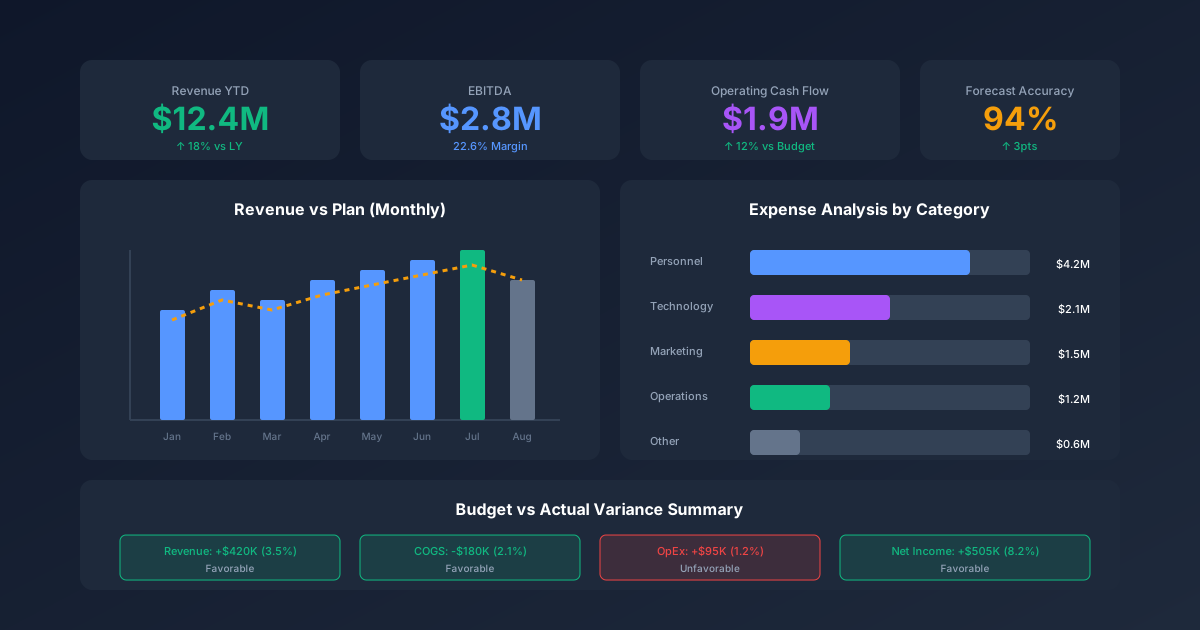
Finance teams that use dashboards reduce month-end close time by 30% and catch budget variances two weeks earlier than teams relying on static reports (AFP, 2024). Yet most finance managers are still navigating a 10-tab spreadsheet to answer basic questions that should take 30 seconds.
A well-built financial dashboard template solves this. It replaces the sprawl with one visual view — current status, trend direction, and variance alerts at a glance.
This guide shows you which KPIs to track by role, how to set up your dashboard in under an hour, and the design rules that separate useful dashboards from ignored ones. For a ready-to-use solution, download our Financial Dashboard Template ($79) or start with the free Financial KPI Dashboard.
Why Every Finance Team Needs a Financial Dashboard
According to a Gartner survey, 87% of senior business leaders say data and analytics are critical to their organization's digital transformation — but fewer than 30% of finance teams have real-time visibility into key performance metrics (Gartner, 2025). That gap between intention and execution is where dashboards live.
The core problem is format, not data. Most companies have the numbers — they're just buried in ERP exports, disconnected tabs, and month-end packs that take three days to produce. By the time the report lands, the window for corrective action has already closed.
A financial dashboard template changes this in three ways:
For the CFO: Instead of waiting for the monthly close deck, you see revenue vs. plan, EBITDA margin, and cash position updated weekly. Strategic decisions get made on current information, not 30-day-old snapshots.
For the controller: Close checklists and compliance metrics stay visible all month. You know at a glance whether days sales outstanding is drifting or AP aging needs attention — before anyone calls asking.
For FP&A: Budget vs. actual variances surface automatically. You spend your time on the "why" and the "so what," not on building the comparison table from scratch.
For advanced planning workflows, see our FP&A Dashboard Suite ($79), which extends the core dashboard with scenario modeling and rolling forecast automation.
What Financial KPIs Should Your Dashboard Track?
High-performing finance teams keep their primary dashboard tight — a focused set of metrics rather than a sprawling data dump. Deloitte's CFO program makes the same case across its CFO Insights research (Deloitte CFO Insights): the discipline to track fewer, better metrics is what separates signal from noise.
Which metrics belong on your dashboard depends on your role. Here's the breakdown.
CFO-Level KPIs (Strategic View)
| KPI | What It Measures | Target Direction |
|---|---|---|
| Revenue growth rate | Year-over-year or month-over-month revenue change | Up and to plan |
| EBITDA margin | Operating profitability as a % of revenue | At or above target |
| Cash runway | Months of operating expenses covered by current cash | 12+ months |
| Return on equity (ROE) | Profit generated per dollar of shareholder equity | Above industry benchmark |
| Debt-to-equity ratio | Financial leverage and balance sheet risk | Within covenant limits |
These five metrics give a CFO the complete strategic picture in under 60 seconds.
Controller-Level KPIs (Compliance View)
| KPI | What It Measures | Warning Signal |
|---|---|---|
| Days sales outstanding (DSO) | Average days to collect invoices | Rising trend |
| Accounts payable aging | Outstanding payables by age bucket | 60+ day balance growing |
| Month-end close days | Days from period end to books closed | Longer than target |
| Audit findings | Open findings from internal/external audits | Any unresolved critical items |
| Cash conversion cycle | Days from cash out to cash back | Lengthening |
Controllers use these to stay ahead of compliance issues and close bottlenecks before they become month-end fires.
FP&A-Level KPIs (Planning View)
| KPI | What It Measures | Action Trigger |
|---|---|---|
| Budget variance | Actual vs. budget by department and category | >5% unfavorable |
| Forecast accuracy | Prior-month forecast vs. actual result | Below 90% accuracy |
| Revenue per employee | Revenue efficiency across headcount | Declining quarter-over-quarter |
| Operating expense ratio | OpEx as a % of revenue | Above target |
| Working capital ratio | Current assets divided by current liabilities | Below 1.2x |
FP&A teams use these five to drive the monthly business review and reforecast conversations.
Financial Dashboard Template: Free Download and Paid Options
Our Financial Dashboard Template tracks all 15 KPIs above in a single Excel workbook. It's built for finance managers who need a production-ready tool without starting from a blank spreadsheet.
What's included:
- Dashboard tab — One-page visual overview with KPI scorecards, RAG status indicators, and 12-month sparkline trends for each metric
- Data input tab — Structured input area for monthly actuals, budget targets, and prior-year comparatives
- Trend analysis tab — Rolling 12-month charts for each KPI category (strategic, compliance, planning)
- Assumptions tab — Documented thresholds and alert logic so reviewers understand the rules
Technical specs:
- Compatible with Excel 2016 and later, and Google Sheets (with minor formatting differences)
- No macros or VBA required — all formulas use standard Excel functions (IF, IFERROR, OFFSET, SPARKLINE)
- Conditional formatting auto-applies RAG coloring when you enter actuals
If you're at the beginning of your finance toolkit build, start with our free Financial KPI Dashboard, which covers the core CFO metrics without the full setup complexity.
How to Set Up Your Financial Dashboard
Setting up takes 30 minutes on the first run and about 10 minutes monthly to update. Here's the four-step process.
Step 1 — Connect Your Data Sources
Identify where your actuals come from: your ERP (QuickBooks, NetSuite, SAP), your accounting platform, or a manually maintained general ledger. The template uses a structured input tab, so you'll export a monthly trial balance and paste the relevant line totals into the data input sheet. No live connections required — manual input is intentional to keep the template portable.
Step 2 — Map Accounts to KPI Categories
Open the assumptions tab and map your chart of accounts to the template's KPI categories. For example, "Accounts Receivable" maps to the DSO calculation; "Total Revenue" maps to revenue growth rate. This step takes the longest the first time (15–20 minutes) but only needs updating when your chart of accounts changes.
Step 3 — Set Targets and Thresholds
For each KPI, enter your annual target and your amber/red thresholds. Example: revenue growth rate — green if ≥8%, amber if 4–7.9%, red if <4%. The dashboard auto-applies these thresholds to the conditional formatting. If you don't have formal targets yet, use industry benchmarks from your most recent management accounts or sector research.
Step 4 — Customize the Dashboard Layout
Decide which 8–10 KPIs appear on the main dashboard view. Hide or minimize the others — they still calculate in the background but won't clutter the primary view. Arrange the cards so the most critical metric for your role sits in the top-left position (the first place the eye lands on any dashboard).
For related financial reporting tools, see our Financial Reporting Templates collection.
Dashboard Design Best Practices
A McKinsey study found that finance leaders who follow structured dashboard design principles report 40% higher satisfaction with their reporting tools and spend 25% less time explaining data to stakeholders (McKinsey, 2024). Design isn't cosmetic — it's how quickly your audience can act on the information.
Follow these five rules to build a dashboard that gets used rather than ignored:
Rule 1: Limit to 8–10 KPIs. Every additional metric reduces the attention each metric receives. If everything is highlighted, nothing stands out. Be ruthless about what earns a spot on the main view.
Rule 2: Use consistent RAG color coding. Red/amber/green thresholds should be defined once and applied everywhere. Never use color for decoration — only for status. Color-blind-friendly alternatives: use shapes or text labels alongside colors.
Rule 3: Show trends, not just snapshots. A single number tells you where you are. A 12-month sparkline tells you where you're headed. The trend matters more than the point-in-time value for most strategic metrics.
Rule 4: Put the most important metric top-left. Readers scan dashboards in an F-pattern (left to right, top to bottom). The most critical metric belongs in the top-left, not buried in the middle.
Rule 5: Include all three comparison axes. Actual vs. budget tells you if you're on plan. Actual vs. prior year tells you if you're improving. Budget vs. prior year tells you if the plan was ambitious or conservative. Show all three for full context.
For a free starting point that applies these principles, download our Financial KPI Dashboard.
3 Financial Dashboard Examples by Company Stage
The right dashboard design isn't universal — it changes as the company matures and the finance function's priorities shift.
Startup Dashboard (Pre-Profitability)
At the pre-profitability stage, cash is the only metric that can kill you overnight. The startup dashboard focuses on burn and growth:
- Monthly burn rate — cash spent per month
- Runway — months until cash runs out at current burn
- Monthly recurring revenue (MRR) — for SaaS; gross revenue for other models
- MRR growth rate — month-over-month percentage change
- Customer acquisition cost (CAC) — total sales + marketing spend ÷ new customers
If a startup CEO can answer "how long is our runway?" and "how fast are we growing?" in under 10 seconds, the dashboard is working. For a full financial model that integrates with this dashboard, see our Startup Financial Model ($149).
Growth-Stage Dashboard (Scaling Operations)
Growth-stage companies have product-market fit and are optimizing for unit economics. The dashboard shifts toward efficiency:
- Revenue growth rate — quarterly and annual
- Gross margin and gross margin expansion trend
- LTV:CAC ratio — for subscription or repeat-purchase businesses
- Revenue per employee — productivity as headcount scales
- Operating expense ratio — OpEx as a % of revenue (should be declining)
At this stage, investors and board members are watching gross margin expansion and unit economics closely. These belong front and center.
Mature Business Dashboard (Profitability Focus)
For profitable, established businesses, the dashboard shifts to capital efficiency and return metrics:
- EBITDA and EBITDA margin — absolute and vs. prior year
- Free cash flow — EBITDA minus capex and working capital changes
- Return on equity (ROE) — vs. cost of equity and industry benchmarks
- Dividend coverage ratio — for businesses paying dividends
- Debt-to-EBITDA — leverage relative to earning power
These metrics track value creation and balance sheet health — the metrics that drive valuation multiples for mature companies.
Common Financial Dashboard Mistakes
Research by the CFO Alliance found that 64% of finance dashboards are either rarely used or used only during formal reporting cycles — meaning they fail their primary purpose of enabling faster decisions (CFO Alliance, 2024). Most failures trace back to the same mistakes.
Mistake 1: Too many KPIs. The most common failure. When you track 30 metrics, none of them carry urgency. Limit the main view to 8–10 and move everything else to a drill-down tab.
Mistake 2: Vanity metrics without context. Gross revenue sounds impressive until you realize margin is collapsing. Always pair top-line metrics with their profitability counterparts.
Mistake 3: Stale data. A dashboard updated once a quarter isn't a dashboard — it's a report. If the data isn't current enough to drive action, people stop trusting it. Build a monthly (or weekly) update cadence and stick to it.
Mistake 4: No action triggers. When a KPI turns red, what happens next? Who owns the response? A dashboard without defined escalation paths creates awareness without accountability. Document the threshold and the owner for each metric.
Mistake 5: Missing benchmarks. A DSO of 45 days means nothing without context. Is that good or bad for your industry? Add an industry benchmark or prior-year comparison to every KPI so the number has meaning.
For a complete suite of financial reporting tools, explore our Financial Reporting Templates collection.
When to Upgrade from Excel to BI Tools
Excel dashboards work well until you hit one of these limits: more than 5 data sources that need daily refreshes, more than 20 people regularly accessing the dashboard, or a need for drill-through to transaction-level detail.
That's when Power BI, Tableau, or Looker start making sense. They offer live connections to data sources, role-based access controls, and self-service filtering that Excel can't replicate.
But the upgrade comes at a cost: BI tools require IT involvement, licensing budgets, and often a dedicated analyst to maintain the data model. For most finance managers at companies under 500 employees, an Excel financial dashboard template is the right tool — it's faster to set up, easier to share, and doesn't need IT support to modify a KPI definition.
Start with Excel. Upgrade to BI tools when you can clearly articulate what Excel can't do that your business needs. Our Financial Dashboard Template is built to last well beyond the point where most teams feel the BI tool pressure.
Frequently Asked Questions
What is the best financial dashboard template for Excel?
The best Excel financial dashboard template includes three things: pre-built KPIs with clear definitions, conditional formatting that automatically highlights variances, and trend charts that show direction over time. Avoid templates that require macro-enabled workbooks or complex VBA — they break during version upgrades. Our Financial Dashboard Template uses only standard Excel formulas and is compatible with Excel 2016 through Microsoft 365.
How many KPIs should a financial dashboard have?
Eight to ten KPIs on the main view is the right number for most finance dashboards. More than that and the dashboard becomes a data dump rather than a decision tool. You can track additional metrics in supporting tabs — they just shouldn't compete for attention on the primary view. Deloitte's CFO program makes the same case for focusing on fewer, higher-signal metrics (Deloitte CFO Insights).
Can I build a financial dashboard in Google Sheets?
Yes, and our template supports Google Sheets with minor limitations. Sparklines work natively in Google Sheets. Some complex conditional formatting rules need rebuilding after import. If your team works primarily in Google Workspace, the Sheets version works well for the core CFO and FP&A KPIs. For the full feature set — including the trend analysis and drill-down tabs — Excel is the better platform.
How often should I update my financial dashboard?
Monthly is the minimum for most financial dashboards. For cash-sensitive businesses (startups, companies managing tight working capital), weekly cash and burn rate updates are worth the extra effort. Don't update the dashboard more frequently than your underlying data is reliable — a weekly dashboard built on manual inputs that nobody trusts is worse than a monthly dashboard everyone believes.
What's the difference between a financial dashboard and a financial report?
A dashboard shows current status at a glance — it's visual, real-time (or near-real-time), and designed for quick consumption. A report provides detailed analysis for a specific period — it's narrative, historical, and designed for deep review. The CFO needs both: the dashboard for weekly operational visibility, the monthly report package for board communication and audit trails. They serve different audiences at different frequencies. Start with the dashboard; it'll tell you which sections of the report actually need deeper analysis.
A financial dashboard template is the highest-leverage tool in a finance manager's toolkit. It replaces the 10-tab sprawl with one view, turns raw variance data into visible alerts, and gives every stakeholder from CFO to controller the information they need in under 60 seconds.
Download the Financial Dashboard Template ($79) to get pre-built KPI scorecards, RAG indicators, and 12-month trend analysis ready to go. If you're building out the full FP&A toolkit, the FP&A Dashboard Suite ($79) adds scenario modeling and rolling forecast automation. Or start free with the Financial KPI Dashboard to get the core CFO metrics working before you invest in the full build.