Customer Journey Mapping Template: Visualize Every Touchpoint

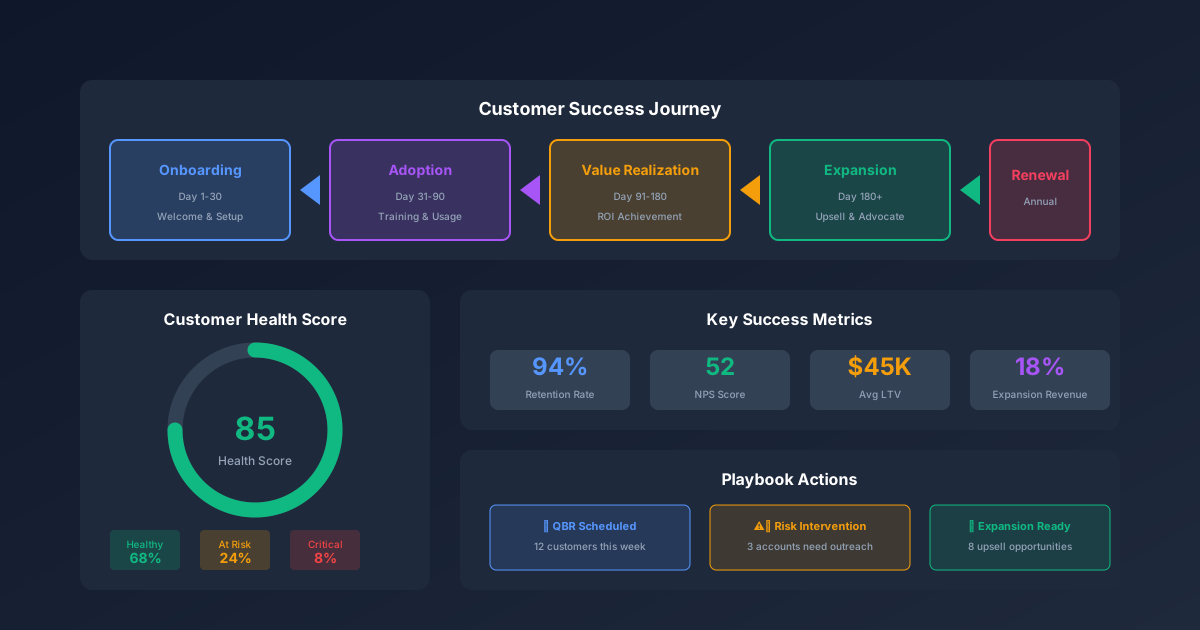
Companies that actively manage the customer journey see 54% greater return on marketing investment and 56% higher cross-sell/upsell revenue (Aberdeen Group, 2023). Yet most businesses map their sales process from the company's perspective — what we do at each stage — instead of from the customer's perspective: what they experience, feel, and need at every interaction. A customer journey mapping template flips that lens. It forces you to walk through every touchpoint from first awareness to post-purchase loyalty, identify where friction kills deals, and prioritize the fixes that matter most. For a ready-to-use framework, grab our Customer Journey Mapping Template.
What Is a Customer Journey Map?
A customer journey map is a visual representation of every interaction a customer has with your business, from their first moment of awareness through purchase and beyond. It documents what customers do, think, and feel at each stage — and identifies the gaps between what they expect and what they actually experience.
The map isn't a sales funnel. A funnel shows where customers drop off. A journey map shows why they drop off — the specific friction points, unmet expectations, and emotional states that turn prospects into lost opportunities. Funnels tell you what happened. Journey maps tell you what to fix.
Journey mapping originated in service design and has been adopted by marketing, product, sales, and CX teams because it's the only framework that captures the full customer experience across every department and channel.
The 5 Stages of a Customer Journey
Every customer journey follows roughly the same arc, regardless of industry. The specific touchpoints change, but the psychological stages are universal.
Stage 1: Awareness
The customer recognizes they have a problem or need. They don't know your brand yet — they're searching for information, asking peers, or encountering content that names their pain point.
Customer mindset: "I have a problem. What solutions exist?"
Typical touchpoints:
- Search engines (Google, Bing)
- Social media content
- Industry publications and blogs
- Peer recommendations
- Paid advertising
- Conferences and events
Your job at this stage: be discoverable. Create content that addresses the problem, not your product. The customer isn't ready to hear about features — they're still defining what they need.
Stage 2: Consideration
The customer has identified potential solutions and is actively evaluating options. They're comparing features, reading reviews, requesting demos, and building a shortlist.
Customer mindset: "Which option is best for my specific situation?"
Typical touchpoints:
- Product/service pages
- Comparison content (vs. competitors)
- Case studies and testimonials
- Free trials or demos
- Sales conversations
- Review sites (G2, Capterra, Trustpilot)
Your job at this stage: reduce uncertainty. Provide clear, honest comparisons. Make it easy to evaluate your product against alternatives without requiring a sales call.
Stage 3: Decision
The customer has chosen their preferred solution and is working through the purchase process. Friction here kills deals that are effectively already won.
Customer mindset: "I've decided — make it easy to buy."
Typical touchpoints:
- Pricing pages
- Checkout flow
- Contract negotiation
- Procurement/legal review
- Payment processing
- Order confirmation
Your job at this stage: remove friction. Every extra form field, unclear pricing tier, or manual approval step costs you conversions. The decision is made — don't give them reasons to reconsider.
Stage 4: Onboarding
The customer has purchased and is starting to use your product or service. First impressions here determine whether they become a long-term customer or churn after the first invoice.
Customer mindset: "Did I make the right choice? Help me get value fast."
Typical touchpoints:
- Welcome emails
- Setup/configuration
- Training and documentation
- First-use experience
- Customer success check-ins
- Support interactions
Your job at this stage: deliver the "aha moment" as quickly as possible. Every day between purchase and first value is a day the customer questions their decision. For email onboarding sequences, see our Email Sequence Template guide.
Stage 5: Loyalty and Advocacy
The customer is getting consistent value and has the potential to become a repeat buyer, expand their usage, or refer others. Most companies underinvest here despite the fact that acquiring a new customer costs 5-7x more than retaining an existing one (Bain & Company, 2023).
Customer mindset: "This is working. What else can I do with it?"
Typical touchpoints:
- Product updates and new features
- Loyalty programs
- Community engagement
- Referral programs
- Renewal/upsell conversations
- Customer advisory boards
Your job at this stage: grow the relationship. Don't just wait for renewal — proactively identify expansion opportunities and make it easy for happy customers to refer others.
How to Build a Customer Journey Map
Follow these 6 steps to create a journey map that drives real CX improvements, not a poster that hangs on the wall and gathers dust.
Step 1 — Define Your Target Persona
A journey map without a specific persona is too generic to be useful. Choose one persona to start — your highest-value or most common customer type. Include:
- Demographics: role, company size, industry
- Goals: what they're trying to achieve
- Pain points: what frustrates them about the current state
- Decision criteria: what matters most when evaluating solutions
If you have multiple distinct buyer personas, create a separate journey map for each. A procurement director and an end user have fundamentally different journeys even when buying the same product.
Step 2 — List Every Touchpoint
For each journey stage, list every interaction the customer has with your business. Be exhaustive — include indirect touchpoints like reading a review site or asking a colleague for their opinion.
Sources for touchpoint data:
- Analytics: website sessions, page paths, email opens
- CRM: sales call logs, deal stage timestamps
- Support: ticket categories, first-contact topics
- Customer interviews: ask 5-10 customers to walk you through their buying process
- Internal teams: sales, support, and success teams know the touchpoints analytics miss
Step 3 — Map Actions, Thoughts, and Emotions
For each touchpoint, document three layers:
| Layer | What to Capture | Example |
|---|---|---|
| Actions | What the customer does | "Searches Google for 'CRM templates Excel'" |
| Thoughts | What questions they have | "Is this template compatible with my CRM?" |
| Emotions | How they feel | "Frustrated — can't find clear pricing" |
The emotions layer is where most companies discover their biggest insights. A customer who feels confused during onboarding or anxious during checkout is at risk of dropping off — even if the rational arguments for your product are strong.
Step 4 — Identify Pain Points and Moments of Truth
Review each touchpoint and flag:
- Pain points: where friction, confusion, or frustration exists
- Moments of truth: high-stakes interactions that disproportionately shape the customer's overall perception (first contact, pricing reveal, first support ticket)
- Handoff gaps: where the customer transitions between teams (marketing → sales, sales → success) and information gets lost
Handoff gaps are the most common source of CX failure. The customer tells their story to marketing, repeats it to sales, and repeats it again to support. Each repetition erodes trust.
Step 5 — Prioritize Improvements
You can't fix everything at once. Score each pain point on two dimensions:
- Impact on customer experience (1-5): how much does this friction point affect satisfaction, retention, or revenue?
- Effort to fix (1-5): how much time, money, or organizational change is required?
Start with high-impact, low-effort fixes. These quick wins build momentum and demonstrate ROI for journey mapping, which earns buy-in for larger improvements.
Step 6 — Assign Owners and Track Progress
Every improvement needs a team owner and a timeline. Journey maps that lack accountability become shelfware. Update the map quarterly as you implement fixes and as customer behavior evolves.
Customer Journey Map Template Download
Our customer journey mapping template includes a structured framework for all 5 stages with touchpoint documentation, emotion tracking, pain point identification, and an improvement prioritization matrix.
What's included:
- Persona Profile sheet — structured buyer persona with goals, pain points, and decision criteria
- Journey Map — 5-stage framework with rows for actions, thoughts, emotions, touchpoints, and pain points
- Touchpoint Inventory — master list of all customer interactions across channels
- Pain Point Tracker — impact vs. effort scoring with prioritization matrix
- Improvement Roadmap — action items with owners, timelines, and KPIs
Download the Customer Journey Mapping Template →
For CRM integration to track journey stages at the individual customer level, see our CRM Templates guide. For sales pipeline mapping that complements the journey view, explore our Sales Pipeline Template.
Journey Mapping by Business Model
B2B Journey Maps
B2B journeys are longer (average 6-18 months), involve multiple decision-makers, and include formal evaluation stages (RFP, procurement, legal review). Key differences:
- Multiple personas per journey — map the champion, the decision-maker, and the blocker separately
- Longer consideration stage — content needs for each buying stage are more extensive
- Committee decisions — touchpoints include internal presentations and business case documents
- Post-sale complexity — implementation, training, and ongoing account management
B2C and E-commerce Journey Maps
B2C journeys are shorter (minutes to weeks), more emotional, and heavily influenced by social proof and brand perception.
- Shorter consideration — comparison shopping happens in a single session
- Higher impulse factor — emotions drive more decisions
- Multiple channels — mobile, desktop, in-store, social media
- Post-purchase is critical — returns, reviews, and repeat purchases
SaaS Journey Maps
SaaS journeys have unique characteristics around trial experience, activation, and ongoing engagement.
- Free trial/freemium gate — the onboarding stage is the journey's make-or-break moment
- Activation metrics — specific in-product actions that predict conversion
- Ongoing engagement — the journey doesn't end at purchase; usage drives retention
- Expansion revenue — upsells and feature upgrades are journey touchpoints
Frequently Asked Questions
What is a customer journey map used for?
A customer journey map identifies friction points, unmet expectations, and emotional gaps in your customer experience. It's used to prioritize CX improvements, align teams around the customer perspective, improve conversion rates, reduce churn, and increase customer lifetime value. Marketing uses it to create better content. Sales uses it to handle objections. Support uses it to anticipate issues.
How is a customer journey map different from a sales funnel?
A sales funnel is a company-centric view showing how many prospects move through each stage (awareness → interest → decision → purchase). A journey map is a customer-centric view showing what the customer experiences, thinks, and feels at each stage. Funnels measure conversion rates. Journey maps diagnose why conversions succeed or fail.
How many journey maps does a business need?
One per major customer persona or buying scenario. A SaaS company might need maps for self-serve signups, enterprise sales, and partner referrals. A B2C brand might need maps for first-time buyers, repeat purchasers, and gift buyers. Start with one (your highest-revenue persona) and add maps as you validate the process.
Who should be involved in creating a journey map?
Cross-functional representation is essential: marketing (awareness stage), sales (consideration/decision), customer success (onboarding/retention), support (pain points across all stages), and product (in-product experience). The biggest CX gaps exist between teams, so the mapping process itself forces alignment.
How often should I update a customer journey map?
Review quarterly and update annually or after major changes (new product launch, website redesign, market shift, or organizational restructuring). Also update immediately if customer feedback or data reveals a significant new pain point or behavior change.
Start Mapping Your Customer Journey
The gap between what customers expect and what they experience is where revenue leaks. A journey map makes those gaps visible — not as abstract concepts, but as specific touchpoints with specific fixes. Start with your highest-value persona, map the 5 stages, and prioritize the pain points that cost you the most deals.
Download the Customer Journey Mapping Template →
For deeper customer analysis, explore our Customer Success Playbook Templates for retention strategies, our Customer Retention Playbook for churn prevention, and our Sales Funnel Template for pipeline-level conversion tracking.