Compensation Analysis Template [Free Excel] — Salary Benchmarking & Pay Equity

![Compensation Analysis Template [Free Excel] — Salary Benchmarking & Pay Equity](/images/compensation-analysis-hero.svg?dpl=dpl_At1SKoA9zh8NKaLECzqhv4yEjB9o)
Compensation analysis is the cornerstone of strategic talent management. Organizations that systematically benchmark salaries against market data retain top performers 34% longer than those relying on gut instinct. Yet many HR teams struggle to implement rigorous compensation analysis due to data complexity and methodology gaps.
This comprehensive guide walks you through building a compensation analysis framework that ensures market competitiveness and pay equity. For additional compensation resources, explore our HR Management Hub, Compensation & Benefits section, and related Compensation Budgeting Guide. For ready-to-use templates, see our Salary Planning Template and Budget vs Actual Variance Template.
Quick Start: Use our free Employee Cost Calculator to model the true cost of salary adjustments including taxes, benefits, and overhead.
What is Compensation Analysis?
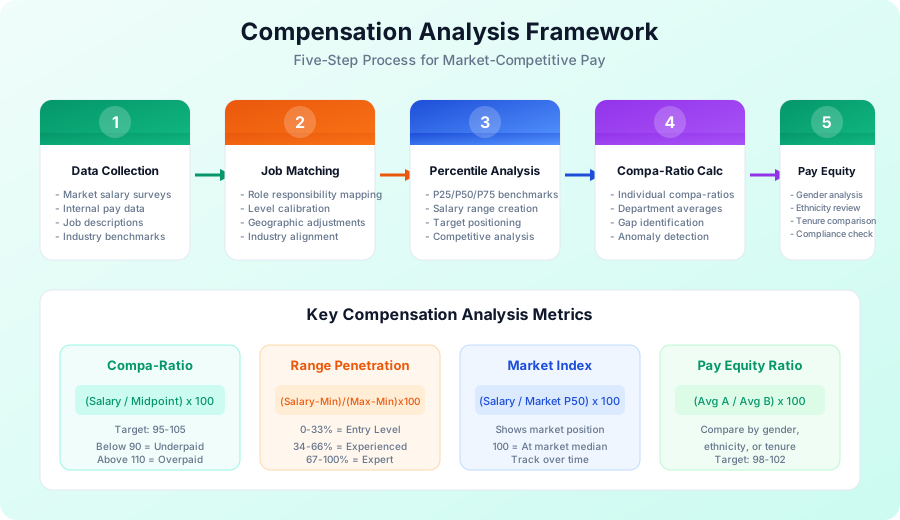
Compensation analysis is the systematic process of evaluating how your organization's pay practices compare to the external labor market and internal equity standards. It combines market benchmarking, statistical analysis, and policy evaluation to answer critical questions:
- Are we paying competitively for talent?
- Do we have pay equity issues across demographics?
- Where are our compensation gaps and overpayments?
- How should we allocate our salary budget?
A robust compensation analysis program includes:
Market Benchmarking:
- Collecting external salary survey data
- Matching internal jobs to market benchmarks
- Analyzing percentile positioning (P25, P50, P75)
- Adjusting for geography, industry, and company size
Internal Equity Analysis:
- Comparing pay across similar roles
- Identifying compression and inversion issues
- Evaluating pay by tenure and performance
- Detecting demographic pay disparities
Competitive Positioning:
- Defining target market position (lag, match, lead)
- Creating salary ranges aligned to strategy
- Monitoring market movement trends
- Planning budget allocation
Why Compensation Analysis Matters
Organizations without systematic compensation analysis face predictable challenges:
Retention Risk:
- 63% of employees who quit cite inadequate compensation
- Replacing an employee costs 50-200% of annual salary
- Top performers leave first when underpaid vs. market
Recruiting Challenges:
- Offer rejection rates increase 40% when below market
- Time-to-fill extends 25% without competitive data
- Employer brand suffers from Glassdoor/LinkedIn salary complaints
Legal and Compliance Risk:
- Pay equity lawsuits increased 300% in the past decade
- OFCCP audits scrutinize compensation practices
- State pay transparency laws require documented ranges
Budget Inefficiency:
- Overpaying in some areas while underpaying others
- Reactive retention bonuses instead of proactive adjustments
- No data to defend compensation decisions to leadership
Strategic compensation analysis converts these risks into competitive advantages.
Step 1: Gather Market Salary Data
The foundation of compensation analysis is reliable market data. Here is how to build your data foundation.
Primary Data Sources
Compensation Surveys (Most Reliable):
| Survey Provider | Best For | Cost Range | Update Frequency |
|---|---|---|---|
| Radford (Aon) | Technology, Life Sciences | $5,000-15,000/year | Annual |
| Mercer | Broad Industries | $3,000-10,000/year | Annual |
| Culpepper | Startups, Mid-Market | $2,000-8,000/year | Annual |
| Willis Towers Watson | Executive Compensation | $5,000-20,000/year | Annual |
| PayScale | General Market Data | $500-5,000/year | Continuous |
| Salary.com | Job-Specific Data | $300-3,000/year | Continuous |
Free/Low-Cost Sources (Use Directionally):
| Source | Strengths | Limitations |
|---|---|---|
| Bureau of Labor Statistics | Government data, broad coverage | Lagging data, limited job specificity |
| Glassdoor | Large sample size, company-specific | Self-reported, potential inflation |
| LinkedIn Salary | Professional roles | Limited data points |
| Levels.fyi | Tech industry detail | Tech-only, company-specific |
| Payscale Free | Quick benchmarks | Less precise without paid tier |
Best Practice: Invest in one comprehensive paid survey for your primary industries, supplement with 2-3 free sources for validation.
Data Collection Checklist
Before starting your analysis, gather:
- 2-3 years of survey data (identify trends)
- Current employee census (all pay data)
- Job descriptions for matching
- Organizational chart (reporting relationships)
- Performance ratings (link pay to performance)
- Demographic data (for equity analysis)
- Geographic locations (for market adjustments)
Selecting the Right Survey Cut
Most surveys offer multiple data "cuts" based on:
Industry Sector:
- General industry (broad benchmark)
- Specific industry (technology, healthcare, finance)
- Sub-sector (SaaS, biotech, fintech)
Company Size:
- Revenue-based ($0-50M, $50-200M, $200M-1B, $1B+)
- Employee count (1-100, 100-500, 500-2000, 2000+)
Geographic Scope:
- National average
- Regional (Northeast, West Coast, etc.)
- Metro area (San Francisco, New York, etc.)
- Remote/distributed
Select cuts that match your talent competitors, not necessarily your industry peers. A tech startup competes for engineers against Google, not against other startups in the same survey.
Step 2: Match Jobs to Market Data
Accurate job matching is where most compensation analyses fail. Titles vary wildly across organizations, making apples-to-apples comparisons challenging.
Job Matching Methodology
Match by Responsibilities, Not Titles:
Your "Senior Software Engineer" may be a survey's "Software Engineer III" or "Staff Engineer." Focus on:
| Factor | Questions to Ask |
|---|---|
| Scope | How much does this role own independently? |
| Complexity | What is the technical/business difficulty? |
| Experience | What years of experience are typical? |
| Management | Direct reports? Budget responsibility? |
| Impact | Individual contributor vs. organizational influence |
Create a Job Matching Matrix:
| Internal Title | Survey Match | Confidence | Notes |
|---|---|---|---|
| Software Engineer I | SW Engineer - Entry | High | 0-2 years experience match |
| Software Engineer II | SW Engineer - Intermediate | High | 2-4 years experience match |
| Senior Software Engineer | SW Engineer - Senior | Medium | May span levels |
| Principal Engineer | SW Engineer - Principal/Staff | Medium | Scope varies by company |
| Engineering Manager | Engineering Manager I | High | Direct reports 4-8 |
Confidence Levels:
- High: Direct match, responsibilities align closely
- Medium: Reasonable match, some scope differences
- Low: Best available, significant differences
For low-confidence matches, consider blending multiple survey jobs or adjusting the data point.
Geographic Adjustments
Salaries vary dramatically by location. Apply geographic differentials:
| Location | Differential vs. National | Example (P50 = $100K nationally) |
|---|---|---|
| San Francisco | +35-45% | $135,000 - $145,000 |
| New York City | +30-40% | $130,000 - $140,000 |
| Seattle | +25-35% | $125,000 - $135,000 |
| Boston | +20-30% | $120,000 - $130,000 |
| Austin | +10-20% | $110,000 - $120,000 |
| Denver | +10-15% | $110,000 - $115,000 |
| Atlanta | +0-5% | $100,000 - $105,000 |
| Phoenix | -5-0% | $95,000 - $100,000 |
| Midwest (avg) | -10-5% | $90,000 - $95,000 |
| Rural Areas | -20-10% | $80,000 - $90,000 |
Remote Work Adjustments:
- Location-based: Pay based on employee location
- Headquarters-based: Pay based on company HQ
- Hybrid: National average with cost-of-living bands
- Location-agnostic: Same pay regardless of location (premium approach)
Company Size Adjustments
Larger companies typically pay more for equivalent roles:
| Company Size (Revenue) | Adjustment Factor |
|---|---|
| Under $50M | 0.85-0.95x |
| $50M - $200M | 0.95-1.00x |
| $200M - $1B | 1.00-1.05x |
| $1B - $5B | 1.05-1.15x |
| Over $5B | 1.10-1.25x |
Applying Adjustments:
Adjusted Market Rate = Base Survey Rate × Geographic Factor × Size Factor

Example:
- Survey P50 for Software Engineer: $120,000 (national, mid-size)
- Your company: San Francisco, $100M revenue
- Geographic factor: 1.40 (SF)
- Size factor: 0.97 (small-mid)
- Adjusted rate: $120,000 × 1.40 × 0.97 = $163,000
Step 3: Conduct Percentile Analysis
Percentile analysis positions your salaries within the market distribution. This is the core of salary benchmarking.
Understanding Percentiles
Percentiles show where a salary falls relative to the market:
| Percentile | Meaning | Example ($120K P50) |
|---|---|---|
| P10 | 10% earn less, 90% earn more | ~$84,000 |
| P25 | 25% earn less, 75% earn more | ~$96,000 |
| P50 (Median) | 50% earn less, 50% earn more | $120,000 |
| P75 | 75% earn less, 25% earn more | ~$150,000 |
| P90 | 90% earn less, 10% earn more | ~$180,000 |
Why Median (P50) Matters More Than Mean:
- Less skewed by outliers (extremely high salaries)
- Better represents "typical" market rate
- Standard benchmark for compensation strategy
Positioning Your Salary Ranges
Define your competitive positioning strategy:
Below-Market (P25-P40):
- Organizations: Non-profits, mission-driven, cash-constrained startups
- Tradeoff: Lower cost but higher turnover risk
- Mitigation: Equity, flexibility, mission, career growth
At-Market (P45-P55):
- Organizations: Most companies, balanced approach
- Tradeoff: Competitive but not premium
- Mitigation: Strong total rewards, culture, development
Above-Market (P60-P75):
- Organizations: Tech leaders, specialized skills, talent wars
- Tradeoff: Premium cost, lower turnover
- Justification: Revenue per employee, critical skills, competitive advantage
Lead-Market (P75+):
- Organizations: FAANG, high-growth unicorns, specialized hedge funds
- Tradeoff: Significant cost, attracts top 10% talent
- Justification: Winner-take-all markets, revenue directly tied to talent
Building Salary Ranges
Create structured salary ranges from percentile data:
Range Spread Formula:
Range Spread = (Maximum - Minimum) / Minimum × 100

Typical Spreads by Level:
- Entry Level: 30-40% spread
- Professional: 40-50% spread
- Manager: 50-60% spread
- Director: 60-70% spread
- Executive: 70-100% spread
Example Range Construction:
| Level | P25 | P50 | P75 | Your Min | Your Mid | Your Max | Spread |
|---|---|---|---|---|---|---|---|
| Engineer I | $75K | $85K | $100K | $72K | $85K | $102K | 42% |
| Engineer II | $90K | $105K | $125K | $88K | $105K | $130K | 48% |
| Sr. Engineer | $110K | $130K | $155K | $108K | $130K | $162K | 50% |
| Staff Engineer | $140K | $165K | $195K | $138K | $168K | $207K | 50% |
| Principal | $175K | $210K | $255K | $175K | $215K | $270K | 54% |
Range Midpoint = Your Target Market Position
If targeting P50, set midpoint at P50. If targeting P60, set midpoint between P50 and P75.
Step 4: Calculate Compa-Ratios
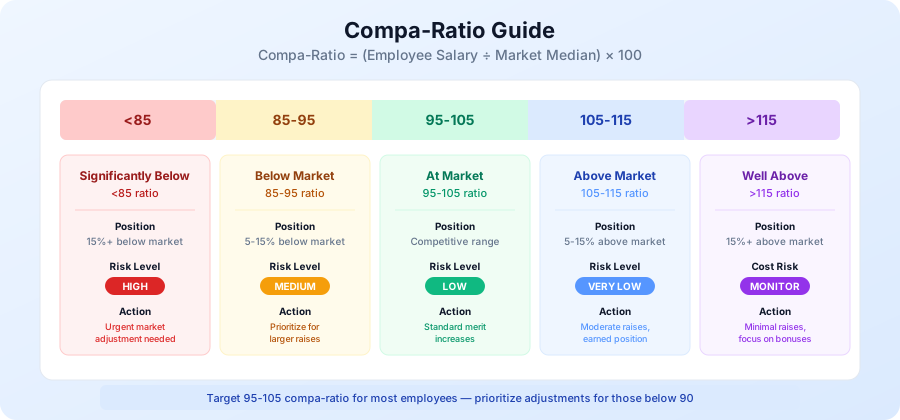
The compa-ratio (comparative ratio) is the single most important metric in compensation analysis. It measures how an employee's pay compares to the target rate.
Compa-Ratio Formula
Compa-Ratio = (Employee Salary / Range Midpoint) × 100

Alternative: Market Compa-Ratio
Compa-Ratio = (Employee Salary / Market P50) × 100
Interpreting Compa-Ratios
| Compa-Ratio | Position | Interpretation | Action |
|---|---|---|---|
| Below 80 | Significantly below | Major underpayment, flight risk | Urgent adjustment needed |
| 80-90 | Below market | Underpaid, retention risk | Prioritize for larger increases |
| 90-95 | Slightly below | Developing or below market | Increase to close gap |
| 95-105 | At market | Competitive, target zone | Standard merit increases |
| 105-115 | Above market | Well-paid, strong performer | Moderate increases |
| Above 115 | Significantly above | Overpaid or red-circled | Minimal increases, bonus focus |
Compa-Ratio Analysis by Segment
Analyze compa-ratios across different dimensions:
By Department:
| Department | Avg Compa-Ratio | Employees Below 90 | Employees Above 110 |
|---|---|---|---|
| Engineering | 98 | 5 (8%) | 8 (13%) |
| Sales | 103 | 2 (5%) | 12 (30%) |
| Marketing | 94 | 8 (20%) | 3 (7%) |
| Operations | 96 | 6 (15%) | 4 (10%) |
| Finance | 101 | 3 (8%) | 5 (14%) |
Insights from this data:
- Marketing is underpaid relative to market (94 avg, 20% below 90)
- Sales may be overpaid or commission-heavy (103 avg, 30% above 110)
- Engineering is well-positioned (98 avg, balanced distribution)
By Tenure:
| Tenure | Avg Compa-Ratio | Common Issue |
|---|---|---|
| 0-1 years | 102 | New hires at market or above |
| 1-3 years | 98 | Some market lag developing |
| 3-5 years | 94 | Compression starting |
| 5-10 years | 91 | Significant compression |
| 10+ years | 88 | Long-tenure penalty |
If long-tenure employees have lower compa-ratios, you have salary compression. New hires are catching up to or exceeding tenured employees.
By Performance Rating:
| Rating | Avg Compa-Ratio | Expectation |
|---|---|---|
| Exceptional (5) | 108 | Should be highest |
| Exceeds (4) | 103 | Above average |
| Meets (3) | 98 | At target |
| Developing (2) | 94 | Below average |
| Below (1) | 90 | Lowest |
Performance-pay alignment is healthy when higher performers have higher compa-ratios. If not, your merit process needs calibration.
Range Penetration (Alternative Metric)
Range penetration shows position within salary range:
Range Penetration = (Salary - Range Min) / (Range Max - Range Min) × 100
| Penetration | Position | Typical Employee Profile |
|---|---|---|
| 0-25% | Low in range | New to role, developing |
| 25-50% | Below midpoint | Building competency |
| 50-75% | Above midpoint | Fully competent |
| 75-100% | High in range | Expert, top performer |
| 100%+ | Above range | Red-circled, exceptional |
Use range penetration when you have established salary bands. Use market compa-ratio when comparing directly to external data.
Step 5: Conduct Pay Equity Analysis
Pay equity analysis examines whether compensation varies inappropriately by protected characteristics (gender, race, ethnicity, age) or other factors that should not influence pay.
Legal Context
Pay equity requirements are expanding:
| Legislation | Scope | Key Requirements |
|---|---|---|
| Equal Pay Act (1963) | Federal, US | Equal pay for equal work regardless of sex |
| Title VII | Federal, US | No discrimination based on race, color, religion, sex, national origin |
| State Pay Equity Laws | CA, NY, CO, WA, and more | Expanded protections, pay transparency, salary history bans |
| UK Gender Pay Gap | United Kingdom | Annual reporting for companies 250+ employees |
| EU Pay Transparency | European Union | Pay range disclosure, reporting requirements |
Pay Equity Analysis Methods
Method 1: Unadjusted Pay Gap
Simple average comparison:
Unadjusted Gap = (Average Pay Group A - Average Pay Group B) / Average Pay Group A × 100

Example:
- Average male salary: $105,000
- Average female salary: $95,000
- Unadjusted gap: ($105K - $95K) / $105K = 9.5%
Limitation: Does not account for legitimate factors (job level, experience, location).
Method 2: Adjusted Pay Gap (Preferred)
Control for legitimate factors:
Compare pay for same:
- Job family and level
- Geographic location
- Years of experience
- Performance rating

Adjusted Gap = Remaining difference after controls
Example Adjusted Analysis:
| Job Level | Male Avg | Female Avg | Gap | Employees |
|---|---|---|---|---|
| Engineer I | $82,000 | $81,500 | 0.6% | 24 |
| Engineer II | $98,000 | $97,200 | 0.8% | 35 |
| Sr. Engineer | $128,000 | $125,000 | 2.3% | 42 |
| Staff Engineer | $165,000 | $158,000 | 4.2% | 18 |
| Principal | $210,000 | $198,000 | 5.7% | 8 |
Insights: Gap widens at senior levels, suggesting promotion or negotiation differences.
Method 3: Regression Analysis
Statistical regression controls for multiple factors simultaneously:
Salary = β0 + β1(Job Level) + β2(Experience) + β3(Performance) + β4(Location) + β5(Gender) + ε

If β5 (gender coefficient) is significant and negative for women,
there is an unexplained pay gap.
When to Use Regression:
- Large employee populations (200+)
- Multiple factors to control
- Need statistical significance testing
- Preparing for audit or litigation defense
Pay Equity Metrics Dashboard
Track these metrics monthly or quarterly:
| Metric | Target | Action Threshold |
|---|---|---|
| Unadjusted Gender Gap | Below 5% | Above 10% requires investigation |
| Adjusted Gender Gap | Below 2% | Above 3% requires remediation |
| Compa-Ratio by Gender | Within 2 points | More than 3 points requires review |
| Promotion Rate by Gender | Within 1% | More than 2% requires analysis |
| Hiring Salary by Gender | Within 2% | More than 3% requires calibration |
Remediation Strategies
When gaps are identified:
Immediate Actions:
- Individual adjustments for clear underpayment
- Salary band corrections where ranges are misaligned
- Manager training on equitable pay decisions
Systemic Changes:
- Salary transparency and published ranges
- Structured hiring and promotion processes
- Regular (quarterly) equity audits
- Compensation committee review of adjustments
Building Your Compensation Analysis Template
Create a comprehensive workbook with these components:
Tab 1: Employee Data
| Column | Description | Source |
|---|---|---|
| Employee ID | Unique identifier | HRIS |
| Name | Full name | HRIS |
| Department | Cost center | HRIS |
| Job Title | Current role | HRIS |
| Job Code | Standard code for matching | Job architecture |
| Job Family | Function (Engineering, Sales) | Job architecture |
| Job Level | Grade/band | Job architecture |
| Location | Work location | HRIS |
| Hire Date | Start date | HRIS |
| Time in Role | Months in current job | Calculated |
| Current Salary | Base pay | Payroll |
| Performance Rating | Latest rating | Performance system |
| Gender | M/F/Other | HRIS (voluntary) |
| Ethnicity | Categories per policy | HRIS (voluntary) |
Tab 2: Market Data
| Column | Description |
|---|---|
| Job Code | Links to employee data |
| Survey Source | Radford, Mercer, etc. |
| Survey Job Title | Matched title |
| Match Confidence | High/Medium/Low |
| National P25 | 25th percentile |
| National P50 | Median |
| National P75 | 75th percentile |
| Geo Factor | Location adjustment |
| Size Factor | Company size adjustment |
| Adjusted P25 | P25 x Geo x Size |
| Adjusted P50 | P50 x Geo x Size |
| Adjusted P75 | P75 x Geo x Size |
Tab 3: Analysis Calculations
Key formulas:
Compa-Ratio = (Current Salary / Adjusted P50) × 100

Range Penetration = (Salary - Adjusted P25) / (Adjusted P75 - Adjusted P25) × 100

Market Index = (Salary / Adjusted P50) × 100

Gap to Market = Adjusted P50 - Current Salary

Adjustment Needed = IF(Compa-Ratio < 90, Adjusted P50 × 0.95 - Current Salary, 0)
Tab 4: Summary Dashboard
Overall Metrics:
- Average compa-ratio (company-wide)
- % employees below 90 compa-ratio
- % employees above 110 compa-ratio
- Estimated adjustment cost to reach 95% compa-ratio minimum
Department View:
- Average compa-ratio by department
- Headcount by department
- Payroll by department
- Adjustment budget needed by department
Equity Metrics:
- Average compa-ratio by gender
- Average compa-ratio by ethnicity
- Gaps identified (count and dollar value)
Tab 5: Adjustment Recommendations
| Employee | Current | Compa-Ratio | Gap | Recommended Adjustment | Priority |
|---|---|---|---|---|---|
| J. Smith | $72,000 | 82% | -$15,800 | $10,000 (11.4%) | High |
| M. Chen | $95,000 | 88% | -$12,950 | $8,000 (8.4%) | High |
| A. Patel | $110,000 | 93% | -$8,300 | $5,000 (4.5%) | Medium |
Priority Logic:
- High: Compa-ratio below 85% OR identified equity gap
- Medium: Compa-ratio 85-92%
- Low: Compa-ratio 92-95%
- None: Compa-ratio 95%+
Common Compensation Analysis Mistakes
Avoid these pitfalls in your analysis:
Mistake 1: Using Stale Data
Problem: Survey data is 12-18 months old in fast-moving markets. Solution: Age data forward using market movement rates (typically 3-5% annually). Update surveys annually.
Mistake 2: Poor Job Matching
Problem: Matching by title creates inaccurate comparisons. Solution: Match by scope, experience, and responsibilities. Document matching rationale.
Mistake 3: Ignoring Total Compensation
Problem: Analyzing base salary only misses equity, bonus, benefits. Solution: Include total compensation view: base + bonus target + equity value + benefits value.
Mistake 4: One-Size-Fits-All Ranges
Problem: Same ranges for all locations and job families. Solution: Create location-adjusted and function-specific ranges. Tech talent may need different positioning than operations.
Mistake 5: Skipping Equity Analysis
Problem: Legal risk and employee trust erosion. Solution: Conduct equity analysis before every salary planning cycle. Document findings and remediation.
Mistake 6: Analysis Without Action
Problem: Identifying gaps but not allocating budget to fix them. Solution: Tie compensation analysis to budget planning. Create multi-year remediation plans if needed.
Implementing Your Compensation Analysis Program
Annual Cycle
| Month | Activity | Owner |
|---|---|---|
| January | Purchase updated survey data | Compensation |
| February | Refresh market data and job matches | Compensation |
| March | Complete annual analysis | Compensation |
| April | Present findings to leadership | Compensation + HR |
| May | Incorporate into merit/budget planning | Compensation + Finance |
| June-July | Make adjustments with annual increases | HR Operations |
| August | Audit results, verify accuracy | Compensation |
| October | Mid-year market check (hot jobs) | Compensation |
| November | Preliminary data for next year | Compensation |
| December | Strategic planning inputs | Compensation + Leadership |
Ongoing Monitoring
Between annual analyses, monitor:
- New hire offer acceptance rates (declining = below market)
- Regrettable turnover exit interview data
- Time-to-fill for critical roles
- Competitor hiring announcements
- Industry survey preliminary data
- Glassdoor/LinkedIn salary trends
Technology Tools
Spreadsheet-Based (Small Organizations):
- Excel or Google Sheets with structured templates
- Pros: Flexible, low cost, familiar
- Cons: Manual updates, version control, limited analytics
Compensation Software (Mid-Large Organizations):
- Payscale, Salary.com, Payfactors, Syndio
- Pros: Automated market data, analytics, equity tools
- Cons: Cost ($5-50K+ annually), implementation time
HRIS Integrated (Enterprise):
- Workday Compensation, SAP SuccessFactors
- Pros: Single system, automated data flow
- Cons: High cost, complexity, customization limits
Conclusion: Building Compensation Intelligence
Effective compensation analysis transforms HR from reactive administrators to strategic business partners. When you can answer "Are we paying competitively?" and "Do we have pay equity?" with data, you earn leadership trust and make better decisions.
Your Compensation Analysis Checklist:
- Source 2-3 reliable market data sources
- Create job matching documentation
- Apply geographic and size adjustments
- Calculate compa-ratios for all employees
- Analyze by department, tenure, and performance
- Conduct pay equity analysis by protected class
- Identify adjustment priorities and costs
- Present findings with action recommendations
- Build annual and ongoing monitoring processes
Related Resources:
- Compensation Budgeting Guide - Plan salaries, raises, and total rewards
- Salary Planning Spreadsheet - Free Excel template for HR teams
- Employee Cost Calculator - Calculate true employee cost
- HR Policy Templates - Complete HR documentation
Build a compensation analysis practice that attracts, retains, and fairly rewards your talent while maintaining fiscal responsibility.