Virtual Events Tracker Template: Manage Webinars, Online Conferences & Digital Events

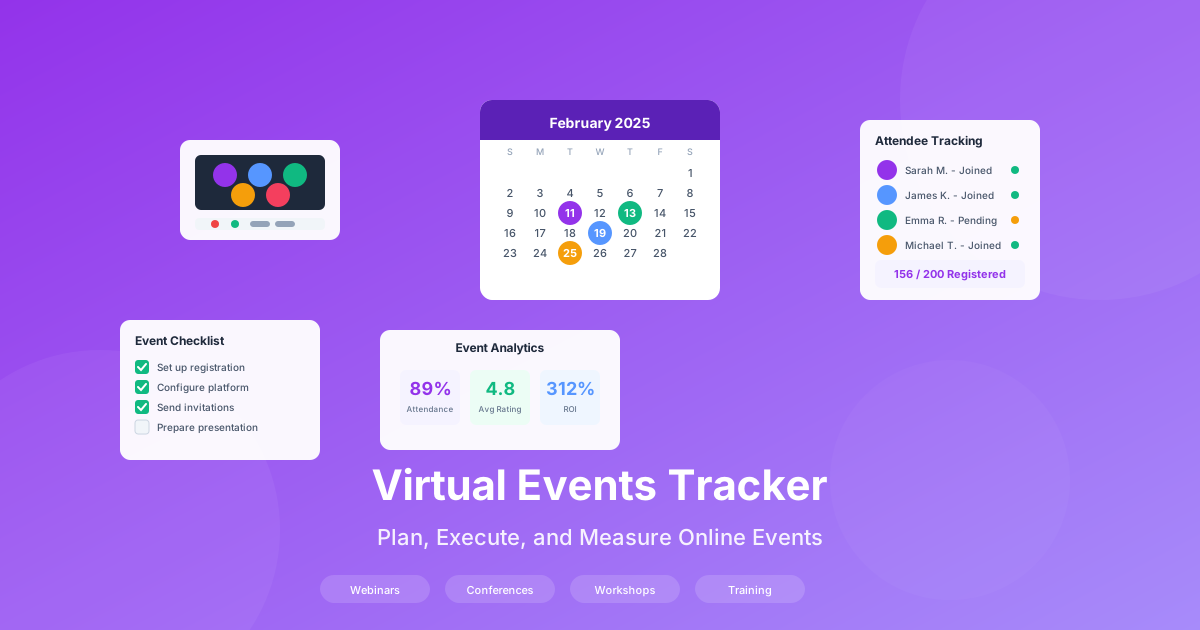
Virtual events have become a cornerstone of modern marketing and communication strategies. From webinars that generate leads to online conferences that build thought leadership, the ability to plan, execute, and measure digital events effectively can transform your organization's reach and revenue. However, without proper tracking systems, even the best-executed events fail to deliver measurable business value. A comprehensive virtual events tracker template provides the structure needed to manage every aspect of your online events program. For comprehensive sales and marketing resources, visit our Sales & Marketing Hub. For ready-to-use templates, see our Content Marketing Strategy Template and Communication Plan Template.
Why Virtual Events Tracking Matters
Organizations investing in virtual events without proper tracking systems operate blind. The data paints a clear picture of why systematic event management matters:
- Companies with structured event tracking achieve 40% higher registration-to-attendance conversion rates
- Post-event follow-up within 24 hours increases lead conversion by 3x compared to delayed outreach
- Engagement scoring during events identifies 35% more sales-qualified leads than passive attendance tracking
- ROI measurement enables data-driven decisions about event investment and format optimization
- Historical event data reveals patterns that improve future event performance by 25-30%
The cost of untracked events
Without systematic event tracking, marketing teams struggle to justify event budgets, sales teams miss qualified leads, and organizations repeat the same mistakes event after event. The hidden costs include wasted promotional spend, lost opportunities from poor follow-up, and inability to demonstrate marketing ROI to leadership.
The Virtual Event Planning Lifecycle
Successful virtual events follow a structured lifecycle with distinct phases, each requiring specific tracking and management activities. Understanding this lifecycle ensures nothing falls through the cracks.
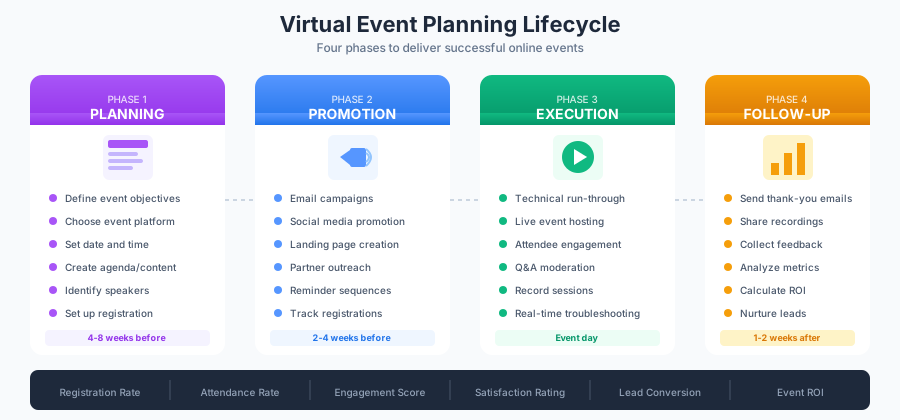
Phase 1: Planning (4-8 Weeks Before)
The planning phase establishes the foundation for event success. Key activities include:
Event Strategy:
- Define clear event objectives (lead generation, brand awareness, customer education)
- Identify target audience and personas
- Set specific, measurable goals (registrations, attendance, engagement targets)
- Determine event format (webinar, panel, workshop, conference)
Logistics Setup:
- Select and configure event platform (Zoom, Microsoft Teams, Webex, custom solutions)
- Create registration landing page with tracking parameters
- Build email sequences for registration confirmation and reminders
- Develop event content and presentation materials
- Coordinate with speakers and moderators
Success Metrics Definition:
- Registration targets by source and segment
- Attendance rate benchmarks
- Engagement thresholds (poll participation, Q&A activity, chat engagement)
- Post-event conversion goals
Phase 2: Promotion (2-4 Weeks Before)
Effective promotion drives registrations and sets attendance expectations. For strategic insights on campaign planning, explore our marketing campaigns guide.
Multi-Channel Outreach:
- Email campaigns to existing contacts and subscribers
- Social media promotion with event-specific hashtags
- Paid advertising targeting ideal attendee profiles
- Partner and co-host promotional coordination
- Internal promotion to employees and stakeholders
Registration Tracking:
- Daily registration monitoring against targets
- Source attribution for each registration
- Lead quality scoring based on registration data
- Waitlist management for capacity-limited events
Reminder Sequences:
- One week before: detailed agenda and speaker highlights
- Three days before: calendar reminder and technical requirements
- One day before: final reminder with login instructions
- One hour before: last chance notification
Phase 3: Execution (Event Day)
Flawless execution requires real-time tracking and coordination:
Pre-Event Preparation:
- Technical run-through with all presenters (30-60 minutes before)
- Platform testing for audio, video, and screen sharing
- Backup plans for technical failures
- Moderator briefing on agenda and timing
Live Event Management:
- Attendance tracking as participants join
- Real-time engagement monitoring
- Q&A moderation and prioritization
- Chat management and participant support
- Recording initiation and verification
- Time management and speaker transitions
Engagement Activities:
- Launch polls at strategic moments
- Highlight audience questions for speakers
- Monitor chat for technical issues and feedback
- Capture key engagement data points
Phase 4: Follow-Up (1-2 Weeks After)
Post-event activities convert attendance into business value:
Immediate Actions (Within 24 Hours):
- Send thank-you emails to attendees
- Deliver recording access and presentation materials
- Share event summary and key takeaways
- Launch post-event survey
Analysis and Reporting:
- Compile attendance and engagement metrics
- Calculate event ROI and cost per lead
- Analyze feedback survey results
- Identify hot leads for sales follow-up
- Document lessons learned
Lead Nurturing:
- Segment attendees by engagement level
- Create personalized follow-up sequences
- Hand off qualified leads to sales team
- Add no-shows to re-engagement campaigns
Building Your Virtual Events Tracker Template
A comprehensive tracking template centralizes all event data and automates key calculations. Here is how to structure your Excel-based event management system.
Event Master Tab
Create a central registry for all events:
| Column | Purpose | Example |
|---|---|---|
| Event ID | Unique identifier | VE-2025-001 |
| Event Name | Descriptive title | Q1 Product Launch Webinar |
| Event Type | Format classification | Webinar |
| Event Date | Scheduled date/time | 2025-02-15 2:00 PM EST |
| Duration | Planned length | 60 minutes |
| Platform | Hosting technology | Zoom Webinar |
| Target Audience | Intended attendees | Marketing Directors |
| Registration Goal | Target signups | 500 |
| Attendance Goal | Expected attendees | 250 |
| Event Owner | Primary organizer | Sarah Johnson |
| Status | Current phase | Promotion |
| Budget | Allocated spend | $5,000 |
Registration Tracking Tab
Monitor signup progress and sources:
| Column | Purpose | Example |
|---|---|---|
| Registrant ID | Unique identifier | R-001 |
| Event ID | Linked event | VE-2025-001 |
| Full Name | Registrant name | John Smith |
| Contact email | john@company.com | |
| Company | Organization | Acme Corp |
| Job Title | Role | VP Marketing |
| Registration Date | Signup timestamp | 2025-02-01 |
| Source | Attribution channel | LinkedIn Ad |
| UTM Campaign | Tracking parameter | q1-launch-promo |
| Lead Score | Quality rating | 85 |
| Reminder Sent | Confirmation status | Yes |
| Attended | Participation status | Yes |
Attendance and Engagement Tab
Track live event participation:
| Column | Purpose | Example |
|---|---|---|
| Attendee ID | Linked registrant | R-001 |
| Join Time | Entry timestamp | 2:02 PM |
| Leave Time | Exit timestamp | 3:05 PM |
| Duration (min) | Time attended | 63 |
| Attention Score | Engagement percentage | 92% |
| Polls Answered | Poll participation | 4/5 |
| Questions Asked | Q&A engagement | 2 |
| Chat Messages | Chat participation | 5 |
| Resources Downloaded | Content engagement | 3 |
| Engagement Score | Composite rating | 87 |
Post-Event Analysis Tab
Compile results and calculate ROI:
| Metric | Formula | Target |
|---|---|---|
| Total Registrations | COUNT(Registrations) | 500 |
| Attendance Rate | Attended/Registered | 50% |
| No-Show Rate | 1-Attendance Rate | 50% or less |
| Avg Engagement Score | AVERAGE(EngagementScore) | 70+ |
| Poll Participation | AvgPollsAnswered/TotalPolls | 60% |
| Q&A Engagement | RegistrantsWithQuestions/Attendees | 15% |
| Survey Response Rate | SurveysCompleted/Attendees | 40% |
| Leads Generated | QualifiedLeads | 75 |
| Cost Per Lead | Budget/LeadsGenerated | $67 |
| Pipeline Generated | SUM(OpportunityValue) | $150,000 |
| Event ROI | (Revenue-Cost)/Cost | 300% |
Virtual Event KPIs and Benchmarks
Understanding industry benchmarks helps set realistic goals and evaluate performance. These metrics vary by event type and audience, but provide useful reference points.
Registration Metrics
| Metric | Average | Good | Excellent |
|---|---|---|---|
| Email Invite Conversion | 1-2% | 3-5% | Greater than 5% |
| Landing Page Conversion | 20-30% | 35-45% | Greater than 50% |
| Social Media Conversion | 0.5-1% | 2-3% | Greater than 4% |
| Partner Referral Conversion | 5-10% | 15-20% | Greater than 25% |
| Registration-to-Attendance | 35-45% | 50-60% | Greater than 65% |
Attendance and Engagement Metrics
| Metric | Average | Good | Excellent |
|---|---|---|---|
| Show Rate (Webinars) | 40-45% | 50-55% | Greater than 60% |
| Show Rate (Conferences) | 60-70% | 75-80% | Greater than 85% |
| Average Watch Time | 50-55% | 60-70% | Greater than 75% |
| Poll Participation | 40-50% | 55-65% | Greater than 70% |
| Q&A Engagement | 8-12% | 15-20% | Greater than 25% |
| Chat Activity | 15-20% | 25-35% | Greater than 40% |
| Resource Downloads | 20-30% | 35-45% | Greater than 50% |
Post-Event Metrics
| Metric | Average | Good | Excellent |
|---|---|---|---|
| Survey Response Rate | 25-35% | 40-50% | Greater than 55% |
| Recording Views | 20-30% | 35-50% | Greater than 60% |
| Lead-to-MQL Conversion | 15-25% | 30-40% | Greater than 45% |
| Cost Per Registrant | $15-25 | $8-15 | Less than $8 |
| Cost Per Attendee | $30-50 | $15-30 | Less than $15 |
| Cost Per Lead | $50-100 | $25-50 | Less than $25 |
Organizations that track and optimize against these benchmarks see 2-3x improvement in event ROI within 12 months of implementing systematic measurement.
Event Planning Checklists
Comprehensive checklists ensure nothing is overlooked across the event lifecycle.
Pre-Event Planning Checklist (4-8 Weeks Before)
Strategy and Goals:
- Define event objectives and success criteria
- Identify target audience and create attendee personas
- Set registration and attendance targets
- Determine budget and resource allocation
- Select event date avoiding conflicts
Content Development:
- Finalize event topic and title
- Confirm speakers and moderators
- Create detailed agenda with timing
- Develop presentation materials
- Prepare speaker bios and headshots
- Create promotional copy and graphics
Technical Setup:
- Select and configure event platform
- Set up registration page with tracking
- Configure email integration
- Test webinar settings (registration, waiting room, recording)
- Create calendar invites with conferencing details
- Establish backup platform and contingency plans
Marketing Preparation:
- Build promotional email sequences
- Create social media content calendar
- Design paid advertising campaigns
- Coordinate partner promotional activities
- Prepare sales team talking points
Promotion Phase Checklist (2-4 Weeks Before)
Campaign Launch:
- Send initial invitation to email list
- Launch social media promotion
- Activate paid advertising campaigns
- Distribute to partner networks
- Enable employee amplification
Registration Management:
- Monitor daily registration against targets
- Track registration sources for attribution
- Score registrant lead quality
- Manage waitlist if approaching capacity
- Send registration confirmations immediately
Reminder Sequences:
- Queue one-week reminder email
- Schedule three-day reminder
- Prepare day-before reminder
- Create one-hour reminder with login details
- Set up calendar reminder triggers
Content Finalization:
- Complete all presentation materials
- Create poll questions and timing
- Develop Q&A preparation document
- Prepare handouts and resources
- Test all demos and interactive elements
Event Day Checklist
Pre-Event (60-30 Minutes Before):
- Launch event platform and verify settings
- Test audio, video, and screen sharing
- Verify recording is configured
- Brief moderator on agenda and roles
- Conduct speaker technical check
- Review Q&A moderation process
- Confirm backup plans are ready
During Event:
- Start recording immediately
- Track attendance as participants join
- Launch polls at designated times
- Monitor Q&A queue and prioritize questions
- Manage chat and participant support
- Watch time and signal speakers as needed
- Document technical issues for follow-up
Post-Event (Immediately After):
- Stop recording and verify save
- Export attendance report
- Download Q&A and chat logs
- Note engagement observations
- Debrief with speakers and team
- Trigger thank-you email sequence
Post-Event Checklist (1-2 Weeks After)
Within 24 Hours:
- Send thank-you and recording access email
- Launch post-event survey
- Export complete attendee data
- Share key takeaways summary
- Notify sales of hot leads
Within One Week:
- Compile attendance and engagement metrics
- Analyze survey feedback
- Calculate event ROI
- Create executive summary report
- Segment attendees for follow-up nurture
- Hand off qualified leads to sales
- Schedule no-show re-engagement
Within Two Weeks:
- Complete lessons learned document
- Update event template with improvements
- Archive all event materials
- Schedule pipeline review for event leads
- Plan repurposed content (blog, social clips, podcast)
Engagement Scoring Framework
Not all attendees are equal. Engagement scoring identifies your most interested prospects for prioritized follow-up.
Building an Engagement Score
Create a composite score based on weighted engagement activities:
| Activity | Points | Weight |
|---|---|---|
| Attended full event | 20 | High |
| Attended 75%+ of event | 15 | Medium-High |
| Attended 50-75% of event | 10 | Medium |
| Attended less than 50% | 5 | Low |
| Asked question in Q&A | 15 | High |
| Answered all polls | 10 | Medium |
| Active in chat (5+ messages) | 10 | Medium |
| Downloaded resources | 10 | Medium |
| Clicked CTA during event | 20 | High |
| Completed post-event survey | 10 | Medium |
| Requested follow-up | 25 | Very High |
Engagement Score Tiers:
| Tier | Score Range | Follow-Up Action |
|---|---|---|
| Hot | 80-100 | Immediate sales outreach within 24 hours |
| Warm | 60-79 | Priority nurture sequence, sales review |
| Engaged | 40-59 | Standard nurture sequence |
| Passive | 20-39 | General follow-up, re-engagement |
| Low | 0-19 | Recording reminder, long-term nurture |
Integrating Engagement with Lead Scoring
Combine event engagement with existing lead scores for comprehensive qualification:
Pre-Event Lead Score Factors:
- Job title and seniority level
- Company size and industry fit
- Previous engagement history
- Lead source quality
Post-Event Combined Score:
Combined Score = (Pre-Event Score x 0.4) + (Event Engagement Score x 0.6)
This weighting prioritizes recent engagement while accounting for fit factors, ensuring sales receives the most promising leads.
Platform-Specific Tracking Considerations
Different virtual event platforms offer varying tracking capabilities. Understanding these differences helps maximize data collection.
Zoom Webinars
Available Metrics:
- Registration and attendance reports
- Attention tracking (focus on Zoom window)
- Poll responses with individual attribution
- Q&A submissions and responses
- Recording access analytics
Data Export Options:
- CSV export of registration and attendance
- Post-webinar report with detailed engagement
- Integration with CRM via Zapier or native connectors
Microsoft Teams Live Events
Available Metrics:
- Attendance reports with join/leave times
- Q&A analytics
- Viewer count over time
- Stream health metrics
Limitations:
- Less granular engagement tracking than Zoom
- Limited native polling functionality
- Requires third-party tools for detailed analytics
Dedicated Webinar Platforms (ON24, Webex, GoToWebinar)
Enhanced Capabilities:
- Detailed engagement scoring built-in
- Resource download tracking
- CTA click attribution
- Audience sentiment analysis
- Advanced reporting dashboards
- Native CRM integration
Trade-Offs:
- Higher cost than basic video conferencing
- Learning curve for advanced features
- Platform lock-in for historical data
Hybrid and Custom Solutions
For organizations with specific requirements, custom solutions combining multiple tools may be necessary:
- Registration: Dedicated landing page platform (Unbounce, Instapage)
- Event Hosting: Video conferencing (Zoom, Teams)
- Engagement: Interactive tools (Slido, Mentimeter)
- Analytics: Event analytics platform (Splash, Bizzabo)
- Integration: Marketing automation (HubSpot, Marketo)
Calculating Virtual Event ROI
Demonstrating event ROI justifies continued investment and helps optimize future event strategies.
Event Cost Components
Direct Costs:
- Platform subscription and per-event fees
- Paid promotion and advertising spend
- Speaker fees and honorariums
- Content production (design, video, writing)
- Staff time (planning, execution, follow-up)
Indirect Costs:
- Technology infrastructure
- Training and enablement
- Opportunity cost of staff time
Revenue Attribution Models
Direct Attribution: Revenue from deals where the event was the primary conversion point:
Direct Revenue = SUM(Closed Deals with Event as Primary Source)
Influenced Attribution: Revenue from deals where attendees engaged with the event during their buying journey:
Influenced Revenue = SUM(Closed Deals with Event Touch) x Attribution Weight
Pipeline Attribution: Value of open opportunities generated or influenced by the event:
Pipeline Value = SUM(Open Opportunities with Event Touch)
ROI Calculation Formula
Event ROI = ((Total Attributed Revenue - Total Event Cost) / Total Event Cost) x 100
Example Calculation:
- Total Event Cost: $8,000
- Direct Revenue Generated: $25,000
- Influenced Revenue (30% weight): $50,000 x 0.30 = $15,000
- Total Attributed Revenue: $40,000
Event ROI = (($40,000 - $8,000) / $8,000) x 100 = 400%
Long-Term Value Considerations
Single-event ROI captures immediate impact but undervalues long-term benefits:
- Brand awareness and thought leadership positioning
- Database growth from new registrants
- Content assets (recordings, presentations) with extended shelf life
- Relationship building with prospects and customers
- Market intelligence from audience feedback and questions
Consider tracking 6-month and 12-month revenue influence to capture full event value.
Advanced Event Tracking Strategies
A/B Testing Event Variables
Systematic testing improves performance over time:
Testable Elements:
- Event titles and descriptions
- Registration page layouts and copy
- Email subject lines and send times
- Promotional channel mix
- Event day and time slots
- Presentation formats and lengths
- Call-to-action placement and messaging
Testing Methodology:
- Identify single variable to test
- Split audience randomly
- Run sufficient sample size
- Measure statistical significance
- Implement winning approach
- Document learnings
Cohort Analysis
Track attendee groups over time to understand long-term value:
- Event Type Cohorts: Compare webinar vs. workshop vs. conference attendees
- Source Cohorts: Analyze organic vs. paid vs. partner-sourced registrants
- Engagement Cohorts: Track conversion differences by engagement tier
- Time Cohorts: Compare attendees from Q1 vs. Q2 vs. Q3 events
Predictive Analytics
Use historical data to forecast and optimize:
- Registration prediction: Model expected registrations based on promotion timing and channels
- Attendance prediction: Forecast show rate based on registrant characteristics
- Engagement prediction: Identify high-potential attendees before the event
- Conversion prediction: Score leads based on event behavior patterns
Common Virtual Event Mistakes to Avoid
Planning Mistakes
Insufficient Lead Time: Rushing event planning leads to poor promotion and lower attendance. Allow minimum 4-6 weeks for webinars, 8-12 weeks for conferences.
Unclear Objectives: Events without specific, measurable goals cannot demonstrate value. Define success metrics before planning begins.
Wrong Platform Selection: Choosing platforms based on cost alone rather than feature fit results in capability gaps and poor attendee experience.
Promotion Mistakes
Single-Channel Reliance: Depending solely on email limits reach. Diversify across social, paid, partner, and organic channels.
Generic Messaging: One-size-fits-all promotion underperforms. Segment messaging by persona and previous engagement.
Insufficient Reminders: Under-communication leads to no-shows. Plan systematic reminder sequences without being annoying.
Execution Mistakes
No Technical Rehearsal: Skipping run-throughs leads to preventable technical failures. Always conduct full rehearsal with all participants.
Passive Presentation Style: Reading slides without engagement loses audience attention. Build in interaction every 5-7 minutes.
Ignoring Chat and Q&A: Unanswered questions frustrate attendees and waste engagement opportunity. Dedicate moderator resources.
Follow-Up Mistakes
Delayed Outreach: Waiting days to follow up loses momentum. Send thank-you emails within 2 hours of event end.
Generic Follow-Up: One email to all attendees ignores engagement differences. Segment by engagement score and customize messaging.
No Lead Handoff: Marketing holding leads too long reduces conversion. Establish clear criteria and process for sales handoff within 48 hours.
Ready-to-Use Virtual Event Templates
Our comprehensive toolkit provides everything needed for professional virtual event management:
- Campaign Planning Resources - Event promotion strategies and content calendars
- Lead Generation Templates - Registration page optimization and nurture sequences
- CRM Implementation Guide - Lead scoring and follow-up automation
- Sales Playbook Templates - Event lead conversion processes
Each template is field-tested, fully customizable, and includes implementation guidance for immediate deployment.
Transform Your Virtual Events Program Today
Virtual events represent significant investment of time, budget, and organizational effort. Without systematic tracking and measurement, that investment delivers unpredictable results at best. A professional virtual events tracker template transforms your program from ad-hoc execution to data-driven optimization.
The organizations achieving highest virtual event ROI share common characteristics: they plan systematically, promote across channels, engage attendees actively, follow up promptly, and measure everything. These practices compound over time, with each event informing improvements for the next.
Do not let your virtual events operate without measurement. Implement comprehensive tracking today and build the foundation for events that consistently deliver measurable business value.
Ready to elevate your virtual events program? Explore our Sales & Marketing Hub and Campaign Planning Resources to build a world-class event operation that generates leads, builds relationships, and drives revenue growth.