Total Cost of Ownership Excel Template: Free TCO Calculator Download

When evaluating any significant purchase—software, hardware, equipment, or services—the sticker price tells only a fraction of the story. Organizations that rely solely on purchase price routinely underestimate true costs by 70-80%, leading to budget overruns, unexpected expenses, and regrettable decisions.
Total Cost of Ownership (TCO) analysis captures the complete financial picture: acquisition, operations, maintenance, and disposal costs over an asset's entire lifecycle. With our free TCO Excel template, you can calculate accurate costs and make data-driven decisions that save your organization thousands—or millions—of dollars.
For comprehensive financial resources, visit our Financial Planning Hub and use our interactive TCO Calculator for quick estimates.
Quick Start: Download our free TCO Excel template below and follow this guide to calculate the true cost of your next major investment.
What is Total Cost of Ownership?
Total Cost of Ownership (TCO) is a financial analysis methodology that calculates the complete cost of acquiring, operating, and maintaining an asset throughout its entire lifecycle.
The TCO Formula:
TCO = Acquisition Costs + Operating Costs + Maintenance Costs + Disposal Costs
Why TCO Matters:
- Purchase price represents only 15-20% of true lifetime costs
- Operating costs typically account for 50-70% of TCO
- Hidden costs accumulate significantly over time
- TCO enables accurate comparison between alternatives
- Better forecasting and budget planning
- Identifies cost optimization opportunities
Example: Server Purchase vs. TCO
Purchase Price Perspective:
  Dell PowerEdge Server: $12,000
  "This server costs $12,000"

5-Year TCO Perspective:
  Hardware purchase: $12,000
  Software licenses: $8,500
  Implementation: $4,000
  Power (5 years): $3,200
  Cooling (5 years): $1,800
  Data center space: $2,400
  Maintenance/support: $12,000
  Administration (5 years): $22,000
  End-of-life disposal: $600

  Total 5-Year TCO: $66,500
  "This server actually costs $66,500 over 5 years"
The difference between $12,000 and $66,500 is why TCO analysis is essential.
The Four Pillars of TCO
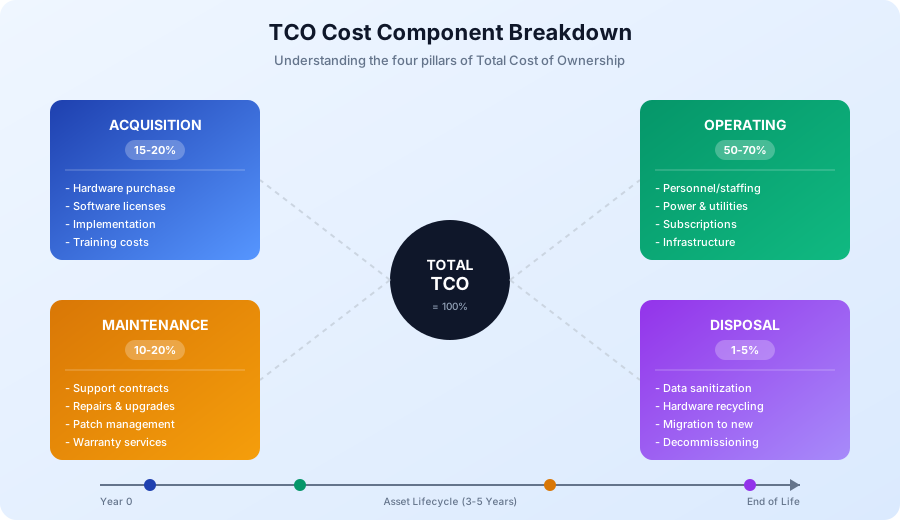
Understanding TCO requires examining four distinct cost categories that together represent the complete financial impact of any investment.
1. Acquisition Costs (15-20% of TCO)
Acquisition costs are one-time expenses incurred to obtain and deploy an asset.
Hardware Acquisition:
- Equipment purchase price
- Shipping and handling
- Sales tax and duties
- Spare parts inventory
- Installation materials
Software Acquisition:
- License purchase or initial subscription
- Volume licensing fees
- Customization and configuration
- Integration development
Implementation Costs:
- Project management time
- Installation and setup
- Data migration
- System integration
- Testing and validation
- User training
- Documentation creation
- Change management
- Travel and consulting fees
Infrastructure Preparation:
- Rack space and cabling
- Power infrastructure upgrades
- Network connectivity
- Cooling requirements
- Physical security measures
2. Operating Costs (50-70% of TCO)
Operating costs are recurring expenses required to run and use the asset—and they represent the largest TCO component.
Personnel Costs:
- System administration time
- Help desk support hours
- Security management
- Backup administration
- User training (ongoing)
- Management oversight
Facilities Costs:
- Electricity consumption
- Cooling and HVAC
- Floor space allocation
- Physical security
- Environmental controls
Software Costs:
- Subscription renewals
- License maintenance fees
- Usage-based charges
- Additional user licenses
- Feature upgrades
Network and Connectivity:
- Bandwidth costs
- Internet connectivity
- VPN licenses
- Data transfer fees
3. Maintenance Costs (10-20% of TCO)
Maintenance costs keep the asset functioning properly over time.
Vendor Support:
- Hardware warranties and extensions
- Software maintenance agreements
- Premium support contracts
- Priority response fees
Internal Support:
- Troubleshooting and diagnostics
- Incident response time
- Performance monitoring
- Patch management
- Security updates
Upgrades and Enhancements:
- Hardware component upgrades
- Memory and storage expansion
- Software version updates
- Capacity expansion
- Performance tuning
4. Disposal Costs (1-5% of TCO)
End-of-life costs are often forgotten but can be significant.
Decommissioning:
- Data sanitization and destruction
- Hardware disposal and recycling
- Certificate of destruction
- Environmental compliance fees
Transition:
- Migration to replacement system
- Parallel operation period
- User retraining
- Knowledge transfer
- Documentation updates
Opportunity Costs:
- Resources tied up during transition
- Productivity loss during changeover
5-Year TCO Calculation Examples
Let's walk through complete TCO calculations for common business scenarios.
Example 1: CRM Software - Cloud vs. On-Premise
Scenario: 100-user company selecting CRM platform for 5 years
Option A: On-Premise CRM (Perpetual License)
| Cost Category | Year 0 | Year 1 | Year 2 | Year 3 | Year 4 | Year 5 | Total |
|---|---|---|---|---|---|---|---|
| Software License | $50,000 | - | - | - | - | - | $50,000 |
| Server Hardware | $15,000 | - | - | - | - | - | $15,000 |
| Implementation | $25,000 | - | - | - | - | - | $25,000 |
| Training | $10,000 | $2,000 | $2,000 | $2,000 | $2,000 | $2,000 | $20,000 |
| Annual Maintenance (20%) | - | $10,000 | $10,000 | $10,000 | $10,000 | $10,000 | $50,000 |
| Server Maintenance | - | $3,000 | $3,000 | $3,000 | $3,000 | $3,000 | $15,000 |
| IT Administration (500 hrs @ $75) | - | $37,500 | $37,500 | $37,500 | $37,500 | $37,500 | $187,500 |
| Infrastructure (power, space) | - | $2,400 | $2,400 | $2,400 | $2,400 | $2,400 | $12,000 |
| Disposal/Migration | - | - | - | - | - | $5,000 | $5,000 |
| Annual Total | $100,000 | $54,900 | $54,900 | $54,900 | $54,900 | $59,900 | $379,500 |
5-Year TCO: $379,500 Per User Per Month: $63.25
Option B: Cloud CRM (SaaS Subscription)
| Cost Category | Year 0 | Year 1 | Year 2 | Year 3 | Year 4 | Year 5 | Total |
|---|---|---|---|---|---|---|---|
| Implementation/Migration | $15,000 | - | - | - | - | - | $15,000 |
| Training | $8,000 | $1,500 | $1,500 | $1,500 | $1,500 | $1,500 | $15,500 |
| Subscription (100 @ $75/user/mo) | - | $90,000 | $90,000 | $90,000 | $90,000 | $90,000 | $450,000 |
| IT Administration (100 hrs @ $75) | - | $7,500 | $7,500 | $7,500 | $7,500 | $7,500 | $37,500 |
| Integration Maintenance | - | $5,000 | $5,000 | $5,000 | $5,000 | $5,000 | $25,000 |
| Annual Total | $23,000 | $104,000 | $104,000 | $104,000 | $104,000 | $104,000 | $543,000 |
5-Year TCO: $543,000 Per User Per Month: $90.50
Analysis:
- On-premise saves $163,500 over 5 years (30% less)
- But on-premise requires: Higher upfront capital, IT expertise, infrastructure
- Cloud advantages: Automatic updates, better reliability, easier scaling, lower risk
- Break-even consideration: If on-premise experiences 2+ days unplanned downtime per year, cloud becomes cheaper
Example 2: Laptop Fleet - Purchase vs. Lease
Scenario: Replace 200 laptops, 4-year lifecycle
Option A: Purchase
| Cost Category | Year 0 | Year 1 | Year 2 | Year 3 | Year 4 | Total |
|---|---|---|---|---|---|---|
| Hardware (200 @ $1,200) | $240,000 | - | - | - | - | $240,000 |
| Deployment (3 hrs each @ $75) | $45,000 | - | - | - | - | $45,000 |
| Warranty Extension | - | $20,000 | $20,000 | $20,000 | $20,000 | $80,000 |
| Help Desk (400 hrs @ $75) | - | $30,000 | $30,000 | $30,000 | $30,000 | $120,000 |
| Repairs and Parts | - | $8,000 | $12,000 | $18,000 | $25,000 | $63,000 |
| Disposal/Recycling | - | - | - | - | $4,000 | $4,000 |
| Annual Total | $285,000 | $58,000 | $62,000 | $68,000 | $79,000 | $552,000 |
Less Residual Value: ($24,000) Net 4-Year TCO: $528,000 Per Device Per Month: $55.00
Option B: Lease (4-year term with refresh)
| Cost Category | Year 0 | Year 1 | Year 2 | Year 3 | Year 4 | Total |
|---|---|---|---|---|---|---|
| Deployment (3 hrs each @ $75) | $45,000 | - | - | - | - | $45,000 |
| Lease Payment (200 @ $42/mo) | - | $100,800 | $100,800 | $100,800 | $100,800 | $403,200 |
| Help Desk (300 hrs @ $75) | - | $22,500 | $22,500 | $22,500 | $22,500 | $90,000 |
| Annual Total | $45,000 | $123,300 | $123,300 | $123,300 | $123,300 | $538,200 |
4-Year TCO: $538,200 Per Device Per Month: $56.06
Analysis:
- Purchase saves $10,200 (2% less)
- Lease advantages: Lower upfront cost, newer equipment, predictable costs, included support
- Purchase advantages: Asset ownership, potential for longer use, flexibility
- Recommendation: Nearly equivalent cost—choose based on cash flow needs and IT capacity
Example 3: Enterprise Software Platform
Scenario: ERP system for 500-employee manufacturing company
5-Year TCO Summary Table:
| Component | On-Premise ERP | Cloud ERP | Difference |
|---|---|---|---|
| Software/Licenses | $400,000 | $0 | -$400,000 |
| Subscription Fees | $0 | $750,000 | +$750,000 |
| Implementation | $350,000 | $200,000 | -$150,000 |
| Hardware/Infrastructure | $120,000 | $0 | -$120,000 |
| Annual Maintenance | $400,000 | $0 | -$400,000 |
| IT Staff (5 years) | $625,000 | $187,500 | -$437,500 |
| Training | $100,000 | $75,000 | -$25,000 |
| Upgrades | $150,000 | $0 (included) | -$150,000 |
| Total 5-Year TCO | $2,145,000 | $1,212,500 | -$932,500 |
Result: Cloud ERP saves $932,500 (43% less) over 5 years for this scenario.
Software TCO vs. Hardware TCO: Key Differences
Understanding how TCO differs between software and hardware investments helps you build more accurate models.
Software TCO Characteristics
Licensing Models:
- Perpetual License: High upfront cost, ongoing maintenance fees (15-22% annually)
- Subscription (SaaS): Lower initial cost, predictable monthly/annual fees
- Usage-Based: Variable costs based on consumption
Key Software TCO Components:
Year 0:
  License/subscription start
  Implementation services
  Integration development
  Data migration
  User training

Annual Recurring:
  Maintenance/subscription fees
  User license additions
  Integration maintenance
  Ongoing training
  Administration time
  Support tickets

Periodic:
  Version upgrades (every 2-3 years)
  Recertification/retraining
  Security compliance audits
Software TCO Tips:
- Include ALL users who need access (not just current)
- Factor in annual price increases (typically 3-7%)
- Account for integration complexity
- Consider switching costs if changing vendors
Hardware TCO Characteristics
Depreciation Schedules:
- Servers: 3-5 years
- Desktops/laptops: 3-4 years
- Network equipment: 5-7 years
- Storage systems: 4-5 years
Key Hardware TCO Components:
Year 0:
  Equipment purchase
  Installation/deployment
  Infrastructure preparation
  Initial configuration

Annual Recurring:
  Power consumption
  Cooling costs
  Floor space
  Maintenance contracts
  Administration time
  Spare parts

Periodic:
  Component upgrades (memory, storage)
  Warranty extensions
  Refresh cycles

End of Life:
  Data sanitization
  Disposal/recycling
  Migration to replacement
Hardware TCO Tips:
- Calculate actual power consumption (not nameplate ratings)
- Include cooling at 0.5-1x power cost
- Factor in failure rates increasing after Year 3
- Account for technology obsolescence
Combined Hardware + Software TCO
Most real-world scenarios involve both:
Example: Database Server (5-Year TCO)

Hardware:
  Server purchase: $25,000
  Power (5 years): $4,500
  Cooling (5 years): $2,700
  Data center space: $3,000
  Hardware maintenance: $7,500

Software:
  Database license: $45,000
  Annual maintenance (20%): $45,000

Services:
  Implementation: $15,000
  DBA administration (5 years): $75,000
  Training: $5,000

End of Life:
  Migration/disposal: $3,000

Total 5-Year TCO: $230,700
How to Use Our TCO Excel Template
Our free TCO Excel template includes multiple worksheets for comprehensive analysis.
Tab 1: Quick Calculator
For fast estimates, enter basic parameters:
- Asset type (hardware, software, or combined)
- Purchase/subscription cost
- Expected lifecycle (years)
- Estimated annual operating percentage
The calculator automatically applies industry benchmarks to estimate your TCO.
Tab 2: Detailed TCO Analysis
For thorough analysis, complete each section:
Acquisition Costs:
- Hardware purchase price
- Software licenses
- Implementation services
- Training costs
- Infrastructure preparation
Annual Operating Costs:
- Personnel time (hours x hourly rate)
- Facilities (power, space, cooling)
- Subscription/maintenance fees
- Network and connectivity
Maintenance Costs:
- Vendor support contracts
- Internal support allocation
- Planned upgrades
End-of-Life Costs:
- Disposal/recycling
- Migration expenses
- Parallel operation period
Tab 3: Comparison Matrix
Compare up to 4 alternatives side-by-side:
- Input costs for each option
- View annual and cumulative costs
- Identify break-even points
- Visualize cost differences
Tab 4: Sensitivity Analysis
Test your assumptions:
- Adjust key variables (labor rates, utilization, lifecycle)
- See impact on total TCO
- Identify decision-critical assumptions
- Document risk factors
Tab 5: Summary Report
Generate executive-ready output:
- Total TCO for each option
- Cost per user/unit/transaction
- Recommendation with supporting data
- Key assumptions documented
TCO Analysis Best Practices
1. Define Scope Clearly
Before calculating, establish boundaries:
- What asset or solution are you analyzing?
- What alternatives are you comparing?
- What is the analysis timeframe?
- What cost categories to include/exclude?
Tip: Use the same timeframe for all alternatives (typically 3-5 years for technology).
2. Gather Accurate Data
Use reliable sources for cost inputs:
- Vendor quotes (not estimates)
- Historical spending data
- Industry benchmarks
- Internal time tracking
- Utility bills
- Contract documents
Tip: When estimating, use conservative (higher) cost assumptions.
3. Include Hidden Costs
Commonly missed expenses:
- Training time (including productivity loss)
- Integration complexity
- Change management
- Opportunity costs
- Downtime impact
- Shadow IT workarounds
4. Document All Assumptions
Every estimate should have documentation:
- Labor hourly rates
- Utilization assumptions
- Growth projections
- Inflation factors
- Technology lifespan
Why: Enables review, updates, and post-implementation comparison.
5. Perform Sensitivity Analysis
Test key variables:
- What if labor costs increase 10%?
- What if the lifecycle is 3 years instead of 5?
- What if usage doubles?
Identify which assumptions most impact your decision.
6. Consider Qualitative Factors
TCO is important but not everything:
- Strategic alignment
- Risk and reliability
- Vendor stability
- Scalability and flexibility
- User experience
- Time to value
Tip: Present TCO alongside qualitative factors, not in isolation.
Common TCO Mistakes to Avoid
Mistake 1: Using Purchase Price Only
The Error: "This software costs $50,000, the other costs $80,000, so we'll buy the cheaper one."
The Reality: The $50,000 software might require $100,000 in implementation, while the $80,000 option needs only $20,000.
Solution: Always calculate full TCO before comparing options.
Mistake 2: Ignoring Operating Costs
The Error: Focusing on acquisition while ignoring that operating costs are 50-70% of TCO.
Example:
- Option A: $100K acquisition, $50K/year operating = $350K TCO (5 years)
- Option B: $50K acquisition, $80K/year operating = $450K TCO (5 years)
Solution: Model all cost categories, especially ongoing personnel time.
Mistake 3: Inconsistent Timeframes
The Error: Comparing 3-year cloud costs against 5-year on-premise costs.
Solution: Normalize all alternatives to the same period. If lifecycles differ, use the longest and adjust for refresh costs.
Mistake 4: Forgetting Training and Change Management
The Error: Omitting user productivity impact during learning curve.
Reality: New system deployments typically reduce productivity 20-30% for 2-3 months.
Solution: Include training time AND productivity loss during transition.
Mistake 5: Not Tracking Actual Costs
The Error: Never comparing TCO estimates to actual spending.
Impact: Repeat same estimation errors, no organizational learning.
Solution: Track actual costs post-implementation and refine future TCO models.
TCO vs. ROI: Using Both Metrics
TCO and ROI serve different purposes—use them together for complete analysis. For detailed comparison, see our guide on TCO vs ROI: Which to Use When.
When to Use TCO:
- Comparing multiple options (which costs less?)
- Budget planning (how much will we spend?)
- Vendor negotiation (what's the true price?)
When to Use ROI:
- Justifying investment (is the value worth the cost?)
- Prioritizing projects (which delivers most return?)
- Measuring success (did we achieve expected value?)
Combined Analysis Example:
Project: Marketing Automation Platform

TCO Analysis (5 years):
  Platform A: $250,000
  Platform B: $185,000
  Platform C: $320,000

  Winner: Platform B (lowest cost)

ROI Analysis (Platform B):
  TCO: $185,000
  Benefits:
    Lead conversion improvement: $150,000
    Marketing efficiency gains: $100,000
    Sales productivity: $80,000
  Total Benefits: $330,000

  ROI = ($330,000 - $185,000) / $185,000 = 78%

Decision: Platform B offers lowest TCO AND strong ROI
Industry-Specific TCO Considerations
Technology/IT
- Typical lifecycle: 3-5 years
- Key factors: Rapid obsolescence, integration complexity, skill requirements
- Watch for: Cloud cost escalation, shadow IT, technical debt
Manufacturing
- Typical lifecycle: 7-10 years
- Key factors: Equipment reliability, maintenance costs, energy efficiency
- Watch for: Downtime impact, spare parts availability, regulatory compliance
Healthcare
- Typical lifecycle: 5-7 years
- Key factors: Compliance requirements, integration with clinical systems, reliability
- Watch for: HIPAA compliance costs, clinical workflow impact, vendor lock-in
Financial Services
- Typical lifecycle: 5-7 years
- Key factors: Security requirements, audit trails, regulatory compliance
- Watch for: Compliance costs, vendor stability, data sovereignty
Download the Free TCO Excel Template
Our comprehensive TCO template includes:
Sheet 1: Quick TCO Calculator
- Instant estimates using industry benchmarks
- Hardware, software, and combined options
- Automatic cost category breakdown
Sheet 2: Detailed TCO Worksheet
- Complete line-item cost entry
- Acquisition, operating, maintenance, disposal sections
- Multi-year cash flow projection
Sheet 3: Alternative Comparison
- Side-by-side analysis of up to 4 options
- Cumulative cost visualization
- Break-even analysis
Sheet 4: Sensitivity Analysis
- Variable testing (labor rates, lifecycle, growth)
- Impact assessment on total TCO
- Risk factor documentation
Sheet 5: Executive Summary
- One-page decision summary
- Cost comparison charts
- Key assumptions and recommendations
Conclusion
Total Cost of Ownership analysis transforms purchasing decisions from price-focused to value-focused. By capturing acquisition, operating, maintenance, and disposal costs, TCO reveals the true financial impact of any investment over its complete lifecycle.
Key Takeaways:
- Purchase price is only 15-20% of true cost—operating costs dominate TCO
- Use consistent timeframes when comparing alternatives (typically 3-5 years)
- Include hidden costs: training, integration, change management, downtime
- Document assumptions for future reference and validation
- Combine TCO with ROI for complete investment analysis
- Track actual costs to improve future estimates
Next Steps:
- Download the TCO Excel Template
- Try the Interactive TCO Calculator
- Learn TCO vs. ROI Decision Frameworks
- Explore Financial Planning Resources
Stop making decisions based on sticker price alone. Download our TCO template today and calculate the true cost of your next major investment—your budget will thank you.
Frequently Asked Questions
What is total cost of ownership?
Total cost of ownership is a financial analysis method that calculates the complete cost of acquiring, operating, maintaining, and disposing of an asset over its entire lifecycle. Unlike purchase price alone, TCO captures hidden costs such as implementation, training, ongoing support, and end-of-life expenses, giving decision-makers an accurate picture of what an investment truly costs over time.
How do you calculate total cost of ownership?
To calculate TCO, add together four cost categories: acquisition costs (purchase price, implementation, training), operating costs (personnel, facilities, subscriptions), maintenance costs (support contracts, upgrades, repairs), and disposal costs (decommissioning, migration, recycling). Sum these across the asset's expected lifecycle, typically three to five years for technology investments.
What costs should be included in a TCO analysis?
A comprehensive TCO analysis should include direct costs like purchase price and licensing fees, plus indirect costs such as employee time for administration, training and productivity loss during adoption, infrastructure requirements like power and cooling, ongoing maintenance and support contracts, integration development, and eventual disposal or migration expenses. Operating costs typically represent 50 to 70 percent of total TCO.
What is the difference between TCO and ROI?
TCO measures the total cost of an investment over its lifecycle, answering "how much will this cost?" ROI measures the return generated relative to that cost, answering "is this investment worth it?" TCO compares alternatives by cost, while ROI justifies whether an investment delivers sufficient value. Organizations should use both metrics together for complete financial analysis.
Who uses TCO analysis in an organization?
IT managers use TCO to compare technology solutions, finance teams use it for budget planning and vendor negotiations, procurement professionals use it to evaluate competing bids, and executives use it to make strategic investment decisions. Any department evaluating significant purchases benefits from TCO analysis, particularly when comparing options with different cost structures such as cloud versus on-premise.
How many years should a TCO projection cover?
TCO projections typically cover three to five years for technology investments, matching standard hardware depreciation and software contract cycles. Manufacturing equipment may warrant seven to ten year projections. The timeframe should reflect the asset's expected useful life and align across all alternatives being compared. Using inconsistent timeframes is one of the most common TCO analysis mistakes.