10 Essential Project Management Templates Every Business Needs: Complete Guide

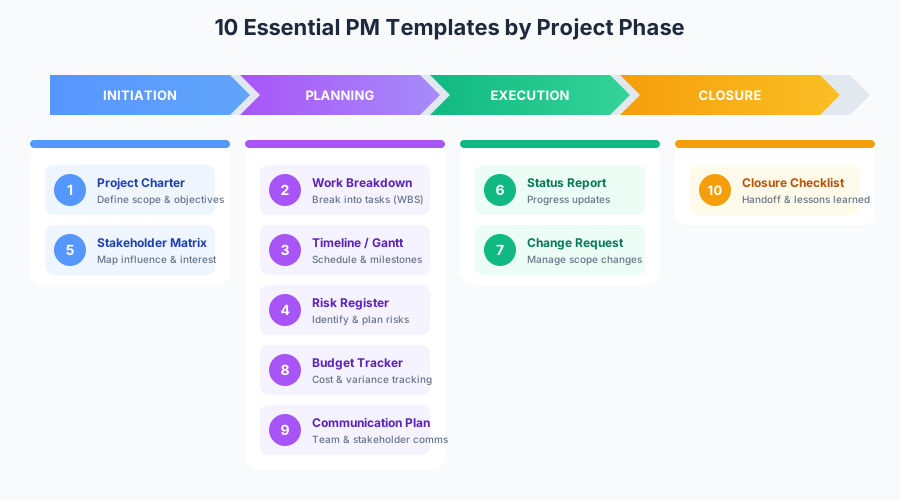
Project management success often comes down to having the right processes and documentation in place. Yet many organizations either use inconsistent approaches across projects or rely on ad-hoc documentation that misses critical elements. Whether you're launching a new product, implementing software, or managing organizational change, the right templates can mean the difference between project success and costly delays. This guide covers the 10 essential templates every business needs, with detailed guidance on how to use each one effectively. For comprehensive resources, visit our IT Management Hub and IT Project Management section.
Why Project Management Templates Matter
The numbers tell a compelling story about the value of standardized project management:
Project success rates by documentation maturity:
| Documentation Level | On-Time Delivery | On-Budget Delivery | Stakeholder Satisfaction |
|---|---|---|---|
| Ad-hoc/None | 35% | 40% | 45% |
| Basic templates | 55% | 58% | 62% |
| Standardized templates | 72% | 70% | 78% |
| Mature PMO with templates | 85% | 82% | 88% |
Key benefits of standardized templates:
Consistency Across Projects
- Every project follows proven methodologies
- New team members can quickly understand project structure
- Lessons learned from one project transfer to others
- Easier to compare performance across projects
Time Savings
- Reduce project initiation time by 40-60%
- Eliminate reinventing documentation for each project
- Focus team energy on execution rather than formatting
- Faster onboarding for new project managers
Risk Reduction
- Standardized risk identification catches more issues
- Nothing falls through the cracks
- Audit trails demonstrate governance
- Consistent change management prevents scope creep
Stakeholder Alignment
- Professional documentation builds confidence
- Clear communication prevents misunderstandings
- Executive dashboards enable informed decisions
- Vendors and partners understand expectations
Organizations with mature project management practices waste 28 times less money than those with poor practices—primarily due to better documentation and standardized processes.
Template 1: Project Charter
The project charter is the foundational document that formally authorizes a project and gives the project manager authority to apply resources. Without a charter, projects often suffer from unclear objectives, scope creep, and lack of stakeholder commitment.
When to Use
- At the start of every project before detailed planning begins
- When seeking formal approval and resource commitment
- To establish project manager authority
- As a reference point when scope questions arise
Key Components
1. Project Overview
| Element | Description | Example |
|---|---|---|
| Project Name | Clear, descriptive title | "Customer Portal Redesign" |
| Project Sponsor | Executive with ultimate authority | VP of Digital Experience |
| Project Manager | Day-to-day project leader | Jane Smith, Senior PM |
| Date | Charter creation/approval date | January 15, 2025 |
2. Business Case
Why is this project being undertaken?
- Problem statement or opportunity description
- Strategic alignment (which company objectives does this support?)
- Expected benefits (quantified where possible)
- Cost of inaction (what happens if we don't do this?)
3. Project Objectives
Write SMART objectives:
- Specific: Clearly defined outcome
- Measurable: Quantifiable success criteria
- Achievable: Realistic given constraints
- Relevant: Aligned with business goals
- Time-bound: Clear deadline
Example objective: "Reduce customer support ticket volume by 30% within 6 months of portal launch by enabling self-service for the top 10 support request types."
4. Scope Statement
| In Scope | Out of Scope |
|---|---|
| New customer portal UI | Mobile app development |
| Self-service knowledge base | Backend system replacement |
| SSO integration | Third-party integrations beyond SSO |
| User acceptance testing | Load testing beyond 10,000 concurrent users |
5. Key Deliverables
- List major outputs the project will produce
- Include both tangible deliverables and documentation
- Link deliverables to objectives
6. High-Level Timeline
| Phase | Target Date | Key Milestone |
|---|---|---|
| Initiation | Jan 15 | Charter approved |
| Planning | Feb 15 | Project plan complete |
| Design | Apr 1 | Design approved |
| Development | Jul 1 | Development complete |
| Testing | Aug 1 | UAT sign-off |
| Deployment | Sep 1 | Go-live |
7. Budget Summary
| Category | Estimate | Notes |
|---|---|---|
| Internal Labor | $150,000 | 3 FTEs for 6 months |
| External Contractors | $75,000 | UI/UX specialist |
| Software/Tools | $25,000 | Design tools, testing platform |
| Contingency (15%) | $37,500 | Risk buffer |
| Total | $287,500 |
8. Key Stakeholders
| Stakeholder | Role | Interest Level | Influence Level |
|---|---|---|---|
| VP Digital Experience | Sponsor | High | High |
| Customer Support Director | Key User | High | Medium |
| IT Security | Approver | Medium | High |
| Legal | Reviewer | Low | Medium |
9. Assumptions and Constraints
- Assumptions: Conditions believed to be true (existing team available, technology stack approved)
- Constraints: Limitations on the project (budget cap, deadline, technology restrictions)
10. Risks (High-Level)
Identify top 3-5 risks for executive awareness:
| Risk | Impact | Mitigation |
|---|---|---|
| Key developer unavailable | High | Cross-train backup |
| Security approval delayed | Medium | Early engagement with security team |
| Scope creep from stakeholders | High | Formal change control process |
11. Approval Signatures
Formal sign-off from sponsor and key stakeholders indicates commitment.
Common Charter Mistakes
- Too vague: "Improve customer experience" isn't actionable
- Too detailed: The charter isn't the project plan—keep it high-level
- Missing business case: Without "why," projects lose priority
- No constraints acknowledged: Pretending there are no limitations sets up failure
- Skipping signatures: Verbal approval isn't commitment
Template 2: Work Breakdown Structure (WBS)
The Work Breakdown Structure decomposes the project scope into manageable components. It's the foundation for scheduling, budgeting, and resource planning.
When to Use
- After charter approval, during detailed planning
- When estimating effort and duration
- To ensure nothing is missed in the scope
- As the basis for assigning work packages
Key Components
WBS Hierarchy Levels:
1.0 Project Name
    1.1 Phase/Deliverable
        1.1.1 Work Package
            1.1.1.1 Activity
            1.1.1.2 Activity
        1.1.2 Work Package
    1.2 Phase/Deliverable
        1.2.1 Work Package
Example WBS for Website Redesign:
| WBS Code | Element | Type |
|---|---|---|
| 1.0 | Website Redesign Project | Project |
| 1.1 | Project Management | Phase |
| 1.1.1 | Project planning | Work Package |
| 1.1.2 | Status reporting | Work Package |
| 1.1.3 | Project closure | Work Package |
| 1.2 | Requirements | Phase |
| 1.2.1 | Stakeholder interviews | Work Package |
| 1.2.2 | Requirements documentation | Work Package |
| 1.2.3 | Requirements approval | Work Package |
| 1.3 | Design | Phase |
| 1.3.1 | Wireframes | Work Package |
| 1.3.2 | Visual design | Work Package |
| 1.3.3 | Design review and approval | Work Package |
| 1.4 | Development | Phase |
| 1.4.1 | Front-end development | Work Package |
| 1.4.2 | Back-end integration | Work Package |
| 1.4.3 | Content migration | Work Package |
| 1.5 | Testing | Phase |
| 1.5.1 | Unit testing | Work Package |
| 1.5.2 | Integration testing | Work Package |
| 1.5.3 | User acceptance testing | Work Package |
| 1.6 | Deployment | Phase |
| 1.6.1 | Production deployment | Work Package |
| 1.6.2 | Post-launch monitoring | Work Package |
| 1.6.3 | Handoff to operations | Work Package |
WBS Best Practices
The 100% Rule: The WBS must include 100% of the work—nothing more, nothing less.
8/80 Rule: Work packages should require between 8 and 80 hours of effort. Smaller is too granular; larger needs decomposition.
Deliverable-Oriented: Focus on outcomes, not activities. "Requirements document" not "write requirements."
Mutually Exclusive: No overlap between elements. Each piece of work appears once.
WBS Dictionary
For each work package, document:
| Field | Description |
|---|---|
| WBS Code | Unique identifier |
| Name | Descriptive title |
| Description | What this work package includes |
| Responsible | Who owns this work |
| Effort Estimate | Hours required |
| Duration | Calendar time |
| Dependencies | What must complete first |
| Deliverables | Outputs produced |
| Acceptance Criteria | How we know it's done |
Template 3: Project Timeline & Gantt Chart
The project timeline visualizes when work happens, showing dependencies, milestones, and the critical path.
When to Use
- After WBS is complete
- For communicating schedule to stakeholders
- To identify scheduling conflicts and resource constraints
- For tracking progress against plan
Key Components
1. Task List
Derived from WBS work packages:
| ID | Task Name | Duration | Start | End | Predecessor |
|---|---|---|---|---|---|
| 1 | Requirements gathering | 10 days | Jan 15 | Jan 28 | — |
| 2 | Requirements approval | 3 days | Jan 29 | Jan 31 | 1 |
| 3 | Wireframe design | 8 days | Feb 1 | Feb 12 | 2 |
| 4 | Visual design | 10 days | Feb 13 | Feb 26 | 3 |
| 5 | Design approval | 3 days | Feb 27 | Mar 1 | 4 |
| 6 | Development sprint 1 | 10 days | Mar 4 | Mar 17 | 5 |
| 7 | Development sprint 2 | 10 days | Mar 18 | Mar 31 | 6 |
2. Milestones
Key dates that mark significant achievements:
| Milestone | Target Date | Criteria |
|---|---|---|
| Requirements complete | Jan 31 | Signed off by sponsor |
| Design approved | Mar 1 | Stakeholder approval |
| Development complete | Mar 31 | All features coded |
| UAT sign-off | Apr 15 | Business acceptance |
| Go-live | Apr 22 | Production deployment |
3. Dependencies
| Type | Description | Example |
|---|---|---|
| Finish-to-Start (FS) | Task B starts when Task A finishes | Design starts after requirements |
| Start-to-Start (SS) | Tasks start together | Testing starts with development |
| Finish-to-Finish (FF) | Tasks end together | Documentation finishes with development |
| Start-to-Finish (SF) | Rare; Task B finishes when Task A starts | — |
4. Critical Path
The longest sequence of dependent tasks—any delay here delays the project:
- Identify all paths through the project
- Calculate duration of each path
- Longest path = critical path
- Tasks on critical path have zero float
5. Resource Assignment
| Task | Resource | Allocation |
|---|---|---|
| Requirements gathering | Business Analyst | 100% |
| Wireframe design | UX Designer | 100% |
| Visual design | UI Designer | 100% |
| Development | Developer 1 | 100% |
| Development | Developer 2 | 50% |
| Testing | QA Engineer | 100% |
Timeline Best Practices
- Build in buffer: Add contingency for critical path tasks
- Avoid resource over-allocation: No one can work 150% capacity
- Set realistic durations: Estimates should include meetings, reviews, rework
- Update regularly: The timeline is a living document
- Show dependencies clearly: Stakeholders need to understand sequencing
Template 4: Risk Register
The risk register identifies potential problems before they occur and documents planned responses.
When to Use
- During project planning (initial population)
- Throughout project execution (ongoing updates)
- At phase gates and steering committee meetings
- When new risks are identified
Key Components
Risk Register Fields:
| Field | Description |
|---|---|
| Risk ID | Unique identifier (R001, R002) |
| Risk Description | Clear statement of what might happen |
| Category | Technical, Resource, External, etc. |
| Probability | Likelihood of occurrence (1-5 or %) |
| Impact | Severity if it occurs (1-5 or $) |
| Risk Score | Probability × Impact |
| Risk Owner | Person responsible for monitoring |
| Response Strategy | Avoid, Mitigate, Transfer, Accept |
| Response Actions | Specific steps to address |
| Status | Open, In Progress, Closed |
| Trigger | How we'll know risk is materializing |
Example Risk Register:
| ID | Risk | Prob | Impact | Score | Owner | Strategy | Actions |
|---|---|---|---|---|---|---|---|
| R001 | Key developer leaves mid-project | 2 | 5 | 10 | PM | Mitigate | Cross-train team, document code |
| R002 | Third-party API changes | 3 | 4 | 12 | Tech Lead | Mitigate | Abstract API layer, monitor vendor |
| R003 | Requirements change significantly | 4 | 4 | 16 | PM | Avoid | Lock requirements, change control |
| R004 | Testing environment unavailable | 2 | 3 | 6 | QA Lead | Mitigate | Cloud backup environment |
| R005 | Budget reduction mid-project | 2 | 5 | 10 | Sponsor | Accept | Prioritized scope, MVP defined |
Risk Response Strategies:
| Strategy | When to Use | Example |
|---|---|---|
| Avoid | Eliminate the threat entirely | Change approach to remove risk |
| Mitigate | Reduce probability or impact | Add testing, cross-train team |
| Transfer | Shift risk to third party | Insurance, fixed-price contract |
| Accept | Acknowledge and monitor | Document and set aside contingency |
Risk Matrix:
| Impact 1 | Impact 2 | Impact 3 | Impact 4 | Impact 5 | |
|---|---|---|---|---|---|
| Prob 5 | 5 | 10 | 15 | 20 | 25 |
| Prob 4 | 4 | 8 | 12 | 16 | 20 |
| Prob 3 | 3 | 6 | 9 | 12 | 15 |
| Prob 2 | 2 | 4 | 6 | 8 | 10 |
| Prob 1 | 1 | 2 | 3 | 4 | 5 |
- Green (1-6): Low risk, monitor
- Yellow (8-12): Medium risk, mitigation required
- Red (15-25): High risk, immediate action required
Risk Management Best Practices
- Review risks weekly: Risks change as the project progresses
- Engage the team: Everyone should identify risks, not just the PM
- Be specific: "Things might go wrong" isn't a risk
- Track triggers: Know when a risk is becoming an issue
- Close risks: When no longer relevant, formally close them
Template 5: Stakeholder Analysis Matrix
Understanding who your stakeholders are and what they need prevents surprises and builds project support.
When to Use
- Early in project initiation
- When stakeholder conflicts arise
- Before major communications or decisions
- When new stakeholders are identified
Key Components
Stakeholder Register:
| Name | Role | Organization | Contact | Interest | Influence | Engagement |
|---|---|---|---|---|---|---|
| Sarah Chen | VP Operations | Internal | sarah@co.com | High | High | Supportive |
| Mike Johnson | IT Director | Internal | mike@co.com | Medium | High | Neutral |
| Lisa Park | End User Rep | Internal | lisa@co.com | High | Low | Supportive |
| External Vendor | Implementation | External | vendor@co.com | Low | Medium | Neutral |
Interest/Influence Grid:
| Low Influence | High Influence | |
|---|---|---|
| High Interest | Keep Informed | Manage Closely |
| Low Interest | Monitor | Keep Satisfied |
Engagement Assessment:
| Level | Description | Target Engagement |
|---|---|---|
| Unaware | Doesn't know about project | Inform as appropriate |
| Resistant | Aware but opposed | Convert to neutral |
| Neutral | Aware, neither supportive nor opposed | Convert to supportive |
| Supportive | Aware and supportive | Maintain, leverage |
| Champion | Actively advocates | Empower |
Stakeholder Communication Plan:
| Stakeholder | Current | Target | Strategy | Frequency | Method |
|---|---|---|---|---|---|
| VP Operations | Supportive | Champion | Involve in decisions | Weekly | 1:1 meeting |
| IT Director | Neutral | Supportive | Address concerns | Bi-weekly | Status report |
| End Users | Supportive | Supportive | Maintain engagement | Monthly | Newsletter |
Template 6: Project Status Report
Regular status reporting keeps stakeholders informed and surfaces issues before they become crises.
When to Use
- Weekly for active projects
- Monthly for longer-term programs
- Ad-hoc for critical issues
- At phase gates and milestones
Key Components
1. Executive Summary
One paragraph capturing:
- Overall project health (Green/Yellow/Red)
- Key accomplishments this period
- Critical issues or decisions needed
- Next period focus
2. Status Indicators
| Area | Status | Trend | Notes |
|---|---|---|---|
| Schedule | 🟢 Green | → Stable | On track for April launch |
| Budget | 🟡 Yellow | ↓ Declining | 5% over due to contractor rates |
| Scope | 🟢 Green | → Stable | No changes this period |
| Quality | 🟢 Green | ↑ Improving | Defect rate decreasing |
| Resources | 🟡 Yellow | → Stable | Still seeking QA resource |
3. Accomplishments This Period
- Completed user interface design (ahead of schedule)
- Received security architecture approval
- Onboarded two new developers
- Completed 60% of integration testing
4. Planned Next Period
- Begin user acceptance testing (Apr 1)
- Complete data migration scripts
- Conduct training for support team
- Finalize deployment runbook
5. Issues and Risks
| ID | Description | Impact | Owner | Status | Target Date |
|---|---|---|---|---|---|
| I-001 | QA resource gap | Testing delayed | PM | Open | Seeking contractor |
| R-003 | Requirements change | Scope impact | Sponsor | Monitoring | Change control |
6. Decisions Needed
| Decision | Options | Recommendation | Needed By |
|---|---|---|---|
| QA approach | Hire contractor vs. delay | Hire contractor | Apr 1 |
| Go-live date | Apr 22 vs. May 6 | Maintain Apr 22 | Apr 8 |
7. Key Metrics
| Metric | Target | Actual | Variance |
|---|---|---|---|
| Budget spent | $180K | $189K | +5% |
| Schedule progress | 75% | 73% | -2% |
| Defects found | N/A | 45 | — |
| Defects resolved | N/A | 38 | 84% |
Status Report Best Practices
- Be honest: Yellow and red statuses build credibility
- No surprises: Escalate issues before the report
- Focus on decisions: What do stakeholders need to do?
- Keep it brief: Executives skim; make it scannable
- Consistent format: Same structure every time
Template 7: Change Request Form
Scope changes are inevitable. A formal change request process ensures changes are evaluated, approved, and tracked.
When to Use
- Any request to modify scope, schedule, or budget
- New requirements discovered mid-project
- Stakeholder requests for additional features
- External factors requiring project adjustment
Key Components
Change Request Fields:
| Field | Description |
|---|---|
| Change ID | Unique identifier (CR-001) |
| Requestor | Who is asking for the change |
| Date Submitted | When request was made |
| Change Description | What is being requested |
| Justification | Why this change is needed |
| Priority | Critical, High, Medium, Low |
| Impact Analysis | Effects on scope, schedule, budget, quality |
| Alternatives Considered | Other options evaluated |
| Recommendation | PM recommendation (approve/reject/defer) |
| Decision | Approved, Rejected, Deferred |
| Decision Date | When decision was made |
| Decision By | Who made the decision |
Impact Analysis Template:
| Area | Current State | After Change | Impact |
|---|---|---|---|
| Scope | 10 features | 11 features | +1 feature |
| Schedule | Apr 22 go-live | May 6 go-live | +2 weeks |
| Budget | $287,500 | $312,500 | +$25,000 |
| Resources | 3 developers | 4 developers | +1 FTE for 4 weeks |
| Quality | No change | No change | — |
| Risk | Medium | Medium-High | Additional integration risk |
Change Request Workflow:
- Submit: Requestor completes change request form
- Review: PM assesses impact and feasibility
- Analyze: Technical team provides detailed impact
- Recommend: PM makes recommendation
- Decide: Change Control Board or sponsor approves/rejects
- Implement: If approved, update project documents
- Communicate: Inform all stakeholders of change
Change Control Best Practices
- No verbal changes: Everything in writing
- Evaluate every change: Even "small" changes have impact
- Track all requests: Including rejected ones
- Update baseline: Approved changes modify the project baseline
- Communicate widely: Everyone needs to know about approved changes
Template 8: Project Budget Tracker
Financial management ensures the project delivers value within approved constraints.
When to Use
- From project initiation through closure
- Weekly or bi-weekly budget reviews
- Monthly reporting to sponsors
- When variance thresholds are exceeded
Key Components
Budget Categories:
| Category | Planned | Actual | Variance | % Variance |
|---|---|---|---|---|
| Labor - Internal | $150,000 | $145,000 | -$5,000 | -3.3% |
| Labor - External | $75,000 | $82,000 | +$7,000 | +9.3% |
| Software/Tools | $25,000 | $23,500 | -$1,500 | -6.0% |
| Hardware | $0 | $2,500 | +$2,500 | — |
| Travel | $5,000 | $3,200 | -$1,800 | -36.0% |
| Contingency | $37,500 | $12,000 | -$25,500 | -68.0% |
| Total | $292,500 | $268,200 | -$24,300 | -8.3% |
Earned Value Metrics:
| Metric | Formula | Value | Interpretation |
|---|---|---|---|
| Planned Value (PV) | Budget for work scheduled | $200,000 | What we planned to spend |
| Earned Value (EV) | Budget for work completed | $185,000 | Value of work done |
| Actual Cost (AC) | Actual spending | $195,000 | What we actually spent |
| Schedule Variance (SV) | EV - PV | -$15,000 | Behind schedule |
| Cost Variance (CV) | EV - AC | -$10,000 | Over budget |
| Schedule Performance Index (SPI) | EV / PV | 0.925 | 92.5% schedule efficiency |
| Cost Performance Index (CPI) | EV / AC | 0.949 | 94.9% cost efficiency |
| Estimate at Completion (EAC) | BAC / CPI | $308,200 | Projected total cost |
Monthly Burn Rate:
| Month | Planned | Actual | Cumulative Planned | Cumulative Actual |
|---|---|---|---|---|
| Jan | $25,000 | $22,000 | $25,000 | $22,000 |
| Feb | $40,000 | $45,000 | $65,000 | $67,000 |
| Mar | $55,000 | $58,000 | $120,000 | $125,000 |
| Apr | $60,000 | $62,000 | $180,000 | $187,000 |
| May | $50,000 | — | $230,000 | — |
Budget Tracking Best Practices
- Track actuals weekly: Don't wait for month-end
- Understand variances: Know why you're over or under
- Forecast completion: Project where you'll end up
- Manage contingency: Draw down thoughtfully
- Report honestly: Hiding overruns makes them worse
Template 9: Communication Plan
Clear communication prevents misunderstandings and keeps all parties aligned throughout the project.
When to Use
- During project planning
- When new stakeholders join
- When communication breakdowns occur
- At project milestones requiring broad communication
Key Components
Communication Matrix:
| Audience | Information | Frequency | Method | Owner | Notes |
|---|---|---|---|---|---|
| Sponsor | Executive summary | Weekly | Email + meeting | PM | Friday 2pm |
| Steering Committee | Status report | Bi-weekly | Presentation | PM | Wednesday |
| Project Team | Detailed status | Daily | Stand-up | PM | 9am daily |
| End Users | Progress updates | Monthly | Newsletter | Comms Lead | First Monday |
| IT Support | Technical updates | As needed | Tech Lead | — |
Meeting Schedule:
| Meeting | Purpose | Attendees | Frequency | Duration |
|---|---|---|---|---|
| Daily Stand-up | Task coordination | Core team | Daily | 15 min |
| Weekly Status | Progress review | Extended team | Weekly | 60 min |
| Steering Committee | Decisions, escalations | Leadership | Bi-weekly | 60 min |
| Technical Review | Architecture decisions | Technical team | Weekly | 90 min |
| Retrospective | Process improvement | Core team | Sprint end | 60 min |
Communication Channels:
| Channel | Purpose | Response Time | Guidelines |
|---|---|---|---|
| Formal communication, decisions | 24 hours | CC relevant stakeholders | |
| Slack/Teams | Quick questions, coordination | 4 hours | Use threads, don't expect instant |
| Meetings | Discussion, decisions | Real-time | Agenda required, notes distributed |
| Project Site | Documents, status | Self-service | Single source of truth |
| Phone/Video | Urgent issues, complex topics | Immediate | Schedule when possible |
Escalation Path:
| Level | Issue Type | Escalate To | Timeframe |
|---|---|---|---|
| 1 | Task issues | Team Lead | Same day |
| 2 | Work package issues | Project Manager | 24 hours |
| 3 | Project issues | Sponsor | 48 hours |
| 4 | Program issues | Steering Committee | 1 week |
Template 10: Project Closure Checklist
Proper project closure ensures knowledge transfer, celebrates success, and frees resources for new work.
When to Use
- When all deliverables are complete
- When project is cancelled or suspended
- At major phase transitions
- For formal project handoff
Key Components
Closure Checklist:
Deliverables
- All deliverables completed and accepted
- Final deliverables archived in project repository
- Documentation transferred to operations
- Training materials completed and delivered
Administrative
- Final status report issued
- Budget reconciled and closed
- Contracts closed out
- Invoices paid
Resources
- Team members released to functional managers
- Contractors offboarded
- Access permissions revoked
- Equipment returned
Knowledge Transfer
- Operations team trained
- Support documentation complete
- Known issues documented
- Escalation contacts established
Lessons Learned
- Lessons learned session conducted
- Lessons documented
- Recommendations for future projects
- Templates updated based on learnings
Celebration
- Team recognition
- Success metrics communicated
- Sponsor thank-you
Lessons Learned Template:
| Area | What Worked Well | What Could Improve | Recommendations |
|---|---|---|---|
| Planning | WBS thoroughness | Initial estimates | Add 20% buffer to estimates |
| Execution | Daily stand-ups | Change control speed | Pre-approve minor changes |
| Communication | Weekly status reports | Stakeholder engagement | Earlier stakeholder mapping |
| Technical | Code review process | Testing environment | Dedicated test environment |
| Team | Cross-functional collaboration | Onboarding new members | Create onboarding checklist |
Selecting Templates by Project Type
Not every project needs every template. Match documentation to project complexity:
Small Projects (Under $50K, under 3 months)
Essential:
- Project charter (abbreviated)
- Simple task list (instead of full WBS)
- Risk register (top 5 risks)
- Status updates (informal)
Optional:
- Stakeholder analysis
- Communication plan
Medium Projects ($50K-$500K, 3-12 months)
Essential:
- Full project charter
- Work breakdown structure
- Project timeline/Gantt
- Risk register
- Status reports
- Change request form
Optional:
- Budget tracker (if significant spend)
- Stakeholder analysis
- Communication plan
Large Projects (Over $500K, over 12 months)
Essential:
- All 10 templates
- Multiple levels of reporting
- Formal governance
- External audits
Additional:
- Program-level documentation
- Benefits realization tracking
- Vendor management documents
Methodology Considerations
Waterfall Projects
Traditional templates work well:
- Detailed upfront planning
- Phase-gate approvals
- Comprehensive documentation
- Formal change control
Agile Projects
Adapt templates for iterative work:
- Product backlog instead of WBS
- Sprint planning instead of Gantt
- Sprint retrospectives for lessons learned
- Working software over documentation
| Traditional Template | Agile Equivalent |
|---|---|
| Project Charter | Product Vision, Release Plan |
| WBS | Product Backlog |
| Gantt Chart | Sprint Plan, Release Burndown |
| Status Report | Sprint Review, Demo |
| Risk Register | Risk Register (same) |
| Change Request | Backlog Refinement |
Hybrid Projects
Combine approaches:
- Charter and high-level planning traditional
- Execution in sprints
- Governance and reporting traditional
- Continuous integration of changes
Template Customization Best Practices
Start with Standards
- Adopt industry-standard templates as baseline
- Customize for your organization's terminology
- Integrate with existing tools and systems
- Train teams on standard usage
Customize Thoughtfully
- Add only what's needed: Every field should serve a purpose
- Remove what's not used: Unused fields clutter and confuse
- Maintain consistency: Same terms, same formats across templates
- Version control: Track template changes over time
Scale Appropriately
| Project Size | Documentation Level |
|---|---|
| Small | Lightweight versions, combined documents |
| Medium | Standard templates |
| Large | Extended templates, additional detail |
| Program | Multi-project coordination, portfolio views |
Tool Integration
Common Project Management Tools
| Tool | Best For | Template Integration |
|---|---|---|
| Microsoft Project | Gantt charts, resource planning | Import/export templates |
| Jira | Agile projects, issue tracking | Custom workflows |
| Asana | Task management, collaboration | Template library |
| Monday.com | Visual project tracking | Custom templates |
| Smartsheet | Spreadsheet-based PM | Direct template use |
| Notion | Documentation, wiki | Flexible templates |
Template Format Recommendations
| Template | Recommended Format | Alternative |
|---|---|---|
| Project Charter | Word | Confluence, Notion |
| WBS | Excel, Project | WBS tools |
| Timeline/Gantt | Project, Excel | Online PM tools |
| Risk Register | Excel | SharePoint list |
| Status Report | PowerPoint, Word | Email, Wiki |
| Budget Tracker | Excel | Financial systems |
| Change Request | Word, Form | Workflow system |
Ready-to-Use Project Management Templates
Creating these templates from scratch takes time and expertise. Our professionally designed templates have been tested across hundreds of projects:
Project Management Toolkit:
- Project Plan Templates - Complete project planning bundle
- IT Project Management Guide - Detailed methodology guidance
- Agile Project Management Guide - Scrum and Kanban templates
- Risk Management Templates - Comprehensive risk documentation
- Change Management Templates - Change control documentation
Related Resources:
- IT Management Hub - Comprehensive IT management resources
- IT Project Management Section - Project-specific guidance
- Project Stakeholder Management Guide - Stakeholder engagement
- IT Project Risk Management - Risk management deep-dive
Start Managing Projects Effectively Today
The difference between chaotic projects and successful ones often comes down to having the right documentation at the right time. These 10 templates provide the foundation for consistent, professional project management.
Your next steps:
- Assess your current templates - What do you have? What's missing?
- Start with the charter - Every project needs clear authorization
- Add templates incrementally - Don't overwhelm your team
- Customize for your context - Industry, size, methodology
- Train your team - Templates only work if people use them correctly
Ready to streamline your project management? Explore our Project Management Templates and set your projects up for success from day one.