BYOD Policy Template: Secure Personal Device Usage

BYOD (Bring Your Own Device) offers flexibility and cost savings but introduces security risks. 82% of organizations allow BYOD, yet 67% have experienced security incidents from personal devices. This guide helps you implement a BYOD policy that protects company data while respecting employee privacy. For comprehensive resources, visit our IT Management Hub and IT Policies section.
Why BYOD Policies Are Essential
The BYOD Challenge:
- Personal devices accessing sensitive company data
- Mixed personal and business use on same device
- Variety of operating systems and versions
- Limited IT control over personal devices
- Privacy concerns vs. security needs
- Lost/stolen device risks
Benefits of BYOD:
- Employee satisfaction and flexibility
- Cost savings (employee-owned devices)
- Increased productivity
- Modern, up-to-date devices
- Simplified device management for employees

10 Essential BYOD Policy Components
1. Eligible Devices and Platforms
Define what devices can access company resources.
Supported Devices:
- Smartphones: iOS 15+, Android 11+
- Tablets: iPad OS 15+, Android 11+
- Laptops: Windows 10+, macOS 11+
Minimum Requirements:
- Current OS version (within 2 major versions)
- Vendor security support
- Encryption capability
- Remote wipe functionality
- MDM compatibility
2. Enrollment and Registration
Required process before accessing company data.
Enrollment Steps:
- Submit device information
- Install MDM profile
- Configure security settings
- Accept terms and conditions
- IT approval
- Access provisioning
Required Information:
- Device type and model
- Operating system version
- Owner name
- Serial number/IMEI
- Primary use case
Get Complete BYOD Policy Template →
3. Security Requirements
Mandatory security controls for all BYOD devices.
Device Security:
- Full device encryption enabled
- Strong passcode/biometric authentication
- Automatic screen lock (5 minutes max)
- Anti-malware on Android devices
- Firewall enabled
- Automatic OS updates
- No jailbreak/root
Application Security:
- Only approved business apps
- Apps from official stores only
- No unauthorized cloud storage
- App permissions review
- Regular app updates
4. Mobile Device Management (MDM)
MDM enrollment is mandatory for BYOD access.
MDM Capabilities:
- Security policy enforcement
- App deployment and management
- Remote wipe (selective or full)
- Compliance monitoring
- Location tracking (for company-owned data)
- Configuration management
User Experience:
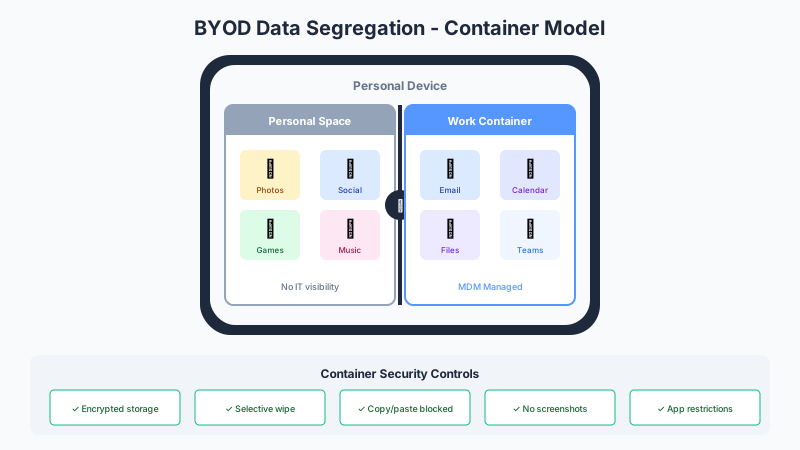
- Containerization (separate business/personal)
- Selective wipe (only company data)
- Minimal impact on personal apps
- Self-service portal
- Clear privacy boundaries
5. Data Access and Storage
Control what data personal devices can access.
Access Controls:
- Role-based access permissions
- Need-to-know principle
- No local storage of sensitive data
- Company data in secure container only
- Automatic data backup to company systems
- Encrypted data transmission
Storage Restrictions:
- No screenshots of sensitive data
- No saving to personal cloud storage
- No emailing to personal accounts
- Automatic deletion on device removal
- No copy/paste between personal and business
6. Acceptable Use
Guidelines for appropriate BYOD usage.
Permitted Activities:
- Business email and communication
- Accessing approved business applications
- Virtual meetings and collaboration
- Document viewing and editing
- Business-related research
Prohibited Activities:
- Sharing company credentials
- Downloading sensitive data locally
- Using unsecured public Wi-Fi without VPN
- Installing unauthorized applications
- Removing security software
- Jailbreaking/rooting device
7. Remote Wipe and Data Deletion
Critical for lost/stolen devices or employee separation.
Wipe Scenarios:
- Device lost or stolen (immediate wipe)
- Employee termination (scheduled wipe)
- Device non-compliance (after grace period)
- Security incident (immediate wipe)
- Employee request (voluntary wipe)
Wipe Types:
- Selective Wipe: Only company data and apps removed
- Full Wipe: Entire device reset (rare, only with consent)
User Notification:
- Advance notice when possible
- No notice for lost/stolen
- Clear explanation
- Support for data recovery
8. Support and Troubleshooting
Clear expectations for IT support.
Company Supports:
- Business app configuration
- MDM enrollment assistance
- Connectivity issues
- Security software problems
- Company data access
- Remote wipe execution
Company Does NOT Support:
- Personal app issues
- Device hardware problems
- Carrier/service issues
- Personal data recovery
- OS upgrade problems (personal choice)
User Responsibilities:
- Basic device troubleshooting
- OS updates
- Hardware maintenance
- Personal app management
- Carrier relationship
9. Privacy and Monitoring
Balance security needs with privacy rights.
Company Can Monitor:
- Business app usage
- Company data access
- Security compliance status
- Network traffic on company systems
- Location when accessing company data
- Device compliance status
Company Cannot Monitor:
- Personal app usage
- Personal browsing history
- Personal communications
- Personal photos/documents
- Personal contacts (not synced with business)
- Location when not accessing company data
Transparency Required:
- Clear disclosure of monitoring capabilities
- User consent for MDM installation
- Annual privacy reminder
- Opt-out option (lose BYOD access)
10. Offboarding and Device Return
Process when employee leaves or stops BYOD.
Departure Process:
- Advance notification (when possible)
- Data backup verification
- Company data removal
- MDM unenrollment
- Account deactivation
- Exit confirmation
Employee Retains:
- Personal device ownership
- Personal data and apps
- Personal contacts
- Personal photos/documents
Company Removes:
- All business apps and data
- Email and calendar access
- VPN profiles
- Certificates and credentials
- MDM profile
BYOD Policy Implementation
Phase 1: Planning (Weeks 1-2)
Assessment:
- Current BYOD usage (shadow IT)
- Security requirements
- Privacy regulations
- Budget for MDM solution
- Support capacity
Stakeholder Input:
- IT security
- Legal/compliance
- HR
- Employee representatives
- Executive sponsors
Phase 2: MDM Selection and Setup (Weeks 3-6)
MDM Solution Requirements:
- Multi-platform support (iOS, Android, Windows, macOS)
- Containerization capabilities
- Selective wipe
- App management
- Compliance reporting
- User self-service
- Integration with existing systems
Popular MDM Solutions:
- Microsoft Intune
- VMware Workspace ONE
- MobileIron
- Jamf Pro (Apple devices)
- ManageEngine
Phase 3: Policy Development (Weeks 7-8)
-
Draft Policy:
- Download professional template
- Customize for organization
- Address legal requirements
- Define support boundaries
-
Legal Review:
- Privacy law compliance
- Employment law considerations
- BYOD agreement language
- Remote wipe consent
- Data ownership clarification
-
Pilot Program:
- IT team enrollment
- Test all scenarios
- Gather feedback
- Refine processes
Phase 4: Rollout (Weeks 9-12)
Communication:
- Policy announcement
- Benefits explanation
- Privacy assurances
- Enrollment instructions
- Support resources
Phased Enrollment:
- Week 9: Executives and managers
- Week 10: Remote workers
- Week 11-12: All interested employees
- Ongoing: New hires
Training:
- Enrollment process
- Security best practices
- App usage guidelines
- Support procedures
- Privacy information
BYOD vs. Company-Owned Devices
Decision Factors
Choose BYOD When:
- Employees prefer personal devices
- Budget constraints
- Diverse device needs
- High device turnover
- Modern, flexible workforce
Choose Company-Owned When:
- Highly regulated industry
- Sensitive data access
- Complex security requirements
- Standardization needs
- 24/7 support requirements
Hybrid Approach:
- BYOD for general employees
- Company devices for high-risk roles
- Choose Your Own Device (CYOD) option
- Device stipends with security requirements
Common BYOD Challenges and Solutions
Challenge 1: Privacy Concerns
Issue: Employees fear company monitoring of personal device.
Solution:
- Transparent disclosure of monitoring
- Containerization (separate business/personal)
- Selective wipe capability
- Clear privacy policy
- Opt-in program (not mandatory)
Challenge 2: Device Diversity
Issue: Wide variety of devices and OS versions.
Solution:
- Define minimum supported versions
- Test common device types
- Regular compatibility updates
- Alternative access methods for unsupported devices
Challenge 3: Support Burden
Issue: IT overwhelmed with device support requests.
Solution:
- Clear support boundaries
- Self-service resources
- User training
- Tiered support model
- Approved device list
Challenge 4: Lost/Stolen Devices
Issue: Delayed reporting of lost devices.
Solution:
- Immediate reporting requirement
- 24/7 reporting hotline
- Automatic remote wipe
- Regular device check-ins
- Find My Device enablement
Challenge 5: Employee Turnover
Issue: Offboarding delays and incomplete data removal.
Solution:
- Automated offboarding triggers
- Scheduled wipe on last day
- Exit checklist
- Immediate access revocation
- Audit trail
BYOD Security Best Practices
1. Defense in Depth
Multiple Security Layers:
- Device-level security (encryption, authentication)
- Network-level security (VPN, firewall)
- Application-level security (app authentication, DLP)
- Data-level security (encryption, DRM)
2. Continuous Monitoring
Regular Checks:
- Device compliance status
- OS and app versions
- Security threat detection
- Unusual behavior patterns
- Access pattern analysis
3. Least Privilege Access
Principle:
- Grant minimum necessary access
- Role-based permissions
- Time-limited access for contractors
- Just-in-time access elevation
- Regular access reviews
4. Zero Trust Approach
Never Trust, Always Verify:
- Authenticate every access attempt
- Verify device health
- Check user context
- Evaluate risk factors
- Continuous authentication
5. Regular Security Assessments
Ongoing Validation:
- Quarterly policy review
- Penetration testing
- Vulnerability assessments
- Compliance audits
- User security awareness
BYOD Cost-Benefit Analysis
Cost Savings
Direct Savings:
- Device purchase costs: $500-1,500 per device
- Device refresh cycle: 20-30% annually
- Reduced IT inventory management
- Lower device support costs
Indirect Savings:
- Employee device preference satisfaction
- Reduced procurement overhead
- Faster device updates
- Simplified logistics
Costs to Consider
MDM and Security:
- MDM licensing: $5-15/device/month
- Security software
- Implementation costs
- Ongoing management
Support:
- IT support time
- Training and documentation
- Help desk resources
- Compliance monitoring
ROI Calculation: Typical organizations save $1,200-1,800 per employee annually with BYOD, after accounting for MDM and support costs.
Free BYOD Resources
Policy Template Package
Our BYOD policy package includes:
- Complete policy template
- BYOD agreement form
- Device enrollment guide
- Security requirements checklist
- MDM comparison chart
- User training materials
- Incident response procedures
Related Resources
Security Policies:
Conclusion
BYOD programs offer significant benefits but require careful security planning. A well-designed BYOD policy protects company data while respecting employee privacy and enabling flexibility.
Implementation Checklist:
- Assess BYOD needs and risks
- Select and deploy MDM solution
- Draft and approve BYOD policy
- Create BYOD agreement
- Develop enrollment process
- Train IT support staff
- Communicate to employees
- Pilot with small group
- Roll out organization-wide
- Monitor and refine continuously
Key Success Factors:
- Balance security with user experience
- Clear privacy boundaries
- Robust MDM implementation
- Comprehensive training
- Defined support model
- Regular policy updates
Next Steps:
- Download BYOD policy template →
- Review mobile security best practices →
- Explore all IT policies →
- Schedule BYOD consultation →
Enable secure, flexible device usage with a comprehensive BYOD policy. Download our proven template and implementation guide today.